
Windows Product Key Viewer: Retrieve Lost License Keys (2026 Guide)

Losing a Windows product key can create real trouble when you need to reinstall Windows, replace a hard drive, upgrade your PC, or move software to another device. Although Windows activation often works automatically on modern computers, many users still need to find their original license key before making major system changes. That is where a Windows product key viewer becomes useful.
A reliable Windows product key viewer can scan your computer and display stored license information in a readable format. Instead of searching through old emails, product boxes, registry entries, or command-line results, you can use a dedicated tool to locate your Windows license key more quickly.
In this 2026 guide, you will learn what a Windows product key viewer does, when you need one, why manual methods often fail, and how Magic Recovery Key can help you recover lost Windows and software license keys safely.
Table of Contents
What Is a Windows Product Key Viewer?
A Windows product key viewer is a software tool that helps you find and display the Windows license key stored on your computer. Depending on how Windows was installed or activated, the key may exist in several places, including the Windows Registry, BIOS/UEFI firmware, system files, or purchase records.
A Windows product key usually contains 25 characters and follows this format:
XXXXX-XXXXX-XXXXX-XXXXX-XXXXX
However, not every activated Windows computer shows a visible product key. Many Windows 10 and Windows 11 devices use a digital license, especially if the system came preinstalled, upgraded from an earlier version, or activated through a Microsoft account. As a result, users often discover that simple commands return a blank result or show only partial information.
A professional Windows product key viewer solves this problem by checking the key locations that ordinary users may miss. Therefore, it gives you a faster and safer way to recover license details before reinstalling Windows or changing hardware.
When Do You Need a Windows Product Key Viewer?
You may need a Windows product key viewer in several common situations.
First, you may need it before reinstalling Windows. If you wipe your system without saving your license information, reactivation can become more complicated. Therefore, it is smart to recover and back up your key before formatting the drive.
Second, you may need it after buying a second-hand computer. A Windows product key viewer can help you check whether a license key exists on the device and whether the system stores recoverable activation information.
Third, you may need it when upgrading hardware. Major changes, such as replacing the motherboard or system drive, can sometimes affect activation. If you recover your product key in advance, you reduce the risk of losing access to your license.
Finally, you may need it for software license management. Many users do not only lose Windows keys. They also lose keys for Microsoft Office, Adobe software, AutoCAD, PDF tools, and other paid programs. A broader license key recovery tool can save time in these cases.
Common Methods to Retrieve a Windows Product Key (And Their Limits)
Before choosing a tool, it’s important to understand why many common methods fail.
Using Command Prompt (CMD)
At first glance, CMD commands are often recommended for advanced users.
Example command:
wmic path softwarelicensingservice get OA3xOriginalProductKey
Pros
- No extra software required
Cons
- Cannot detect many OEM or embedded keys
- Often returns empty results on Windows 10/11
- Not user-friendly for beginners
In real-world use, this method works only in limited scenarios.
Editing the Windows Registry
Another approach involves manually navigating registry paths such as:
HKEY_LOCAL_MACHINE\SOFTWARE\Microsoft\Windows NT\CurrentVersion
Risks
- High chance of system errors
- Accidental changes may cause Windows deactivation
- Registry corruption can prevent system boot
For non-technical users, this method is not recommended.
Unverified Third-Party Tools
Many online tools claim to be a Windows CD key viewer, but not all are trustworthy.
Common issues include:
- Inaccurate key detection
- Outdated algorithms
- Potential security risks
Choosing the wrong tool may create more problems than it solves.
The Professional Solution: A Reliable Windows Product Key Viewer
Because of these limitations, modern systems require a smarter approach. This is where a professional Windows license key viewer becomes valuable.
A reliable solution should:
- Detect OEM and UEFI-embedded keys
- Support Windows 7 through Windows 11
- Work offline to protect privacy
- Display results clearly and accurately
Why Choose Magic Recovery Key as a Windows Product Key Viewer?
Magic Recovery Key helps users recover lost product keys without complicated technical steps. Instead of asking you to search through system folders or modify registry entries, it scans the system and lists detectable license information in one place.
This makes it useful for different recovery scenarios.
If you are preparing to reinstall Windows, Magic Recovery Key can help you find and back up your Windows product key first. If your computer uses an OEM key, the tool can check whether recoverable license information exists. If you need to manage software licenses, it can also help locate product keys for supported applications.
Moreover, Magic Recovery Key is not limited to Windows alone. It can help recover product keys for Windows, Windows Server, Microsoft Office, Adobe programs, and many other installed applications. Therefore, it works well for users who want a broader license key recovery solution instead of a single-purpose tool.
For ordinary users, the biggest advantage is simplicity. You do not need advanced command-line skills. You do not need to manually search the Registry. Instead, you can scan, view, copy, and save the key information with a straightforward workflow.
How to Use Magic Recovery Key to View Your Windows Product Key
Follow these simple steps:
1. Download Magic Recovery Key from the official Amagicsoft website.
Supports Windows 7/8/10/11 and Windows Server
2. Install and launch the program.
3. Open Local > Registry Keys.

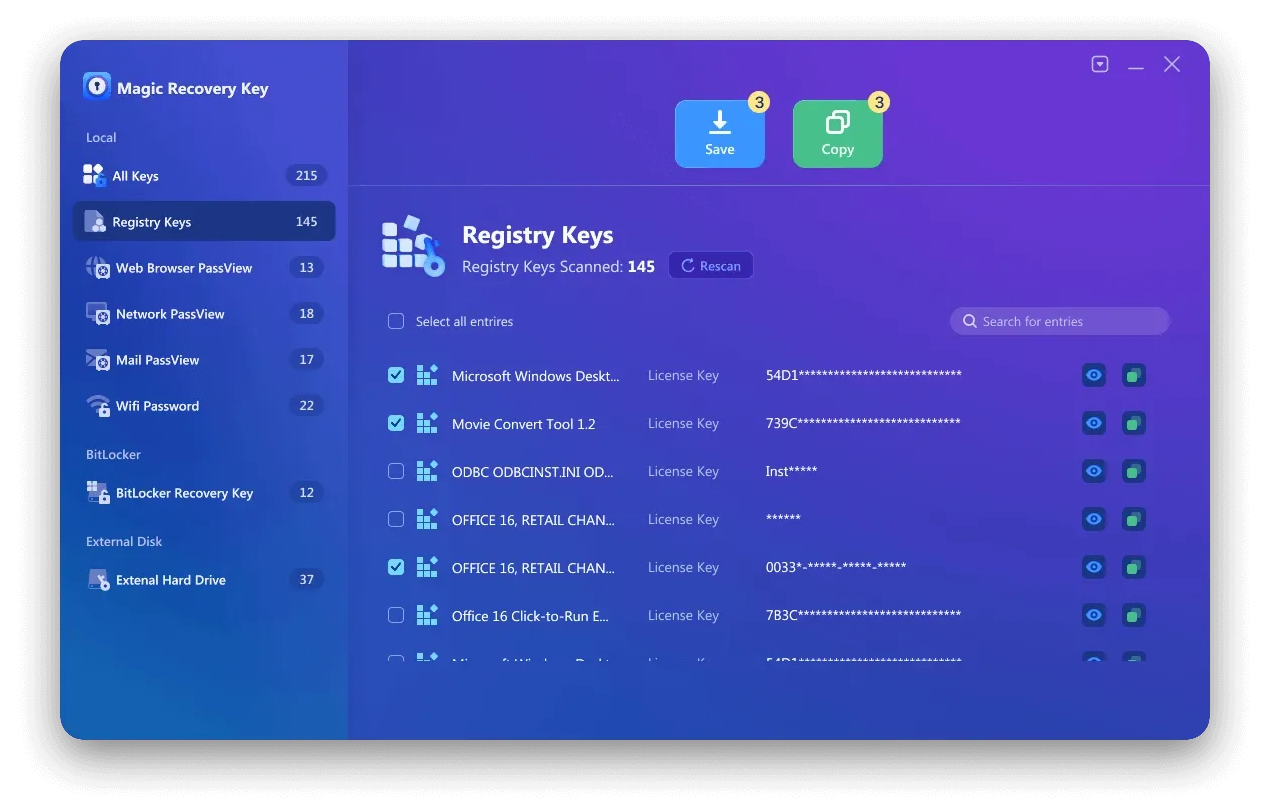
5. Copy or save the key securely.
The entire process takes only a few clicks and does not require technical knowledge.
Other Methods to View a Windows CD Key (If You Prefer Manual Options)
Although professional tools are recommended, alternative methods still exist.
Method 1: Command Line (Advanced Users)
✔ No software required
❌ Cannot detect most OEM keys
Method 2: Registry Editor
⚠ High risk of system instability
⚠ Not suitable for beginners
These methods may work in limited cases but are less dependable than a dedicated Windows Product Key Viewer.
Tips Before Reinstalling Windows
Before reinstalling Windows, take a few simple steps to avoid activation problems.
First, recover and save your Windows product key. A Windows product key viewer can help you do this quickly.
Next, sign in with the Microsoft account linked to your device if you use a digital license. This can make reactivation easier after reinstalling Windows.
Also, back up important files before changing partitions or formatting your drive. License recovery matters, but your personal data matters too.
Finally, save software keys for other paid applications. If you reinstall Windows without backing up those keys, you may lose access to programs that require manual activation.
Conclusion
A lost Windows product key does not have to stop you from reinstalling Windows, upgrading hardware, or managing software licenses. Although built-in methods such as Command Prompt and PowerShell can help in limited cases, they often fail on modern systems that use OEM activation, UEFI-stored keys, or digital licenses.
A professional Windows product key viewer gives you a simpler and safer way to recover license information. Magic Recovery Key helps users locate Windows product keys and other software license keys without complicated manual steps. Therefore, it is a practical solution for anyone who wants to retrieve, copy, and back up important activation data before system changes.
If you need a reliable Windows product key viewer in 2026, Magic Recovery Key is worth trying.
Supports Windows 7/8/10/11 and Windows Server
FAQs
What is the best Windows product key viewer?
Can I find my Windows product key without software?
Why does Command Prompt not show my Windows product key?
Is it safe to use a Windows product key viewer?
Can a Windows product key viewer recover a Windows 11 key?
Should I recover my Windows product key before reinstalling Windows?
Can Magic Recovery Key find product keys for other software?

Erin Smith is recognized as one of the most professional writers at Amagicsoft. She has continually honed her writing skills over the past 10 years and helped millions of readers solve their tech problems.