
Journaling File System Guide & Recovery Tips
A journaling file system protects data during unexpected failures. However, many users only search what is a journaling file system after data loss or system crashes.
For example, sudden shutdowns or power interruptions often break write operations. As a result, file structures become inconsistent. Consequently, files may disappear or become inaccessible.
Therefore, understanding file system journaling is essential. More importantly, knowing how to recover data after failure can prevent permanent loss.
Table of Contents
What Is a Journaling File System and Why It Matters
To understand what is journaling file system, start with its core function. A modern storage system uses a journal to record changes before applying them. In other words, it creates a file system journal that tracks operations step by step.
Because of this mechanism, the system can recover quickly after a crash. As a result, it avoids full disk scans and reduces damage.
What Is File System Journaling and How It Works
To fully understand what is file system journaling, it helps to examine its workflow.
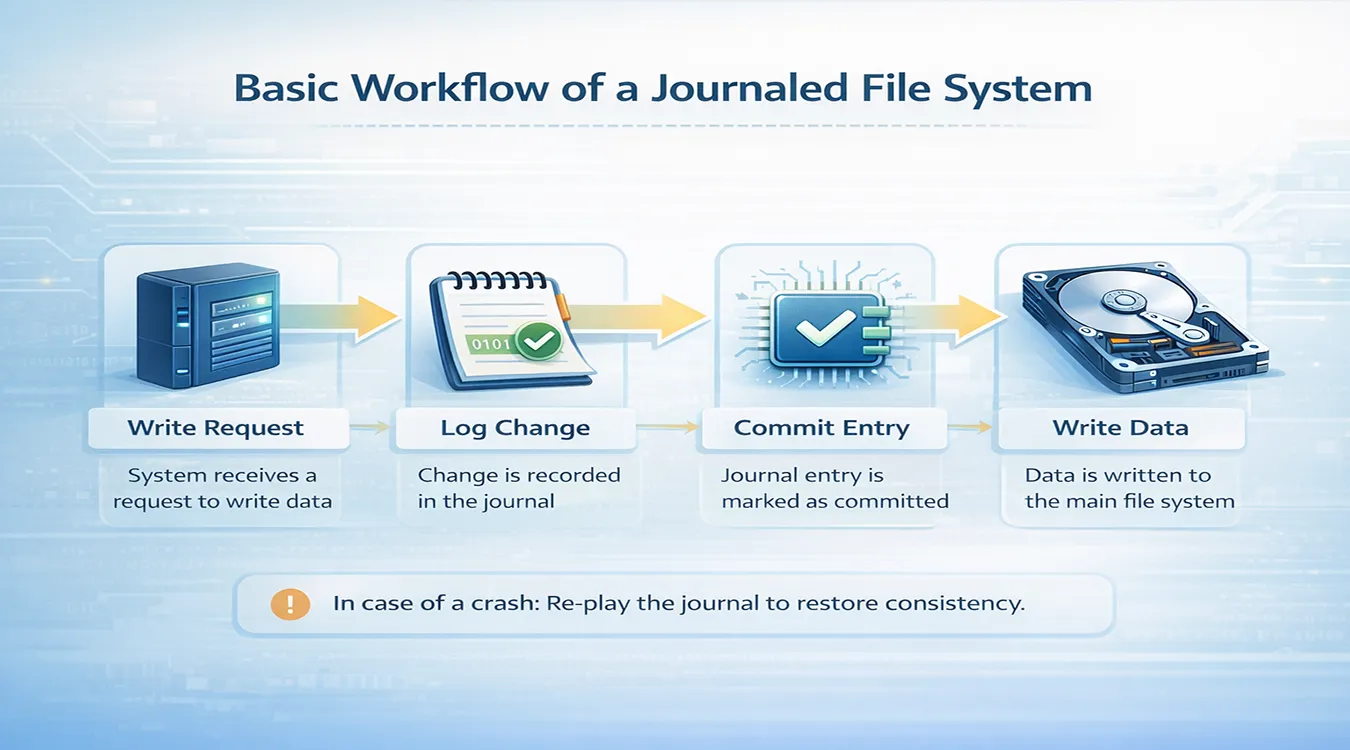
Basic Workflow of a Journaled System
First, the system receives a write request. Then, it logs the change. Next, it commits the entry. Finally, it writes the data.
Because each step follows a clear order, recovery becomes easier. For instance, if a crash interrupts the process, the system replays the journal. As a result, it restores consistency.
Types of Journaling Methods
Different systems use different strategies. Therefore, behavior varies.
- Metadata journaling
Logs only structure data. As a result, performance improves, but protection remains limited.
- Full data journaling
Logs both structure and content. Consequently, protection increases, although disk usage rises.
- Ordered journaling
Ensures data writes occur before metadata updates. Therefore, it balances safety and speed.
Journaling File System Explained with Real Examples
To make journaling file system explained more practical, consider real systems.
NTFS (Windows)
NTFS logs metadata changes. Therefore, it improves system stability. However, user data may still be affected during crashes.
Ext4 (Linux)
Ext4 supports multiple modes. As a result, users can balance performance and protection.
APFS (macOS)
APFS combines journaling with modern storage features. Consequently, it enhances both speed and reliability.
Journaled vs Non-Journaled File Systems
To understand the importance of journaling, a comparison helps.
Feature | With Journaling | Without Journaling |
Recovery Speed | Fast | Slow |
Data Integrity | High | Lower |
Performance | Moderate | Slightly higher |
Corruption Risk | Reduced | Higher |
Although non-journaled systems may seem faster, they lack protection. Therefore, most systems rely on journaling today.
Advantages and Limitations of Journaling
Advantages
First, journaling speeds up recovery. In addition, it reduces structural damage. Moreover, it improves system reliability.
Limitations
However, some trade-offs exist. For example, extra logging increases disk activity. Furthermore, the file system journal itself can fail.
Therefore, this method improves safety but does not eliminate risk.
What Happens When the File System Journal Is Corrupted
When the file system journal becomes damaged, several issues appear. For example, the system may fail to boot. In addition, files may become inaccessible. In some cases, the partition may show as RAW.
Because journal entries become incomplete, the system cannot rebuild the structure. Consequently, normal access fails.
How to Recover Data from a Corrupted System
When dealing with a damaged structure, the recovery order matters.
Why Repairing First Is Risky
Repair tools attempt to fix errors immediately. However, they often remove damaged entries. As a result, recoverable data may disappear. Therefore, repairing first increases risk.
Safer Recovery Strategy
Instead, follow a safer process. First, stop using the disk. Then, scan it without modifying data. Next, recover important files. Finally, repair the system.
Because this approach preserves original data, recovery success improves.
Best Solution for File System Recovery
When standard tools fail, a specialized solution becomes necessary. Magic Data Recovery works effectively in these scenarios.
What It Solves
It handles corrupted structures, RAW partitions, and inaccessible drives. Therefore, it works even when the journal fails.
Key Advantages
- Scans raw disk sectors
- Does not rely on file structure
- Recovers data from damaged environments
Why It Is More Reliable
Unlike repair tools, it does not modify the disk. As a result, it preserves data integrity.
If you are looking for a safer approach, this tool offers a practical solution.

How to Prevent Journaling Issues
Although journaling improves stability, prevention still matters. First, shut down systems properly. In addition, avoid power interruptions. Moreover, use a UPS if possible. Finally, maintain backups.
Conclusion
A journaling file system improves data safety by tracking changes before they occur. However, it cannot prevent all failures. Therefore, the safest approach is clear. First, recover your data. Then, repair the system.
Magic Data Recovery provides a reliable solution. Because it works independently of the file structure, it can recover files even when the journal fails.
Supports Windows 7/8/10/11 and Windows Server
FAQ
What is a journaling file system?
A journaling file system records changes before applying them. As a result, it can recover quickly after crashes. Instead of scanning the entire disk, it replays the journal, which improves efficiency and reduces downtime.
Can journaling prevent data loss?
No, journaling reduces risk but does not eliminate it. For example, hardware failure or overwriting can still cause data loss. Therefore, backups remain important.
What happens when a journal is corrupted?
When the journal is damaged, the system may fail to boot. In addition, files may become inaccessible. Therefore, recovery should happen before repair.
Is NTFS a journaling system?
Yes, NTFS uses journaling. It logs metadata changes to maintain consistency. However, it does not fully protect user data.
Can data be recovered after journal corruption?
Yes, recovery is possible. Tools like Magic Data Recovery can scan raw sectors. Therefore, they can retrieve files even when structure is damaged.
Is journaling still necessary today?
Yes, journaling remains essential. It improves reliability and speeds up recovery after crashes. Therefore, most modern systems continue to use it.

Vasilii is a data recovery specialist with around 10 years of hands-on experience in the field. Throughout his career, he has successfully solved thousands of complex cases involving deleted files, formatted drives, lost partitions, and RAW file systems. His expertise covers both manual recovery methods using professional tools like hex editors and advanced automated solutions with recovery software. Vasilii's mission is to make reliable data recovery knowledge accessible to both IT professionals and everyday users, helping them safeguard their valuable digital assets.