
Small Business Data Loss Statistics You Should Know
Today, data supports every small business operation. However, recent small business data loss statistics show that data loss happens far more often than expected. As a result, many businesses only recognize the risk after a serious incident occurs.
Moreover, data loss does not simply remove files. Instead, it disrupts workflows, reduces customer trust, and increases financial pressure. Therefore, understanding these risks early allows businesses to respond more effectively.
In this guide, you will explore key small business data loss statistics, understand the main causes, and learn practical prevention and recovery strategies.
Table of Contents
Small Business Data Loss Statistics: Key Trends in 2026
To begin with, reviewing updated small business data loss statistics helps clarify how widespread the issue has become. In addition, these trends reveal how quickly risks are evolving.
How Common Is Data Loss in Small Businesses?
Recent findings highlight several important patterns:
- Over 60% of small businesses experience data loss
- Nearly 80% encounter cybersecurity threats
- Around 43% of attacks specifically target small businesses
Clearly, attackers no longer overlook small companies. Instead, they actively target them because defenses tend to be weaker.
What Happens After Data Loss?
Once data loss occurs, the consequences escalate quickly:
- Nearly half of affected businesses shut down within two years
- Extended downtime reduces recovery success significantly
- Many businesses fail to restore complete datasets
Therefore, these small business data loss statistics show that response speed plays a critical role.
Cost Insights From Small Business Data Loss Statistics
Financial impact appears in multiple forms. For example, downtime reduces productivity immediately. Meanwhile, recovery efforts increase operational costs. In addition, lost data may create compliance issues.
Consequently, even a single incident can cause long-term financial damage.
Small Business Data Loss Statistics and Common Causes
Although data loss may seem unpredictable, most small business data loss statistics reveal consistent root causes. Understanding these causes helps businesses reduce risk.
Cyberattacks and Ransomware
First, cyberattacks remain the leading threat. Attackers often encrypt data or restrict access. As a result, businesses must respond quickly to avoid further damage.
Human Error
Next, human mistakes frequently cause data loss. Employees may delete files accidentally or overwrite important documents. Although simple, these actions occur regularly.
Hardware Failure
In addition, hardware can fail without warning. When a drive stops working, access to data may disappear instantly.
Software Corruption
Finally, software issues such as crashes or corrupted files can block access. Even though the data still exists, users cannot retrieve it easily.
Why Small Business Data Loss Statistics Show Higher Risk
Not all organizations face the same level of risk. In fact, small business data loss statistics consistently show that smaller companies remain more vulnerable.
Several factors explain this pattern. For instance, many small businesses lack dedicated IT teams. Furthermore, they often rely on limited backup systems. In addition, cybersecurity investment tends to remain low.
Because of these limitations, small businesses often react slowly. Consequently, recovery becomes more difficult and expensive.
Real Impact Behind Small Business Data Loss Statistics
Beyond statistics, data loss creates real operational challenges. Therefore, understanding its impact helps businesses prepare effectively.
Operational Disruption
First, missing data interrupts daily operations. Teams cannot access files, so productivity drops immediately.
Financial Loss
Next, revenue decreases during downtime. At the same time, recovery efforts increase costs.
Reputation Damage
Moreover, customers expect consistent service. When data disappears, trust declines quickly.
Compliance Risks
Finally, regulations require proper data handling. Losing sensitive information may lead to penalties.
As a result, these small business data loss statistics reflect real business risks rather than abstract numbers.
How to Reduce Risk Based on Small Business Data Loss Statistics
Although risks remain, businesses can take practical steps to reduce exposure. Therefore, prevention strategies still play an important role.
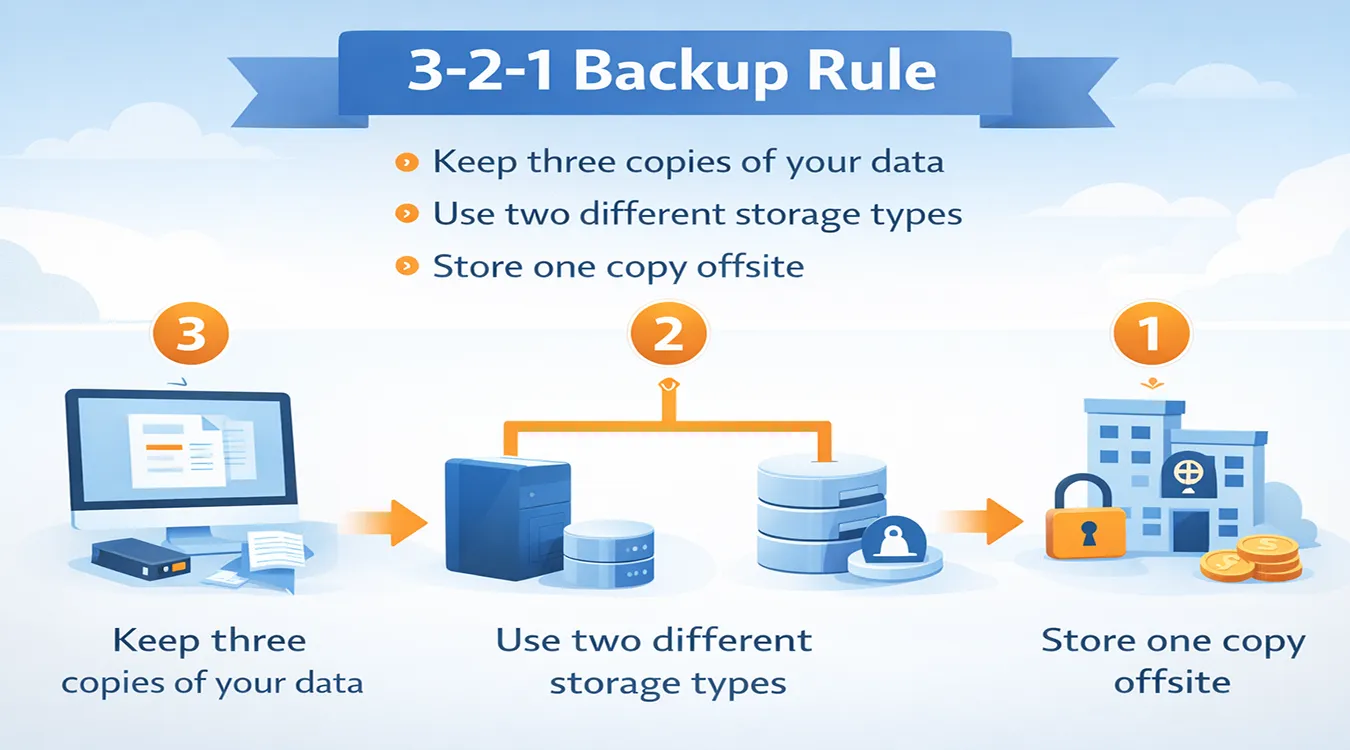
Apply the 3-2-1 Backup Rule
- Keep three copies of your data
- Use two different storage types
- Store one copy offsite
This approach improves resilience.
Strengthen Cybersecurity
- Install antivirus software
- Enable multi-factor authentication
- Update systems regularly
These measures reduce attack risks significantly.
Train Employees
In addition, employee awareness helps prevent mistakes. Training ensures that staff handle data more carefully.
However, prevention alone cannot eliminate all risks. Therefore, recovery readiness remains essential.
How to Recover Data Using Small Business Data Loss Statistics Insights
When prevention fails, businesses must act quickly. Therefore, understanding recovery options becomes critical.
Why Backup Alone Is Not Enough
Although backups help, they have limitations. For example, backups may become outdated. In addition, systems can fail during backup processes. Furthermore, some files may never get backed up.
As a result, relying only on backups creates recovery gaps.
When Data Recovery Software Is Necessary
Businesses often need recovery tools in the following situations:
At this stage, choosing the right solution directly affects recovery success.
A Smarter Recovery Solution for Small Businesses
In real-world scenarios, businesses need fast and reliable recovery. For example, a company may accidentally format a drive or lose access to financial data. In such cases, standard recovery methods often fail.
Therefore, professional tools provide a more effective solution. Magic Data Recovery addresses these challenges directly.
How It Solves Core Problems
Unlike basic tools, it:
- Scans raw disk sectors instead of relying on file systems
- Works even when drives appear as RAW or damaged
- Detects lost data beyond standard recovery paths
As a result, it improves recovery success in complex scenarios.
Key Advantages
- Deep scan technology for difficult cases
- Works without a functional file system
- Preview feature before recovery
- Supports multiple storage devices
Real Scenario Example
For instance, if a business loses accounting files after formatting a drive, the software can locate recoverable data directly from disk sectors. Even when the system cannot detect the partition, recovery remains possible.
Why It Is More Reliable
Compared to basic solutions, it focuses on deeper data structures. Therefore, it performs better in situations where traditional tools fail.
If you are looking for an efficient solution, this approach offers a practical advantage.

Best Tools Based on Small Business Data Loss Statistics
Choosing the right tool depends on the severity of data loss. Therefore, comparing options helps identify the best fit.
| Tool | Raw Scan | Damaged Drive Support | Preview | Ease of Use | Best Use |
| Magic Data Recovery | Yes | Yes | Yes | Easy | Deep recovery |
| EaseUS | Yes | Yes | Yes | Easy | General use |
| Disk Drill | Yes | Yes | Yes | Medium | Mixed recovery |
| Recuva | No | Limited | Yes | Easy | Basic recovery |
| R-Studio | Yes | Yes | Limited | Complex | Advanced users |
Overall, tools with deep scan capabilities provide better results in complex cases.
Conclusion
The latest small business data loss statistics confirm that data loss remains a serious and common business risk. Although prevention strategies reduce exposure, they cannot eliminate every scenario. Therefore, businesses must prepare for recovery as well. A reliable recovery solution helps minimize downtime and protect operations.
Among available options, Magic Data Recovery stands out because it handles complex data loss situations effectively. More importantly, it allows businesses to recover critical data quickly and continue operations with minimal disruption. If you need a practical and efficient recovery solution, this tool is worth considering.
Supports Windows 7/8/10/11 and Windows Server
FAQs
What do small business data loss statistics reveal about business risks?
Small business data loss statistics show that data loss occurs frequently and often leads to serious consequences. Many businesses struggle to recover fully, especially when downtime lasts too long. Therefore, these statistics highlight the importance of both prevention strategies and reliable recovery solutions.
What is the most common cause of data loss in small businesses?
Human error, cyberattacks, and hardware failure represent the most common causes. Among them, human mistakes occur frequently, such as accidental deletion. However, ransomware attacks have increased significantly, making cybersecurity a critical concern for small businesses today.
Can small businesses recover lost data successfully?
Yes, small businesses can recover lost data if they act quickly. Recovery tools scan storage devices and locate recoverable files before new data overwrites them. However, success depends on the type of data loss and how soon recovery begins.
How long does data recovery take for small businesses?
Recovery time depends on the situation. Simple recovery tasks may take a few minutes, while deep scans on large drives can take several hours. Therefore, using efficient tools and acting quickly helps reduce downtime significantly.
Is deleted data permanently lost?
Deleted data does not disappear immediately. Instead, the system removes references while the data remains on the disk. Until new data overwrites it, recovery remains possible using specialized data recovery tools designed for this purpose.
Why are small businesses more vulnerable to data loss?
Small businesses often lack strong IT infrastructure and dedicated security teams. As a result, they respond slower to threats and rely on weaker backup systems. These factors increase both the likelihood of data loss and the difficulty of recovery.
When should a business use data recovery software?
A business should use data recovery software when files are deleted, drives are formatted, or systems become inaccessible. Acting quickly improves success rates. Therefore, having a recovery solution ready helps minimize disruption and protect important data.

Vasilii is a data recovery specialist with around 10 years of hands-on experience in the field. Throughout his career, he has successfully solved thousands of complex cases involving deleted files, formatted drives, lost partitions, and RAW file systems. His expertise covers both manual recovery methods using professional tools like hex editors and advanced automated solutions with recovery software. Vasilii's mission is to make reliable data recovery knowledge accessible to both IT professionals and everyday users, helping them safeguard their valuable digital assets.