
SD Card Repair Near Me: Safe Fix & Recovery Guide
When your SD card stops working, searching for sd card repair near me often feels like the fastest solution. However, acting too quickly can lead to permanent data loss. Many users try to fix corrupted cards immediately, yet they overlook one critical step—data recovery.
In real situations, SD cards fail due to file system errors, improper removal, or accidental formatting. Therefore, before choosing any repair method, you should first protect your files. This guide explains repair options, when to use them, and why recovering data first remains the safest approach. In addition, it introduces a reliable solution like Magic Data Recovery that helps you recover files on the SD card before any repair attempt.
Supports Windows 7/8/10/11 and Windows Server
Table of Contents
Why You Should Be Careful Before Choosing a Repair Service
At first, local repair services seem convenient. However, not all SD card issues require physical repair. Most problems fall into two categories:
- Logical errors (corruption, RAW format, deletion)
- Physical damage (chip failure, electrical issues)
In most cases, logical errors occur more frequently. Therefore, rushing into repair may overwrite data and reduce recovery chances.
Instead of immediately searching for sd card repair near me, you should prioritize data recovery. This approach protects your files and gives you more flexibility later.
Common Problems Before Turning to SD Card Repair Near Me
Understanding the cause helps you choose the right solution. Here are common scenarios:
SD Card Not Recognized
Sometimes, the system fails to detect the SD card due to driver conflicts or file system errors.
Corrupted SD Card
Files become inaccessible, or error messages appear when opening the card.
RAW File System
The SD card shows as RAW, meaning the system cannot read it normally.
Accidental Deletion or Formatting
Photos, videos, or documents disappear unexpectedly.
In these situations, users often look for sd card repair near me, yet recovery software can solve most of these problems faster and more safely.
Repair Services vs DIY Recovery: Which Option Works Better?
Choosing the right solution depends on the type of SD card issue. While many users search for sd card repair near me, not every problem requires professional repair. In fact, several built-in tools and recovery methods can solve common issues effectively.
Local Repair Services
Professional services focus on hardware-level problems. For example, they can repair physically damaged SD cards or recover data from broken chips.
However, these services come with higher costs and longer turnaround times. Therefore, they are best reserved for severe cases where the device is completely unusable.
DIY Fixes and Recovery Methods (Recommended First)
For most logical errors, you can try safe DIY solutions before looking for sd card repair near me. However, each method serves a different purpose, so using them in the correct order is essential.
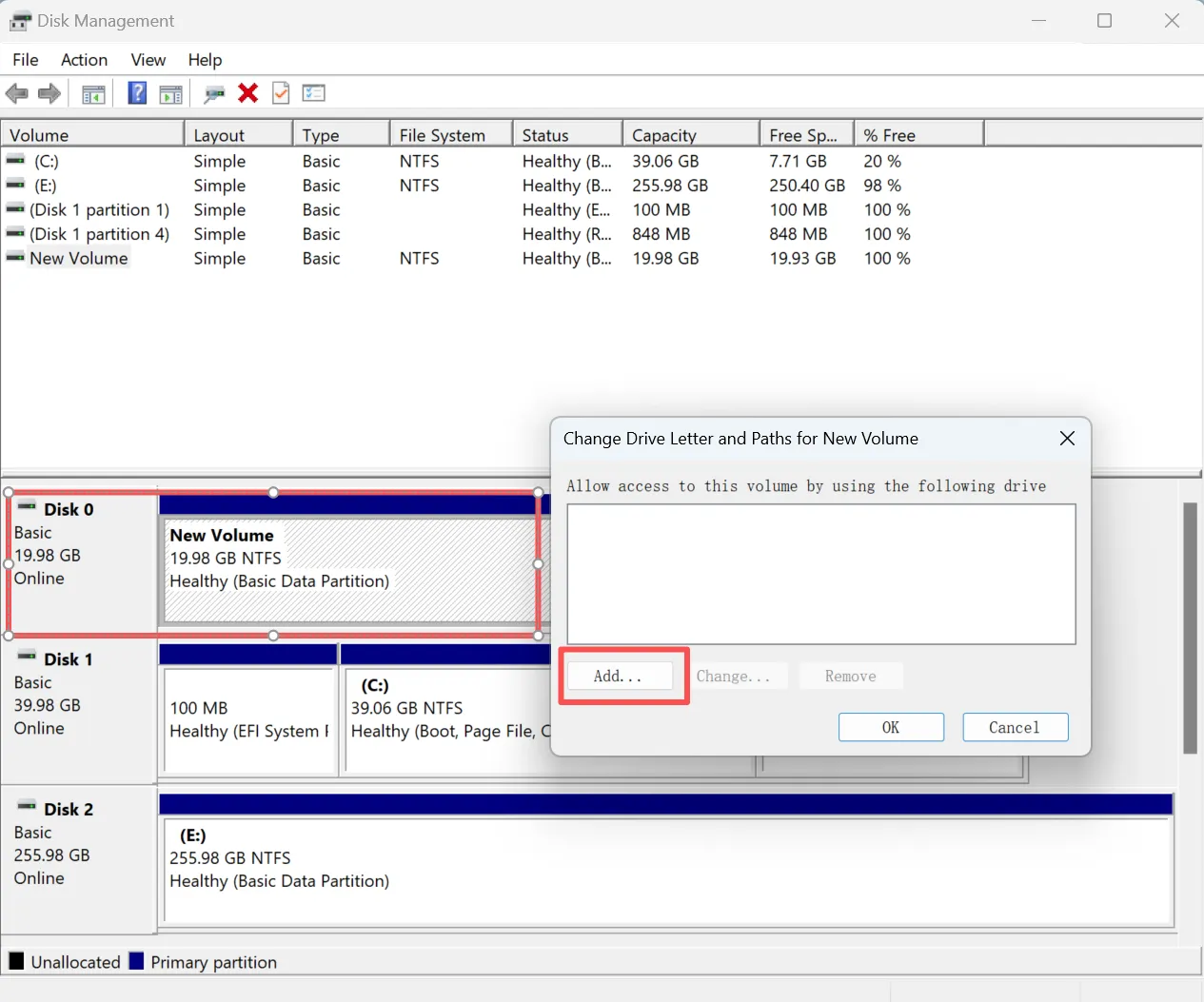
1. Assign a Drive Letter (Disk Management)
If your SD card is detected but not accessible, it may not have a drive letter.
- Open Disk Management
- Locate the SD card
- Right-click and assign a new drive letter
This method works when the system recognizes the device but does not display it in File Explorer.
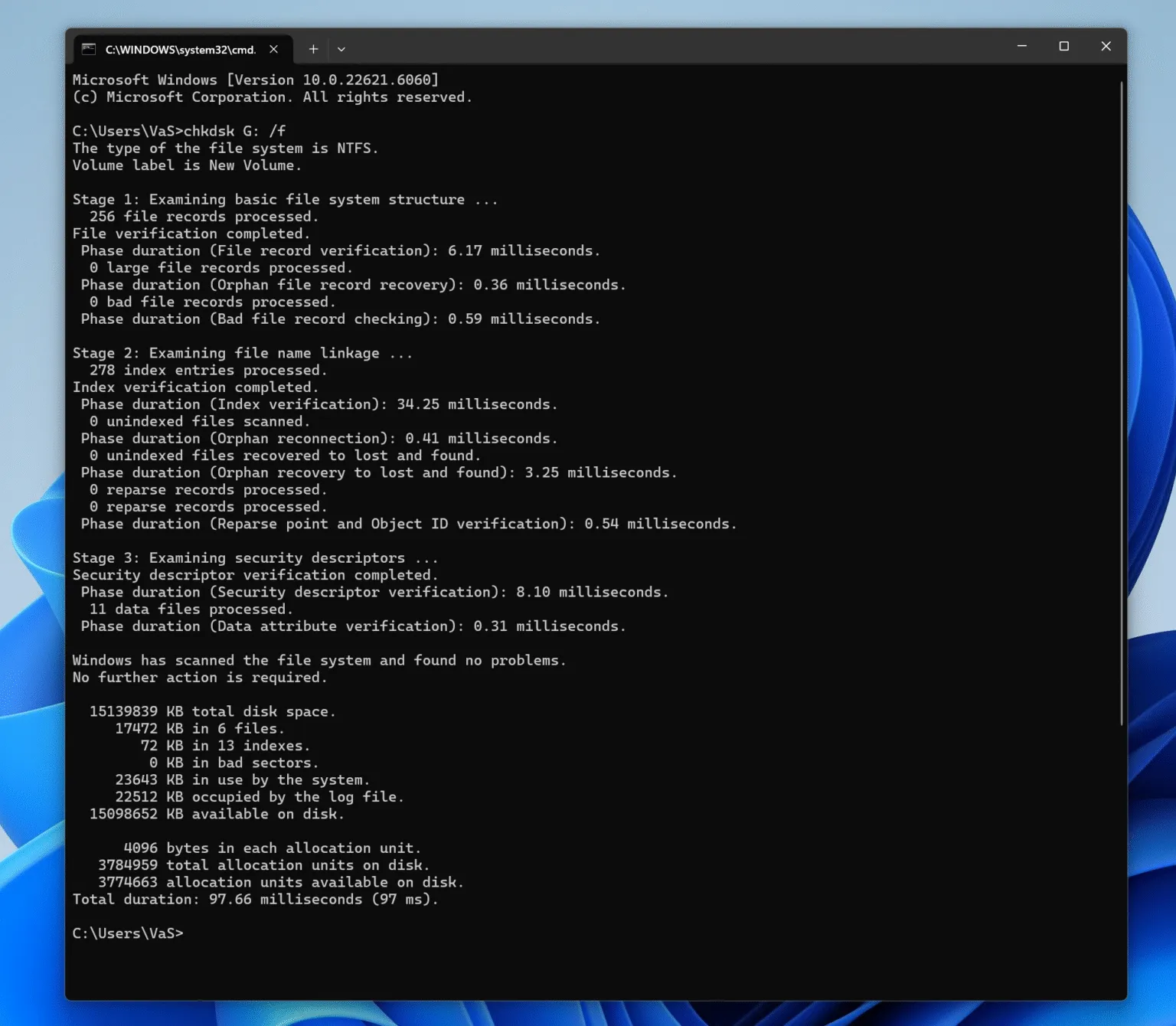
2. Run CHKDSK (Fix File System Errors)
CHKDSK helps repair file system issues such as minor corruption.
Command example:
chkdsk X: /f
Replace “X” with your SD card letter
⚠️ Important:
CHKDSK may modify file structures. Therefore, you should recover important data first to avoid permanent loss.
3. Update or Reinstall Drivers
Sometimes, outdated or corrupted drivers prevent detection.
- Open Device Manager
- Update SD card reader drivers
- Reconnect the device
This method resolves compatibility issues rather than data corruption.
4. Use Data Recovery Software (Safest First Step)
Before applying repair tools, recovery software provides the safest approach. It scans the SD card without altering existing data.
This is where Magic Data Recovery becomes essential. It allows you to:
- Recover files from corrupted or RAW SD cards
- Retrieve deleted or formatted data
- Preview files before recovery
For example, if your SD card becomes unreadable after a camera error, you can recover photos first instead of risking further damage with repair commands.
How to Recover Data Before SD Card Repair (Step-by-Step)
Before you attempt any repair, you should recover your data. The following steps show a safe workflow using Magic Data Recovery.
Step 1: Download and Install Magic Data Recovery
First, download Magic Data Recovery and install it on a different drive from the affected SD card. This setup helps prevent overwriting lost files and improves recovery success.
Supports Windows 7/8/10/11 and Windows Server
Step 2: Select the SD Card to Scan
Next, open the program. From the main interface, locate your SD card and select it. Then, start scanning to search for lost or inaccessible files.

Step 3: Scan the SD Card for Recoverable Files
The software runs an Advanced Scan automatically. Meanwhile, it displays recoverable files in real time. As a result, you can quickly identify important data.

Step 4: Preview Files Before Recovery
After scanning, preview the files to confirm their content. This step ensures accuracy and avoids unnecessary recovery.

Step 5: Recover Files to a Safe Location
Finally, select the files you need and save them to a different location. Avoid restoring data to the same SD card, because doing so may overwrite existing data.

By following these steps, you can secure your data before deciding whether further repair is necessary.
When You Really Need SD Card Repair Near You
Although recovery software solves most issues, some situations require professional help.
You should consider sd card repair near me if:
- The SD card has physical damage
- The card is completely undetectable
- Electrical failure occurs
- Recovery tools cannot detect the device
In these cases, local experts provide solutions beyond software capabilities.
How to Choose a Reliable SD Card Repair Service Near Me
Not all repair services deliver the same quality. Therefore, choosing carefully is essential.
Look for providers that offer:
- Cleanroom repair environments
- Transparent pricing
- Positive customer reviews
- “No data, no charge” policies
- Experience with SD card recovery
These factors improve your chances of successful repair and reduce risk.
Cost Comparison: Local Repair vs Software Recovery
Cost often influences decisions. Therefore, comparing options clearly helps users choose the most efficient solution.
Factor | Local Repair Services | Software Recovery |
Average Cost | $100 – $1000+ | Low cost or free (limited recovery) |
Time Required | Several days to weeks | Minutes to hours |
Data Safety | Risk depends on provider | Safer when used before repair |
Convenience | Requires visiting a shop | Can be done at home |
Best For | Physical damage | Logical errors (corruption, deletion) |
In most cases, software recovery offers a faster and more cost-effective solution. Therefore, trying a recovery tool before searching for sd card repair near me helps reduce expenses while protecting your data.
Conclusion: Do You Really Need SD Card Repair Near Me?
Searching for sd card repair near me may seem like the easiest option, yet it is not always the best first step. Most SD card issues involve logical errors that do not require physical repair. Therefore, recovering your data first protects your files and reduces unnecessary costs.
Magic Data Recovery provides a reliable SD card recovery method to handle these situations. By using it before any repair attempt, you increase your chances of success while keeping your data safe.
Supports Windows 7/8/10/11 and Windows Server
FAQs About SD Card Repair Near Me
Can I fix an SD card without losing data?
Yes, but you must follow the correct order. First, recover your data using reliable software. Then, attempt repair if needed. If you repair first, you risk overwriting files and reducing recovery success.
How much does sd card repair near me cost?
Costs vary depending on damage. Logical issues may cost less, while physical damage often exceeds $500. Therefore, trying software recovery first helps reduce expenses.
Is software recovery enough for most SD card problems?
In most cases, yes. Software handles corruption, deletion, and RAW errors effectively. However, physical damage still requires professional repair services.
What causes SD card failure?
Common causes include improper removal, file system errors, virus attacks, and interrupted transfers. Over time, wear and tear can also affect performance.
Can a RAW SD card be repaired?
Yes. First, recover data using software. After that, you can format the card to restore normal usage. This approach prevents permanent data loss.
When should I search for sd card repair near me?
You should search for repair services only when the SD card has physical damage or cannot be detected by any system or recovery tool.
What is the safest way to recover SD card data?
Stop using the card immediately. Then, use a trusted recovery tool to scan and restore files. This method prevents overwriting and improves recovery success.

Vasilii is a data recovery specialist with around 10 years of hands-on experience in the field. Throughout his career, he has successfully solved thousands of complex cases involving deleted files, formatted drives, lost partitions, and RAW file systems. His expertise covers both manual recovery methods using professional tools like hex editors and advanced automated solutions with recovery software. Vasilii's mission is to make reliable data recovery knowledge accessible to both IT professionals and everyday users, helping them safeguard their valuable digital assets.