
Data Recovery Cost Per GB: Why It’s a Massive Trap
Losing access to your critical files, family photos, or business documents triggers instant panic. Once the initial shock subsides, the very next question always revolves around the financial impact. You begin searching online, trying to figure out the actual data recovery cost for your specific situation. During this research, you will likely encounter various pricing models, including companies that advertise a specific data recovery cost per gb.
However, the HDD data recovery industry is notorious for its lack of upfront pricing transparency. Many professional labs require you to ship your drive for an expensive evaluation before giving a quote. Alternatively, some services charge astronomical rates based entirely on the storage size of your device.
This comprehensive guide will demystify how data recovery cost is actually calculated. Furthermore, we will explore why the data recovery cost per gb model can sometimes be a financial trap. More importantly, we’ll show you how to bypass these hefty lab fees entirely by using Magic Data Recovery—a professional software designed to fix logical data loss and save you thousands of dollars.
Supports Windows 7/8/10/11 and Windows Server
Table of Contents
Why "Data Recovery Cost Per GB" Doesn't Apply to Lab Services
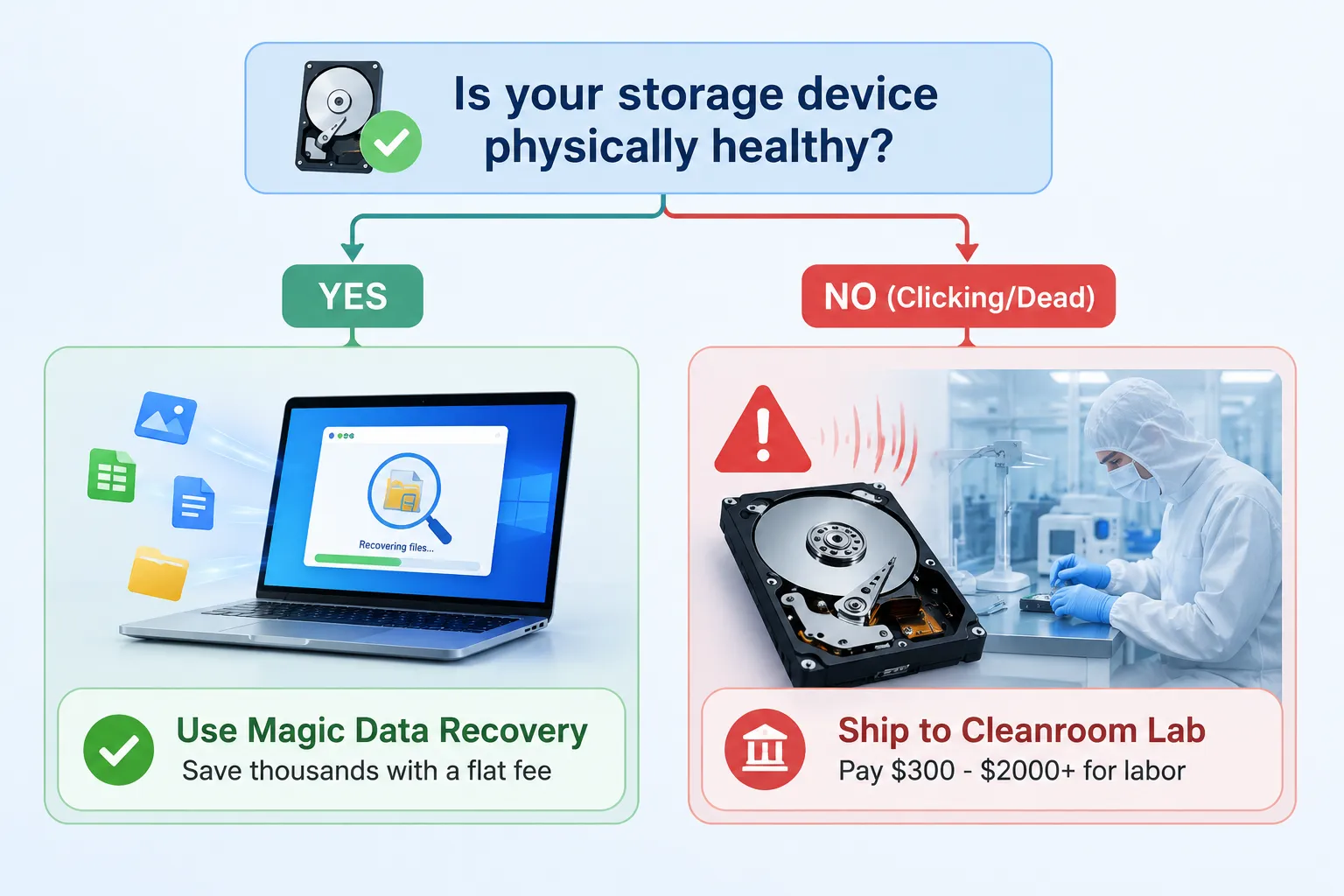
When a hard drive suffers physical damage, the data recovery cost per gb pricing model completely breaks down. If you drop a hard drive and it begins clicking, buzzing, or scraping, you are dealing with a mechanical failure. In these critical scenarios, professional cleanroom recovery labs are mandatory.
The Reality of Physical Damage
Physical data recovery requires highly specialized environments and tools. Engineers must open the hard drive inside a cleanroom to prevent microscopic dust particles from destroying the magnetic platters. Consequently, they often use advanced hardware tools like the PC-3000 to stabilize the drive’s firmware.
Why Gigabytes Do Not Matter to an Engineer
From a laboratory perspective, a data recovery cost per gb rate makes absolutely no sense. If a 4TB hard drive has a failed read/write head assembly, the engineer must source an identical matching donor drive. They then carefully transplant the fragile physical heads into your drive.
The labor, time, and precision required to swap those heads are exactly the same whether you need to recover a 10 GB folder of tax documents or 2 TB of high-definition family videos. The drive must be physically repaired and stabilized before a single byte of data can be read. Therefore, reputable cleanroom labs charge flat, tier-based fees ranging from $300 to $2,000+ based on the complexity of the mechanical fix, completely ignoring the data recovery cost per gb concept.
When Does "Cost Per GB" Matter? Logical Data Loss & Software Solutions
While physical failures require hands-on engineering, the vast majority of data loss incidents are actually logical. If your storage device powers on normally, spins smoothly, and is detected by your computer, your data is likely intact but inaccessible due to software-level corruption.
Understanding Logical Data Loss
Logical data loss occurs in several common scenarios:
- Accidental deletion of vital files or emptying the Recycle Bin.
- Sudden partition corruption turning your drive into a RAW file system.
- Accidental formatting of a camera SD card or USB flash drive.
- File system crashes caused by unexpected power surges or unsafe disconnections.
The Hidden Trap of Greedy Software Pricing
This is exactly where the data recovery cost per gb metrics become highly relevant. Many commercial data recovery software brands use predatory subscription models. They might lure you in with a low entry price but then restrict your recovery amount.
If you exceed their strict data limit, they force you into expensive premium tiers. Suddenly, your effective data recovery cost per gb skyrockets simply because you happen to have a larger hard drive or a high-capacity memory card. In contrast, paying a variable data recovery cost based purely on file size for logical issues is highly inefficient, especially when the recovery algorithm performs the exact same task regardless of volume.
The Smart Alternative: Magic Data Recovery (Flat Rate, Zero Per-GB Limits)
If your storage drive is mechanically healthy, you do not need to ship it to an expensive laboratory. You also do not need to subscribe to software that penalizes you for having large files. Instead, utilizing a dedicated tool like Magic Data Recovery provides a smart, cost-effective solution.
Overcoming the Storage Size Penalty
Magic Data Recovery addresses the core problem of fluctuating data recovery costs. Rather than calculating a complex data recovery cost per gb, this software operates on a highly transparent, flat-rate model. You can recover 500MB of your lost files entirely for free to verify that your data is fully salvageable. If you need to recover more, upgrading allows unlimited data recovery without any hidden size restrictions or unexpected per-gigabyte surcharges.
High-Performance Features for Everyday Scenarios
The tool utilizes advanced low-level parsing algorithms to rebuild corrupted file structures. It natively supports critical Windows file systems like NTFS, FAT32, and exFAT. Whether you need to restore lost office documents from a formatted SSD or extract raw photographs from a corrupted USB drive, the software systematically reconstructs your directory tree.
Why It Beats Other Market Alternatives
Many automated recovery tools simplify the interface but compromise on deep scanning capabilities. Magic Data Recovery offers an ideal balance. It provides a straightforward, wizard-guided interface for beginners while maintaining a powerful scanning engine that can locate deeply buried file signatures. If you are looking for an efficient solution to lower your overall data recovery cost, trying Magic Data Recovery is an excellent starting point.
How to Use Magic Data Recovery
Restoring your lost information does not have to be a complicated or expensive ordeal. Follow these HTML-structured steps to rescue your files without paying an unfair data recovery cost per gb.
Step 1: Download and Install Magic Data Recovery
Download Magic Data Recovery and install the application on a healthy partition. It is critical to choose a drive different from the one that suffered data loss, ensuring you never accidentally overwrite the deleted files.
Step 2: Select the Target Drive to Scan
Open the program to view the main user interface. Next, identify and select the specific drive or partition where your files were deleted, then click the Search button to proceed.

Step 3: Scan the Storage Device
The software automatically launches an Advanced Scan of the chosen storage media. You can monitor the real-time progress as the application dynamically lists all discoverable and salvageable items.

Step 4: Preview Lost Files Before Recovery
Utilize the built-in visual preview panel to double-check the structural integrity of your photos, archives, or documents. This verification step confirms that you only select valid items for final restoration.

Step 5: Recover Files to a Safe Location
Check the boxes next to your target files and export them to an entirely separate storage device. To maintain maximum data safety and avoid permanent file corruption, never save the recovered information back onto the original damaged drive.

Breakdown of Actual Data Recovery Costs
To help you visualize your options and avoid overpaying, this comparison table outlines the expected data recovery cost across different real-world scenarios.
Data Loss Scenario | Typical Hardware State | Pricing Structure | Average Estimated Cost | Recommended Solution |
Accidental File Deletion | Device works perfectly | Flat rate software fee | Free (up to 500MB) or small flat fee | Magic Data Recovery |
Formatted SD/USB Drive | Device works perfectly | Flat rate software fee | Economy flat rate | Magic Data Recovery |
Corrupted RAW Partition | Device works perfectly | Flat rate software fee | Economy flat rate | Magic Data Recovery |
Dropped / Clicking HDD | Clicks, beeps, won’t spin | Tiered lab labor + donor parts | $300 – $1,500+ | Professional Cleanroom Lab |
Internal SSD Controller Failure | Completely dead, no power | Advanced hardware chip-off | $500 – $2,000+ | Specialized Forensic Lab |
5 Red Flags to Watch Out For in Data Recovery Pricing
Navigating the data recovery market can be challenging. Many service providers use confusing terms to inflate the final bill. Keep these five common pricing red flags in mind during your search:
- The Arbitrary Per-GB Upcharge: Be cautious of software solutions that calculate your final checkout price based on a data recovery cost per gb metric. Your software license should cover the algorithm, not the volume of your personal data.
- Mandatory Non-Refundable Attempt Fees: Some physical labs charge hefty upfront evaluation or “attempt” fees. Even if they fail to recover a single file, you still lose your money. Look for companies that offer a “no data, no fee” policy.
- Vague Online Quotes: If a website refuses to provide a clear pricing tier and insists that you must call them to get a basic estimate, they are likely using high-pressure sales tactics.
- Virtual Mailbox Fronts: Many nationwide operations list local addresses on their websites to seem close to home. In reality, these locations are just virtual mailboxes that secretly ship your drive to a centralized lab, adding transit risks.
- Overblown Success Guarantees: No legitimate provider can offer an absolute guarantee before evaluating a drive. Physical media degradation and severe overwriting can occasionally make data permanently unrecoverable.
Conclusion
Understanding how data recovery cost is determined empowers you to make informed decisions and protect your wallet. Remember that physical damage demands cleanroom labor, where standard data recovery cost per gb models do not apply. However, if your drive is functionally working and simply experiencing a logical glitch, software is the most efficient hard drive solution.
Before committing hundreds of dollars to a physical shop or subscribing to restrictive software, always assess the hardware health of your device first. If your drive powers on normally without making unusual noises, download Magic Data Recovery to initiate a free scan. Previewing your recoverable files beforehand ensures you only pay for guaranteed results.
Supports Windows 7/8/10/11 and Windows Server
FAQ
Why do some companies advertise data recovery cost per gb?
Some companies use this model to make their entry prices look attractive to beginners. However, it usually becomes a trap for high-capacity drives. You will often face massive upcharges once you exceed a small data limit, even though the recovery effort remains identical.
What is the average data recovery cost for a clicking hard drive?
A clicking drive indicates serious mechanical failure, requiring physical cleanroom intervention. Consequently, the average cost ranges from $300 to $1,500. This price depends heavily on the cost of matching donor parts and the labor time required to safely rebuild the drive.
Can software fix all logical data loss situations?
Yes, high-quality software can resolve most logical issues, including accidental formatting, partition corruption, and accidental deletion. For instance, if your computer successfully recognizes the storage drive hardware, software tools can rebuild the file system structure without requiring expensive laboratory labor.
Does a higher data recovery cost guarantee better results?
Not necessarily. Many predatory labs inflate their quotes simply because they assume your data is highly valuable. You should always look for transparent pricing tiers, a strict "no data, no fee" guarantee, and verified user reviews instead of relying purely on expensive pricing.
Is it possible to lower my overall data recovery cost?
Absolutely. You can significantly reduce expenses by checking your drive's physical status first. If the device powers on smoothly without unusual noises, using a flat-rate software solution like Magic Data Recovery will save you thousands compared to cleanroom lab fees.
Why is SSD data recovery usually more expensive than HDD recovery?
SSDs use complex flash memory architecture and encrypted controller chips rather than mechanical platters. Therefore, when an SSD controller fails, engineers must perform advanced chip-off procedures. This intricate forensic work requires specialized equipment, which naturally increases the overall lab costs.
Can I safely try free software before paying for a premium version?
Yes, using a free trial is highly recommended to protect your wallet. For example, Magic Data Recovery allows you to scan and preview your deleted files completely free. This ensures you verify that your data is recoverable before spending any money.

Vasilii is a data recovery specialist with around 10 years of hands-on experience in the field. Throughout his career, he has successfully solved thousands of complex cases involving deleted files, formatted drives, lost partitions, and RAW file systems. His expertise covers both manual recovery methods using professional tools like hex editors and advanced automated solutions with recovery software. Vasilii's mission is to make reliable data recovery knowledge accessible to both IT professionals and everyday users, helping them safeguard their valuable digital assets.