
Disk Clone Boot Test: Can Windows Start Without the Source Drive?
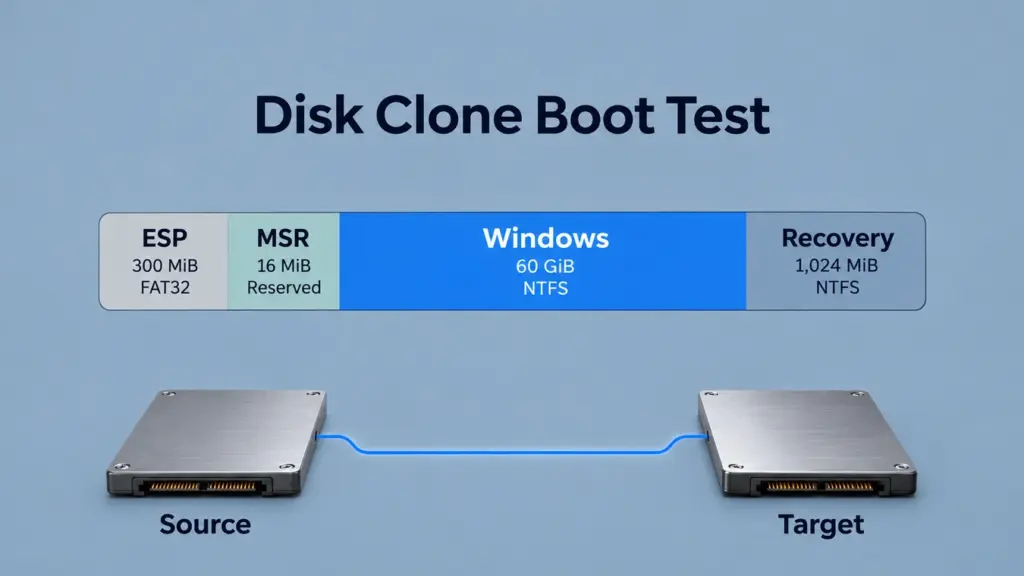
A disk clone boot test checks whether the target starts Windows without the original drive. It also confirms which physical drive runs the installation. However, reaching the desktop with both drives connected can hide a source ESP dependency. This guide uses a calculated GPT layout and six conditional scenarios to trace that dependency. Therefore, the pass criterion combines an independent startup with target identity checks.
Table of Contents
What Does This Disk Clone Boot Test Check?
This disk clone boot test asks one question: can copied Windows start through boot files on the target drive? For example, the reference system uses Windows x64, UEFI, and GPT on the same computer. Also, it keeps the storage controller configuration fixed. In addition, it keeps encryption outside the reference model and assumes readable Windows files and a supported internal storage connection.
The central comparison changes source-drive availability while keeping the target’s partition boundaries and Windows contents fixed. A subsequent reconstruction changes the target’s startup files and boot references. Therefore, these are conditional model states, with calculated addresses; the independent-startup procedure below provides the criteria for checking a physical clone.
For the underlying separation between startup files and Windows itself, see how the EFI System Partition supports Windows startup.
Disk Clone Boot Test Setup and Reference Layout
Item | Reference assumption |
Computer and startup mode | Same computer; Windows x64; UEFI |
Source and target capacity | 64 GiB each; 68,719,476,736 bytes |
Logical sector size | 512 bytes |
Partition arrangement | GPT; ESP, MSR, Windows, recovery |
Partition capacities | 300 MiB, 16 MiB, 60 GiB, 1,024 MiB |
File systems | FAT32 ESP; NTFS Windows and recovery; MSR has no file system |
NTFS allocation unit | Assumed 4 KiB |
Startup prerequisites | Compatible drivers, accepted boot binaries, readable Windows files |
The reference layout keeps the disk clone boot test focused on startup dependencies. Its capacities define an address example rather than a hardware specification. However, the recovery partition’s chosen capacity also does not establish whether a particular customized Windows RE image fits.
Microsoft’s UEFI/GPT deployment guidance separates the ESP, MSR, Windows partition, and recovery partition. For example, in this layout, the ESP begins at LBA 2,048, and Windows begins at LBA 649,216. Their calculated byte offsets are 1,048,576 and 332,398,592, respectively.
The rendered comparison provides the complete partition boundaries, with capacities and addresses shown explicitly for each partition.
Clone Boot Test Procedure: Scenarios S1–S6
Use the six conditions below for a disk clone boot test. Reset each independent case to its stated baseline. S2, S4, and S5 are independent changes to S1; S3 has a connected-source and an isolated-source state; S6 reconstructs the target startup path after S3 isolation. The six scenarios are conditions, rather than repeated hardware trials.
S1 — Complete Clone Boot Path
Define all four target partitions, usable target ESP files, and firmware and BCD references that resolve to the target. Also, keep the source unavailable. The disk clone boot test model marks this path as eligible for an independent-startup check.
S2 — Windows-Only Copy
Omit the ESP, MSR, and recovery partitions while preserving the copied Windows partition’s reference location. Therefore, with the source unavailable, the target lacks the ESP startup files required by this UEFI configuration. Thus, the ESP omission is the immediate startup blocker; the other omissions have separate roles.
S3 — Hidden Source ESP Dependency
Keep the target’s four partition entries, but define its ESP as lacking usable Windows startup files. Instead, firmware selects the source ESP, whose BCD resolves to target Windows. For this disk clone boot test, compare the same target before and after source isolation. Assume no alternative usable startup path.
S4 — Clone Boot Test With the Wrong Firmware Mode
Keep S1’s target layout and files but select legacy-only startup on a machine that offers that mode. Therefore, the standard Windows UEFI/GPT path cannot run through that selection.
S5 — Clone Boot Test With a Stale Windows Reference
Keep the target ESP reachable, but define its BCD Windows-device reference as resolving to an unavailable old partition identity. Assume no other valid loader entry. As a result, the chain stops before the intended Windows installation.
S6 — Rebuild the Target Boot Path
Starting from isolated S3, establish target ESP startup files and BCD references to target Windows, then define a firmware selection that reaches that ESP. Re-evaluate the dependency path. However, an eligible model state still requires an actual isolated startup to meet the pass criterion.
For a physical validation, use a backed-up migration target or disposable test drive. First, confirm source and destination by device identity and capacity before any copying or repair. Preserve the original drive until the target passes the independent-startup check.
Disk Clone Boot Test Results: Before and After Isolation
For this disk clone boot test, compare the selected ESP owner with the unchanged Windows partition. For example, the following images are rendered views of the conditional model, using the same target, field order, and address ranges.
Before Isolation: A Reachable Cross-Drive Path
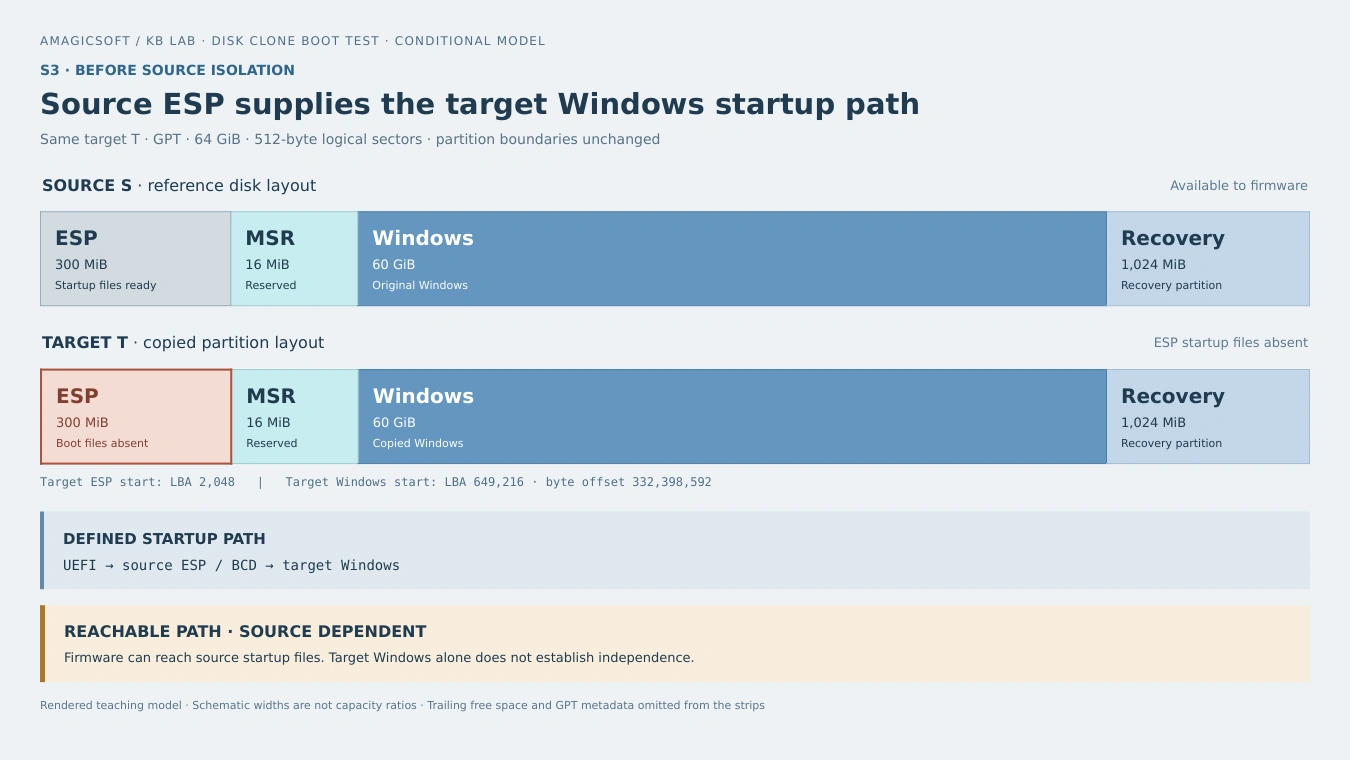
S3 before isolation: the source ESP supplies Windows Boot Manager and BCD, while the Windows installation is on target P3. The modeled chain is reachable, but startup depends on the source.
In this condition, reaching the target Windows desktop still leaves a source-drive dependency. In a disk clone boot test, checking Windows alone can therefore miss the source drive’s startup files.
After Isolation: The Same Target Has No Usable Startup Path
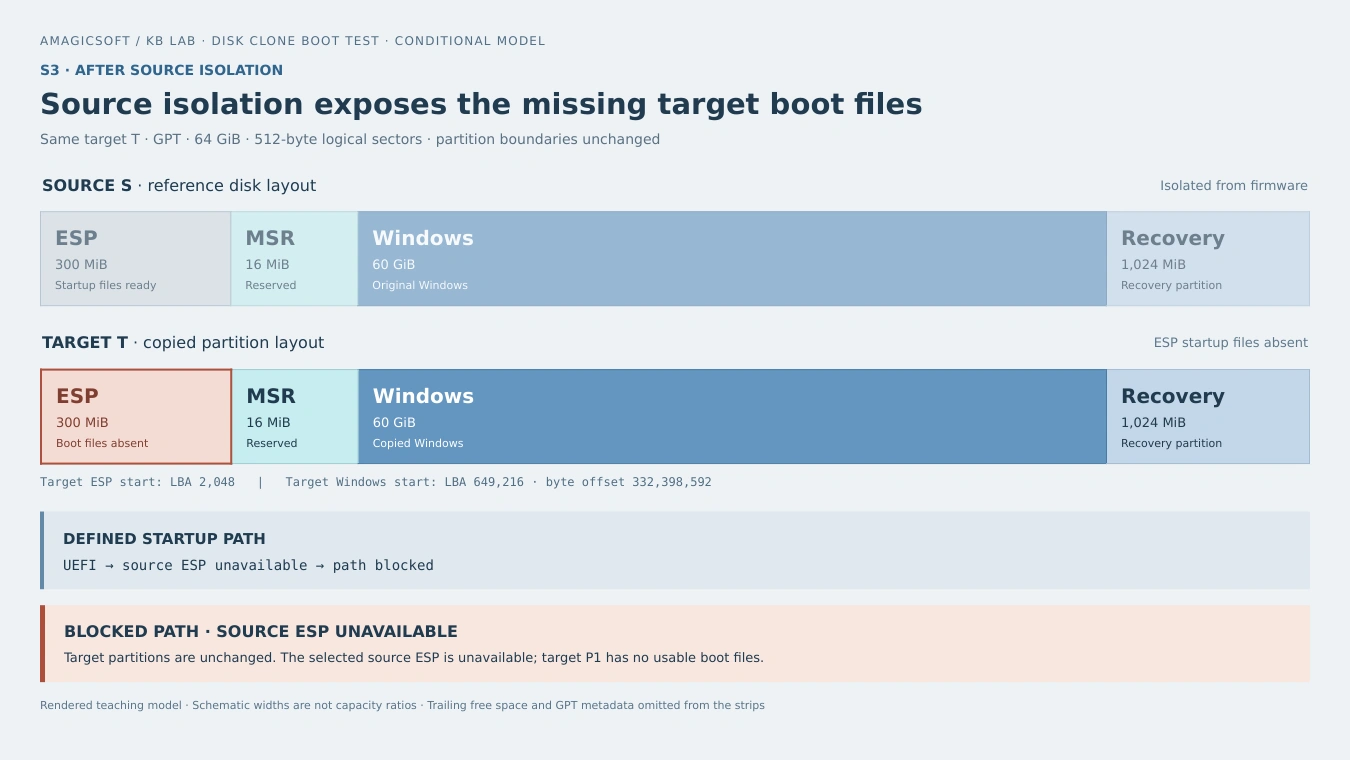
S3 after isolation: target P3 and its boundaries remain unchanged. The selected source ESP becomes unavailable, and target P1 has no usable startup files, so the defined chain is blocked.
The changed input is source availability. The model does not erase Windows or convert its NTFS volume to RAW. Instead, it removes access to the ESP that supplied the startup path. As a result, a corresponding physical symptom could be a firmware boot-selection screen or a startup error; its exact wording depends on firmware and available fallback entries.
After Reconstruction: Startup Prerequisites Resolve to the Target
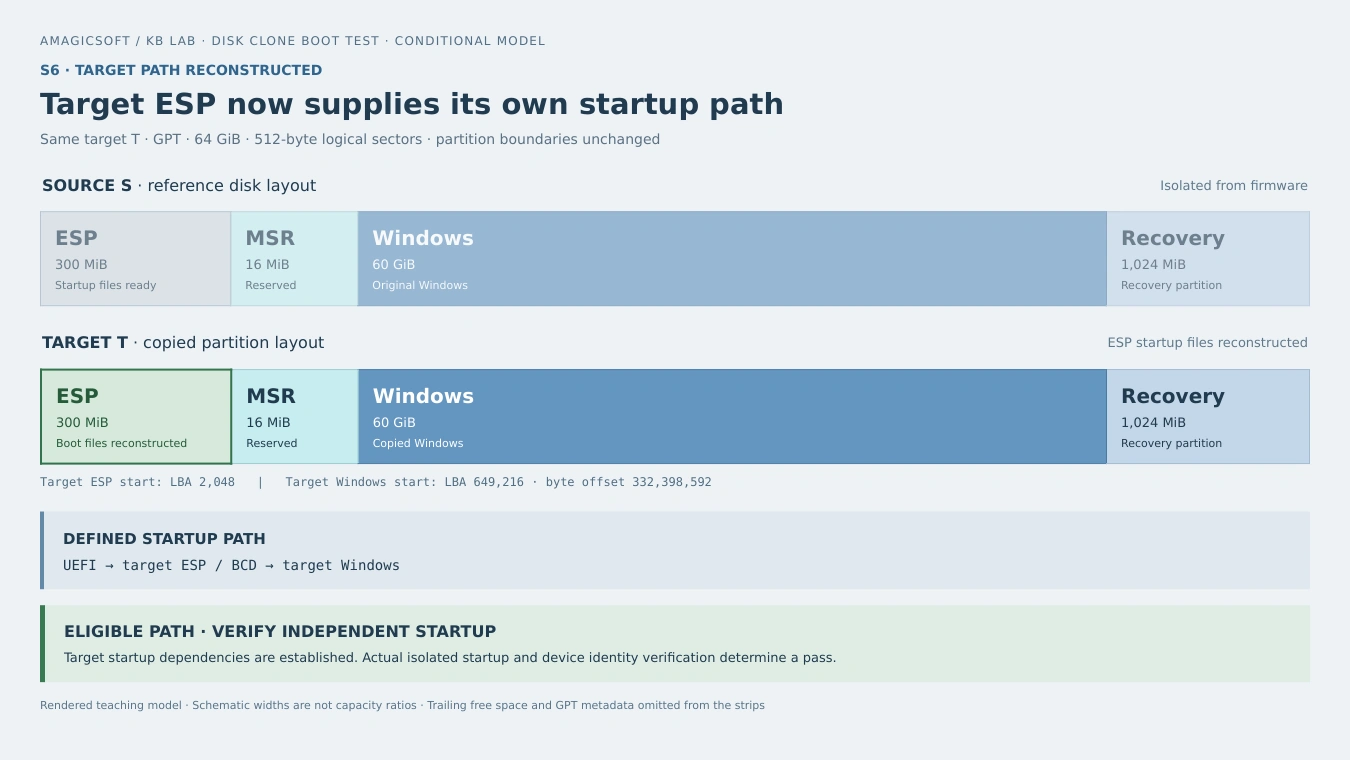
S6: the target ESP supplies the startup files, the firmware selection reaches target P1, and BCD resolves to target P3. The modeled path is eligible for an independent-startup check.
Reconstruction changes startup dependencies while preserving the Windows partition’s location. Use the interactive comparison to inspect all six disk clone boot test scenarios and the calculated partition addresses.
Interactive Clone Boot Test Comparison
Compare scenarios, then inspect partition addresses.
S2 copies Windows but omits ESP, MSR, and Recovery.
Click partitions for addresses; swipe on narrow screens. Red: missing partitions/boot files. Green: reconstructed ESP.
Widths are schematic. Dashed gaps can merge. GPT metadata, alignment gaps and trailing free space (2.69 GiB) are omitted.
Partition addresses
| Partition | Capacity | Format | Start LBA | End LBA | Byte offset |
|---|---|---|---|---|---|
| P1 · ESP | 300 MiB | FAT32 | 2,048 | 616,447 | 1,048,576 |
| P2 · MSR | 16 MiB | None | 616,448 | 649,215 | 315,621,376 |
| P3 · Windows | 60 GiB | NTFS | 649,216 | 126,478,335 | 332,398,592 |
| P4 · Recovery | 1,024 MiB | NTFS | 126,478,336 | 128,575,487 | 64,756,908,032 |
Disk-absolute LBAs, inclusive. Offset=LBA×512. Last usable:134,217,694; tail:5,642,207 sectors. S3/S6 boundaries unchanged.
Scenarios
| Case | Condition | Modeled path |
|---|---|---|
| S1 | Full clone | Eligible |
| S2 | Windows only; no ESP | Blocked |
| S3 | Source ESP | Connected: reachable; isolated: blocked |
| S4 | Legacy mode | UEFI blocked |
| S5 | Stale BCD | Windows blocked |
| S6 | Rebuilt ESP | Eligible |
Eligible paths still require actual source-isolated startup and target identity checks.
Why a Cloned Disk Can Fail to Boot
A disk clone boot test checks several links in the startup chain. Firmware entries, ESP contents, and BCD configuration each play a separate role. First, firmware selects an EFI application. Next, Windows Boot Manager reads the boot configuration and starts the Windows loader. Therefore, an ESP partition can exist while its files are missing, or valid files can exist while the selected boot reference points elsewhere.
The UEFI Boot Manager specification describes firmware boot options and their device paths. Copying disk contents does not, by itself, copy the motherboard’s NVRAM configuration.
Partition identity also matters. A partition’s type GUID identifies its role; its unique GUID identifies that partition. Amagicsoft’s GPT partition entry structure and GUID fields explain that distinction. If a migration changes identities, boot references must still resolve correctly. If cloning preserves identities, those copied GUIDs cannot distinguish the physical source from the target reliably.
Likewise, a valid GPT header and its checksums establish partition-metadata consistency, rather than a complete Windows startup path. S3 keeps the target layout fixed while changing whether its external startup dependency remains available.
How to Run an Independent Clone Boot Test
Therefore, the following disk clone boot test steps connect startup checks to the target’s physical identity.
Record the Target and Isolate the Source
- Record physical identity. Before shutdown, note the target’s model, serial number or device identifier, capacity, and connection location. In Windows,
Get-Disk | Format-List Number,FriendlyName,SerialNumber,UniqueId,Guid,Size,Location,IsBoot,IsSystemprovides useful fields. Cross-check identifiers because adapters can omit or alter what they expose. - Make the source unavailable to firmware. Shut down fully, then disconnect the source safely or use a documented firmware setting that actually removes its storage path. Remove recovery USB media and other drives that could supply startup files. The source must be unavailable to firmware during the disk clone boot test. Setting it offline inside Windows is insufficient because firmware runs earlier.
- Select the target startup path. Keep the appropriate UEFI mode and existing security policy. Next, choose the Windows Boot Manager entry associated with the target. An entry’s display name alone may not identify the physical device.
Verify Windows and Its Startup Partition
- Start Windows and map its partition. Use
Get-Partition -DriveLetter C | Get-Diskwhen the running Windows installation usesC:. Then, match the returned device to the recorded target. Adjust the letter if necessary; disk numbers and drive letters can change between environments. - Check the startup partition too. Inspect
Get-Partition | Format-Table DiskNumber,PartitionNumber,DriveLetter,IsBoot,IsSystem. Windows terminology distinguishes the running Windows partition from the system partition containing startup files. With alternative startup drives unavailable, confirm both roles map to the intended target. - Check a further startup and representative files. Perform a restart and a full shutdown/startup with the source still unavailable. Also, open important documents and applications. Record startup verification and file checks separately, because a working boot path does not establish that every copied file is intact.
Microsoft documents the Get-Partition queries, partition status properties, and disk identity properties. Use those fields together with source isolation and the physical device record.
When a Clone Boot Test Points to Startup Repair
If Windows is readable but its ESP files or BCD need repair, Microsoft BCDBoot can rebuild the boot environment. First, identify the target Windows directory and its ESP. Drive letters in recovery mode can differ from normal Windows.
One detail matters when interpreting a repair: specifying BCDBoot’s /s option directs the system-partition destination but does not create a firmware NVRAM entry. A file-copy completion message therefore leaves firmware selection as a separate check. The S6 model includes both corrected target files and a working target firmware selection. After repair, repeat the disk clone boot test with the source still unavailable.
If the target instead appears RAW, has missing partitions, or reports read errors, reassess its layout, file-system state, and clone completeness before writing repairs. A missing boot entry alone does not explain a RAW Windows volume. Preserve recoverable files before further changes when the source or target is damaged.
Conclusion
A useful disk clone boot test ends with an identified target starting Windows independently. The central comparison explains why that standard matters: Windows can occupy the target while the selected ESP remains on the source. Isolating the source exposes the dependency without changing the target’s Windows partition.
Judge the migration in stages. First check the target layout and startup files. Next make the source and alternative startup media unavailable. Then start Windows and verify the physical target and startup partition. Keep the original drive until those checks succeed, and validate important files separately. This distinguishes a complete copy operation, a coherent startup configuration, and a verified independent startup—three results that require different evidence. Complete the disk clone boot test before you erase or reuse the original drive.
Disk Clone Boot Test FAQ
Can a clone move to a different motherboard?
Can BitLocker affect the first startup after cloning?
Does a larger destination require a different test?
Does missing Windows RE mean Windows cannot start?
Should Secure Boot be disabled for the test?
Does this procedure validate a USB boot installation?

Vasilii is a data recovery specialist with around 10 years of hands-on experience in the field. Throughout his career, he has successfully solved thousands of complex cases involving deleted files, formatted drives, lost partitions, and RAW file systems. His expertise covers both manual recovery methods using professional tools like hex editors and advanced automated solutions with recovery software. Vasilii's mission is to make reliable data recovery knowledge accessible to both IT professionals and everyday users, helping them safeguard their valuable digital assets.