
How to Recover Recycle Bin Deleted Files: Step-by-Step Methods
Accidentally deleting important files happens more often than most users expect. In many cases, files first go to the Recycle Bin, which makes recovery simple. However, once the Recycle Bin is emptied, panic usually follows. Understanding how to recover Recycle Bin deleted files helps you react calmly and correctly. Instead of guessing or taking risky actions, you can follow proven Recycle Bin recovery solutions.
Yes, in many cases, you can recover Recycle Bin deleted files even after emptying the Recycle Bin, as long as the deleted data has not been overwritten. In this guide, you will learn what happens after files are removed from the Recycle Bin, which recovery methods are actually possible, and what to do first to improve your chances of recovery.
Supports Windows 7/8/10/11 and Windows Server
Wondering if your files can be recovered? Find out in seconds with our quick check below.
Data Recovery Assessment
Answer 3 quick questions to estimate your recovery chances
Table of Contents
What Happens When You Delete Files from the Recycle Bin
When you delete a file in Windows, the system usually moves it to the Recycle Bin rather than erasing it immediately. At this stage, restoring the file takes only a few clicks.
After you empty the Recycle Bin, Windows does not instantly destroy the data. Instead, the operating system marks the storage space as available. As a result, the file becomes invisible, but the data often remains on the drive until new information overwrites it.
Because of this process, learning how to recover Recycle Bin deleted files is still meaningful even after permanent deletion.
Where Do Files Go After You Empty the Recycle Bin?
After permanent deletion, files do not move to another folder. Instead, their disk space becomes reusable. Meanwhile, the actual file data may stay intact for some time.
Several factors influence recovery chances:
- How quickly you stop using the drive
- Whether new files are written to the same location
- The type of storage device, such as HDD or SSD
Therefore, once data loss occurs, reducing disk activity immediately improves the possibility to recover Recycle Bin deleted files successfully.
Can You Recover Recycle Bin Deleted Files Without Software
In limited situations, you can recover Recycle Bin deleted files without additional tools. If the files are still in the Recycle Bin, you can restore them directly. If the Recycle Bin has already been emptied, software-free recovery usually depends on backups created before deletion.
Restore Using File History
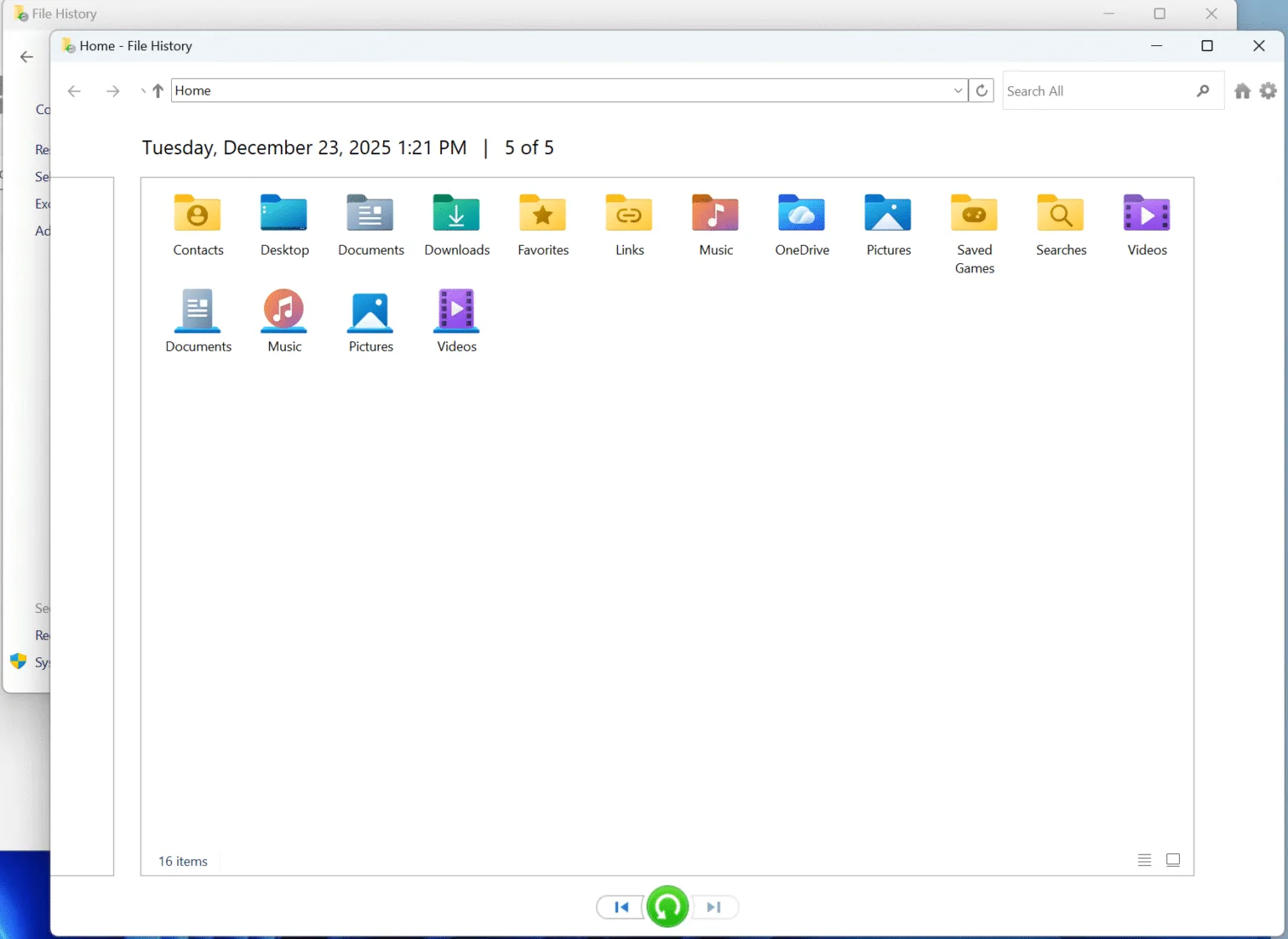
If File History was enabled, Windows may have saved earlier versions of your files. You can browse the backup and restore the needed data. Unfortunately, this feature is disabled on many systems by default.
Restore from System or Cloud Backups
System images or cloud backups can also help. However, backups may be outdated or incomplete. Because of this limitation, recovery from backups often fails when files were deleted recently.
Why Recovery Software Is Often Needed After Emptying the Recycle Bin
When you emptied the Recycle Bin and no backup exists, Windows offers no built-in recovery option. At this point, scanning the storage device directly becomes necessary.
Professional recovery software can locate file traces and recover deleted data safely. Therefore, using a reliable tool significantly improves the chance to recover Recycle Bin deleted files without causing further damage.
Use the following method when the Recycle Bin has already been emptied and no backup, File History version, or cloud restore point is available.
Step-by-Step Guide: How to Recover Recycle Bin Deleted Files with Magic Data Recovery
The following guide explains how to recover Recycle Bin deleted files using Magic Data Recovery. Each step focuses on safety, accuracy, and ease of use.
Step 1: Download and Install Magic Data Recovery
Download Magic Data Recovery from the official website and install it on a drive different from the affected one. This approach reduces the risk of overwriting deleted data and protects recoverable files.
Supports Windows 7/8/10/11 and Windows Server
Step 2: Select the Drive to Scan
Open the program and review the main interface. Then select the drive where the Recycle Bin deleted files were originally stored and start the scan.

Step 3: Scan the Drive for Deleted Files
Magic Data Recovery automatically runs an advanced scan. While the scan continues, the software displays recoverable files in real time, which helps you track progress efficiently.

Step 4: Preview Deleted Files Before Recovery
Before restoring data, use the preview feature to confirm file content. This step ensures accuracy and prevents unnecessary recovery of unwanted files.

Step 5: Recover Files to a Safe Location
Choose the files you want to restore and save them to a different drive or external storage device. Writing recovered files to the same disk may reduce recovery success.

Why Magic Data Recovery Is Recommended for Recycle Bin File Recovery
Magic Data Recovery focuses on solving common data loss problems caused by accidental deletion. It helps users recover Recycle Bin deleted files efficiently without complex settings.
Key advantages include:
- Deep scanning for deleted and lost files
- File preview before recovery
- A clear interface suitable for everyday users
For situations such as cleaning up storage or removing files by mistake, Magic Data Recovery provides a dependable solution.
Tips to Improve Success When You Recover Recycle Bin Deleted Files
To increase recovery success, follow these best practices:
- Stop using the affected drive immediately
- Avoid installing new programs on the same disk
- Start the recovery process as soon as possible
- Save recovered files to a separate device
These steps help protect remaining data and support reliable recovery results.
Conclusion
Losing files after emptying the Recycle Bin does not always mean permanent loss. By understanding how to recover Recycle Bin deleted files, you can take the right steps quickly and safely.
Although backups and Windows features work in some situations, they are often unavailable. In these cases, Magic Data Recovery provides a reliable and user-friendly way to recover Recycle Bin deleted files efficiently. If you need a practical Recycle Bin recovery solution, Magic Data Recovery is a dependable choice.
Supports Windows 7/8/10/11 and Windows Server
FAQs – How to Recover Recycle Bin Deleted Files
Can you recover permanently deleted files?
Is deleting files from the Recycle Bin permanently deleted?
How to recover deleted Recycle Bin files without software?
Where does the Recycle Bin restore to?
Are permanently deleted files really gone?
Where do files go after permanently deleted?
Is it possible to recover files after emptying the Recycle Bin?
How to retrieve permanently deleted from Recycle Bin?

Vasilii is a data recovery specialist with around 10 years of hands-on experience in the field. Throughout his career, he has successfully solved thousands of complex cases involving deleted files, formatted drives, lost partitions, and RAW file systems. His expertise covers both manual recovery methods using professional tools like hex editors and advanced automated solutions with recovery software. Vasilii's mission is to make reliable data recovery knowledge accessible to both IT professionals and everyday users, helping them safeguard their valuable digital assets.