
Best Guide to Seagate Rescue Data Recovery and Magic Data Recovery
Losing important files — whether photos, documents, or project data — can happen at any time due to accidental deletion, formatting, or file system corruption. Even users of a Seagate 2TB portable hard drive with Rescue Data Recovery Services may find that relying solely on standard recovery plans isn’t enough for urgent or logical data loss scenarios.
This guide explains how Seagate Rescue Data Recovery works, explores its advantages and limitations, and introduces Magic Data Recovery as a faster, practical solution for recovering lost files from deleted, formatted, or corrupted drives.
Supports Windows 7/8/10/11 and Windows Server
Table of Contents
What Are Seagate Rescue Data Recovery Services?
Seagate Rescue Data Recovery Services is a professional plan included with certain Seagate drives. It is designed to help users recover data when drives fail due to hardware issues or severe corruption.
Key aspects include:
- Professional lab recovery for mechanical or serious failures
- Coverage for eligible drives within the plan period
- Secure encrypted return of recovered data
While highly reliable for physical damage, Seagate Rescue has limited speed and control for recovering deleted or formatted files.
How Seagate Rescue Recovery Works
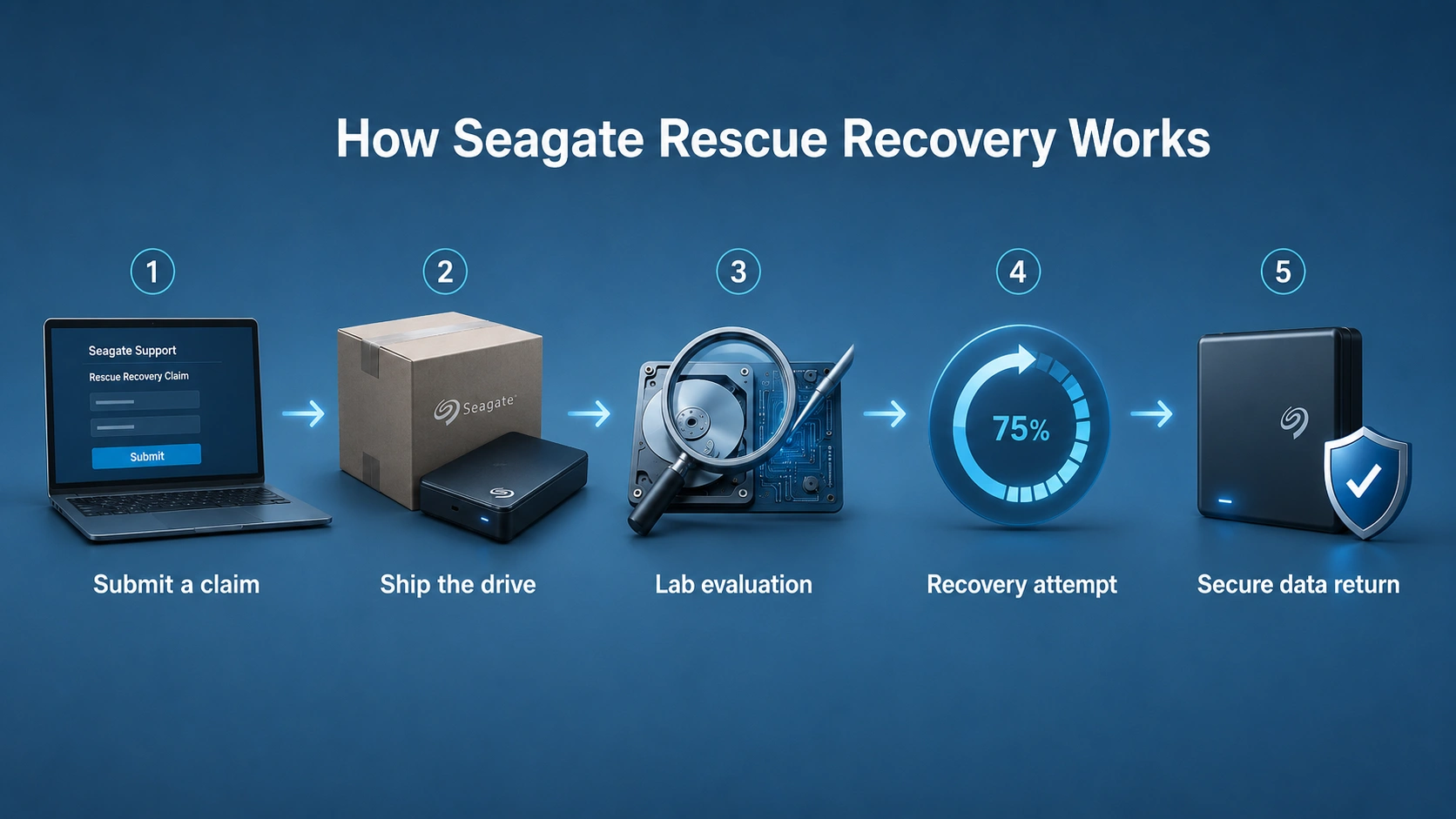
Step-by-step process for clarity:
- Submit a claim: Verify drive eligibility and request recovery.
- Send the drive: Use the prepaid shipping label provided.
- Lab evaluation: Technicians assess physical and logical damage.
- Recovery attempt: Depending on the severity, recovery can take 20–30 business days.
- Return or secure destruction: Recovered files are returned encrypted; failed recoveries result in drive return or destruction per request.
This process ensures professional handling but may be slow for urgent file recovery.
Limitations of Seagate Recovery Services
Even though Seagate Rescue is authoritative for hardware issues, users should note:
- Time-consuming: Recovery often takes weeks.
- Logical file recovery is limited: Deleted or accidentally formatted files may not always be recovered promptly.
- User control is minimal: No preview of recoverable files during the process.
- Eligibility-dependent: Coverage depends on drive type, warranty, and Rescue plan status.
For users needing faster access or control, a software solution can complement Seagate Rescue.
Introducing Magic Data Recovery

Magic Data Recovery is designed for fast, reliable recovery of files lost due to logical errors. It works for:
- Deleted files and emptied recycle bins
- Formatted drives and partitions
- File system corruption (NTFS, FAT32, exFAT, HFS+)
- Lost or inaccessible partitions
Core Advantages:
- Deep file signature scan uncovers documents, images, videos, and other formats even after formatting.
- Multiple recovery modes adapt to deleted files, formatting, or partition loss.
- Preview before restore lets you selectively recover files.
- Cross-platform support works with Seagate HDDs, SSDs, and external drives.
This solution allows immediate, user-controlled recovery, making it ideal when waiting for lab services is impractical.
Supports Windows 7/8/10/11 and Windows Server
Professional Comparison: Seagate Rescue vs Magic Data Recovery
Feature | Seagate Rescue Data Recovery Services | Magic Data Recovery | Recommended for |
Hardware failure | ✔ | ✘ | Drives with physical damage |
Logical file recovery | Partial | ✔ | Deleted, formatted, or corrupted files |
Recovery speed | Weeks | Minutes | Users needing fast access |
File preview | ✘ | ✔ | Users wanting selective restore |
User control | Low | High | Users needing hands-on recovery |
Expert insight: Combining Seagate Rescue with Magic Data Recovery ensures coverage for both physical and logical data loss, enhancing reliability and control.
Best Practices for Data Backup and Recovery
- Regular backups: Protect against accidental deletion or failures.
- Multiple locations: Use both local drives and cloud storage.
- Monitor drive health: Detect early issues before data loss occurs.
- Keep recovery tools ready: Installing software like Magic Data Recovery ensures immediate access when logical errors occur.
These steps complement Seagate Rescue services and maximize data protection.
Conclusion
For critical physical failures, Seagate Rescue Data Recovery Services remains the authoritative choice. For deleted, formatted, or corrupted files, Magic Data Recovery provides a faster, user-friendly, and controlled solution. Using both approaches together gives a comprehensive, professional recovery strategy.
If speed, precision, and control are important, Magic Data Recovery is the recommended first line for logical data recovery, complementing Seagate’s Rescue plan for full protection.
Supports Windows 7/8/10/11 and Windows Server
FAQ – Key Questions for Users
What scenarios does Seagate Rescue Data Recovery cover?
Seagate Rescue focuses on hardware failures and physical damage. It can handle some logical corruption cases but is mainly optimized for lab-based recovery of critically failed drives.
How fast can I recover files using Magic Data Recovery?
Magic Data Recovery can scan and restore files within minutes or hours depending on drive size, much faster than weeks required for lab-based services.
Can deleted files be recovered without Seagate Rescue?
Yes. Magic Data Recovery retrieves deleted or formatted files instantly, making it ideal for logical data loss without shipping the drive to a lab.
What file systems are supported by Magic Data Recovery?
It supports NTFS, FAT32, exFAT, HFS+, and other major file systems, allowing recovery across Windows, Mac, and external drives.
Is professional lab recovery always better than software recovery?
Not always. Labs are essential for physical damage. For logical errors, professional software often achieves faster, high-fidelity recovery without delay.
Does Magic Data Recovery work on all Seagate drives?
Yes. It supports Seagate HDDs, SSDs, and external drives, including models with Rescue Data Recovery Services, covering both portable and desktop drives.
What precautions should I take before recovery?
Immediately stop using the affected drive, avoid overwriting, and ensure backups exist to prevent further data loss, improving recovery success.
Can formatted drives or corrupted partitions be recovered?
Yes. Magic Data Recovery restores files from formatted drives and damaged partitions, making it suitable for file system errors and accidental formatting scenarios.

Jason is a data recovery and technical support specialist with over 15 years of hands-on experience. He has worked extensively with frontline users, troubleshooting difficult data loss cases and providing practical recovery solutions for accidental deletion, formatted drives, damaged file systems, lost partitions, system failures, and other recovery emergencies. His expertise also includes backup and restoration, file repair, and disaster recovery, with a strong emphasis on safe, reliable, and technically accurate guidance.