
Ultimate Server Data Recovery Guide

Data is the lifeblood of modern business operations. Therefore, when a corporate system goes down, operations grind to a halt, financial losses accumulate by the minute, and IT teams face immense pressure. A sudden system failure can lead to severe enterprise data loss, leaving administrators desperate for a reliable server data recovery solution. Whether a company is dealing with complex virtual machines or physical enterprise storage, executing a safe and rapid server recovery strategy is absolutely essential.
Consequently, modern enterprise network environments require highly specialized approaches because standard hard drive recovery methods often fail on complex file configurations. This comprehensive guide walks you through industry-best practices for a successful server recovery deployment. Additionally, you will discover how a dedicated Windows desktop utility like Magic Data Recovery can help administrators resolve logical system failures, access inaccessible drives, and perform emergency server data recovery tasks on corrupted database setups quickly.
Supports Windows 7/8/10/11 and Windows Server
Table of Contents
Understanding Server Data Loss and Server Recovery Scenarios
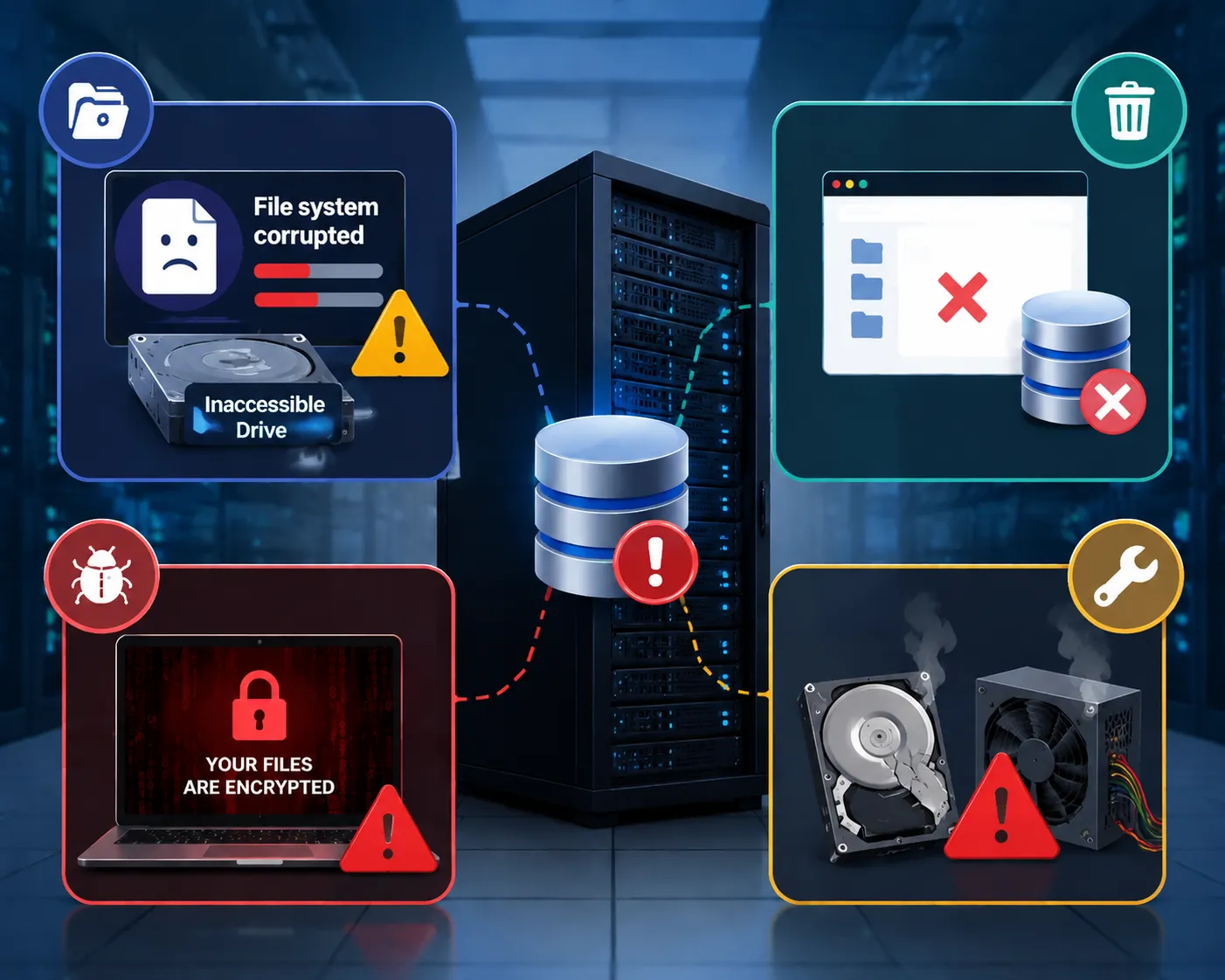
To execute an effective server recovery plan, IT administrators must first diagnose how the data loss occurred. Server architectures differ significantly from standard consumer computers, which means their vulnerabilities are also unique. Therefore, understanding these scenarios speeds up the server data recovery process.
- Logical Corruption and File System Errors: File systems can degrade due to improper system shutdowns, sudden software conflicts, or interrupted write operations. Consequently, the operating system can no longer read the storage volumes, resulting in inaccessible drives.
- Accidental Deletion and Formatting: Even in high-security business networks, human error remains a frequent cause of critical database deletion. For example, administrators might accidentally format a critical storage network volume, triggering an urgent need for professional server data recovery.
- Ransomware and Cyberattacks: Modern malware explicitly targets business network infrastructure. As a result, ransomware can encrypt entire operational databases, forcing companies to seek advanced deployment tools to perform a fast server recovery.
- Physical Component Degradation: Hard disk mechanical components, storage controllers, and power supply units fail over time. When hardware components degrade, the server operating system will often fail to boot entirely, rendering the underlying files as inaccessible drives.
Crucial First Steps for Successful Server Recovery
When a business database vanishes, the actions taken in the first fifteen minutes determine whether you can successfully execute a server data recovery procedure. Rash decisions can turn a simple logical file error into permanent, irreversible damage, making future server recovery impossible.
First, you must immediately isolate the affected machine from the local corporate network. This quick action stops ongoing automatic log writes, prevents background system updates, and isolates potential malware from spreading to other workstations.
Second, you must avoid installing any new diagnostic software directly onto the affected system drives. Writing new data to a compromised drive can overwrite the exact database fragments you need to rescue through server data recovery.
Third, do not attempt to run aggressive built-in disk repair utilities like CHKDSK on failing storage arrays. These automatic system tools often rearrange complex metadata structures, which can permanently destroy directory trees on inaccessible drives. Instead, check your automated offsite backup logs to determine if an uncorrupted, recent snapshot of your operational environment is readily available before starting any manual server recovery attempts.
Software vs. Lab Services for Server Data Recovery
Organizations often struggle to decide between using localized retrieval software or shipping heavy equipment to specialized recovery laboratories. Choosing the right method for your server recovery project depends entirely on the root cause of the system failure.
Recovery Factor | Professional Retrieval Software | Physical Laboratory Services |
Primary Use Case | Logical errors, accidental deletion, formatted volumes, and inaccessible drives | Severe physical damage, burnt controller boards, clicking hard drives |
Average Cost | Affordable corporate or technician licensing fees | Very expensive, often ranging from thousands to tens of thousands of dollars |
Turnaround Time | Immediate deployment, allowing data rescue within hours | Several days to weeks, including transit time and cleanroom queues |
Operational Security | Data remains strictly in-house, ensuring complete corporate privacy | Physical hardware must leave the facility, increasing third-party data handling risks |
If your hard drives are spinning smoothly without making strange clicking noises, the underlying issue is likely logical. In these scenarios, deploying a dedicated software utility is the fastest way to achieve a successful server data recovery outcome without paying massive laboratory fees. Conversely, if the hardware is physically broken, software cannot fix it, and lab services become mandatory for server recovery.
The Best Self-Service Alternative for Server Data Recovery
When an enterprise network experiences a logical crash, IT departments need a dependable solution that delivers immediate results. This is where Magic Data Recovery serves as an essential tool for administrators facing unexpected downtime and urgent server recovery deadlines.
Solving the Core Infrastructure Pain Points
Traditional recovery tools are often designed for consumer files and fail to parse complex server file structures. However, Magic Data Recovery handles advanced Windows database storage architectures efficiently, making it an outstanding choice for professional server data recovery. It directly addresses the nightmare of inaccessible drives, allowing administrators to bypass restrictive operating system errors and access underlying RAW partition data safely.
Key Advantages and Unique Selling Points
- Risk-Free Evaluation: The software provides 500MB free data recovery limit, which allows IT teams to verify that their critical databases are fully restorable before committing to a corporate license.
- Deep Sector Scanning: The advanced search algorithms can reconstruct deep directory trees, which is vital for a successful server recovery if the primary partition table has been completely wiped or corrupted.
- Read-Only Integrity: The application operates in a strict read-only mode, ensuring it will never modify or overwrite your existing server storage sectors during the server data recovery scanning process.
Real-World Application Scenarios
Imagine a scenario where a mid-sized company experiences a sudden power surge, causing a database drive to display as unformatted and RAW. Instead of waiting days for an expensive technician, the network manager installs Magic Data Recovery on a separate workstation to address the inaccessible drives. Within hours, the software extracts the database files immediately, achieving a fast server recovery. If you are currently searching for a fast, reliable solution to get your business operations back online, you should try Magic Data Recovery.
Step-by-Step Guide: Executing Server Data Recovery
Safely executing a server recovery procedure requires a structured approach to maintain data integrity. Follow these steps to extract your business information using professional server data recovery software.
Step 1: Download and Install Magic Data Recovery
First, download Magic Data Recovery and install it on a working volume separate from the compromised server storage partition. Installing the utility on a different drive completely avoids accidental overwriting, thereby protecting the integrity of your lost corporate databases during the server recovery process.
Supports Windows 7/8/10/11 and Windows Server
Step 2: Select the Compromised Server Drive to Scan
Launch the application on your workspace. Next, from the main dashboard, select the specific server volume or inaccessible drives where the data loss occurred to initialize the server data recovery diagnostic process.

Step 3: Scan the Server Volume for Missing Files
The software automatically executes a comprehensive Advanced Scan across the selected storage sectors. Meanwhile, the interface dynamically organizes and updates the list of recoverable network files as the server data recovery sector analysis progresses.

Step 4: Preview Enterprise Files Before Recovery
Once the analysis completes, use the built-in preview panel to verify the file contents and directory structures. Consequently, this quality check ensures that your IT department restores only the exact database files required for a successful server recovery.

Step 5: Save Extracted Files to a Secure Location
Finally, mark the checkboxes next to your essential enterprise data and export them to a stable backup drive or network-attached storage device. You must never save the recovered files back to the original inaccessible drives, because doing so risks immediate data corruption and ruins your server data recovery efforts.

Conclusion
Successfully navigating a storage failure requires a calm approach, a clear understanding of the system’s errors, and the right tools. While physical laboratory interventions remain necessary for broken or damaged drive components, logical failures can be resolved much faster using specialized software.
We highly recommend Magic Data Recovery because it combines enterprise-grade scanning capabilities with a completely transparent evaluation process. Its ability to read inaccessible drives gives IT professionals a reliable hard drive recovery tool to minimize costly operational downtime. By leveraging the 500MB free data recovery limit, your business can safely assess its files, execute an emergency server recovery workflow, and restore critical network infrastructure without upfront costs.
Supports Windows 7/8/10/11 and Windows Server
FAQs Regarding Server Data Recovery
Can software restore files from a server drive that will not boot?
Yes, professional software can restore your files easily from a non-booting drive. However, the underlying storage hardware must remain fully functional. You can simply remove the drive from the broken machine, connect it to a secondary working computer, and run a thorough server recovery scan to safely extract your files.
What should I do if a network drive becomes completely inaccessible?
When a drive becomes inaccessible, stop all write operations to that storage volume immediately to avoid overwriting data. Do not attempt to reformat the partition. Instead, use a read-only data rescue tool to scan the raw file sectors and clone your critical files from those inaccessible drives to a stable storage medium.
Is there a free trial option available for testing enterprise file restoration?
Many professional tools offer free trials that allow you to preview recoverable files before purchasing. For instance, Magic Data Recovery provides a 500MB free data recovery limit, which allows administrators to test the software's advanced capabilities and verify file integrity completely free of charge.
How long does a typical enterprise server recovery process take?
The total scanning time depends entirely on the capacity and speed of your storage drives. For example, a fast SSD can complete a deep scan within a few hours. Conversely, traditional mechanical hard drives with multiple terabytes of data might require several hours to finish a thorough server recovery analysis.
Can I recover database files like SQL or Oracle using software?
Yes, you can readily salvage major database files including MDF, LDF, and DBF formats. The software reconstructs deleted or corrupted storage sectors where these databases reside, even on inaccessible drives. Once you recover the raw files, you can easily attach them back to your active server environments.
What is the main benefit of using software over a physical laboratory?
Software provides immediate deployment, keeps your sensitive data completely in-house, and costs significantly less than a physical cleanroom. Therefore, if your hard drives do not suffer from physical mechanical failures, deploying a specialized utility is the most secure and cost-effective choice for your server data recovery needs.

Vasilii is a data recovery specialist with around 10 years of hands-on experience in the field. Throughout his career, he has successfully solved thousands of complex cases involving deleted files, formatted drives, lost partitions, and RAW file systems. His expertise covers both manual recovery methods using professional tools like hex editors and advanced automated solutions with recovery software. Vasilii's mission is to make reliable data recovery knowledge accessible to both IT professionals and everyday users, helping them safeguard their valuable digital assets.