
How to Get or Recover a 4K Video Downloader Plus License Key (Legal Guide)
4K Video Downloader Plus is a powerful tool for downloading high-quality videos, playlists, and audio from platforms like YouTube, Vimeo, TikTok, and more. As users seek efficient ways to access offline content, questions about its features and obtaining a valid 4k video downloader plus license key (including searches for 4k video downloader license key 2026) have surged. In this guide, we’ll explore what this software offers, its top features, and how to safely secure a license key without risking malware or legal issues.
Supports Windows 7/8/10/11 and Windows Server
Table of Contents
What Is 4K Video Downloader Plus?
4K Video Downloader Plus is an upgraded version of the popular 4K Video Downloader, designed to streamline video and audio downloads in resolutions up to 8K. It supports over 1,000 platforms, allowing users to save content for offline viewing, create backups, or extract audio tracks. Unlike free alternatives, the Plus version offers advanced features like faster downloads, batch processing, and priority customer support.
How to Get / Recover a License Key
Searches for 4k video downloader plus license key 2026 often stem from users wanting to activate the software for free. However, distributing or using cracked keys violates copyright laws and exposes devices to malware. Here’s how to obtain a license key safely:
1. Recover a Lost Key
If you’ve already purchased a license, retrieve your key via Magic Recovery Key. This tool allows you to retrieve your key in just a few easy steps. It supports extracting keys from various software activated on your computer, including Windows, Office, and of course, 4K Video Downloader.
To use Magic Recovery Key:
• Download and install the software from the official website.
Supports Windows 7/8/10/11 and Windows Server
• Run the software and click on the “Registry Keys” tab under “Local.”
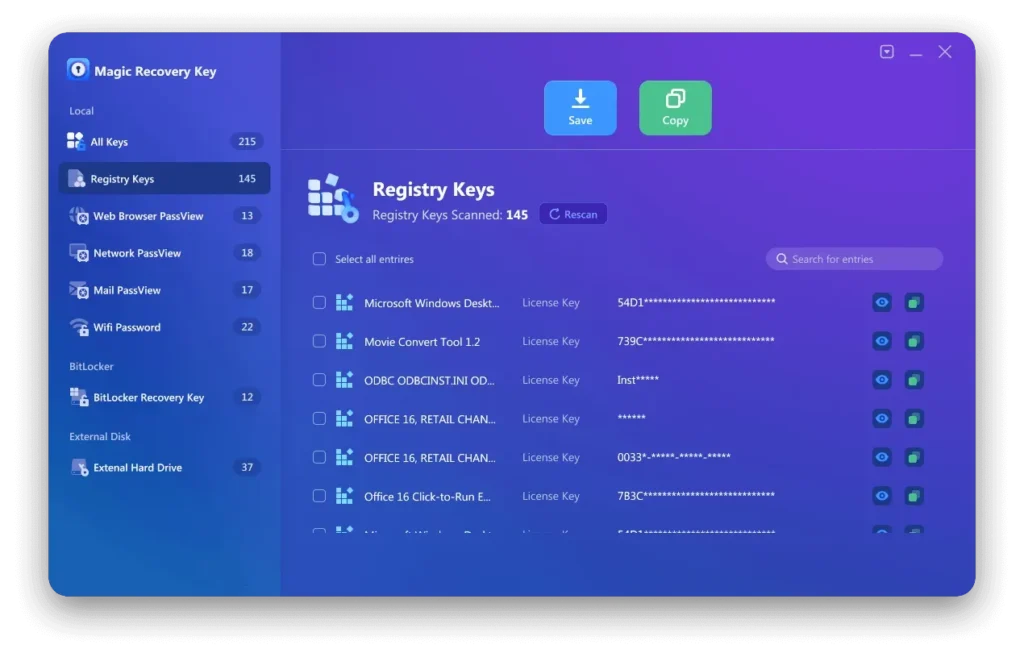
• View the Applications Registry Keys and locate your 4K Video Downloader key.
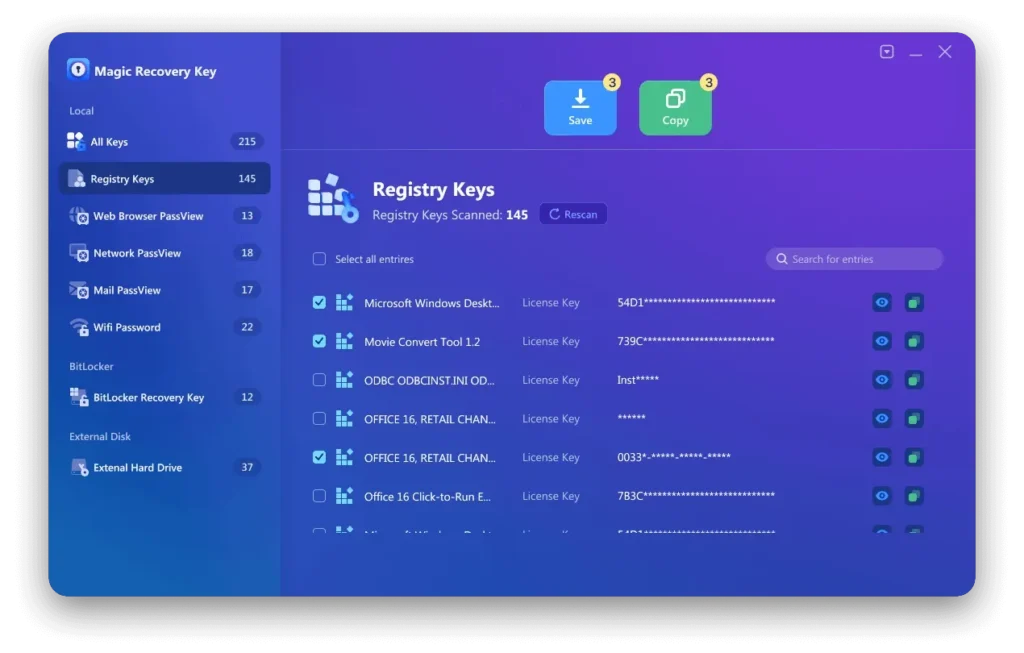
• Select and copy the key, or save it for future use.
2. Temporarily Use the Free Version
If you are unable to recover your lost 4K Video Downloader Plus license key promptly, we recommend contacting the official customer support and providing your purchase details for further assistance. In the meantime, if you urgently need to continue using the software’s features, you can follow the method below to enjoy temporary free usage:
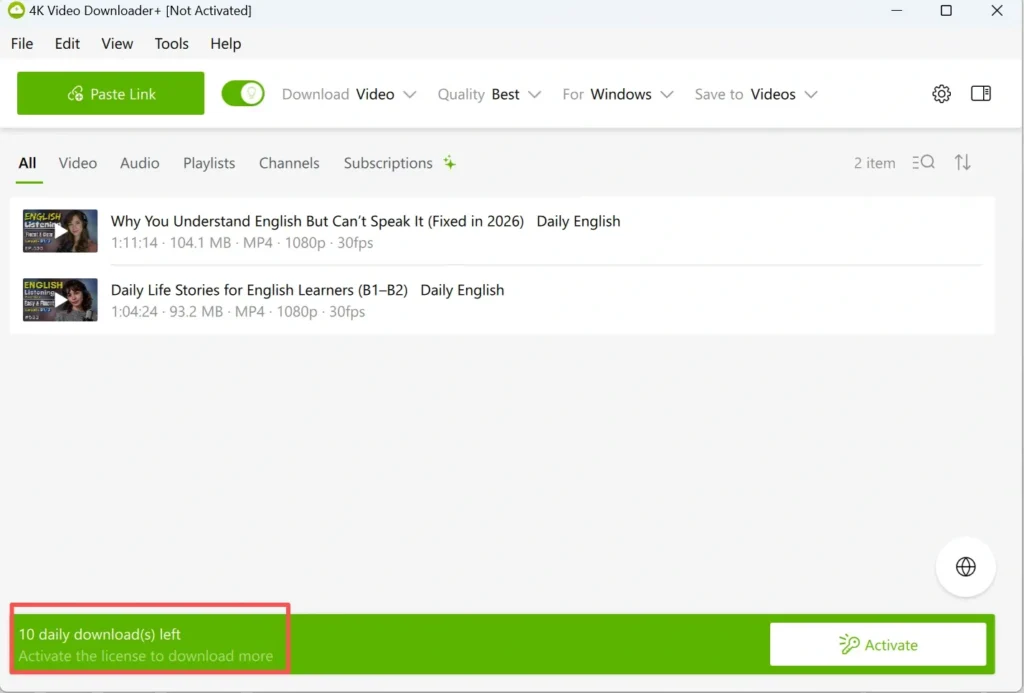
① Download and install the latest version from the official website. Typically, after the initial installation, you can use it for 10 free downloads. If you have already used up the 10 downloads, proceed with the following steps to regain access.
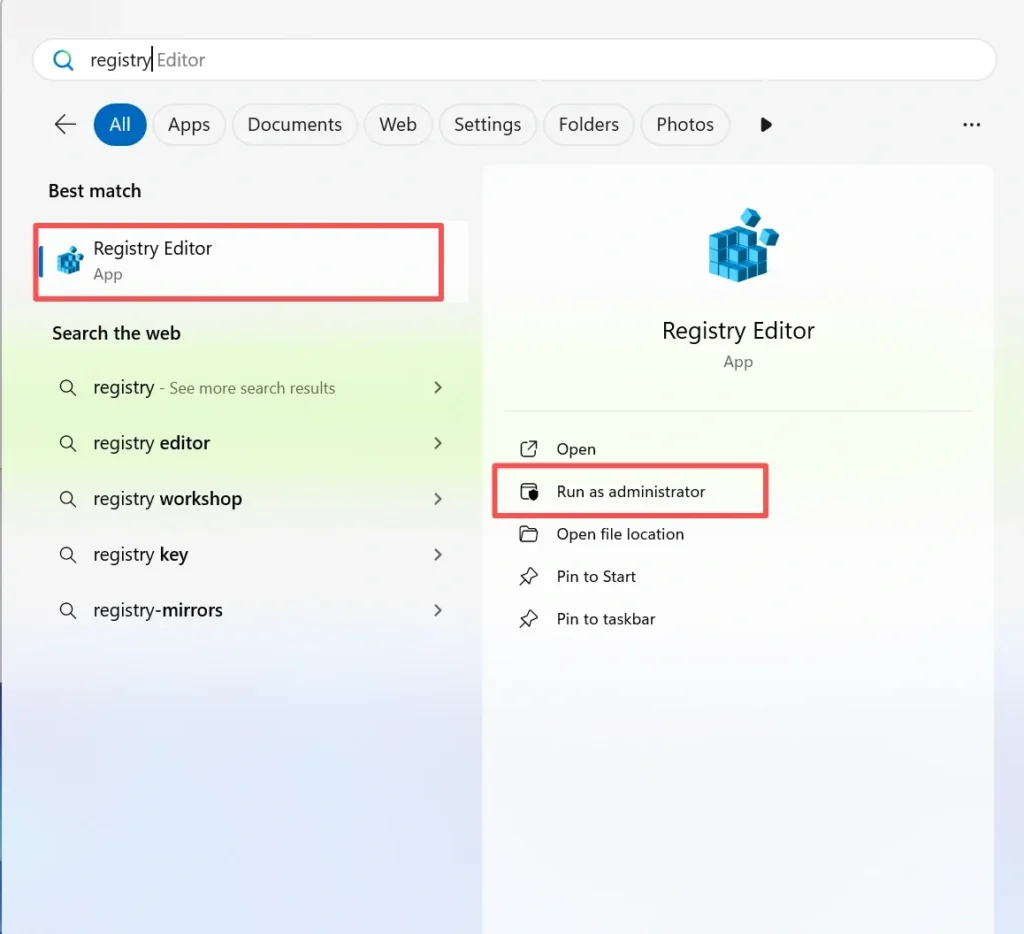
② Search for “Registry Editor” and run it as an administrator.
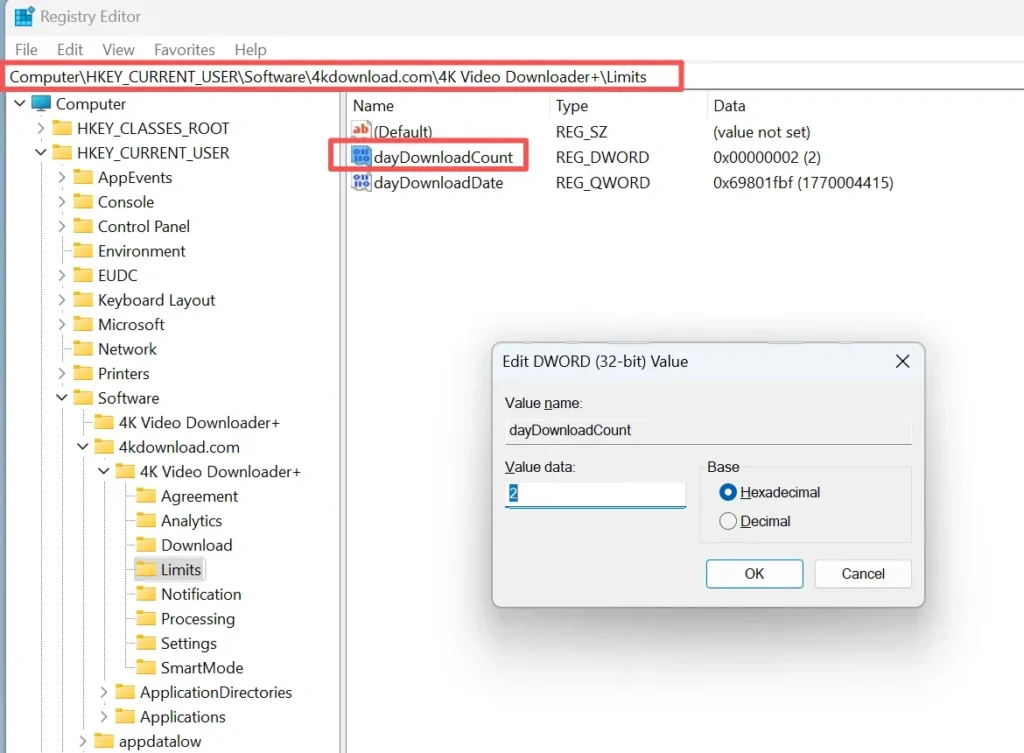
③ Navigate to the registry path shown in the screenshot below and modify the value of “DayDownloadCount” to 0, then save the changes.
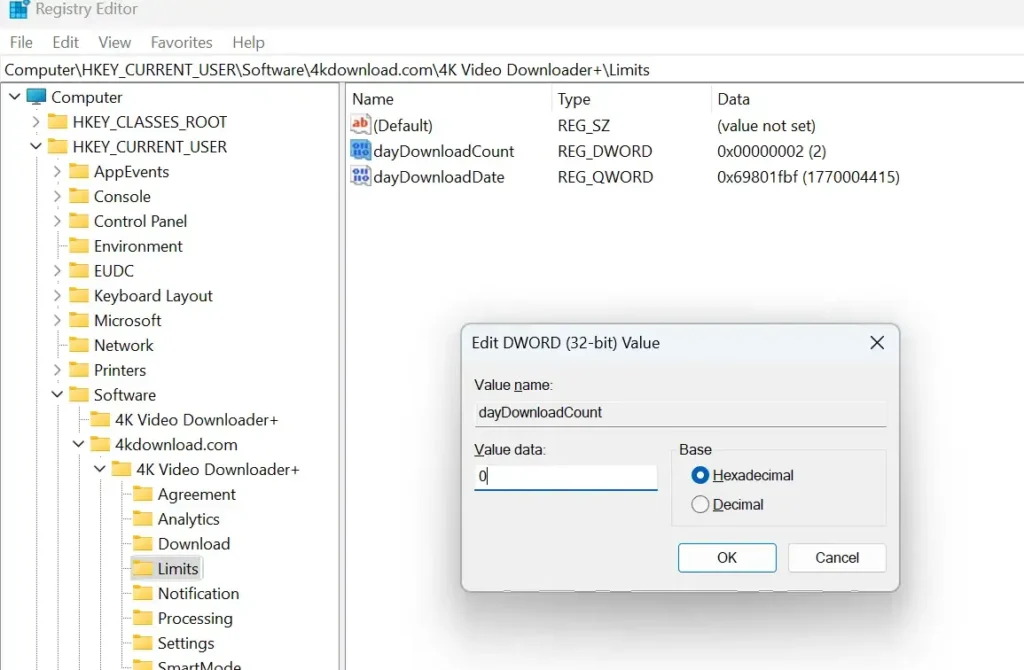
④ Exit the program completely. To ensure a full restart, after closing the main interface, locate the software icon in the system tray (bottom-right corner of the desktop), right-click it, and choose “Exit” to shut down the program entirely.
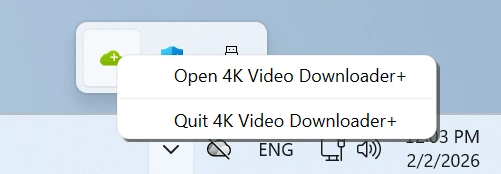
⑤ Restart 4K Video Downloader, and you will regain 10 download opportunities.
This workaround is recommended for emergency use only. If this is a software vulnerability, we hope the official team will address it promptly. We always encourage the use of genuine software—only by supporting official versions can we expect more high-quality and user-friendly software in the future.
3. Get the Shared Program
A shared test version of the 4K Video Downloader is available on GitHub and works properly for downloading videos. You can access it via this link.
4. Purchase Directly from the Official Website
Visit 4K Video Downloader Plus’s official website to purchase a subscription. Pricing varies depending on the plan you choose, ranging from a one-year license to a lifetime option. Purchasing through the official site not only ensures you receive the latest features, updates, and technical support, but also helps support the developers and encourages the continued development of the software.
How to Activate and Fix License Key Issues
Once you have obtained a valid license key, activating 4K Video Downloader Plus is simple. Open the application, click on the “Activate” or “License” option in the menu, and enter your license key exactly as provided. If activation fails, common issues include typing errors, using a key for a different product version, or exceeding the allowed number of devices. In such cases, reviewing your purchase email or contacting official support can usually resolve the problem quickly.
Key Features of 4K Video Downloader Plus
4K/8K Video Downloads
Download videos in ultra-HD resolutions, ideal for creators and viewers who prioritize quality.
Batch Downloads
Save entire playlists or channels with one click, perfect for archiving content.
Smart Mode
Automatically apply preferred settings (e.g., format, quality) for recurring downloads.
Audio Extraction
Convert videos to MP3, M4A, or other formats for music libraries or podcasts.
Proxy Support
Download content securely via proxy servers for enhanced privacy.
Cross-Platform Compatibility
Available for Windows, macOS, and Linux.
Why Choose 4K Video Downloader Plus
Among numerous video downloading tools available on the market, 4K Video Downloader Plus is widely recognized for its stability, ease of use, and long-term reliability. Unlike many free or online downloaders that frequently break due to platform updates, this software is actively maintained and optimized for major video platforms. It is especially suitable for users who regularly download high-resolution videos, playlists, or entire channels and expect consistent performance without intrusive ads or hidden limitations.
Comparison with Other Video Downloaders
Compared with alternative video download solutions such as online download websites or lightweight freeware, 4K Video Downloader Plus offers more advanced and dependable features. Many online tools struggle with 4K or 8K content, batch downloads, or private videos, while some desktop competitors limit functionality behind expensive subscriptions. In contrast, 4K Video Downloader Plus combines high-quality output, playlist and channel support, subtitle downloads, and a clean user interface, making it a balanced choice for both casual users and professionals.
Legal and Ethical Considerations
When using 4K Video Downloader Plus, users should be aware of copyright and platform usage policies. Downloading videos without permission may violate the terms of service of certain websites or local copyright laws. It is recommended to download only content you own, content with explicit permission, or videos distributed under open licenses. Using a legitimate license key not only ensures compliance but also protects your system from security risks associated with cracked software.
Tips for Best Use and Performance
To get the best experience with 4K Video Downloader Plus, enabling Smart Mode can significantly speed up repetitive downloads by pre-selecting preferred formats and resolutions. For large playlists or channel downloads, a stable internet connection and moderate simultaneous download settings are recommended. Regularly updating the software also ensures compatibility with the latest changes on supported video platforms.
Conclusion
In summary, understanding how to obtain or recover a 4K Video Downloader Plus license key is essential for unlocking the full functionality of the software in a safe and legal way. If you have purchased a license in the past but no longer have access to the activation email, relying on unofficial sources can be risky and unreliable.
Using professional license recovery tools like Magic Recovery Key can be a practical solution. By scanning your system and stored registry data, Magic Recovery Key helps users retrieve lost or forgotten software license keys without modifying or cracking the original program. Downloading and using Magic Recovery Key allows you to quickly check whether your 4K Video Downloader Plus license key is still available on your device, saving time while avoiding security and legal risks.
Supports Windows 7/8/10/11 and Windows Server
FAQs
What is a 4K Video Downloader Plus license key?
How can I find my 4K Video Downloader Plus license key if I lost it?
Is it safe to use cracked or free 4K Video Downloader Plus license keys?
Where can I buy a legitimate 4K Video Downloader Plus license key?
What should I do if I didn’t receive my license key after purchase?
How many devices can one 4K Video Downloader Plus license key be used on?
Can I transfer my license key to a new computer?
Does an old 4K Video Downloader license work with the Plus version?
What are the benefits of using an official license key?
Why does my license key show an activation error?

Erin Smith is recognized as one of the most professional writers at Amagicsoft. She has continually honed her writing skills over the past 10 years and helped millions of readers solve their tech problems.