
How to Choose the Best USB Flash Memory in 2026
Choosing the best USB flash memory is no longer as simple as picking the largest capacity at the lowest price. Modern USB drives differ significantly in speed standards, controller quality, flash memory type, and long-term reliability. By understanding these factors, you can avoid fake products, performance bottlenecks, and data loss.
The good news is that high-quality USB flash memory is widely available—if you know what to look for.
Table of Contents
What Defines the Best USB Flash Memory?
In practice, not all USB flash drives are created equal. The best usb flash memory balances performance, durability, and data integrity rather than relying on inflated specifications.
Key Factors That Matter Most
- Real-world read and write speed
- Genuine storage capacity
- Flash memory type and endurance
- Controller stability and firmware quality
- Brand reputation and support
Understanding these elements helps you make informed decisions instead of relying on misleading labels.
USB Speed Standards Explained (USB 3.0 vs 3.1 vs 3.2)
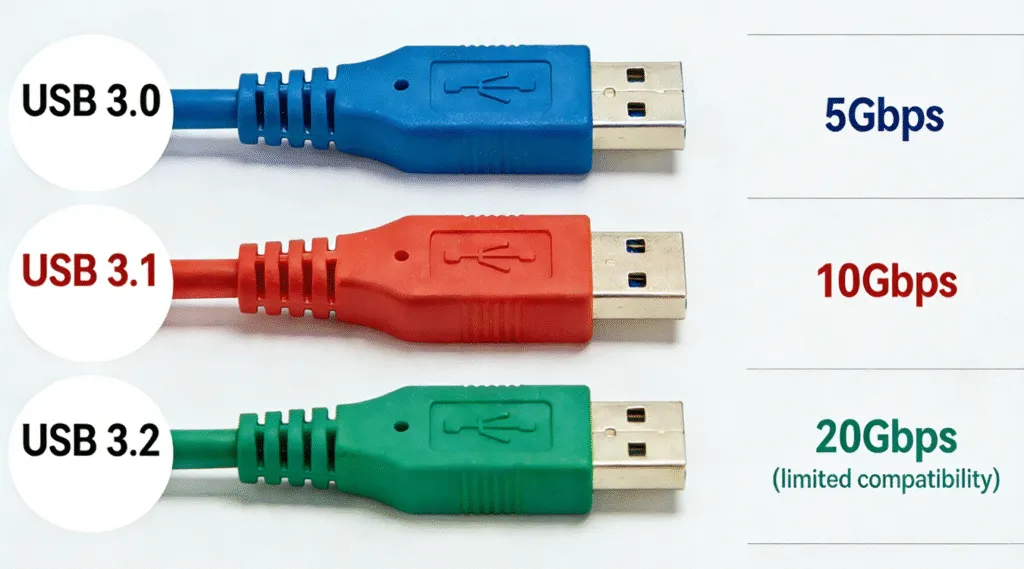
At first glance, speed is often the first specification users notice, but USB naming conventions can be confusing.
USB Speed Comparison
- USB 3.0 / USB 3.1 Gen 1: Up to 5 Gbps
- USB 3.1 Gen 2: Up to 10 Gbps
- USB 3.2 Gen 2×2: Up to 20 Gbps (limited compatibility)
In practice, the best usb flash memory delivers consistent performance. A well-built USB 3.1 Gen 2 drive often outperforms poorly designed USB 3.2 devices.
Flash Memory Types: Why They Affect Reliability
From a reliability standpoint, flash memory quality directly impacts lifespan and stability.
Common NAND Types
- SLC: Extremely durable, rarely used in consumer USB drives
- MLC: Balanced performance and endurance
- TLC: Most common and cost-effective
- QLC: Higher capacity, lower write endurance
Most reliable consumer drives use TLC NAND with advanced wear leveling, making them suitable for everyday storage.
Is a 2TB USB Flash Drive Real or Fake?
Not surprisingly, this is one of the most common questions users ask.
The Reality of High-Capacity USB Drives
- Genuine 2TB USB flash drives are rare and expensive
- Most cheap listings are fake capacity devices
- These drives overwrite old data once real storage is exceeded
If a deal seems unrealistic, it almost always is. Avoiding fake devices is essential when choosing the best usb flash memory.
USB Flash Drive vs USB Stick: Is There a Difference?
No technical difference exists.
- USB flash drive
- USB stick
- Thumb drive
All terms refer to the same storage device. The difference is purely linguistic.
Two Major Disadvantages of USB Flash Memory
That said, even the best usb flash memory has limitations.
1. Limited Write Endurance
Flash cells degrade over time, especially with frequent writes.
2. High Risk of Physical Loss
Their small size makes them easy to misplace or damage.
Understanding these weaknesses allows users to adopt safer usage habits.
Why Flash Drives Are Becoming Less Popular
Although USB drives are not obsolete, their role has changed due to:
- Cloud storage adoption
- Faster external SSDs
- Limited lifespan for heavy workloads
However, USB flash drives remain ideal for offline transfers, firmware updates, and emergency storage.
Which Brand Offers the Best USB Flash Memory?
Brand reputation matters more than advertised speed.
Reliable USB Flash Drive Brands
- SanDisk
- Samsung
- Kingston
- Corsair
- Transcend
These brands control firmware and NAND quality, reducing failure risks.
Common USB Flash Drive Data Loss Scenarios
Nevertheless, even high-quality drives can experience data loss due to:
- Unsafe removal
- Power interruption
- File system corruption
- Fake capacity overwrite
- Accidental deletion
When this happens, continuing to use the drive increases the risk of permanent loss.
How to Restore USB Flash Data
When files disappear from a USB drive, panic is common—but unnecessary. In most cases, the data itself is not immediately erased from the device. As a result, files can still be recovered with a dedicated tool like Magic Data Recovery.
Core Problems It Solves
Why Magic Data Recovery Is Reliable
- Read-only scanning prevents further damage
- Supports NTFS, FAT32, and exFAT
- Works with genuine and problematic USB drives
- Designed for non-technical users
Practical Use Case
For example, if a USB drive suddenly shows as empty after unsafe removal, Magic Data Recovery can scan the device and preview recoverable files before restoration.
Compared to manual repair methods, this approach minimizes risk and improves recovery success.
How to Choose the Best USB Flash Memory for Your Needs
Daily File Transfers
- USB 3.0 or 3.1 Gen 1
- 32GB–256GB
- Reputable brand
Speed-Critical Tasks
- USB 3.1 Gen 2
- Verified benchmark results
Long-Term Storage
- Metal casing
- Moderate capacity
- Regular backups
Ultimately, selecting the best usb flash memory depends on realistic usage, not marketing promises.
Conclusion
The best usb flash memory is defined by reliability, consistency, and data safety—not inflated numbers. Understanding USB standards, avoiding fake capacity drives, and choosing reputable brands are essential steps.
However, even with careful selection, data loss can still occur. That is why having a trusted recovery solution like Magic Data Recovery adds an extra layer of protection. If you are looking for a safe, professional solution, Magic Data Recovery is worth considering.
Supports Windows 7/8/10/11 and Windows Server
FAQ: The Best USB Flash Memory
Which USB memory stick is best?
Is 2TB USB real or fake?
Is 3.1 better than 3.0 USB?
Is USB 3.1 or 3.2 faster?
Why are flash drives becoming obsolete?
What are two disadvantages of a USB memory stick?
Is there a difference between a USB stick and a flash drive?
Which brand of flash drive is the most reliable?

Vasilii is a data recovery specialist with around 10 years of hands-on experience in the field. Throughout his career, he has successfully solved thousands of complex cases involving deleted files, formatted drives, lost partitions, and RAW file systems. His expertise covers both manual recovery methods using professional tools like hex editors and advanced automated solutions with recovery software. Vasilii's mission is to make reliable data recovery knowledge accessible to both IT professionals and everyday users, helping them safeguard their valuable digital assets.