
Differential Backups Explained: How They Work, Use Cases, and Best Practices
Backups only matter when data can be restored. In practice, however, many recovery plans fail due to long restore chains, corrupted images, or overly complex schedules. For this reason, many teams look for a backup method that balances efficiency with reliable recovery.
Differential backups are often chosen because they reduce daily workload while keeping the restore process simple. In this guide, you’ll learn how differential backups work, how they compare to other methods, and how to design a practical backup plan that actually restores data when it matters.
Table of Contents
Understanding the Three Core Backup Types
Before choosing any backup approach, it helps to understand the three foundational methods used in most environments.
- Full backups capture an entire dataset at a specific point in time.
- Incremental backups store only the data that changed since the most recent backup.
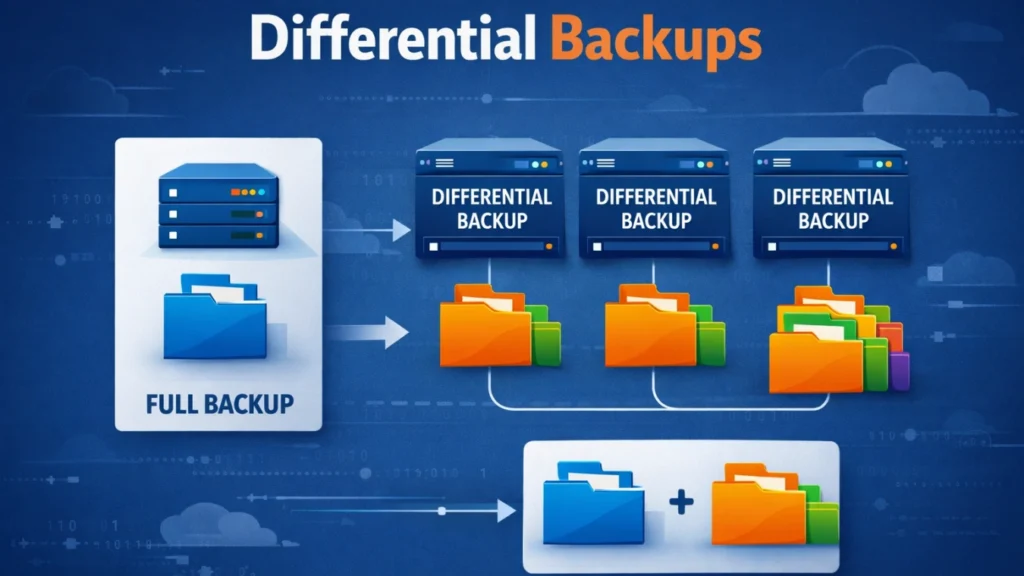
- Differential backups store all changes made since the last full backup.
Because differential backups always reference the same baseline, they typically require fewer steps during recovery. As a result, they are easier to manage in real-world restore scenarios.
How Differential Backups Work in Practice
To see how this method behaves over time, consider a simple weekly cycle.
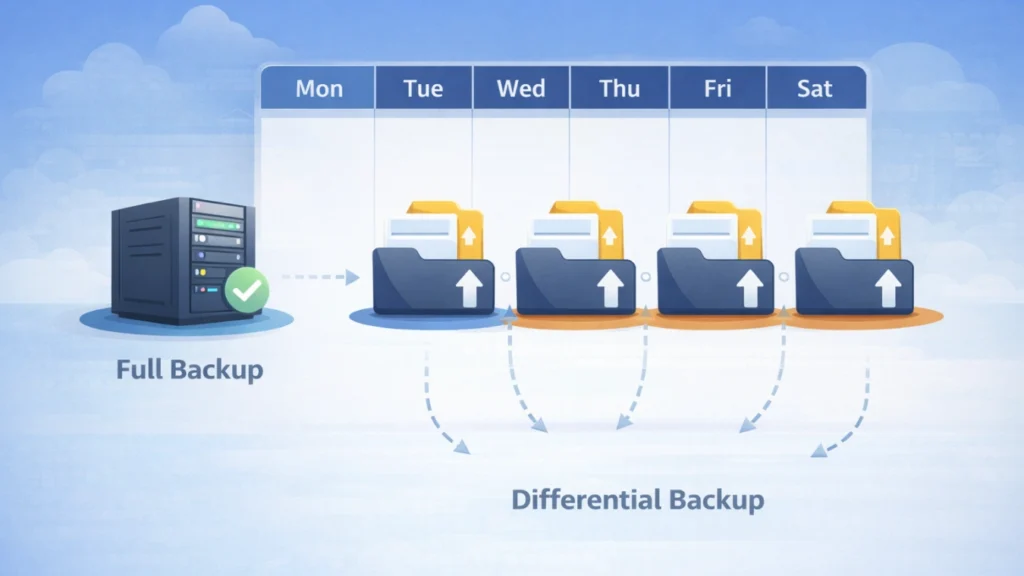
- Sunday: A full backup establishes the baseline.
- Monday: A differential backup records changes since Sunday.
- Tuesday: Another differential backup captures all changes since Sunday, including Monday.
- Wednesday onward: Each new differential continues to accumulate changes since the last full backup.
Because of this cumulative nature, differential backups gradually grow larger. However, recovery remains straightforward because only two backup sets are required: the full backup and the most recent differential.
Differential vs Incremental Backups: Key Differences
Although both methods reduce the need for daily full backups, they solve different problems.
Comparison Factor | Incremental Backup | Differential Backup |
Daily backup size | Very small | Grows over time |
Storage efficiency | Higher | Moderate |
Restore complexity | Higher (long chains) | Lower (short chains) |
Restore speed | Slower | Faster |
Operational risk | Higher if one backup fails | Lower dependency risk |
In contrast to incremental backups, differential backups favor faster recovery over minimal storage usage. Therefore, they are often preferred when recovery time is more critical than storage optimization.
When Differential Backups Are the Right Choice
Differential backups work especially well under certain conditions.
Moderate data change rates
If daily changes are predictable, differential growth remains manageable.
Tight recovery objectives
Because fewer backup sets are needed, restoration is faster and less error-prone.
Smaller IT teams
With simpler recovery logic, fewer operational mistakes occur during incidents.
Environments prioritizing reliability
In practice, shorter restore chains reduce the impact of a single corrupted backup.
Practical Differential Backup Schedule Templates
Template 1: Simple and dependable
- Weekly full backup
- Daily differential backups
- Retain 2–4 full backup cycles
This model is easy to monitor and restore.
Template 2: High-change environments
- Full backups twice per week
- Differential backups on remaining days
By resetting the baseline more often, differential growth stays under control.
Template 3: Mission-critical systems
- Weekly full backup
- Daily differential backups
- Additional snapshots or logs where supported
This layered approach minimizes both recovery time and data loss.
Retention and Storage Planning Tips
Because differential backups grow until the next full backup, retention planning is essential.
In practice, you should:
- Reset the full backup baseline regularly
- Separate datasets with different change rates
- Monitor backup size trends
- Adjust retention rules before storage becomes constrained
As a result, storage usage remains predictable and sustainable.
Best Practices for Reliable Recovery
A backup is only valuable if it restores successfully. To ensure reliability, follow these best practices:
- Monitor all backup jobs automatically
- Restrict deletion and modification permissions
- Verify backup integrity regularly
- Encrypt sensitive data at rest
- Test restores on a fixed schedule
- Document recovery procedures clearly
- Keep at least one isolated backup copy
- Review policies after infrastructure changes
Together, these steps significantly reduce recovery risk.
What If Backups Fail or Are Unavailable?
Despite best efforts, some scenarios fall outside any backup plan. For example, backups may not exist, backup images may be corrupted, or file systems may become unreadable due to errors.
In such cases, direct data recovery becomes necessary. When data is lost due to deletion, formatting, or file system issues—and backups cannot be used—Magic Data Recovery can help recover files from these scenarios without relying on existing backup sets.
Supports Windows 7/8/10/11 and Windows Server
FAQs
Are differential backups faster than full backups?
Do differential backups replace full backups?
How often should a full backup be performed?
Why do differential backups grow larger over time?
Are differential backups safer than incremental backups?
Can differential backups reduce recovery time?
What happens if a differential backup file is corrupted?
Can data still be recovered if backups are missing?

Jason is a data recovery and technical support specialist with over 15 years of hands-on experience. He has worked extensively with frontline users, troubleshooting difficult data loss cases and providing practical recovery solutions for accidental deletion, formatted drives, damaged file systems, lost partitions, system failures, and other recovery emergencies. His expertise also includes backup and restoration, file repair, and disaster recovery, with a strong emphasis on safe, reliable, and technically accurate guidance.