
Incremental Backup Strategy: Complete Guide & Best Practices
An incremental backup strategy is widely used to reduce backup time and storage usage, yet many users still experience unexpected data loss. Missed backup schedules, corrupted backup images, and broken backup chains often go unnoticed until recovery is urgently needed. When that happens, relying on backups alone may no longer be enough.
That is why choosing the right incremental backup strategy matters. This guide explains how it works, when to use it, and how to reduce recovery risks. It also addresses what to do when backups fail and why a reliable recovery solution becomes essential in those moments.
Table of Contents
What Is an Incremental Backup Strategy?
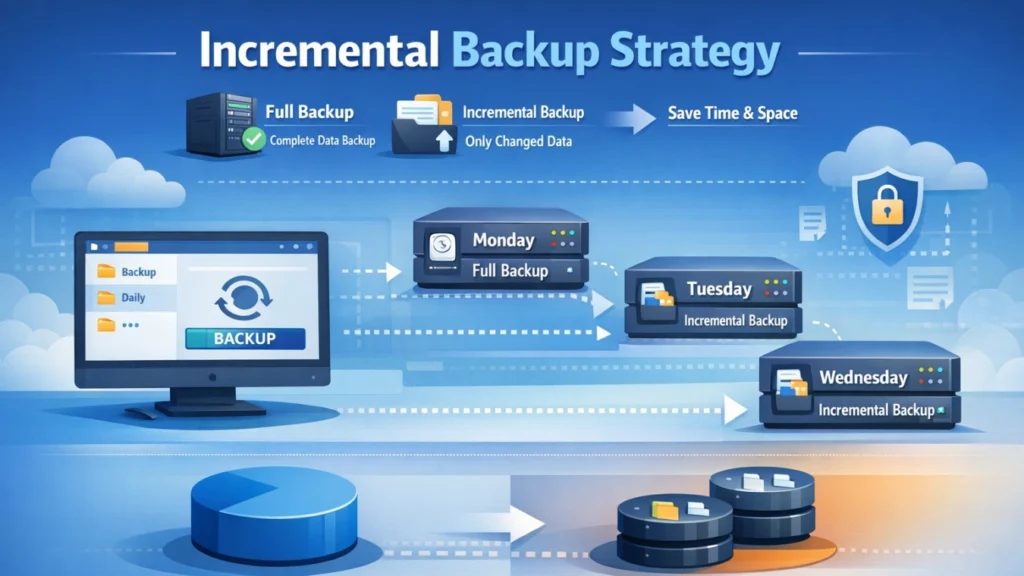
An incremental backup strategy is a data protection approach where only changes made since the last backup are saved.
The process typically follows three steps:
- A full backup creates the initial baseline.
- Each incremental backup records only new or modified data.
- All backups form a dependent backup chain.
Because each backup is smaller, this strategy reduces storage usage and backup time significantly. However, the entire chain must remain intact for successful recovery.
How Incremental Backup Works in Real Scenarios
Imagine a small business server:
- Day 1: Full backup (all data)
- Day 2: Incremental backup (new and changed files)
- Day 3: Incremental backup (changes since Day 2)
To restore data from Day 3, the system needs:
- The Day 1 full backup
- The Day 2 incremental backup
- The Day 3 incremental backup
This dependency explains why managing the backup chain is critical when using an incremental backup strategy.
Incremental vs Full vs Differential Backup
Understanding the differences helps you choose the right backup strategy.
Full Backup
- Copies all selected data every time
- Simple restoration process
- High storage and time cost
Incremental Backup
- Saves only changed data
- Fast and storage-efficient
- Restoration depends on backup chain
Differential Backup
- Saves changes since last full backup
- Larger than incremental over time
- Easier recovery than long incremental chains
For many environments, an incremental backup strategy offers the best balance between efficiency and protection.
When Should You Use an Incremental Backup Strategy?
This strategy works best when:
- Data changes frequently
- Backup windows are limited
- Storage costs need to be controlled
- Regular restore points are required
It is widely used by:
- Small and medium businesses
- Personal computers and laptops
- Workstations with daily file updates
However, it requires careful monitoring and verification to remain reliable.
Common Risks of Incremental Backups (And How to Reduce Them)
Broken Backup Chains
If one incremental file becomes corrupted or missing, recovery may fail.
Tip: Limit chain length and schedule periodic full backups.
Backup Image Corruption
Power outages, disk errors, or system crashes can damage backup files.
Tip: Always verify backups and store copies on different media.
Missed or Failed Backups
Devices being offline or software errors can interrupt scheduled tasks.
Tip: Enable alerts and review backup logs regularly.
These risks are not flaws of the strategy itself but reminders that an incremental backup strategy needs proper management.
Best Practices for a Reliable Incremental Backup Strategy
To strengthen your backup system, follow these proven practices:
- Combine incremental backups with regular full backups
- Follow the 3-2-1 backup rule (three copies, two media types, one offsite)
- Test restore processes, not just backup creation
- Monitor backup success and failure reports
- Protect backups from ransomware and unauthorized access
When these steps are followed, the incremental backup strategy becomes both efficient and dependable.
What If Incremental Backups Fail?
Despite best practices, failures still happen. Many users face situations such as:
- No recent backup available
- Corrupted backup images
- File system errors preventing restoration
- Accidental deletion before backup ran
At this stage, traditional backup methods no longer help. A dedicated data recovery solution becomes necessary.
Why Magic Data Recovery Is a Reliable Backup Failure Solution

Problems It Solves
- Recovers data when backups are missing or outdated
- Restores files from formatted or corrupted drives
- Handles file system errors and accidental deletion
Key Advantages
- Supports multiple data loss scenarios
- Works independently from backup files
- Simple interface suitable for non-technical users
Real-World Use Case
A user discovers that an incremental backup chain is corrupted after a system crash. Instead of rebuilding backups or losing data permanently, Magic Data Recovery scans the affected drive and retrieves critical documents directly.
Compared to relying solely on backups, this approach provides an extra safety net when your incremental backup strategy fails.
If you are looking for a dependable solution to recover data beyond traditional backups, Magic Data Recovery is worth considering.
Supports Windows 7/8/10/11 and Windows Server
Conclusion
An incremental backup strategy is one of the most efficient ways to protect data. It saves time, storage, and system resources. However, its dependency on backup chains introduces real risks.
By applying best practices and preparing a recovery plan for backup failures, you gain stronger protection. When backups cannot restore your data, tools like Magic Data Recovery ensure that data loss does not become permanent.
FAQs
What is an incremental backup strategy?
Is incremental backup better than full backup?
What happens if an incremental backup is corrupted?
How often should I run incremental backups?
Are incremental backups safe from ransomware?
Can I restore files without a full backup?
What should I do if my backup cannot be restored?
Is Magic Data Recovery a replacement for backups?

Jason is a data recovery and technical support specialist with over 15 years of hands-on experience. He has worked extensively with frontline users, troubleshooting difficult data loss cases and providing practical recovery solutions for accidental deletion, formatted drives, damaged file systems, lost partitions, system failures, and other recovery emergencies. His expertise also includes backup and restoration, file repair, and disaster recovery, with a strong emphasis on safe, reliable, and technically accurate guidance.