
What Is Flash Memory? A Complete Beginner’s Guide

If you have ever used a USB flash drive, smartphone, camera, or solid-state drive, you have already relied on flash memory—even if you did not realize it. When data suddenly disappears from these devices, many users panic and assume their files are gone forever. The good news is that this storage technology does not immediately destroy most data, and you can often recover it with the right approach.
This guide explains this storage technology, how it works, where it is used, and what its strengths and weaknesses are. You will also learn whether flash memory can be recovered and which tools are most reliable when data loss occurs.
Table of Contents
What Is Flash Memory?
It is a type of non-volatile storage that retains data even when power is turned off. Unlike traditional hard drives that rely on spinning disks, flash memory stores information electronically using memory cells made from floating-gate transistors.
This lack of moving parts makes it faster, more durable, and more energy-efficient than mechanical storage. This explains its wide use in portable devices and modern computers
In simple terms, this storage technology allows devices to save data instantly and access it quickly without requiring continuous power.
How It Works (Simplified Explanation)
To understand how it works, it helps to break the process into three basic actions:
1. Writing data – Memory cells store electrical charges to represent binary data (0s and 1s).
2. Storing data – These charges remain trapped even without power.
3. Reading data – The device detects the electrical state of each cell to reconstruct the stored information.
Most flash memory is organized into pages and blocks. The device writes and reads data in pages but erases it in larger blocks. This structure explains why sudden power loss or unsafe removal can sometimes cause corruption.
Types of Flash Memory
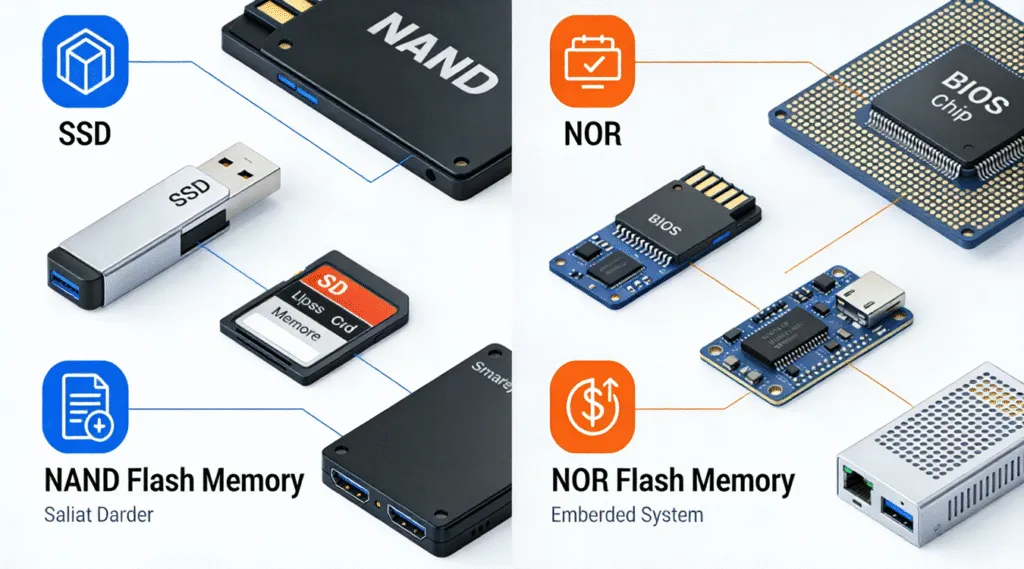
NAND Flash
NAND is the most common form of flash memory. It is optimized for storage density and cost efficiency. You will find NAND flash in:
- USB flash drives
- SD and microSD cards
- Solid-state drives (SSDs)
- Smartphones and tablets
NAND flash is ideal for storing large amounts of data, although it has limited write cycles.
NOR Flash
NOR flash is faster for reading data and is often used for firmware and system-level code. It is commonly found in:
- Embedded systems
- BIOS chips
- Industrial equipment
Compared to NAND, NOR flash is more expensive and less suitable for mass storage.
Flash Memory vs RAM: What’s the Difference?
Although both are memory technologies, flash memory and RAM serve very different purposes:
Feature | Flash Storage | RAM |
Power required | No (non-volatile) | Yes (volatile) |
Data retention | Permanent | Temporary |
Speed | Moderate to fast | Very fast |
Typical use | Storage | Active processing |
RAM clears data when power is lost, while flash memory preserves files, apps, and operating systems.
Flash Memory vs SSD: Are They the Same?
This is a common question. An SSD is not separate from this technology—it is built from it.
- Flash memory refers to the storage technology.
- SSD refers to a storage device that uses this storage technology along with a controller, firmware, and error correction.
In other words, all SSDs use this storage technology, but not all flash-based devices are SSDs.
Common Applications
This technology is embedded in countless everyday devices, including:
- USB flash drives
- SD and microSD cards
- Smartphones and tablets
- Digital cameras and drones
- Laptops and desktop SSDs
- Game consoles
- Automotive infotainment systems
These characteristics make it ideal for portable and embedded systems.
Key Advantages
This technology offers several important benefits:
- Fast access speeds compared to traditional hard drives
- Shock resistance due to no moving parts
- Low power consumption
- Compact design suitable for portable devices
- Silent operation
These advantages explain why it has largely replaced mechanical storage in consumer electronics.
Drawbacks
Despite its strengths, this technology has limitations:
- Limited write cycles – Cells wear out over time
- Data corruption risk from unsafe removal or power loss
- Higher cost per gigabyte compared to HDDs
- Complex recovery due to controllers and wear leveling
Understanding these drawbacks helps users take better care of such devices.
Is Data Recovery Possible?
Yes, in many cases, data on flash-based can be recovered. When you delete files or format a device, the data usually remains intact until overwritten.
Common recovery scenarios include:
Professional recovery tools such as Magic Data Recovery by Amagicsoft are designed to scan these storage devices in read-only mode, minimizing further risk.
Why Magic Data Recovery Is a Reliable Choice
Magic Data Recovery addresses the most common flash memory recovery challenges:
- Supports USB drives, SD cards, and SSDs
- Uses deep scanning for damaged file systems
- Preserves original data without overwriting
- Provides preview before recovery
Compared to manual methods, it offers a safer and more structured recovery process.
If you are facing unexpected data loss, using a professional tool significantly improves your chances of success.
Best Practices for Using Flash Memory Safely
To reduce the risk of data loss:
- Always eject devices properly
- Avoid interrupting write operations
- Keep backups of important files
- Do not overfill flash storage
- Monitor device health when possible
These habits extend the device lifespan and protect your data.
Conclusion
Understanding what is flash memory helps users make better decisions about storage, performance, and data safety. While it offers speed and convenience, it also requires careful handling.
When data loss occurs, tools like Magic Data Recovery provide a professional and dependable solution. If you are looking for an efficient way to recover files from flash-based devices, it is a practical option worth considering.
Supports Windows 7/8/10/11 and Windows Server
FAQ
What do you mean by flash memory?
Is flash memory the same as RAM?
What is flash memory vs SSD?
Where is the flash memory?
Which is better, a 32GB or 64GB flash drive?
What are the downsides of flash memory?
What devices use flash memory?

Vasilii is a data recovery specialist with around 10 years of hands-on experience in the field. Throughout his career, he has successfully solved thousands of complex cases involving deleted files, formatted drives, lost partitions, and RAW file systems. His expertise covers both manual recovery methods using professional tools like hex editors and advanced automated solutions with recovery software. Vasilii's mission is to make reliable data recovery knowledge accessible to both IT professionals and everyday users, helping them safeguard their valuable digital assets.