

Magic Recovery Key
BitLocker Recovery
BitLocker recovery is a specialized process designed to retrieve the recovery key required to unlock a BitLocker-encrypted drive. When a computer requests this key, access to the system and stored files may become unavailable until the correct recovery information is entered. With a professional key recovery solution like Magic Recovery Key, users may still be able to locate the recovery key and regain access before data becomes unreachable.
At Amagicsoft, we understand that being locked out by BitLocker can interrupt normal work and prevent access to important files. Magic Recovery Key offers a secure and practical BitLocker key recovery approach, helping users search for recovery information stored on the current computer and use it when a BitLocker-protected device asks for verification.
What Is a BitLocker Recovery Key?
BitLocker recovery refers to the method of locating and retrieving the BitLocker recovery key used to unlock an encrypted Windows device or drive. This key is usually needed after hardware changes, firmware updates, unusual startup events, or security checks that trigger BitLocker protection. When the original key record cannot be found quickly, a dedicated BitLocker recovery tool can help recover BitLocker key information from the system.
Common Situations That Trigger a Lockout
- A computer asks for the BitLocker recovery key at startup
- System changes trigger BitLocker protection unexpectedly
- The original recovery key cannot be found in time
- A user needs to unlock an encrypted device after maintenance
- The computer becomes inaccessible without recovery verification
- A drive remains protected after hardware or boot changes

Why Magic Recovery Key Is a Good Choice
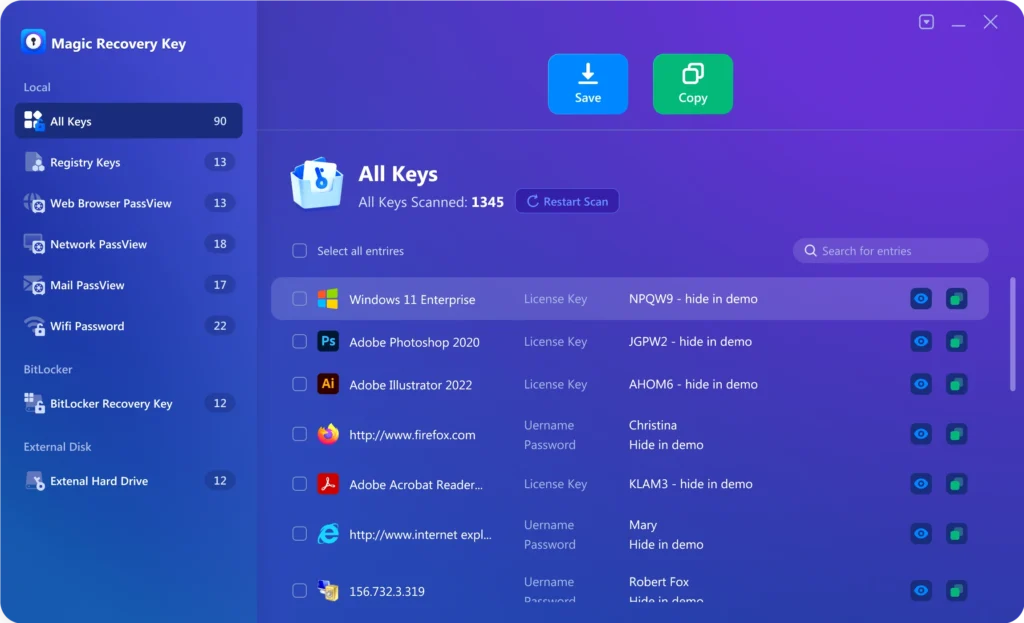
Magic Recovery Key is designed to help with BitLocker recovery scenarios, offering a simple way to search for stored recovery information.
- Retrieve BitLocker recovery key information
- Help unlock BitLocker-protected computers
- Simple workflow for BitLocker key recovery
- Suitable for current Windows systems
- Fast and practical BitLocker recovery tool usage
Steps to Find Your Recovery Key
Recovering BitLocker recovery information does not need to be complex. Magic Recovery Key simplifies the BitLocker recovery process into clear steps.
Step 1: Download and Install Magic Recovery Key
Download Magic Recovery Key from the official website and complete the installation.

Step 2: Select the BitLocker Recovery Key Feature
Open the software and choose the BitLocker Recovery Key function. This feature is designed to search for the key information needed to unlock a protected computer or drive.

Step 3: Search for the Recovery Key
Start the search and let the program scan for BitLocker recovery key information. After the scan, review the discovered result and confirm whether the required key is available.

Step 4: Save the Key Securely
Once the key is found, save it in a secure location for future use. Keeping the BitLocker recovery key properly backed up can help avoid repeated lockout problems later.
Where This Tool Can Help
BitLocker recovery is not limited to one device type. Magic Recovery Key supports BitLocker key retrieval in various Windows-related situations:
- Windows computers and laptops
- BitLocker-protected system drives
- Encrypted internal storage devices
- Computers affected by startup verification
- Systems requiring recovery after configuration changes
- Devices temporarily locked by BitLocker security checks
Tips to Improve Success
To increase the chance of successful BitLocker recovery, it is important to take the right steps before making more system changes.
Retrieve the Key as Soon as Possible
If BitLocker requests a recovery key, begin the search immediately. Early action helps avoid unnecessary delays when trying to unlock the protected computer.
Save the Key Before Future System Changes
If the key is found, back it up before performing maintenance, updates, or hardware adjustments. This reduces the chance of another BitLocker lockout later.
Do Not Depend on Memory Alone
BitLocker recovery keys are long and not easy to remember manually. A secure saved copy is far more reliable than trying to recall or rewrite it later.
Store the Key in a Separate Safe Place
After recovery, keep the key outside the locked computer whenever possible. This makes future BitLocker unlock recovery much easier. This is a practical inference from the product’s backup-oriented workflow.
Check Microsoft Account Options if Needed
If the program does not find the BitLocker recovery key immediately, also check whether the key is stored in the related Microsoft account. The user guide explicitly points users there as another place to look.
Keep Recovery Information Organized
Before maintenance or system migration, make sure your BitLocker recovery details are stored clearly and can be accessed when needed. Organized records help reduce lockout risks.
Frequently Asked Questions
BitLocker recovery often raises specific questions related to locked computers, recovery keys, and encrypted drives. The answers below help clarify the recovery process.
Start searching for the BitLocker recovery key immediately. Magic Recovery Key is designed to help retrieve the recovery information needed to unlock the protected computer.
Yes. In some cases, BitLocker recovery key information can still be found on the computer, and Magic Recovery Key is built to retrieve it.
Yes. Magic Recovery Key is intended to help users retrieve BitLocker recovery key information when a Windows computer is locked by BitLocker.
Yes. Magic Recovery Key provides a guided method to search for existing recovery information instead of forcing risky manual system changes. This safety characterization is an inference from the product workflow and guide.
If the key is not found right away, scan again and also check the related Microsoft account for stored recovery information.
The duration depends on the computer and the search process. In general, the software is designed to provide a straightforward way to retrieve BitLocker recovery key information.

Magic Recovery Key
Find Your Bitlocker Recovery Key Now
Being locked out by BitLocker does not always mean losing access forever. With Magic Recovery Key, you gain a dependable BitLocker recovery solution for retrieving BitLocker recovery keys from Windows computers. Download Magic Recovery Key today and recover your BitLocker key safely, accurately, and efficiently.
Related Guides
Explore more BitLocker recovery guides to understand how to retrieve recovery keys, unlock protected Windows devices, and prepare for future encryption-related access issues.
Losing access to a BitLocker-encrypted drive on a different computer can be frustrating. Many users face this …
Losing access to your encrypted data can be stressful, especially when Windows prompts for a BitLocker …
You’re staring at the blue BitLocker screen, and you suddenly find your BitLocker recovery key lost. What’s …
If you’ve ever encountered the frustrating situation of being locked out of your HP laptop due to BitLocker …
If you’ve ever encountered the dreaded BitLocker recovery screen on your Windows PC or laptop, you …