
Is Geek Squad Data Recovery Worth It?
Losing your data is a highly stressful experience that can happen at any moment. Whether it is a collection of irreplaceable family photos or critical corporate documents, a sudden storage failure triggers immediate panic. When a device stops responding, many frustrated users instantly think of heading to Best Buy to utilize Geek Squad data recovery services.
However, before you pack your computer into your car, you need to understand exactly what happens behind the counter. For a large majority of everyday users, traditional retail technical support turns out to be unexpectedly expensive, incredibly slow, and entirely unnecessary for common hard drive recovery scenarios. This comprehensive guide will break down the real costs, mechanics, and potential risks of a Geek Squad hard drive recovery while demonstrating how a specialized utility like Magic Data Recovery allows you to make an informed, cost-effective decision to rescue your files safely.
Supports Windows 7/8/10/11 and Windows Server
Table of Contents
What is Geek Squad Data Recovery and How Does It Work?
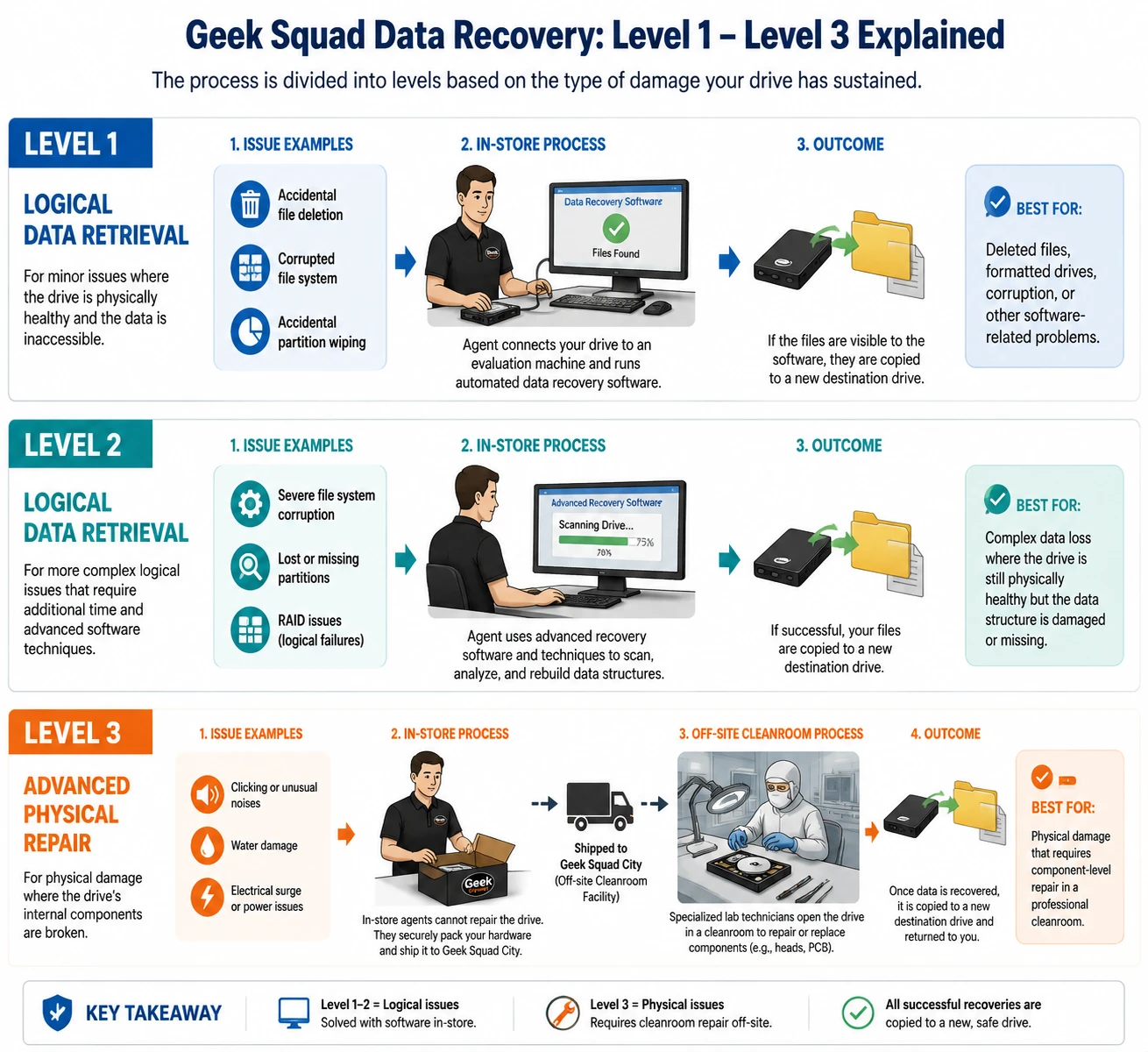
Geek Squad provides retail technical assistance through Best Buy, and their data retrieval department operates on a multi-tiered framework. When you bring a failing device to their precinct, the agents do not immediately dismantle the drive in a specialized cleanroom. Instead, they divide the entire process into distinct operational levels based on the type of damage your media has sustained.
Level 1 and Level 2: Logical Data Retrieval
Logical issues occur when your hard drive remains physically healthy, but the data itself becomes missing or formatted. Common examples include accidental file deletion, corrupted file systems, or accidental partition wiping. During a Level 1 or Level 2 Geek Squad data recovery attempt, the in-store agents simply connect your drive to an evaluation machine and run automated, commercial data retrieval software. If the files are visible to the utility, they copy them to a new destination drive.
Level 3: Advanced Physical Repair
Physical issues mean the internal mechanical components of your drive are broken. If your drive makes unusual clicking sounds, suffered water damage, or experienced an electrical surge, software cannot help. In these critical situations, an in-store agent cannot fix the device on-site. Consequently, they must pack up your hardware and ship it to a centralized, off-site cleanroom facility known as Geek Squad City. There, specialized lab technicians open the drive chassis to replace read/write heads or swap damaged circuit boards.
3 Major Risks of Choosing Geek Squad Hard Drive Recovery
While large retail chains offer a comfortable sense of familiarity, using an in-store service provider exposes your personal information and your schedule to several distinct vulnerabilities.
Severe Project Downtime
When you drop off a device at a retail store, you lose access to your equipment for days, if not weeks. In-store logical scans often take three to seven days due to backlogged corporate queues. Additionally, if your drive requires a Level 3 physical Geek Squad hard drive recovery, shipping the device to a central lab extends the turnaround time to three or four weeks. This extended delay can devastate remote workers or small businesses that need immediate access to their operational files.
High Costs for Automated Fixes
As previously noted, Level 1 and Level 2 services rely entirely on automated software tools. Paying hundreds of dollars for a service that you could easily perform yourself at home is highly inefficient. Many users realize too late that they spent a significant portion of their paycheck on a technical process that requires no specialized engineering skills.
Data Privacy and Exposure Vulnerabilities
Handing over a storage device means allowing strangers unrestricted access to your private life. Your drive contains sensitive financial documents, private messages, tax returns, and intimate family photographs. Over the years, major news outlets have documented instances of retail tech employees violating user privacy by snooping through customer files. Keeping your hardware in your own hands is the only way to establish total confidentiality.
When Should You Actually Use Geek Squad Data Recovery?
Despite the drawbacks, professional laboratory services remain necessary under specific circumstances. Therefore, you must assess the physical condition of your hardware before deciding on a recovery method.
Professional laboratory intervention is the correct path if your hard drive has suffered severe physical trauma. If your laptop fell onto concrete, survived a house fire, or became submerged in water, do not plug it into a computer. Attempting to power up a physically deformed mechanical drive can scratch the internal magnetic platters, causing permanent data destruction. Under these exact conditions, paying for a Level 3 Geek Squad hard drive recovery cleanroom service is a justifiable investment.
In contrast, if your hard drive still spins normally, shows up in Windows Disk Management, or suffered a simple accidental deletion, you do not need an expensive physical lab. You can safely bypass the retail store entirely by utilizing a professional software solution from the comfort of your home.
The Smart Alternative: Fix Logical Issues with Magic Data Recovery
If your drive is physically functional but your files are missing, you can save hundreds of dollars by taking control of the situation yourself. Instead of dealing with the high costs, long lines, and privacy worries of a retail store, you can use Magic Data Recovery.
This powerful tool serves as the ultimate DIY solution for Geek Squad data recovery alternatives. It targets the exact same logical issues that retail stores charge hundreds of dollars to fix, allowing you to scan your device independently.
Why choose a local scan? Traditional retail options force you to ship your drive away. By contrast, a local software utility keeps your data entirely within your household.
Advantages
- Total Privacy Protection: The software executes the entire scanning process locally on your computer. Your sensitive family photos, tax records, and corporate files never leave your sight, ensuring absolute privacy.
- Advanced Deep Scan Algorithms: The tool uses highly sophisticated reconstruction technology to piece together fragmented files, damaged partitions, and unreadable file systems.
- Instant Recovery Turnaround: You do not have to wait weeks for a shipping box. You simply download the program, run the scan, and watch your files reappear in real time.
- Generous Risk-Free Evaluation: Unlike retail shops that demand a non-refundable $49.99 evaluation fee, this software provides a 500MB free data limit for file restoration. This allows you to verify that your files are fully restorable before you invest any money.
Practical Scenarios for This Solution
Consider a few common situations where this software excels over an in-store visit:
- The Formatted Camera Card: You accidentally clicked “Format All” on your digital camera, erasing hundreds of wedding photos. Instead of driving to Best Buy and waiting a week, you can insert the SD card into your computer, run the software, and restore the images in minutes.
- The Unreadable Hard Drive: Your external backup drive suddenly shows an “Access Denied” or “RAW File System” error. The software bypasses the operating system’s logical blocks to read the raw data sectors, letting you copy your files to a safe location.
- Accidental Trash Emptying: You deleted an important work presentation and emptied the Recycle Bin. The tool can scan the unallocated space on your drive to locate and rebuild the deleted file headers instantly.
If you are looking for a more efficient and secure solution, you should give this professional tool a try.
How to Recover Hard Drive Data at Home (Step-by-Step)
Using this professional software is an incredibly straightforward process that requires no prior technical background. By following this simple guide, you can bypass the retail store entirely and restore your files immediately:
1.Download and Install Magic Data Recovery
First, visit the official website to safely download the installation package. You must install Magic Data Recovery on a healthy partition, such as your internal C: drive, rather than the affected hard drive. This cautious approach actively prevents accidental overwriting and keeps your lost data perfectly safe.
Supports Windows 7/8/10/11 and Windows Server
2.Select the Hard Drive to Scan
Launch the program to access the clean user interface. From the main dashboard, simply identify and choose the specific hard drive where your files were located, then initiate the scanning process.

3.Scan the Hard Drive for Lost Files
The software automatically executes a highly thorough Advanced Scan of your storage media. As the algorithm progresses through the drive sectors, it populates a real-time list of all recoverable files on your screen.

4.Preview Files Before Recovery
Next, take advantage of the built-in visual preview function to inspect the recovered items. This helpful verification step ensures that you spend time restoring only the exact images, documents, or videos you actually need.

5.Recover Files to a Safe Location
Finally, mark the checkboxes next to your target files and click the recovery button to save them. Always select a different storage device or drive letter as your destination, because saving files back to the compromised hard drive risks permanent data corruption.

Geek Squad Data Recovery Price Breakdown: Is It Worth It?
The most common complaint from consumers regarding professional recovery services is the steep cost. Budgeting for this retail service requires looking at both non-refundable fees and final tier pricing.
To begin with, every single customer must pay a non-refundable $49.99 diagnostic fee just for an agent to evaluate the drive. Even if the technicians determine that your data is completely unrecoverable, Best Buy keeps this initial deposit. Furthermore, if the service succeeds, the final bill escalates rapidly depending on the complexity of the job.
Service Level | Damage Type | Estimated Cost | Turnaround Time |
Initial Diagnostic | Evaluation Fee | $49.99 (Non-refundable) | 1-2 Days |
Level 1 / 2 | Accidental Deletion / Formatted Drive | $200 – $450+ | 3-7 Days |
Level 3 | Clicking Hard Drive / Dead SSD / Physical Damage | $450 – $1,500+ | 2-4 Weeks |
Magic Data Recovery | All Logical Data Loss Scenarios | Free – $69.95 | Instant (DIY) |
Consequently, Level 1 and Level 2 logical services generally range from $200 to $450+. You are essentially paying hundreds of dollars for a retail employee to click “scan” on a basic software interface. If your device requires cleanroom intervention for a deep Geek Squad hard drive recovery, the price regularly skyrockets to anywhere between $450 and $1,500+, sometimes topping $3,000 for high-capacity corporate arrays. Finally, these steep prices do not include the cost of a new destination drive, which adds another $60 to $150 to your bill.
Conclusion: The Final Verdict on Geek Squad Data Recovery
While Geek Squad data recovery serves a vital purpose for crushed, burned, or completely dead mechanical drives, it represents a massive waste of time and money for ordinary file loss. Paying extortionate retail markups for simple logical errors is simply unhelpful when professional tools are readily available.
If you are currently dealing with a corrupted partition, an accidental format, or a misplaced folder, you should choose a more efficient hard drive solution. We highly recommend downloading Magic Data Recovery to check your drive first. It eliminates the long waiting periods, keeps your private documents completely confidential, and provides a 500MB free data limit to prove its capabilities before you spend a dime. Do not let an overpriced repair shop penalize your wallet—take control of your digital life and rescue your data safely from home today.
Supports Windows 7/8/10/11 and Windows Server
FAQs About Geek Squad Data Recovery
How much does Geek Squad data recovery cost?
Geek Squad data recovery prices depend entirely on the severity of the damage. To begin, you must pay a non-refundable $49.99 diagnostic fee. If the drive has logical errors, the price ranges from $200 to $450. However, physical repairs requiring a cleanroom cost between $450 and $1,500+, sometimes exceeding $3,000.
Does Geek Squad charge if they cannot recover data?
Yes, Best Buy charges a non-refundable $49.99 diagnostic fee upfront. Even if their technicians determine that your files are completely gone or unrecoverable, they will keep this money. However, you will not have to pay the additional Level 1, 2, or 3 recovery service fees if the attempt fails.
How long does a Geek Squad hard drive recovery take?
The turnaround time varies by damage type. For in-store logical scans, a Geek Squad hard drive recovery usually takes three to seven days. However, if your hard drive has physical damage and requires shipping to their off-site lab at Geek Squad City, the entire process takes three to four weeks.
Can Geek Squad recover data from a dead hard drive?
Yes, they can retrieve data from dead or clicking storage devices through their Level 3 service. They ship the device to a specialized cleanroom facility to manually replace broken internal parts. However, this mechanical process is incredibly expensive and typically costs over $1,000.
Is my data private during a Geek Squad data recovery process?
While Best Buy maintains strict data privacy policies, shipping your device away or leaving it in a retail store always creates data exposure risks. Tech employees will have unrestricted access to your files. To ensure total confidentiality, using a local DIY software alternative at home is a much safer option.
Can I recover files myself without going to Best Buy?
Absolutely. If your hard drive is still spinning and recognized by your computer, you do not need to visit a retail store. You can safely use professional software to scan the device locally. This home method fixes the exact same logical issues while saving you hundreds of dollars.

Vasilii is a data recovery specialist with around 10 years of hands-on experience in the field. Throughout his career, he has successfully solved thousands of complex cases involving deleted files, formatted drives, lost partitions, and RAW file systems. His expertise covers both manual recovery methods using professional tools like hex editors and advanced automated solutions with recovery software. Vasilii's mission is to make reliable data recovery knowledge accessible to both IT professionals and everyday users, helping them safeguard their valuable digital assets.