
Corrupted MS Word File Recovery Guide
When a document suddenly refuses to open, it can disrupt your workflow immediately. Therefore, many users search for reliable corrupted ms word file recovery solutions to restore critical document files without losing data.
In many cases, Microsoft Word provides basic repair tools. However, these methods often fail when the file structure is severely damaged. As a result, users need a more effective approach that goes beyond simple repair.
In this guide, you will learn how to identify corruption types, choose the right solution, and improve success rates. Moreover, you will understand when advanced tools like Magic Data Recovery become necessary for damaged word file recovery.
Supports Windows 7/8/10/11 and Windows Server
Table of Contents
What Causes Corrupted MS Word Files?
Before starting any corrupted ms word file recovery, it is important to understand the root causes. Otherwise, you may repeat the same issue.
Common causes include:
- Sudden system shutdowns during saving
- Disk errors or bad sectors
- File system corruption
- Malware or software conflicts
- Interrupted transfers or copying
- Accidental overwriting
For example, if a file is being saved and the system crashes, the internal structure may break. As a result, Word cannot interpret the file correctly.
Built-in Methods for Corrupted MS Word File Recovery
Microsoft Word includes several recovery options. Therefore, you should always try these first.
Open and Repair
- Open Word → File → Open
- Select file → choose “Open and Repair”
This method attempts to fix structural issues. However, it often fails for serious corruption.
AutoRecover
- Navigate to File → Info → Manage Document
- Locate unsaved versions
Meanwhile, this method only works if AutoSave was enabled.
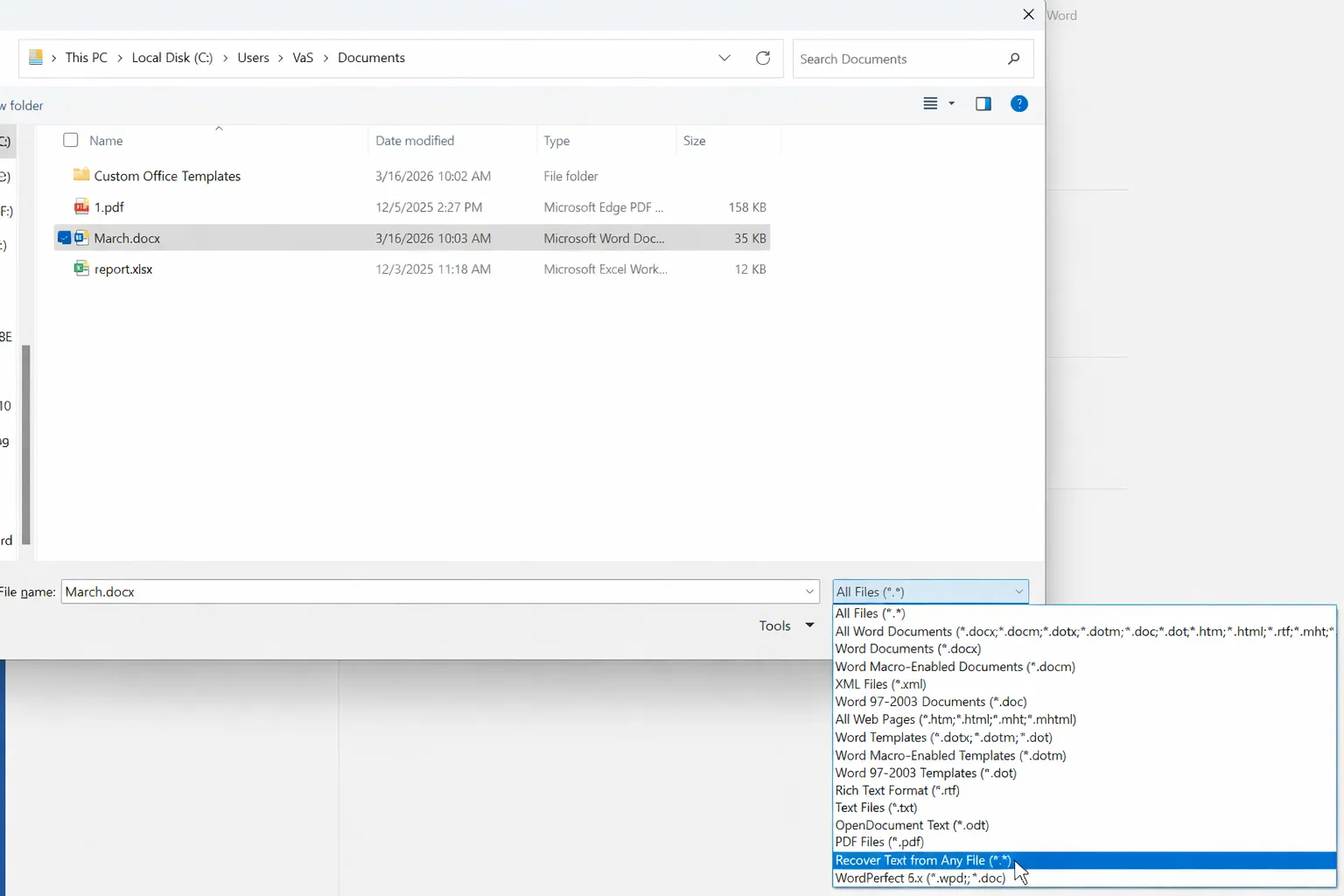
Recover Text from Any File
- Open the corrupted file → choose “Recover Text from Any File”
Although it extracts text, formatting is usually lost. Moreover, encoding errors often appear.
Limitations of Built-in Corrupted MS Word File Recovery Methods
Although these tools are useful, they have clear limitations. Therefore, relying on them alone is risky.
- They only handle minor corruption
- They cannot rebuild file structure
- Formatting and images are often lost
- They fail in severe cases
As a result, many users still need advanced corrupted ms word file recovery solutions.
Advanced Corrupted MS Word File Recovery (Recommended)
When built-in tools fail, a different approach is required. Therefore, data recovery software becomes essential.
Why Advanced Recovery Works
Unlike Word repair tools, recovery software:
- Scans raw disk sectors directly
- Bypasses corrupted file systems
- Recovers previous file versions
As a result, it improves success rates for damaged word file recovery, especially in severe scenarios.
How to Recover a Damaged MS Word File with Magic Data Recovery
When files are severely corrupted, Magic Data Recovery provides a practical solution. Moreover, it does not require advanced technical knowledge.
Step 1: Download and Install the Software
Download Magic Data Recovery and install it on a different location to avoid overwriting data.
Supports Windows 7/8/10/11 and Windows Server
Step 2: Select the Drive to Scan
Launch the software and choose the drive where the file was stored.

Step 3: Perform an Advanced Scan
The tool automatically performs an Advanced Scan and lists recoverable files.

Step 4: Preview and Recover Files
Preview the document first. Then recover it to a safe location.

Why Magic Data Recovery Is a Reliable Solution
Instead of repairing broken files, this tool focuses on retrieving usable data. Therefore, it provides a more stable approach.
Core Advantages
- Recovers files even when Word cannot open them
- Supports DOC and DOCX formats
- Allows preview before recovery
- Works with deleted, corrupted, or inaccessible files
Practical Scenario
For example, if a file becomes corrupted after a crash, Word repair may fail. However, Magic Data Recovery can scan the disk and locate intact versions. As a result, recovery becomes possible even when standard methods fail.
Why It Outperforms Other Methods
- It does not rely on file integrity
- It bypasses system-level corruption
- It retrieves original data instead of repairing structure
Therefore, it is more effective for corrupted ms word file recovery in complex situations.
Recovery Success Rate Explained
Recovery success depends on several factors. Therefore, acting quickly is essential.
- Not overwritten → High success
- Partially overwritten → Moderate success
- Fully overwritten → Impossible
As a result, delaying recovery reduces success chances significantly.
Best Practices to Prevent File Corruption
Prevention is always better than recovery. Therefore, follow these practices:
- Enable AutoSave
- Create regular backups
- Avoid forced shutdowns
- Safely eject external storage
- Use reliable disks
In addition, avoid running repair tools too early, as they may overwrite recoverable data.
Conclusion
In conclusion, corrupted ms word file recovery depends on the severity of damage and the method used. Although built-in Word tools are useful, they only work in limited scenarios. Therefore, relying on them alone is not enough.
However, advanced solutions like Magic Data Recovery provide a more reliable path. Instead of attempting to repair broken structures, they recover usable data directly. As a result, they significantly improve recovery success rates. For users facing serious data loss, this approach offers the most practical solution for document recovery.
Supports Windows 7/8/10/11 and Windows Server
FAQs About Corrupted MS Word File Recovery
Can corrupted Word files be fully recovered?
In many cases, corrupted Word files can be recovered, especially if they have not been overwritten. However, success depends on the level of damage. Minor corruption can often be fixed using built-in tools, while severe issues require corrupted ms word file recovery software. Therefore, acting quickly significantly improves recovery results.
Why does Word show unreadable content errors?
This error usually appears when the file structure becomes damaged. As a result, Microsoft Word cannot properly interpret the document content. Although built-in repair options may help, they often fail in complex cases. Therefore, advanced damaged word file recovery solutions are recommended when the issue persists.
What is the best method for damaged word file recovery?
The best method depends on the severity of the damage. First, you should try built-in repair features. However, if those fail, using professional recovery software becomes necessary. In addition, advanced tools can bypass file system issues, making them more reliable for damaged word file recovery in critical situations.
Is recovery software safe to use on corrupted files?
Yes, recovery software is generally safe when used correctly. However, you should install it on a different location to avoid overwriting data. In addition, most tools only read disk data rather than modifying it. Therefore, they are considered a reliable option for corrupted ms word file recovery.
Can recovery tools restore formatting as well as content?
Recovery tools primarily focus on retrieving usable content rather than restoring full formatting. As a result, recovered files may require manual adjustments. However, the most important data is usually preserved. Therefore, using recovery software remains an effective approach for corrupted ms word file recovery.
How long does it take to recover a corrupted Word file?
The recovery time depends on file size, disk condition, and scan depth. In most cases, quick scans take only a few minutes. However, deep scans may take longer. Meanwhile, advanced tools often display results during scanning, allowing users to begin damaged word file recovery earlier.
What should I do immediately after a Word file becomes corrupted?
You should stop using the storage device immediately to prevent overwriting. Then, avoid running repair tools that may alter the file structure. Instead, proceed with corrupted ms word file recovery as soon as possible. Therefore, early action greatly increases the chances of successful recovery.

Vasilii is a data recovery specialist with around 10 years of hands-on experience in the field. Throughout his career, he has successfully solved thousands of complex cases involving deleted files, formatted drives, lost partitions, and RAW file systems. His expertise covers both manual recovery methods using professional tools like hex editors and advanced automated solutions with recovery software. Vasilii's mission is to make reliable data recovery knowledge accessible to both IT professionals and everyday users, helping them safeguard their valuable digital assets.