
Document Recovery Service: Recover Lost Files
Losing an important document can disrupt work immediately. Reports, contracts, presentations, and research files may disappear due to accidental deletion, system crashes, malware infections, or disk formatting. As a result, many users begin searching for a reliable document recovery service to restore their files.
However, professional document recovery services are not always necessary. In many situations, deleted documents still remain stored on the device. Therefore, with the correct recovery method, users can often retrieve those document files quickly.
This guide explains how document recovery works, what causes document loss, and which recovery methods are most effective. In addition, it introduces a practical recovery solution like Magic Data Recovery that helps users restore documents safely and efficiently.
Supports Windows 7/8/10/11 and Windows Server
Table of Contents
What Is a Document Recovery Service
A document recovery service refers to a specialized process that restores deleted, lost, or corrupted documents from storage devices.
Typical storage devices include:
- Hard drives
- SSDs
- USB flash drives
- Memory cards
- External storage devices
Professional recovery services usually involve technical analysis of storage structures. Recovery specialists analyze file systems, rebuild metadata, and reconstruct damaged files.
However, not every data loss scenario requires laboratory-level recovery. In fact, many document loss situations involve logical issues that recovery software can resolve.
Therefore, before sending a device to recovery specialists, users should first evaluate whether software-based recovery can solve the problem.
Common Situations That Require a Document Recovery Service
Documents rarely disappear without a reason. Understanding the causes helps users react properly and avoid further data loss.
Accidental Deletion
Accidental deletion remains the most common reason people search for a recovery service. When files are deleted, the operating system usually removes only the file reference rather than the actual data.
Consequently, recovery tools can often restore those files before new data overwrites them.
System Crash or Power Failure
Unexpected shutdowns can interrupt the document saving process. As a result, files may become corrupted or disappear from the directory.
Disk Formatting
Formatting a disk rebuilds the file system structure. Meanwhile, document data often remains on the storage sectors until new data replaces it.
Malware or Ransomware Attacks
Certain malicious programs encrypt or remove files. In these situations, users frequently seek professional recovery services to retrieve important documents.
File System Corruption
File systems such as NTFS, FAT32, and exFAT store information about file locations. If corruption occurs, the system may lose the map to existing files.
DIY Methods Before Using a Document Recovery Service
Before contacting professional recovery services, users should try several built-in recovery methods.
Check the Recycle Bin
First, open the recycle bin and search for the deleted document. If the file remains there, restoring it takes only a few seconds.
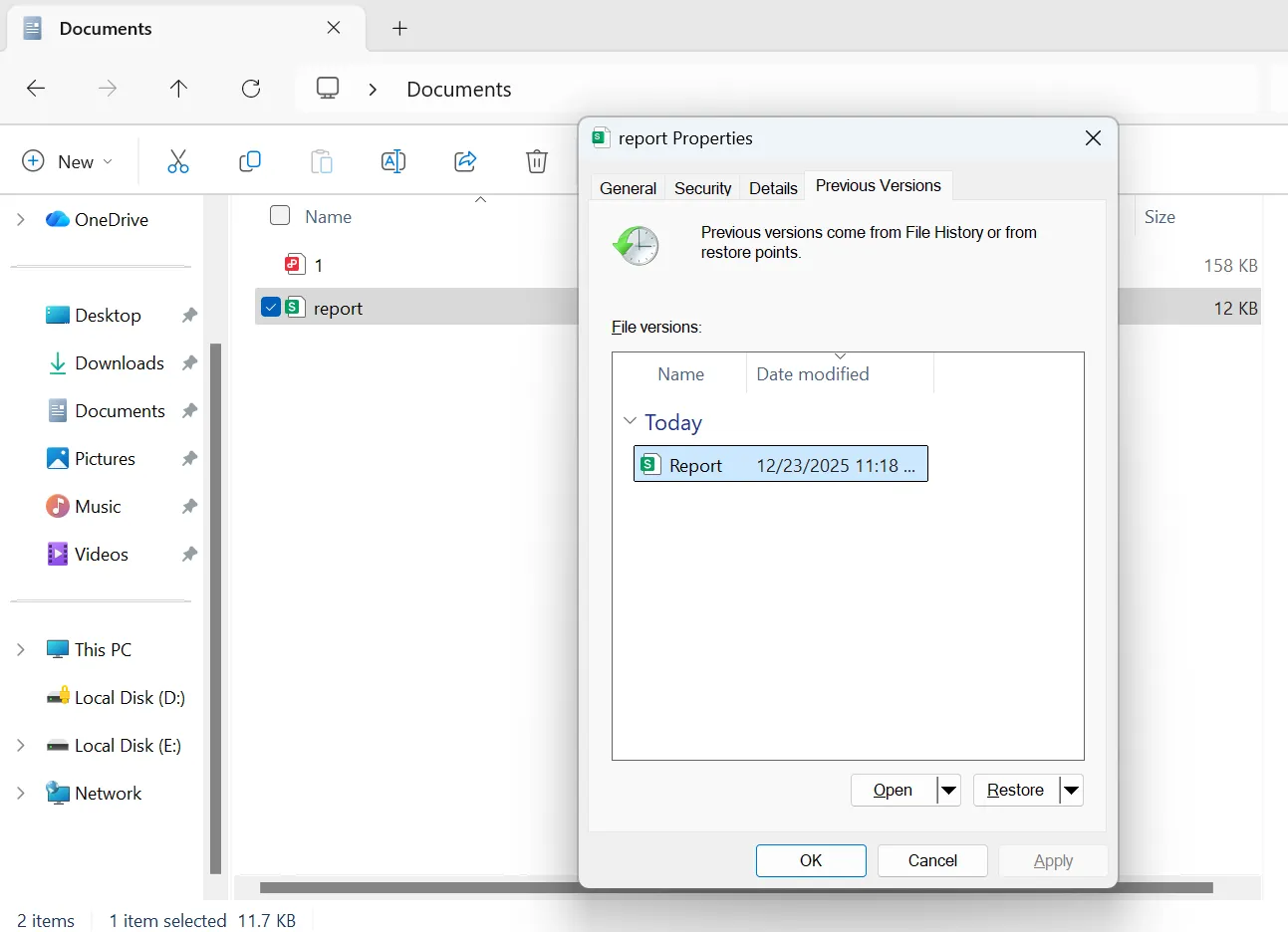
Restore Previous Versions
Windows File History may contain earlier versions of documents.
Steps:
- Right-click the folder
- Select Restore previous versions
- Choose the desired version
- Restore the file
Use Office AutoRecover
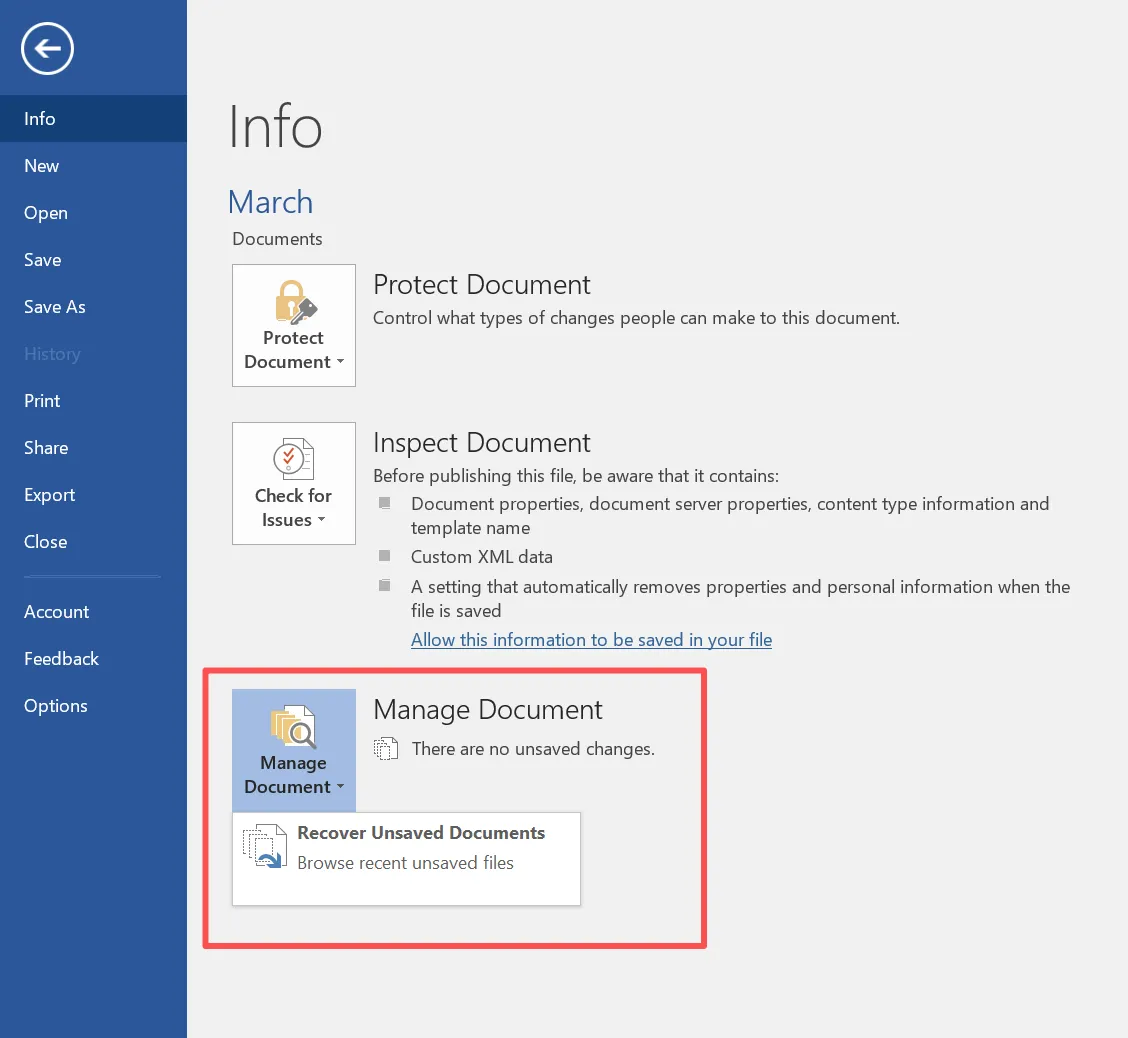
Many Office applications save temporary backup versions.
Steps:
- Open Microsoft Word
- Click File → Info
- Select Manage Document
- Choose Recover Unsaved Documents
If these methods do not recover the file, recovery software becomes the next logical step.
Using Software Instead of a Document Recovery Service
Modern recovery software offers a practical alternative to expensive recovery services. Instead of sending a device to a recovery lab, users can scan the drive directly.
One effective solution is Magic Data Recovery, a recovery tool designed to restore deleted and lost files.
Problems the Tool Solves
Magic Data Recovery helps recover documents that were:
- Accidentally deleted
- Lost after formatting
- Missing because of partition errors
- Unavailable due to file system corruption
Key Advantages
Several features make the software particularly effective:
- Fast scanning for recently deleted files
- Deep scanning for damaged file systems
- File preview before recovery
- Support for NTFS, FAT32, and exFAT
Because of these capabilities, recovery software often resolves problems that would otherwise require a professional recovery service.
Document Recovery Service Alternative: Magic Data Recovery
If built-in methods fail, recovery software provides a reliable solution. The following workflow explains how to restore documents using Magic Data Recovery.
Step 1: Download and Install Magic Data Recovery
First, download Magic Data Recovery and install the software. Completing the installation prepares the system for the recovery process.
Supports Windows 7/8/10/11 and Windows Server
Step 2: Select the Drive to Scan
Next, open the program and choose the drive where the documents were lost. After selecting the correct location, start the scanning process.

Step 3: Scan the Drive for Lost Documents
The software automatically performs a comprehensive scan. Meanwhile, the system lists recoverable files as the scan progresses.

Step 4: Preview Recoverable Documents
After the scan finishes, review the results carefully. The preview feature allows users to verify document content before restoring it.

Step 5: Recover the Selected Files
Finally, select the documents you want to restore and save them to a safe location. Choosing a different storage location helps avoid accidental overwriting.

When Professional Document Recovery Services Are Necessary
Although recovery software works in many situations, some scenarios still require professional recovery services.
For example:
- Hard drives with mechanical damage
- RAID system failures
- Severe firmware corruption
- Water or fire damage
In these cases, engineers repair hardware components inside specialized cleanroom environments. However, if the storage device still functions normally, software recovery usually provides faster and more affordable results.
Document Recovery Service vs Recovery Software
Choosing between software and professional recovery services depends on the device condition.
Factor | Recovery Software | Professional Service |
Speed | Immediate scan | Several days |
Cost | Lower cost | Higher service fees |
Device condition | Logical errors | Physical damage |
Convenience | Can be done at home | Requires shipping device |
Therefore, many users try recovery software before contacting a professional recovery service.
Tips to Prevent Document Data Loss
Preventing data loss remains easier than relying on a document recovery service later.
Consider these best practices:
- Enable automatic backups
- Use cloud storage platforms
- Keep multiple document versions
- Install reliable antivirus protection
- Avoid interrupting system updates
Regular backups significantly reduce the risk of permanent document loss.
Conclusion
A reliable document recovery service can restore important files after unexpected data loss. However, many document loss situations involve logical issues that recovery software can solve quickly.
Instead of immediately sending a device to a recovery lab, users can often retrieve lost documents using the right tool. Magic Data Recovery provides efficient scanning technology, document preview capabilities, and support for multiple file systems.
Therefore, if you need a practical solution to restore missing documents, Magic Data Recovery offers a convenient alternative to traditional document recovery services.
Supports Windows 7/8/10/11 and Windows Server
FAQ
What is a document recovery service?
A document recovery service restores deleted, lost, or corrupted documents from storage devices using specialized recovery methods.
Can deleted documents be recovered?
Yes. If new data has not overwritten the original storage space, recovery tools can often restore deleted documents.
How long does document recovery take?
Software recovery typically takes minutes to several hours depending on disk size and scan depth.
Is document recovery software safe?
Most recovery tools operate in read-only mode, which prevents additional data changes during scanning.
What is the difference between recovery services and software?
Professional recovery services handle physical device damage, while recovery software focuses on logical data loss.
Can formatted drives recover documents?
Yes. Deep scanning technology can locate document signatures even after formatting.
When should I use professional recovery services?
Professional recovery becomes necessary when a storage device suffers physical damage or fails to function normally.

Vasilii is a data recovery specialist with around 10 years of hands-on experience in the field. Throughout his career, he has successfully solved thousands of complex cases involving deleted files, formatted drives, lost partitions, and RAW file systems. His expertise covers both manual recovery methods using professional tools like hex editors and advanced automated solutions with recovery software. Vasilii's mission is to make reliable data recovery knowledge accessible to both IT professionals and everyday users, helping them safeguard their valuable digital assets.