
A Complete Guide to Hard Drive Format Recovery
Hard drives are a crucial part of our daily digital lives. But what happens when things go wrong, and your computer asks you to format your hard drive? Suddenly, you’re faced with the terrifying prospect of losing valuable files, photos, and documents. Accidental formatting is one of the most common causes of data loss. When this happens, many users immediately search for hard drive format recovery solutions, hoping their files are not gone forever. The good news is that data recovery is possible, even after a format.
In this article, we’ll explore the hard drive format recovery process and introduce a reliable solution to help you recover your precious data—Magic Data Recovery.
Supports Windows 7/8/10/11 and Windows Server
Wondering if your files can be recovered? Find out in seconds with our quick check below.
Data Recovery Assessment
Answer 3 quick questions to estimate your recovery chances
Table of Contents
What Happens When You Format a Hard Drive?
When you format a hard drive, the data stored on it doesn’t disappear immediately. Instead, the system erases the file system structure (like NTFS or FAT32), marking the space as available for new data. However, until new data overwrites the old, it is often possible to recover lost files after formatting.
This is where hard drive format recovery tools come into play. But how does this actually work?
How Hard Drive Format Recovery Works
The core principle behind hard drive format recovery is that formatting only removes the reference points to the data. The actual data may remain on the drive until it is overwritten by new files. In this context, professional data recovery software plays an important role in scanning the drive for traces of lost files and retrieving them.
Try Manual Recovery for Formatted Hard Drive (If Possible)
If you made backups for the data before formatting, it may be possible to recover files from a formatted hard drive without using third-party software.
Check for previous versions or backups in Control Panel — System and Security — File History. After you click Restore personal files, you will see all the backups. If you can see backups for the lost data, you can select the files you need and restore them.
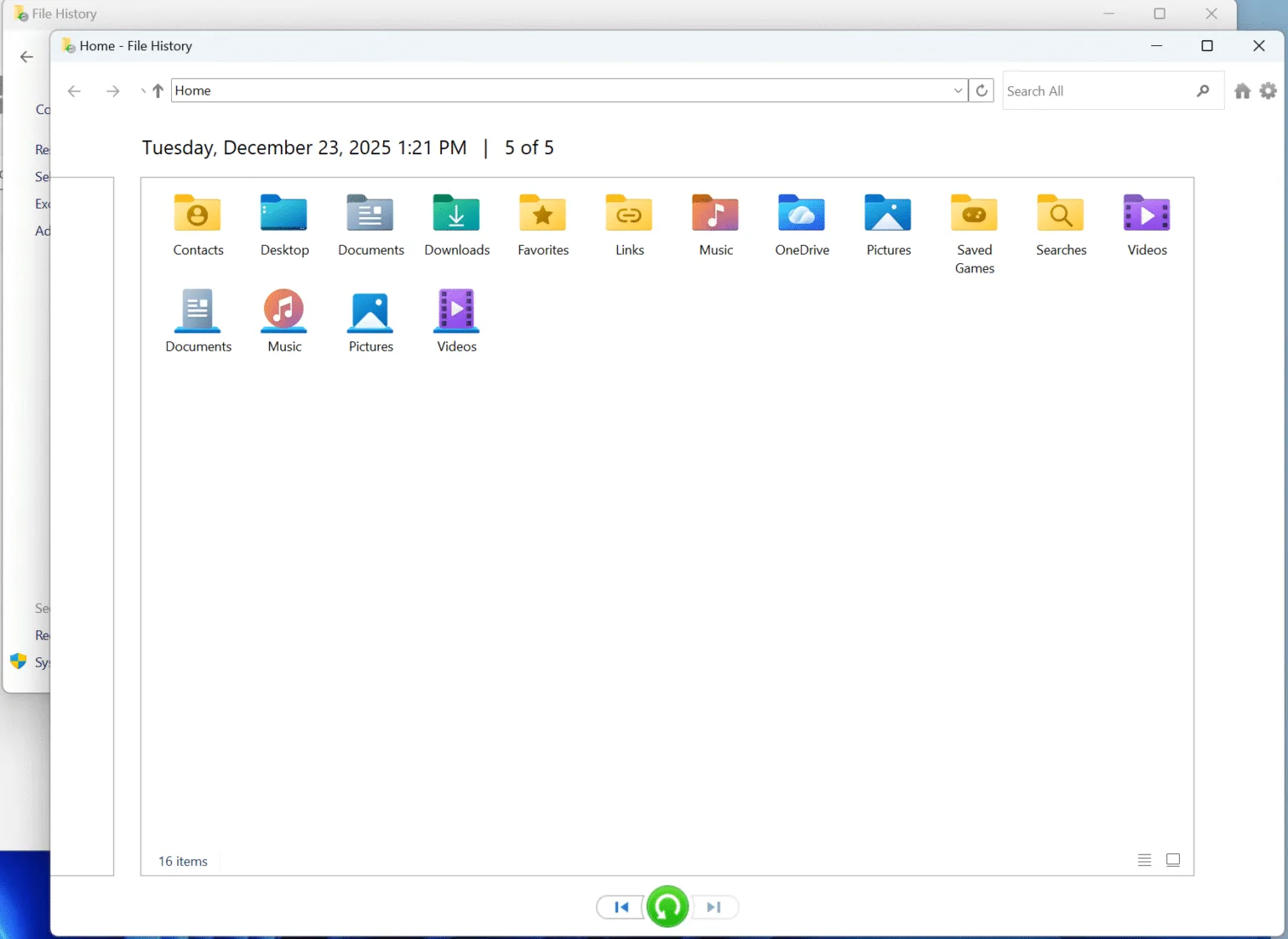
This method is not guaranteed to work as most users only realize to make backups when data loss happens. If you cannot find any backups for the lost files, moving on to dedicated hard drive format recovery tools.
How to Recover Data After Formatting Hard Drive: Step-by-Step Guide
If you’ve accidentally formatted your hard drive or external drive, don’t panic. You need to stop using the drive immediately as new files may overwrite the lost data. Magic Data Recovery is designed to perform hard drive recovery after formatting. Here’s a step-by-step guide on how to recover lost files:
1. Install Magic Data Recovery
Install the software to another drive rather than the formatted one in case the lost files get overwritten.
Supports Windows 7/8/10/11 and Windows Server
2. Select and Scan the Drive
When you run the software, it shows all the drives connected to the computer. Select the formatted drive and start searching.

3. Wait till the scan completes
It runs Advanced Scan automatically. You will see all the files when the scan completes.

4. Preview and Recover Files
After the scan is complete, Magic Data Recovery lets you preview the files it found.

5. Recover data
You can choose the files you need and save them to another drive. DO NOT recover them back to the formatted drive as that risks overwriting lost data.

Why Magic Data Recovery is the Best Solution for Formatted Hard Drive Recovery
When it comes to formatted hard drive recovery, you need a reliable, user-friendly solution. Magic Data Recovery offers:
- Comprehensive Scanning: It deeply scans your hard drive, external devices, and SD cards to locate recoverable files.
- High Success Rate: Whether you’ve accidentally formatted your hard drive or lost data due to file system corruption, Magic Data Recovery boasts a high success rate in file retrieval.
- Ease of Use: With its intuitive interface, even beginners can use Magic Data Recovery without technical knowledge.
- Secure Recovery: Files are recovered to a new location, ensuring no further damage is done to the original drive.
Magic Data Recovery is a powerful, cost-effective solution for all your hard drive format recovery needs. If you’re looking for a quick and reliable way to retrieve lost data, Magic Data Recovery is the tool you can trust.
Conclusion
If you’ve accidentally formatted your hard drive, don’t panic. With the right tools, like Magic Data Recovery, you can recover your valuable files easily. Whether you’re dealing with a formatted drive, a corrupted hard drive, or accidental deletion, this easy-to-use software provides a reliable solution for all your data recovery needs.
If you’re looking for the best way to recover lost files from a formatted drive, Magic Data Recovery is the solution you’ve been waiting for. Try it today and experience a seamless recovery process!
Supports Windows 7/8/10/11 and Windows Server
Hard Drive Format Recovery – FAQ
How to recovery format a hard disk?
How to completely wipe and reset a hard drive?
How do professionals recover data from a hard drive?
What happens if I format the recovery drive?
Can you reset a corrupted hard drive?
What is the best format for a recovery drive?
Can you ever fully wipe a hard drive?
Is there a way to reverse format?

Vasilii is a data recovery specialist with around 10 years of hands-on experience in the field. Throughout his career, he has successfully solved thousands of complex cases involving deleted files, formatted drives, lost partitions, and RAW file systems. His expertise covers both manual recovery methods using professional tools like hex editors and advanced automated solutions with recovery software. Vasilii's mission is to make reliable data recovery knowledge accessible to both IT professionals and everyday users, helping them safeguard their valuable digital assets.