
SD Card Speed Classes: Complete Guide
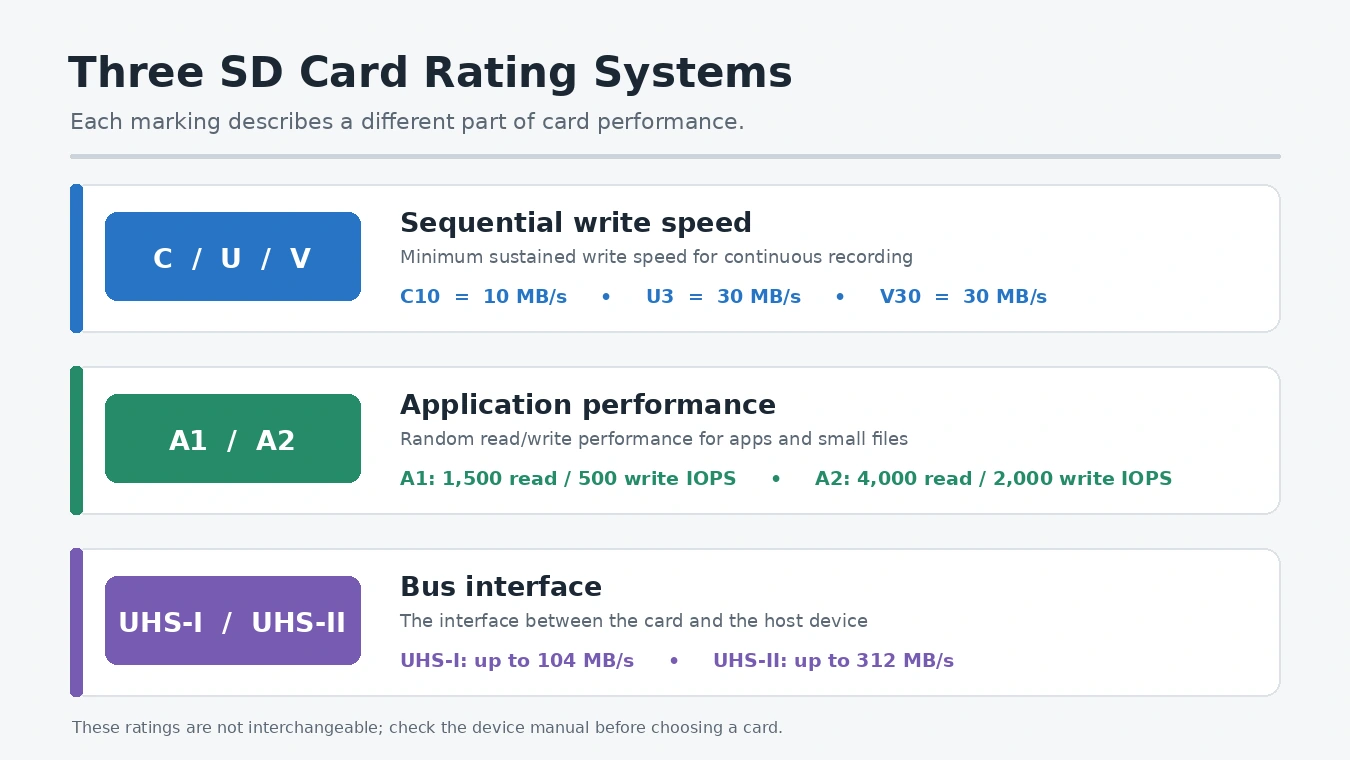
C10, U3, V30, A2, and UHS-II measure different aspects of card performance. SD card speed classes describe minimum sustained sequential writing; A1/A2 measure application access, while UHS identifies the bus. The right choice also depends on whether you plan to use the card in a camera, phone, or another SD card-compatible device.
Table of Contents
SD Card Speed Class Chart: C, U, V, A, and UHS Ratings
This SD card speed class chart separates sequential writing, application performance, and bus interfaces.
Performance dimension | Rating | What it measures | Standard performance |
Sequential write | C2 / C4 / C6 / C10 | Minimum sustained sequential write | 2 / 4 / 6 / 10 MB/s |
Sequential write | U1 / U3 | Minimum sustained sequential write | 10 / 30 MB/s |
Sequential write | V6 / V10 / V30 / V60 / V90 | Minimum sustained sequential write | 6 / 10 / 30 / 60 / 90 MB/s |
Application performance | A1 | Random read / write IOPS and sequential write | 1,500 / 500 IOPS; 10 MB/s sequential write |
Application performance | A2 | Random read / write IOPS and sequential write | 4,000 / 2,000 IOPS; 10 MB/s sequential write |
Bus interface | UHS-I | Maximum bus interface speed | Up to 104 MB/s |
Bus interface | UHS-II | Maximum bus interface speed | Up to 312 MB/s half-duplex; 156 MB/s full-duplex |
The table groups marks by purpose, not one universal ranking. C10, U1, and V10 each indicate 10 MB/s, but a device may require one family. Therefore, match the manual’s symbol, not just the number. These SD card speed classes show a write floor, not actual transfer speed. Read sequential-write ratings separately from application and bus ratings.
How SD Card Speed Classes Measure Sequential Writing
C, U, and V marks describe minimum sustained sequential writing—the steady data flow a camera needs for video. If a card cannot keep up, recording may stop or trigger a warning. Higher ratings give more write headroom, but the camera and recording mode must support that bandwidth. Therefore, compare SD card speed classes with the camera’s requirements and choose the family your camera maker names.
V30 vs V60 vs V90: Which Video Speed Class Do You Need?
The V30 vs V60 vs V90 choice depends on bitrate, codec, frame rate, and recording mode—not resolution alone. Compare SD card speed classes against the camera’s exact recording mode.
Rating | Minimum sustained write | Typical use to check |
V30 | 30 MB/s | Many standard 4K modes |
V60 | 60 MB/s | Higher-bitrate 4K and selected 6K modes |
V90 | 90 MB/s | Demanding professional video modes |
A 400 Mbps stream equals 50 MB/s before camera overhead, so V30 may not meet the camera’s requirement. Nevertheless, check the exact recording mode. This is the practical way to compare SD card speed classes.
U1 vs U3 SD Card: What Changes?
The U1 vs U3 SD card difference is 10 MB/s versus 30 MB/s minimum sustained writing. Therefore, U3 gives more headroom for demanding video, while U1 may suit basic recording when the manual allows it. Although U3 and V30 share a 30 MB/s minimum, they belong to different families. As a result, match the exact symbol your device maker requests.
A1 vs A2 microSD: Application Performance Class
Not all SD card speed classes measure video writing. A1 and A2 measure random access plus minimum sequential writing. This matters when a phone opens apps or handles small files.
IOPS means input/output operations per second; each test uses a 4 KB data block. A1 requires 1,500 random read IOPS and 500 random write IOPS. A2 raises those figures to 4,000 and 2,000. Both classes require 10 MB/s minimum sustained sequential writing. Therefore, application ratings describe small random tasks, not large video files.
The A1 vs A2 microSD choice depends on host support. These SD card speed classes cannot replace the camera’s required C, U, or V rating. A2 uses Command Queuing, Cache, and Maintenance features, but both card and device must support A2. If your phone supports only A1 or cannot run apps from removable storage, A2 may add little.
UHS-I vs UHS-II: Understanding the Bus Interface
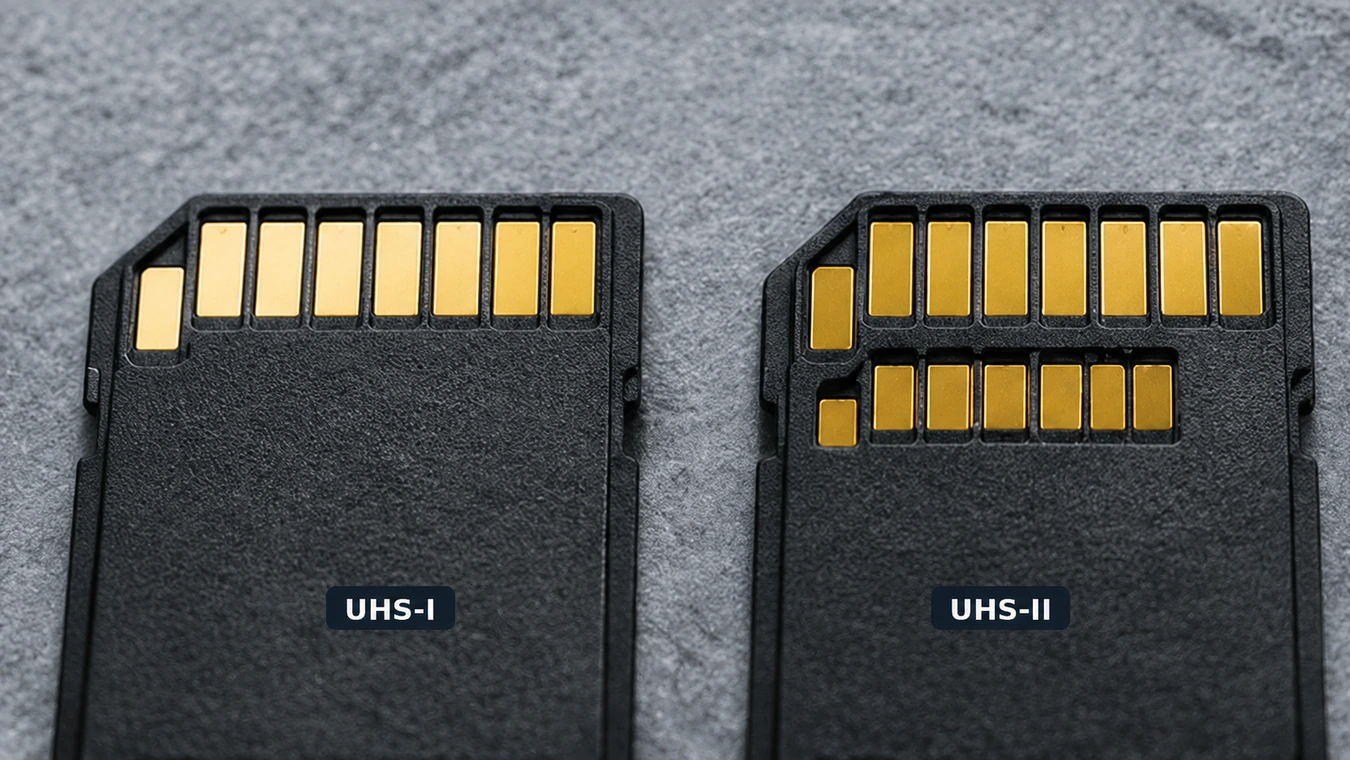
UHS-I and UHS-II describe the data path between a card and its host, unlike C, U, and V ratings. The bus sets a transfer limit; the card’s controller and flash memory determine actual performance. Treat UHS as a separate mark.
UHS-I supports up to 104 MB/s. UHS-II supports up to 312 MB/s in half-duplex mode or 156 MB/s in full-duplex mode. These figures describe interface capability, not guaranteed card speeds. When comparing SD card speed classes, keep the bus as a separate check. The camera, reader, and computer must support UHS-II to use its higher speed; otherwise, the card falls back to UHS-I. In short, UHS-I vs UHS-II compares interfaces, not write classes.
How to Match SD Card Speed Classes to Your Device Manual
Before buying, check the manual for card type, capacity, speed class, and interface. These steps match SD card speed classes to your device:
- Confirm format and capacity. Check SD, SDHC, SDXC, or microSD support and the maximum capacity. Also confirm the file system your device expects. SDXC cards use exFAT by default, so older devices may require explicit SDXC and exFAT file system support.
- Match the write rating. For video, match the C, U, or V symbol in the recording table. If it specifies V30, choose V30 or higher in that family.
- Check the bus. Choose UHS-II if the manual specifies it. A UHS-II card can work in a UHS-I host, but the host limits speed.
- Check app support. Confirm that the phone supports A1/A2 and allows apps on removable storage.
- Check the reader. Use a reader and USB connection that support the card’s interface; otherwise, they become the bottleneck.
For example, if a camera lists SDXC, 256 GB, UHS-I, and U3, choose a compatible SDXC card up to 256 GB with UHS-I and U3. A UHS-II card may work, but the slot will limit it to UHS-I speeds. Do not substitute V30 for U3 unless the manual allows it. Match SD card speed classes to the stated requirement.
Why Is My SD Card Slower Than Advertised?
An “up to” read-speed claim describes a peak result. By contrast, C, U, and V marks describe minimum sustained sequential performance. Actual transfers also depend on the reader, USB port, computer, file sizes, and card condition. Therefore, SD card speed classes do not promise identical copy times. In other words, SD card speed classes describe one part of performance, not every transfer scenario.
If a card records reliably but copies files slowly, test the reader and port first. Also, compare read and write ratings; they measure different directions. Repeated deletion and writing can fragment free space. Therefore, follow the manual when preparing a card for reuse, and keep a backup.
What If Files Disappear from an SD Card?
Even the best SD card speed classes cannot prevent accidental deletion, formatting, file-system errors, or card failure. If photos disappear, stop recording and avoid saving new files because further writes may overwrite recoverable data.
For example, accidental deletion or missing folders on a card that Windows can still detect may leave recoverable files. A data recovery process for SD cards can help locate those files without first changing the card’s contents.
A different approach applies when the card suddenly appears as RAW or Windows asks you to format it. This may indicate file-system damage, so avoid formatting the card before attempting recovery. The steps for handling a corrupted SD card depend on whether the device can still detect its storage.
Likewise, if someone has already formatted the card, recovery depends on the format method, subsequent writes, and card condition. In that situation, recovering data from a formatted SD card requires a scan rather than saving new files to the same card.
Magic Data Recovery provides a Windows-based scanning workflow for SD and microSD cards. It supports more than 5,000 file formats, deep scanning, file filters, and previews. For example, after accidentally deleting camera photos, connect the card to a PC, install the software on the PC—not the affected card—and scan. Preview the results, then save selected files to another drive. This approach lets you inspect candidate files before restoring a larger batch.
The trial allows up to 500 MB of recovery. However, overwriting or physical damage may prevent recovery. If the card disconnects repeatedly or shows physical failure, stop scanning and consult a specialist.
Conclusion: Match the Card to Your Device
Ultimately, choose SD card speed classes that match the manual: C, U, or V for sustained writing; A1/A2 for supported apps; and UHS-I/II for interface capability. Evaluate the card’s labels together rather than treating one symbol as an overall performance score. Confirm capacity and format too. If files disappear, stop using the card and consider Magic Data Recovery for its SD/microSD support, deep scan, filters, and preview workflow.
Supports Windows 7/8/10/11 and Windows Server
FAQ
What SD card speed class do I need for 4K video?
Is V30 the same as U3?
Is UHS-II faster than UHS-I?
Is A2 better than A1 for a microSD card?
Can I use a UHS-II card in a UHS-I device?
Does a higher SD card speed class make file transfers faster?
Can I recover files from an SD card after accidental formatting?

Vasilii is a data recovery specialist with around 10 years of hands-on experience in the field. Throughout his career, he has successfully solved thousands of complex cases involving deleted files, formatted drives, lost partitions, and RAW file systems. His expertise covers both manual recovery methods using professional tools like hex editors and advanced automated solutions with recovery software. Vasilii's mission is to make reliable data recovery knowledge accessible to both IT professionals and everyday users, helping them safeguard their valuable digital assets.