
Recover QuickBooks File: 7 Safe Ways
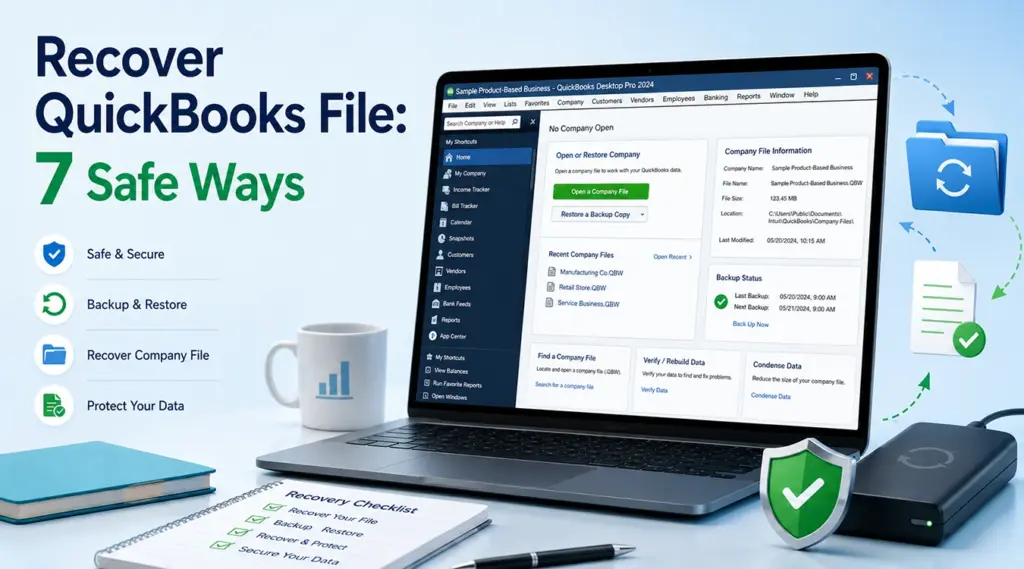
.QBW may simply be in another folder, while a deleted file may still be in the Recycle Bin. If a .QBB backup or QuickBooks Auto Data Recovery copy exists, use it first. When those options fail and the file was actually deleted from a healthy storage device, Magic Data Recovery may help recover the deleted file before new data overwrites it.Supports Windows 7/8/10/11 and Windows Server
Table of Contents
Which QuickBooks File Do You Need to Recover?
Before you recover QuickBooks file data, identify the file type:
.QBW— the active QuickBooks Desktop company file..QBB— a backup that QuickBooks restores into a new.QBW..QBM— a portable company file..TLG— a transaction log used by some Auto Data Recovery workflows..QBW.adrand.TLG.adr— Auto Data Recovery copies.
Intuit handles .QBW, .QBB, and .QBM differently, so do not treat every QuickBooks file as a normal company file.
Also, separate “missing,” “deleted,” and “corrupted.” A missing file may still exist, a deleted file has been removed, and a corrupted .QBW may have internal database damage. File recovery software can find lost files; it cannot repair a corrupted QuickBooks database.
What to Do Before You Recover QuickBooks File Data
If the file may have been deleted, stop writing new data to that drive. Do not install recovery software on the same partition or save recovered files there.
Then check whether QuickBooks simply lost track of the file. Intuit recommends searching for *.qbw and *.qbb; it also lists C:\Users\Public\Public Documents\Intuit\QuickBooks\Company Files as a common location.
If the drive clicks, repeatedly disconnects, or fails to spin up, stop DIY scanning. Software cannot solve physical hardware failure.
Method 1: Search Windows for the Missing QuickBooks File
This is the safest first way to recover QuickBooks file access when the file was moved, renamed, or saved somewhere unexpected.
- Press
Windows + E. - Select This PC.
- Search for
*.qbw. - Then search for
*.qbband*.qbm. - Turn on Hidden items if needed.
- Sort results by Date modified.
You can also use Find a company file from QuickBooks Desktop’s No Company Open window. Intuit says it scans for .QBW and .QBB files, including removable media and network locations.
Method 2: Recover QuickBooks File from Recycle Bin
If you deleted a local file normally, check the Recycle Bin before using recovery software.
- Open Recycle Bin.
- Search for the company name.
- Confirm the file extension.
- Right-click the correct file and select Restore.
- Open or restore it through QuickBooks.
This will not help after an emptied Recycle Bin, Shift + Delete, formatting, or some network deletions. In those cases, stop using the affected storage.
Method 3: Recover QuickBooks File from a QBB Backup
A recent .QBB is usually the preferred way to recover QuickBooks file data because QuickBooks created it specifically for restoration.
- Open QuickBooks Desktop.
- Choose File > Open or Restore Company.
- Select Restore a backup copy.
- Choose Local Backup.
- Select the
.QBB. - Save the restored company file to a safe folder.
Intuit states that restoring a .QBB creates a new .QBW. It also warns about overwriting an existing company file, so use a separate folder or unique name when possible.
Method 4: Use QuickBooks Auto Data Recovery
QuickBooks Auto Data Recovery can help recover QuickBooks file data when suitable ADR files still exist. Intuit says ADR is available in QuickBooks Pro, Premier, and Enterprise Solutions for Windows, but not Accountant Editions, and it lists a 1.5 GB ADR file-size limit.
Use .QBW.adr with the Original .TLG
- Create a temporary folder such as
QBTest. - Copy the matching original
.TLGinto it. - Open the
QuickBooksAutoDataRecoveryfolder. - Copy the matching
.QBW.adrintoQBTest. - Remove
.adrfrom the copied file name. - Open that copied
.QBWin QuickBooks. - Run File > Utilities > Verify Data.
Intuit also documents recovery with both .QBW.adr and .TLG.adr. However, ADR may not include the newest transactions, so verify the recovered books carefully.
Method 5: Check Earlier Copies and Backups
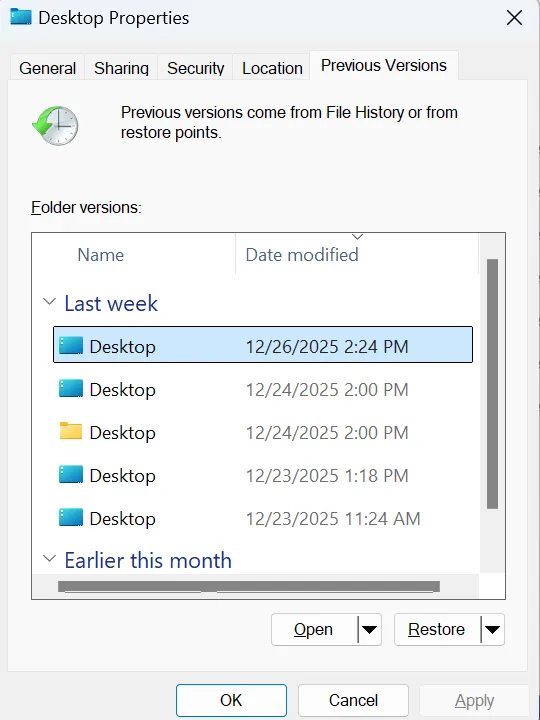
Before scanning a drive, check File History, Previous Versions, OneDrive, external backups, and copies held by your accountant. For Previous Versions, right-click the original folder, choose Properties > Previous Versions, and copy a suitable version elsewhere.
Method 6: Recover QuickBooks File from Hard Drive with Magic Data Recovery
If the Recycle Bin is empty, no usable .QBB or ADR copy exists, and the file was deleted from a healthy disk, Magic Data Recovery becomes a reasonable next option.
The software scans storage for lost or deleted files that Windows no longer shows normally. Therefore, it may help recover QuickBooks file from hard drive storage when a .QBW, .QBB, or related file was deleted but its underlying data has not been overwritten.
This differs from .QBB backup and ADR because disk recovery searches storage for lost file records. However, no software can guarantee recovery. New writes can overwrite deleted data, SSD TRIM may remove access to deleted blocks, and Magic Data Recovery cannot repair physical drive damage or a corrupted .QBW database.
If the built-in recovery options no longer work, you can try Magic Data Recovery before new data overwrites the deleted files with following steps:
Step 1: Download and Install Magic Data Recovery
Download Magic Data Recovery, but install it on a different drive or partition from the one where the QuickBooks file was lost. This reduces the risk of overwriting deleted data.
Supports Windows 7/8/10/11 and Windows Server
Step 2: Select the Drive Where the QuickBooks File Was Stored
Launch the program, select the drive that originally contained the missing .QBW, .QBB, or .QBM, and start scanning.

Step 3: Scan for Lost or Deleted QuickBooks Files
Let the scan continue while found files appear. Narrow the results by file name, location, date, size, or QuickBooks extension where available.

Step 4: Recover Files to a Safe Location
Save recovered files to a different physical drive or another safe location. Then open or restore the file through QuickBooks and verify the company data.

Method 7: What If the QBW File Is Corrupted, Not Deleted?
If the .QBW exists but will not open, copy it first, update QuickBooks, and confirm that it is a true .QBW rather than .QBB or .QBM. Intuit notes that backup and portable files require different workflows.
If it remains unreadable, use QuickBooks troubleshooting, Verify/Rebuild Data where appropriate, Intuit support, or a database specialist. Magic Data Recovery can help recover QuickBooks file copies that were deleted; it cannot repair a damaged .QBW database.
QuickBooks Online Recovery Is Different
When users ask how to recover lost QuickBooks files, they sometimes mean QuickBooks Online. Cloud data does not exist as a normal local .QBW file on your PC.
For QuickBooks Online Advanced and Intuit Enterprise Suite, Intuit provides Online Backup and Restore for supported point-in-time recovery, with data and retention limits. Therefore, hard-drive software cannot recover QuickBooks file data that existed only in the cloud.
How to Prevent Future QuickBooks File Loss
After you recover QuickBooks file data:
- Create regular
.QBBbackups on separate storage. - Test important backups occasionally.
- Keep company files and backups in clearly named folders.
- Do not rely on ADR as your only backup.
- Record the correct company-file path for multi-user setups.
- For QuickBooks Online Advanced, review Online Backup and Restore settings.
Autosave or recovery data is not the same as a permanent backup. Multiple independent copies provide stronger protection against deletion and drive failure.
Conclusion
The safest way to recover QuickBooks file data is to search for the missing .QBW, check the Recycle Bin, restore a .QBB, and use Auto Data Recovery when it applies. If the file was deleted from a healthy disk and those methods fail, Magic Data Recovery can scan the storage and recover deleted files. Stop writing to the affected drive, recover files elsewhere, and remember that overwriting, SSD TRIM, physical damage, and database corruption can limit recovery.
Supports Windows 7/8/10/11 and Windows Server
FAQs
How do I recover QuickBooks file data that suddenly disappeared?
To recover disappeared QuickBooks files, first search Windows for *.qbw, *.qbb, and *.qbm, then check hidden folders and the Recycle Bin. If the working file is gone, restore a recent .QBB backup or check QuickBooks Auto Data Recovery. Use disk recovery only when the file was actually deleted or lost from local storage.
How can I recover QuickBooks file from hard drive after permanent deletion?
To recover QuickBooks file from hard drive storage after permanent deletion, stop using the affected drive. Check backups and ADR first. If no copy exists, scan the healthy drive with recovery software installed elsewhere and save recovered files to another location. Success depends on whether the deleted data has been overwritten or made unavailable by SSD TRIM.
How to recover lost QuickBooks files when I have a QBB backup?
If you are learning how to recover lost QuickBooks files and have a .QBB, open QuickBooks Desktop and choose File > Open or Restore Company > Restore a backup copy > Local Backup. Select the backup and restore it to a safe folder. QuickBooks creates a new .QBW, so avoid overwriting another useful company-file copy.
Can QuickBooks Auto Data Recovery restore a deleted company file?
QuickBooks Auto Data Recovery may help if suitable ADR files still exist. Supported QuickBooks Desktop editions can use .QBW.adr with transaction-log data or use both .QBW.adr and .TLG.adr. However, ADR has edition and file-size limits, and it may not contain the newest transactions. Always verify the recovered company data before replacing your normal file.
Can Magic Data Recovery repair a corrupted QuickBooks QBW file?
No. Magic Data Recovery is relevant when you need to locate a deleted or lost QuickBooks file on storage. It does not repair the internal accounting database of a corrupted .QBW. If the file still exists but will not open, preserve a copy, use QuickBooks troubleshooting tools, and consider Intuit support or a specialist in QuickBooks database corruption.
Why might a deleted QuickBooks file be impossible to recover?
A deleted QuickBooks file may become unrecoverable after new data overwrites its disk space. SSDs add another limitation because TRIM can make deleted blocks unavailable to recovery software. Physical drive damage can also prevent safe DIY scanning. Therefore, stop using the affected storage as soon as you notice the loss and recover files to another device.
Can I recover a QuickBooks Online company file with hard-drive recovery software?
Usually not. QuickBooks Online keeps company data in the cloud rather than as a normal local .QBW file. QuickBooks Online Advanced offers Online Backup and Restore for supported data and point-in-time recovery. Hard-drive recovery software only helps when a local QuickBooks file actually existed on the computer or another storage device and was later deleted or lost.

Vasilii is a data recovery specialist with around 10 years of hands-on experience in the field. Throughout his career, he has successfully solved thousands of complex cases involving deleted files, formatted drives, lost partitions, and RAW file systems. His expertise covers both manual recovery methods using professional tools like hex editors and advanced automated solutions with recovery software. Vasilii's mission is to make reliable data recovery knowledge accessible to both IT professionals and everyday users, helping them safeguard their valuable digital assets.