
exFAT Entry Set Deletion Experiment: Before and After
This exFAT entry set deletion experiment follows a sample file before deletion, after deletion, and after cluster reuse. After deletion, the directory entry set becomes inactive. In addition, the allocation bitmap marks the file’s clusters as available. However, the sample keeps its original data bytes until the reuse step overwrites one cluster. The screenshots show all three changes in wxHexEditor.
Table of Contents
Research Question and Scope
What changes when a small, contiguous exFAT file becomes inactive, and what happens if another allocation overwrites part of its old extent?
The experiment follows the same file through three defined states. It models the completed metadata changes and the later overwrite. For example, the deletion step clears the allocation bits and preserves the original contents. The practical interpretation below covers how later writes and discard can affect real media.
For background on where this format is commonly used, see the exFAT file system overview.
exFAT Entry Set Deletion Experiment Setup
The generated sample represents selected structures from a logical exFAT volume. It uses one FAT, one active Allocation Bitmap, and fixed directory timestamps. Together, the excerpts show the directory entry set, one bitmap range, and part of the file data.
Parameter | Reference value |
Logical sector / cluster | 512 bytes / 4,096 bytes |
Cluster Heap start | Volume-relative sector 2,048 |
Root directory | Cluster 5; target set at directory offset |
File |
|
Allocation | Contiguous clusters 100–102; |
Directory set | One File, one Stream Extension, one File Name entry |
The payload repeats a fixed ASCII pattern for exactly 10,240 bytes. However, its three clusters hold 12,288 bytes in total. The final 2,048 bytes sit beyond the logical end of the file. The allocation unit size explanation explains this distinction between file length and allocated space.
In this exFAT entry set deletion experiment, the inactive record keeps its stored checksum, name, and stream fields. Later, a new allocation takes the middle cluster and sets its bit again. The new owner’s directory record lies outside the excerpt.
Procedure for the exFAT Deletion Experiment
Scenario1 defines the baseline. Each later scenario starts from the preceding state of the same generated sample.
Scenario1 — Before deletion.
First, construct the active 96-byte set and calculate its name hash and checksum. Then allocate clusters 100, 101, and 102, and map the complete payload to that range.
Scenario2 — After deletion.
Next, clear bit 7 in all three entry types and clear the three corresponding allocation bits. Preserve the other entry-set bytes and the full payload. Then check that exactly three bytes in the entry set changed and that the file contents still match S1.
Scenario3 — After cluster reuse.
Then allocate cluster 101 to a new owner. Fill all 4,096 bytes of the cluster with 0x58 (X) and keep the old entry set inactive. Check the middle range for changes and compare the first and last file ranges with S2.
Compare the same locations.
Finally, inspect the entry types, stream mapping, bitmap byte, and data excerpt. Recompute the checksum across the 96-byte entry set, skipping the two bytes that store the checksum.
For a drive-based check, use spare media and test files. First, verify the drive letter, capacity, and device identity. Capture a read-only baseline. Then permanently delete the test file. Once the writes finish, compare the same directory and bitmap locations.
exFAT File Entry Before and After Deletion
For an exFAT deleted file entry, the before-and-after comparison starts with the first byte at directory offsets 0x100, 0x120, and 0x140. These are the beginnings of three separate 32-byte entries.
Each wxHexEditor screenshot shows a 128-byte sample excerpt opened in read-only mode. The offsets start at the beginning of that excerpt. The entry set starts at 0x00, the allocation bitmap excerpt at 0x60, and the cluster 101 data excerpt at 0x70. The three entry-type bytes appear at 0x00, 0x20, and 0x40. Bitmap byte +0C appears at 0x6C.
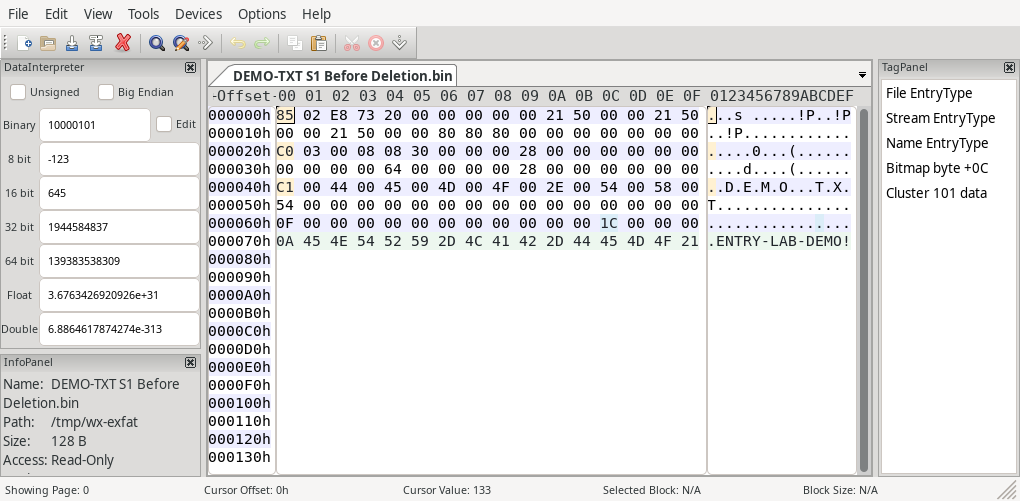
Figure 1. S1 in wxHexEditor. The sample contains active entry types 85/C0/C1. Bitmap byte +0C is 1C, marking the three target clusters allocated.
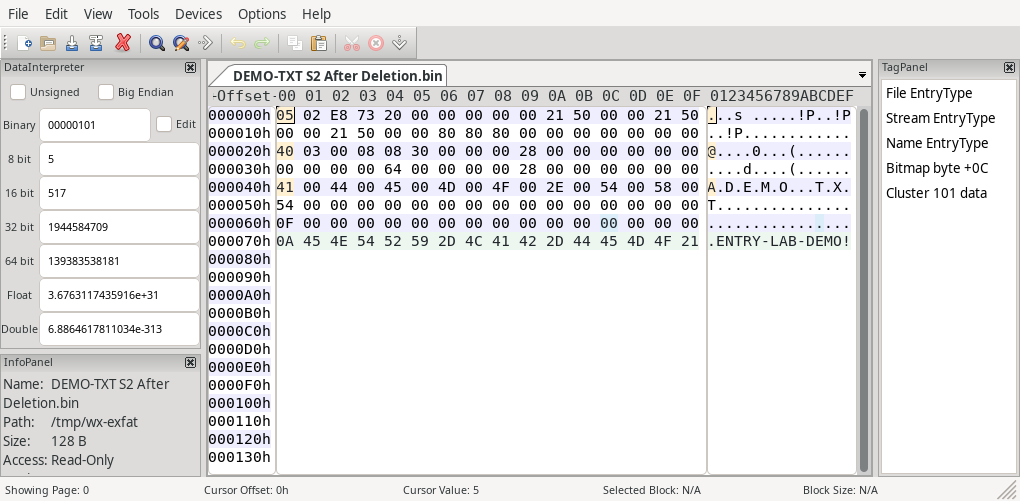
Figure 2. S2 in wxHexEditor. The same entry types become 05/40/41, and bitmap byte +0C becomes 00. The displayed payload excerpt remains unchanged.
Only the three entry-type bytes change inside the 96-byte set. The old UTF-16LE name still reads DEMO.TXT. Likewise, the Stream Extension still contains first cluster 100 and a data length of 10,240 bytes.
The LinuxCon Europe exFAT presentation illustrates these three entry-type changes. The Linux exFAT directory code shows how the driver clears the InUse bit when it marks an entry as deleted.
exFAT Entry Set Checksum After Deletion
S1 stores checksum 0x73E8 as bytes E8 73. Recalculating the active sample reproduces that value. However, S2 keeps those same bytes even though its inactive entry types produce 0x6DE8.
The three changed type bytes account for the difference. For each input byte, rotate the 16-bit accumulator right by one bit. Then add the byte and keep the low 16 bits. Skip offsets 2 and 3 within the set.
As a cross-check, set the three InUse bits back to one in an in-memory copy. Recalculating the checksum then returns 0x73E8. Check current cluster ownership separately before drawing any recovery conclusions.
exFAT Allocation Bitmap After Entry Set Deletion
Read the exFAT allocation bitmap after deletion alongside the directory set. The Microsoft exFAT specification defines the Allocation Bitmap as the record of cluster allocation status. Cluster 2 corresponds to the first bit, and bit order within each byte starts at the least significant bit.
For cluster 100, the bitmap bit index is 100 − 2 = 98. Consequently, its byte offset is floor(98 / 8) = 12, or 0x0C, and its bit position is 2. Clusters 101 and 102 occupy bits 3 and 4 of that same byte.
In this sample, those bits add up to 0x04 + 0x08 + 0x10 = 0x1C. S2 clears all three. Because the other clusters in this byte are already free, the result is 0x00. However, an occupied neighbor on another volume could leave the byte nonzero.
A zero bit means the cluster is available. Check the data bytes separately to see what remains. Also check current records and cluster ownership. For example, a forensic study of exFAT directory entries documents how moving or renaming a file can leave inactive entries even when another record still describes the file.
When Cluster Reuse Changes the Result
S3 deliberately reuses the middle cluster while preserving the inactive directory set. Compare the highlighted bitmap and payload bytes with S2.
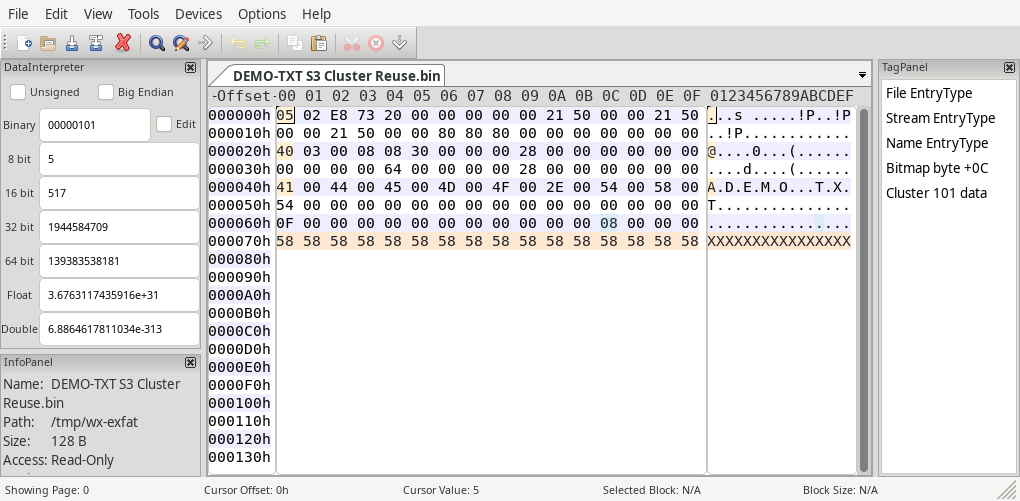
Figure 3. S3 in wxHexEditor. Bitmap byte +0C becomes 08. The middle cluster’s excerpt contains 58 bytes, while the old file’s name and mapping remain in the inactive set.
The original file occupies 4,096 bytes in cluster 100, 4,096 in cluster 101, and 2,048 in cluster 102. Replacing cluster 101 therefore removes 4,096 bytes from the original logical payload. Exactly 6,144 original bytes remain in their original positions.
A byte-for-byte comparison confirms that the first and last ranges still match. Likewise, the full payload has the same SHA-256 hash in S1 and S2. In contrast, S3 has a different hash because the middle cluster contains new bytes.
Because the reference file uses NoFatChain = 1, its first cluster and length describe a contiguous extent. If that flag were zero, an analyst would need the relevant FAT-chain information instead. Simply reading consecutive clusters would not establish the correct file order.
For a related allocation problem, see exFAT orphaned allocations and lost cluster chains. A completed deletion releases space. In contrast, an orphaned allocation can remain occupied without a valid directory association.
Generated sample · Orange underline = changed from S1 · Blue outline = selected field
What the exFAT Deletion Experiment Shows
In the sample, S2 keeps all 10,240 file bytes. However, S3 keeps only 6,144. Both states show the same old name and length. Therefore, check the actual contents before treating a metadata preview as evidence of a complete file.
On actual media, inspect the complete file range and check which records own its clusters. For example, a later write can replace the old data. Read errors and discard can also affect the bytes the device returns. In S3, the bitmap shows current allocation and the data excerpt shows the overwrite.
After ordinary file deletion, Windows can still recognize the exFAT volume. However, if Disk Management reports the volume as RAW, investigate the file system or volume metadata.
If you need the missing file, stop writing to the source. Work from a read-only copy when possible. A tool such as Magic Data Recovery can scan for deleted files and let you preview supported files before recovery. Save any recovered files to another device before attempting file-system repairs.
Conclusion
This exFAT entry set deletion experiment separates entry deactivation, space release, and content preservation. S2 changes three entry-type bytes and the relevant bitmap bits while retaining the generated payload. S3 leaves the same inactive name and mapping but overwrites the middle cluster.
First, use the full entry set to map the file’s clusters. Then check their current allocation and read the complete logical extent. The surviving entry identifies a recovery candidate. Comparing the data bytes tells you whether that candidate still holds the original file.
FAQ
Can one exFAT filename require several entries?
Does an inactive entry mark the end of a directory?
0x80. The 0x00 end-of-directory marker has a different meaning. Confusing them can make a scanner stop early and miss later records.Is NameHash a checksum of file contents?
What if ValidDataLength is smaller than DataLength?
Can two bitmap copies be treated as interchangeable?
Will restoring the InUse bits safely undelete a file?

Vasilii is a data recovery specialist with around 10 years of hands-on experience in the field. Throughout his career, he has successfully solved thousands of complex cases involving deleted files, formatted drives, lost partitions, and RAW file systems. His expertise covers both manual recovery methods using professional tools like hex editors and advanced automated solutions with recovery software. Vasilii's mission is to make reliable data recovery knowledge accessible to both IT professionals and everyday users, helping them safeguard their valuable digital assets.