
exFAT Boot Region After Formatting: Metadata and Recovery
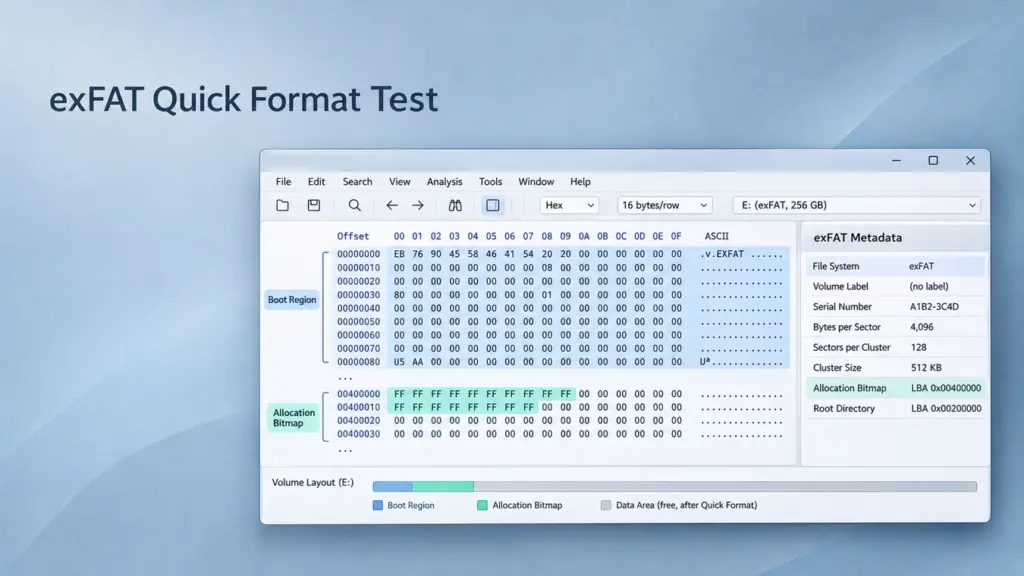
The exFAT boot region after formatting describes the newly created file system, not a saved version of the previous one. A quick format creates fresh metadata while some old file contents may remain readable elsewhere on the device. Recovery depends on which structures were replaced and whether the underlying data still exists.
This distinction matters when a USB drive, SD card, or external disk appears empty or requests formatting. Repairing damaged boot information can sometimes restore access, but it cannot undo metadata overwritten by a completed format. This guide examines the exFAT file system using WinHex, separating boot-region repair from recovery of files whose original directory links have disappeared.
Table of Contents
exFAT Metadata Quick Format Comparison
A meaningful comparison separates the file system’s layout, allocation records, directory information, and actual file contents.
Structure | Before formatting | After an exFAT quick format | Recovery significance |
Main and Backup Boot Regions | Describe the existing volume | Describe the newly formatted volume | Valid boot information does not establish that old files remain accessible |
Allocation Bitmap | Records clusters unavailable for allocation | Reflects allocations belonging to the new file system | Old file clusters can become available without their contents being erased |
FAT | Contains chains for allocations that use FAT chaining | Initialized for the new layout | Original chains may be lost, especially affecting fragmented files |
Root directory | Links files, subdirectories, and system metadata | Initialized with the new volume’s metadata entries | Old names and directory links can be overwritten |
Other directory clusters and file contents | Hold the original information | May survive outside areas rewritten or otherwise made unreadable | Surviving metadata or content may support extraction |
The exact write ranges depend on the formatter, settings, and device. The published exfatprogs formatter implementation provides one concrete example: its quick-format path clears an initial area through the new root directory and writes fresh boot, FAT, bitmap, and directory structures. That implementation is evidence of how a formatter can work, not a byte-for-byte specification of Windows behavior.
An empty volume therefore does not prove complete erasure. Conversely, a quick format does not guarantee recovery. Metadata writes can destroy older records, while supported discard/TRIM operations can make additional data unavailable. The distinction between missing references and replaced contents is explained further in data overwriting and recovery limits.
Reading the exFAT Boot Region After Formatting
exFAT has a Main Boot Region at volume-relative sectors 0–11 and a Backup Boot Region at sectors 12–23. Each includes a boot sector, extended boot sectors, OEM parameters, a reserved sector, and a checksum sector.
The backup protects boot information. It is not a backup of the root directory, Allocation Bitmap, or file contents, and formatting can initialize both boot regions.
When examining a boot sector, use offsets relative to that sector’s beginning:
Byte offset | Field | Interpretation |
|
| Eight-byte identifier: |
|
| Media-relative partition offset in sectors; zero means this field is ignored |
|
| Volume length in sectors |
|
| FAT location and length in sectors |
|
| Cluster Heap location and cluster count |
|
| Starting cluster of the root directory |
| Sector and cluster shifts | Bytes per sector = |
Multibyte numbers use little-endian encoding. For example, 00 80 00 00 00 00 00 00 represents 32,768, not 128.
Both boot regions need independent checksum validation. The checksum processes each region’s first 11 sectors, excluding boot-sector bytes 106, 107, and 112, then repeats the resulting 32-bit value throughout its checksum sector. Backup VolumeFlags and PercentInUse values may be stale, so identical bytes throughout both regions are not a universal requirement. The volume boot record guide explains these validation rules in more detail.
Interpreting the exFAT Bitmap Before and After Format
The Allocation Bitmap records whether each cluster is available. A zero bit means available; a one bit means unavailable. Its first byte covers clusters 2–9, starting with the least significant bit.
For cluster number N:
- Bitmap byte index = floor((N – 2) / 8)
- Bit position = (N – 2) mod 8
Example: Clusters 18–20 correspond to bits 0–2 of bitmap byte 2. If that byte changes from 07 to 00, those clusters have become available in the new allocation map. That change alone says nothing about the bytes stored inside them.
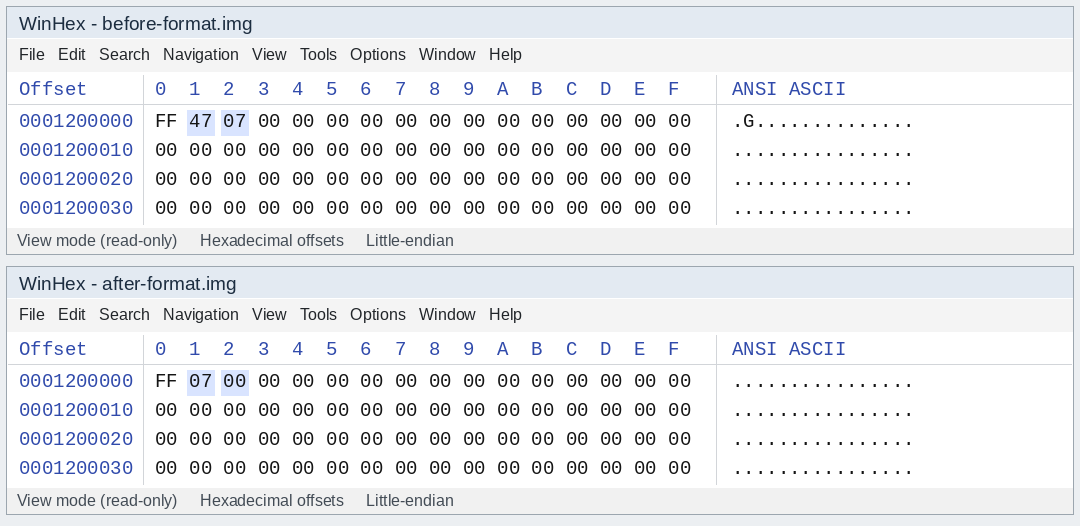
Example: Redrawn WinHex-style views show selected allocation bits cleared after formatting. These are constructed comparison bytes, not a captured formatting test. System allocations remain marked in the bitmap.
Locate the bitmap through its 0x81 entry in the root directory; do not assume a fixed physical address. If formatting changes its location, compare the old and new bitmap structures at their respective addresses.
The FAT serves a different purpose. Check the file’s Stream Extension entry: when NoFatChain is set, its allocation is contiguous and the corresponding FAT entries must not be used to determine its extent. An empty-looking FAT therefore does not prove that a contiguous file was erased.
A WinHex Workflow for Boot-Region Recovery
A published WinHex recovery case concerns an unreadable exFAT device with partition information and an apparently displaced boot sector. It does not document a controlled before-and-after quick-format test. Its useful lesson is to locate surviving structures and check their relationships before changing anything.
1. Preserve the Device and Work on an Image
Cancel any format prompt. Create a raw sector image on another physical device, keep an unchanged master copy, and analyze a working copy in WinHex’s read-only/view mode. Confirm the source by capacity and device identity before imaging.
A whole-disk image includes partition information; a volume image normally begins at the volume itself. Record which kind is open because their offsets differ. Do not format a replacement volume and copy the image into it as a substitute for preserving the original sector layout.
If the device disconnects or reports read errors, repeated repair attempts are inappropriate; first obtain a reliable acquisition or professional assessment.
2. Locate Candidate Boot Sectors
In the image, inspect the expected partition start and search for EXFAT . A candidate commonly begins with EB 76 90, followed by that identifier.
For a whole-disk image:
- Volume start byte offset = partition starting LBA × logical sector size
Example: LBA 0x8000 with 512-byte logical sectors gives offset 0x01000000.
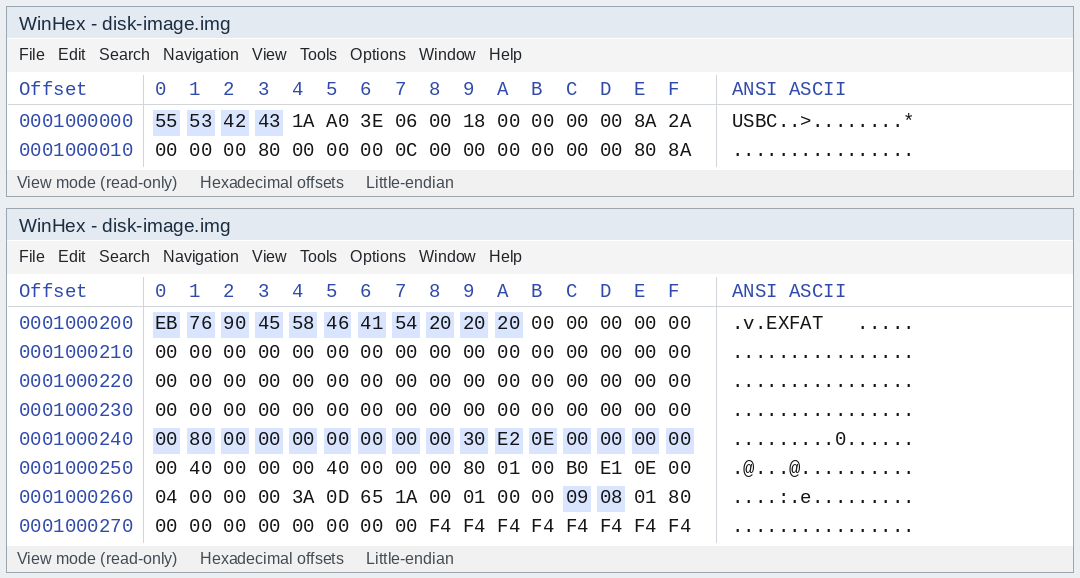
Unexpected bytes appear at 0x01000000, while a candidate exFAT boot sector begins at 0x01000200. This illustrates an apparent one-sector displacement, not a normal quick-format result.
Finding the identifier one sector later is a clue. It does not establish that the entire partition should move, or that all following structures share the same displacement.
3. Validate Geometry Against Surviving Metadata
Decode the candidate’s fields and check that the volume fits within the image, the FAT can describe the stated cluster count, and the Cluster Heap lies within the volume. Navigate to the calculated root directory and inspect its entries.
For cluster N, with B bytes per sector, S sectors per cluster, H as ClusterHeapOffset, and P as the independently established volume-start LBA:
- Disk byte offset = [P + H + (N – 2) × S] × B
For a volume-only image, omit P. Sector size and allocation unit size are different quantities; substituting one for the other produces incorrect addresses.
Look for consistent root-directory, bitmap, and file references. A familiar signature or a readable filename alone is insufficient evidence of a valid layout.
4. Check the Backup Region and Repair Only the Copy
At the independently validated volume start, inspect sectors 12–23 and verify the backup’s checksum and geometry. A structurally valid backup must also describe the surviving metadata before it can support a repair.
For isolated Main Boot Region damage, restoring matching boot information from a validated backup may be appropriate on the working image. If both regions describe a newly formatted volume, copying between them will not restore the old directory tree.
The reference case describes moving displaced main-region sectors and supplying a checksum sector from the backup. Such an operation requires verifying every source and destination first. Read source bytes into a separate buffer before an overlapping copy; recompute the resulting region’s checksum rather than assuming a borrowed checksum still matches.
Do not copy a donor disk’s partition entry or boot sector. Its geometry can differ. MBR entry reconstruction and GPT repair also require different structures; a protective MBR is not the GPT partition map.
5. Reopen and Export Before Allowing Writes
Reopen the modified image in a read-only parser or recovery environment. If files become accessible, copy them to a separate healthy device and validate them. Avoid mounting the damaged source writable simply to see whether File Explorer opens.
Boot-region repair is successful only at the structural level until the required files have been extracted and checked.
Extracting Files from Surviving Directory Entries
After a genuine quick format, the new boot region may already be valid while the old root directory is gone. Manual extraction then depends on surviving file records and data, rather than replacing the boot sector.
Search the working image for a known filename using UTF-16 little-endian text. exFAT directory entries are 32 bytes each. A typical active file entry set contains:
Entry type | Role | Useful information |
| File entry | Secondary-entry count, attributes, timestamps, entry-set checksum |
| Stream Extension | Allocation flags, name length, valid data length, first cluster, data length |
| File Name | Filename characters in UTF-16LE |
Validate the complete set, including its checksum, rather than treating a text match as a recoverable file. An old entry can still look active even when no current directory links to it.
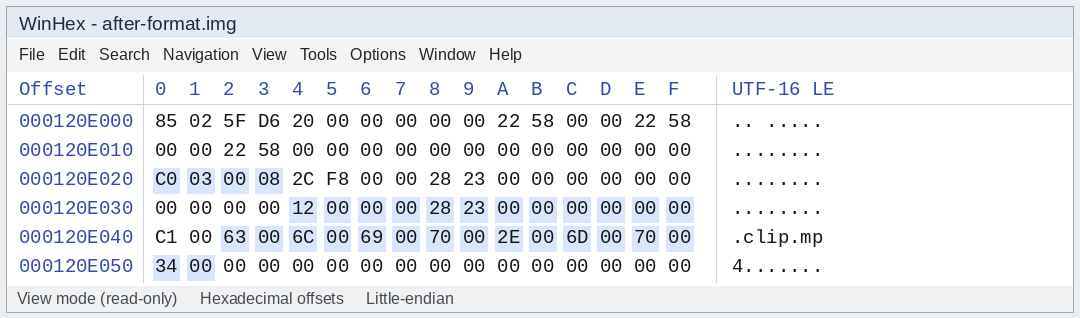
Example: A redrawn entry set describes clip.mp4, with Stream Extension flags 03, first cluster 18, and data length 9,000 bytes. These constructed bytes illustrate metadata interpretation, not a verified recovered file.
For that example, assume the original layout used 512-byte sectors, eight sectors per cluster, P = 32768, and H = 4096.
The file begins at:
- [32768 + 4096 + (18 – 2) × 8] × 512
- = 18,939,904 bytes
- = 0x01210000
With NoFatChain = 1, its 9,000 bytes occupy three consecutive 4,096-byte clusters. Define a block starting at 0x01210000 with a length of 9,000 bytes and export that block to another device. The inclusive final offset is 0x01212327; do not export all three clusters as file content. This example assumes ValidDataLength also equals 9,000; bytes beyond a smaller valid data length are not established user data.
If NoFatChain = 0, follow and validate the original FAT chain instead. A new FAT can have replaced that chain, and exporting consecutive clusters would then assemble unrelated data. Without usable metadata, file carving may identify content, but original names, folder relationships, and fragmented extents can remain unresolved.
Always use the original file’s geometry when interpreting an old entry. Current post-format parameters are not automatically valid for earlier allocations.
Validating Recovery and Recording a Comparison
To document an actual formatting comparison, retain images from before and after formatting a disposable test volume. Record the OS, formatter, device, sector size, cluster size, partition boundaries, and any writes afterward. Compare boot regions, bitmap locations, FAT ranges, root-directory clusters, and selected file extents separately.
Without a pre-format image, describe surviving evidence; do not claim to have measured which bytes changed during formatting.
Result | What it establishes | Next check |
Boot checksum validates | Boot-region bytes are internally consistent | Confirm geometry against metadata |
Directory becomes readable | Some directory relationships can be interpreted | Export required files |
Exported file has expected size | The extraction length is plausible | Open and inspect its contents |
Video plays at the beginning | Some initial media data is usable | Check seeking, later sections, and decoding errors |
File hash matches a trusted original | The recovered file matches that baseline | Preserve the recovered copy |
For a guided extraction workflow after an accidental USB format, see recovering files from a formatted USB drive. Save results elsewhere and assess actual file usability, rather than relying on a recovery count or a successful mount.
FAQs
Can the backup boot region undo an exFAT quick format?
Does a cleared Allocation Bitmap mean the old files were erased?
Can an exFAT file survive without a usable FAT chain?
NoFatChain = 1 and the required data remains readable. A file that requires a lost FAT chain is harder to reconstruct reliably.Does finding an MP4 filename prove the video is recoverable?
Should CHKDSK run before recovery?
Does changing cluster size during formatting erase every file?

Jason is a data recovery and technical support specialist with over 15 years of hands-on experience. He has worked extensively with frontline users, troubleshooting difficult data loss cases and providing practical recovery solutions for accidental deletion, formatted drives, damaged file systems, lost partitions, system failures, and other recovery emergencies. His expertise also includes backup and restoration, file repair, and disaster recovery, with a strong emphasis on safe, reliable, and technically accurate guidance.