
FAT32 Deletion Before and After: Directory Entry and FAT Test
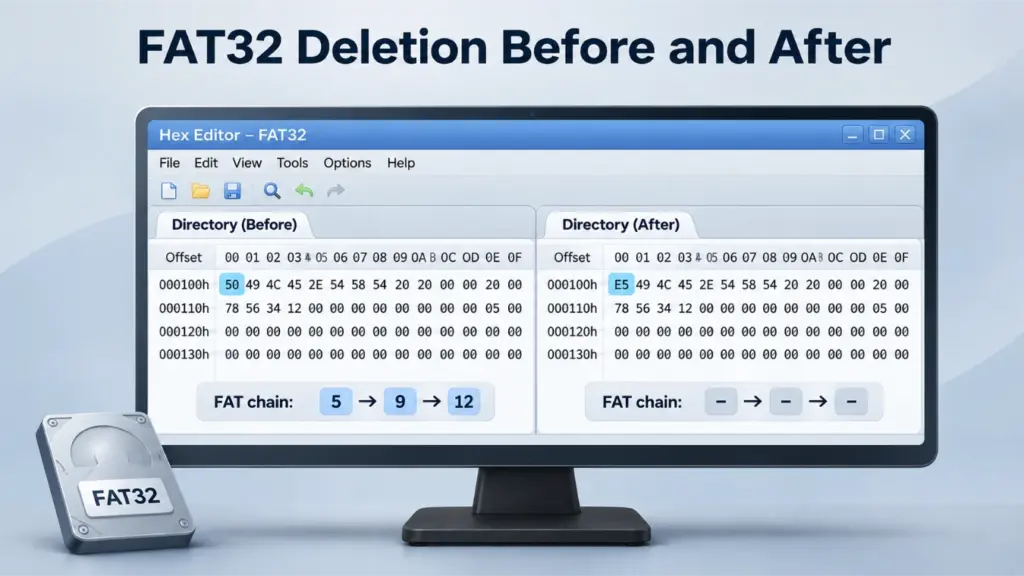
When Windows deletes a file from a FAT32 volume, the file can disappear from the directory even though its original data clusters still contain information. The key changes occur in two separate locations: the file’s directory entry and the File Allocation Table (FAT). This FAT32 deletion before and after experiment examines both regions at their actual byte offsets and explains what happens to the cluster chain, file contents, and recovery possibilities.
Table of Contents
What Changes When a FAT32 File Is Deleted?
A completed ordinary FAT32 deletion generally marks the short directory entry as free and releases the file’s allocated clusters in the FAT. For the short name PHOTO.JPG, the first directory-entry byte changes from 0x50 (the letter P) to 0xE5. Separately, its FAT chain entries change from allocation pointers to free entries.
These are different operations in different regions of the volume. The directory entry stores the file name, attributes, starting cluster, and file size. The FAT stores the links between data clusters. The ASCII column of a hex editor simply represents the bytes in the region being viewed; it does not contain a written description of a cluster chain.
The question is whether releasing this metadata also removes the file data. To answer it, the experiment compares the same directory-entry bytes and FAT entries before and after deletion, then examines fragmentation, an interrupted metadata update, and cluster reuse.
Reference Configuration and Sample File
The experiment uses a defined FAT32 reference volume with fixed offsets so every change can be traced to a particular byte. Its configuration is:
- Volume: 512 MiB FAT32 partition, starting at disk LBA
2048. - Sector and cluster sizes: 512 bytes per logical sector; 8 sectors (4,096 bytes) per cluster.
- FAT32 layout: 32 reserved sectors followed by two FAT copies of 1,024 sectors each.
- First FAT: starts at disk LBA
2080, or byte offset0x00104000. - Data region: starts at disk LBA
4128, or byte offset0x00204000. - Root directory: starts in cluster
2. ItsPHOTO.JPGshort entry begins at disk byte offset0x00204040(cluster-relative offset+0x40). - Sample:
PHOTO.JPG, 10,000 bytes, with three allocated data clusters.
The file occupies the fragmented chain 5 → 9 → 12 → EOC, where EOC means end of chain. In this layout, the first bytes of clusters 5, 9, and 12 begin at disk LBAs 4152, 4184, and 4208, respectively.
At 4,096 bytes per cluster, a 10,000-byte file requires three clusters. The first two contain 8,192 file bytes, while the last supplies the remaining 1,808 bytes. Thus, its allocation spans 12,288 bytes, including unused space at the end of the final cluster.
The 32-byte short directory entry records the starting cluster at entry-relative offsets +0x14 and +0x1A, and the file size at +0x1C. For this sample, those fields decode to starting cluster 5 and size 10,000 (10 27 00 00 in little-endian order).
Experiment Procedure: S1–S5
The FAT32 deletion before and after comparison uses five clearly defined states. S1 is the baseline; S2 shows completed deletion; S3–S5 isolate conditions that change the interpretation. Each comparison preserves the same volume geometry and uses matching offsets for its before and after states.
- S1 — Intact file: Keep
PHOTO.JPGactive with directory marker0x50and FAT entriesFAT[5] = 9,FAT[9] = 12, andFAT[12] = 0x0FFFFFFF. Its 10,000 file bytes occupy clusters5,9, and12. - S2 — Completed deletion: Change the first byte of the
PHOTO.JPGdirectory entry to0xE5. ClearFAT[5],FAT[9], andFAT[12]to0x00000000in both mirrored FAT copies. Leave the former data-cluster bytes unchanged. - S3 — Contiguous control: Begin with a second placement of the same file in clusters
5 → 6 → 7 → EOC. Then mark its directory entry deleted and clear those three FAT entries. The file bytes remain in the same contiguous locations. - S4 — Directory-only update: Change the directory marker to
0xE5but retain the FAT pointers5 → 9 → 12 → EOC. This creates a directory/FAT inconsistency that resembles an interrupted update rather than a completed deletion. - S5 — Deletion followed by reuse: Begin with S2, then allocate former cluster
9to another one-cluster file. Its old 4,096 bytes are replaced, andFAT[9]becomes EOC for the new allocation. The originalPHOTO.JPGentry remains marked deleted.
Keep the original device unchanged when investigating lost files. Any attempt to reproduce metadata changes on storage media should use an expendable test volume or a separate copy.
FAT32 Deletion Before and After: Hex Results
The two structural changes appear at separate disk offsets. First, inspect the directory-entry marker in root-directory cluster 2. Then inspect the cluster allocation pointers in FAT #1. Each pair of figures shows the same region before and after S2 using the same offset basis and byte-column order.
Figure 1 and Figure 2: Directory Entry Before and After
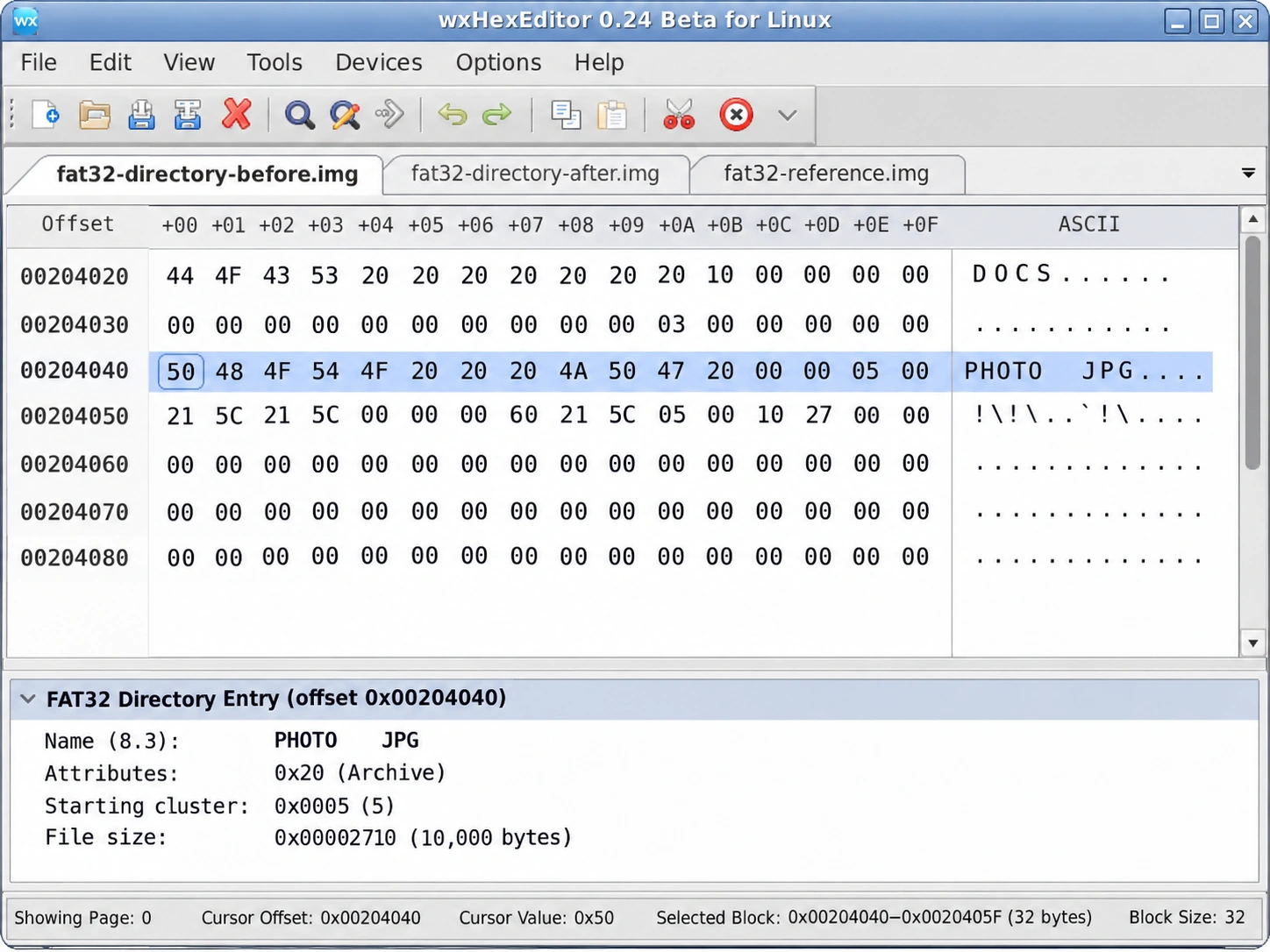
Figure 1. Directory entry before deletion (S1). At disk offset 0x00204040, the short entry for PHOTO.JPG begins with 50. The field at entry offset +0x1A stores starting cluster 5, and +0x1C stores the 10,000-byte file size.
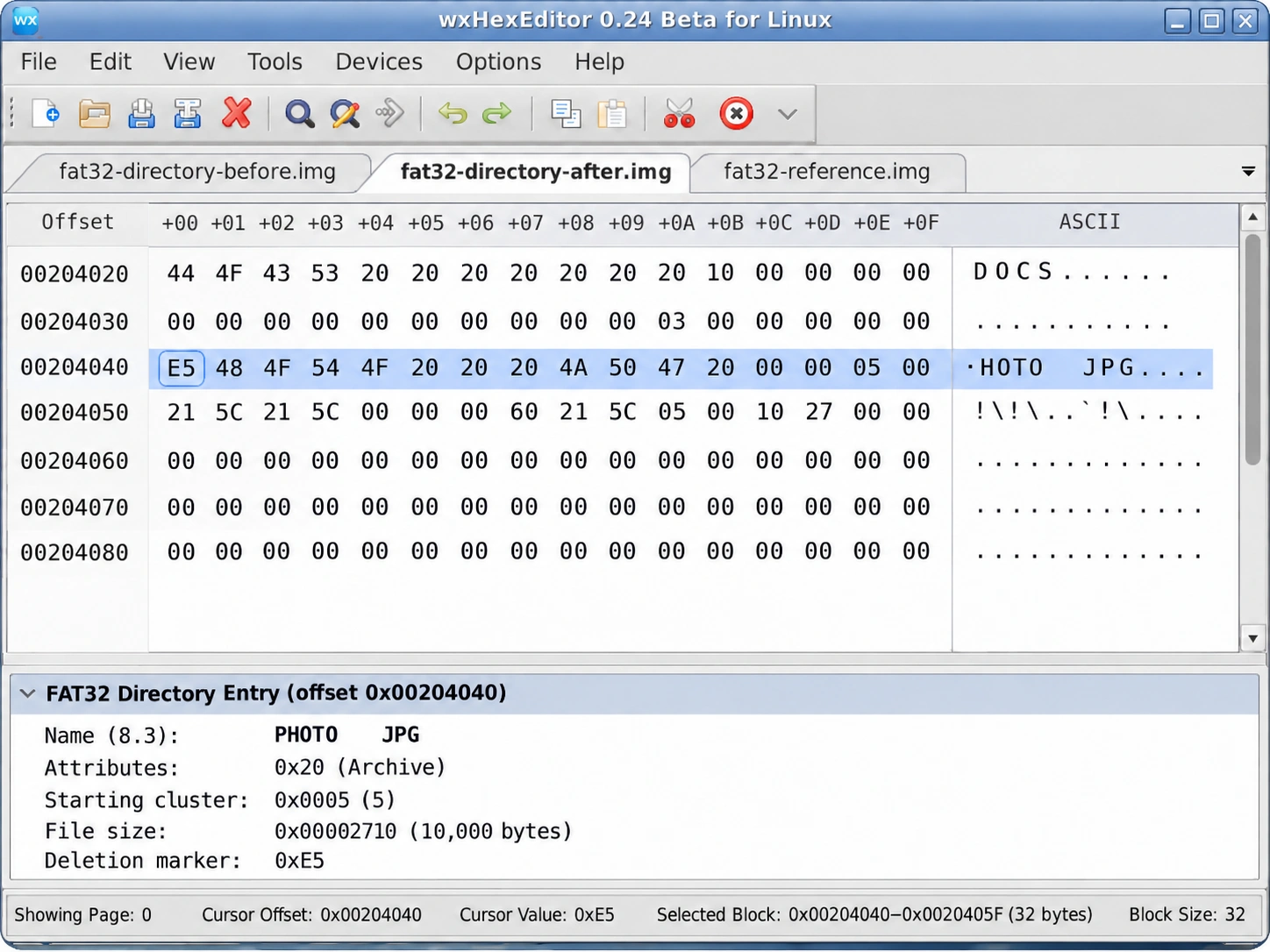
Figure 2. The same directory entry after deletion (S2). Its first byte is E5 at disk offset 0x00204040. The starting-cluster and file-size fields in this comparison remain unchanged.
The FAT32 deleted directory entry experiment highlights an important distinction. At entry-relative offset +0x00, 0xE5 means the slot is free; it does not mean all 32 bytes have been erased. As a result, the file size and starting cluster can remain available for analysis even when the file is no longer listed in the directory.
The ASCII area beside these bytes reflects only the directory data. For example, the first character of PHOTO.JPG is shown as P before deletion; once replaced by E5, that position becomes a nonprintable or code-page-dependent character in a typical ASCII view. The remaining short-name characters still correspond to bytes in the directory entry.
Figure 3 and Figure 4: FAT Chain Before and After
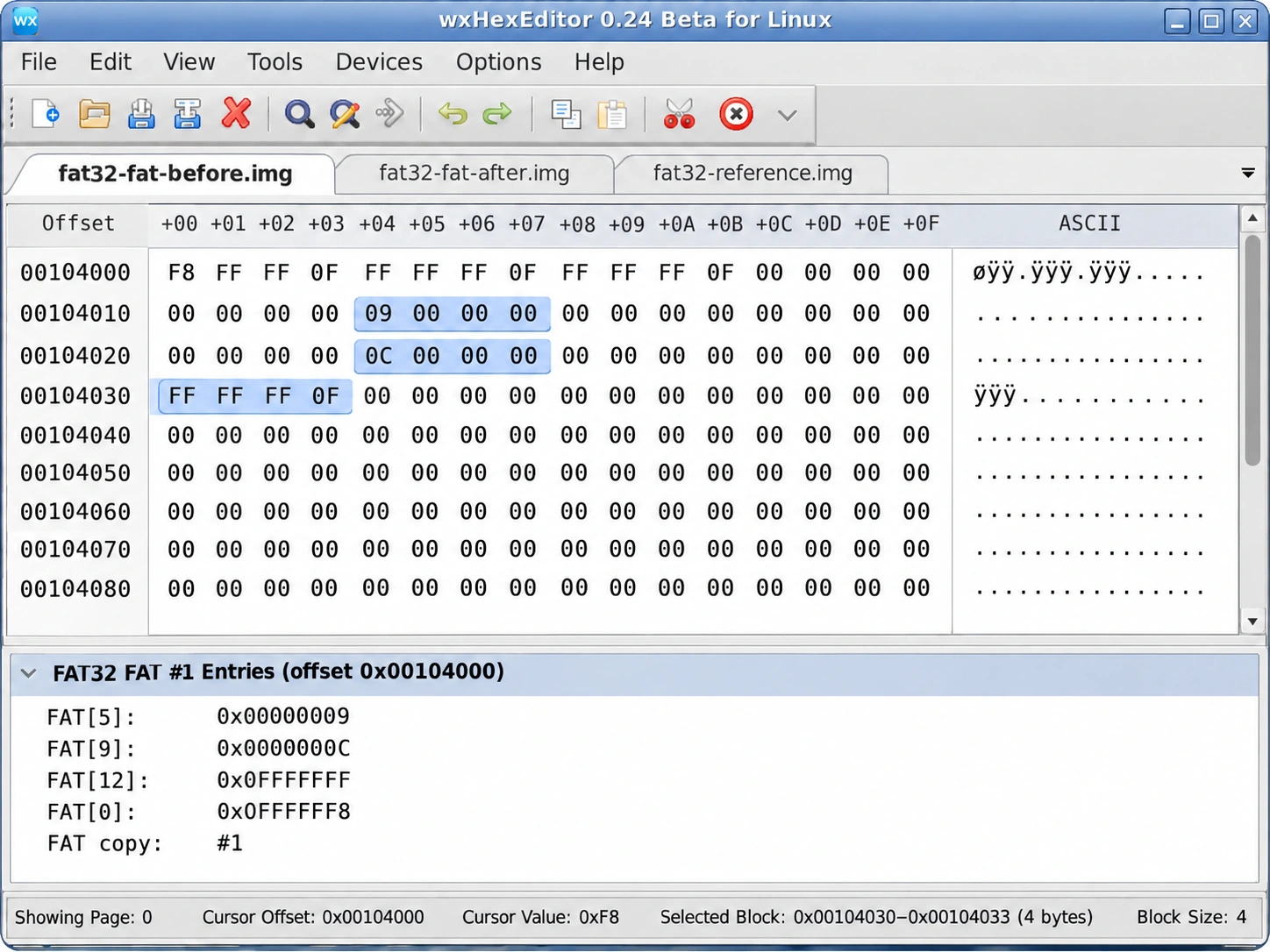
Figure 3. FAT #1 before deletion (S1). The relevant entries are FAT[5] = 9 at 0x00104014, FAT[9] = 12 at 0x00104024, and FAT[12] = 0x0FFFFFFF at 0x00104030.
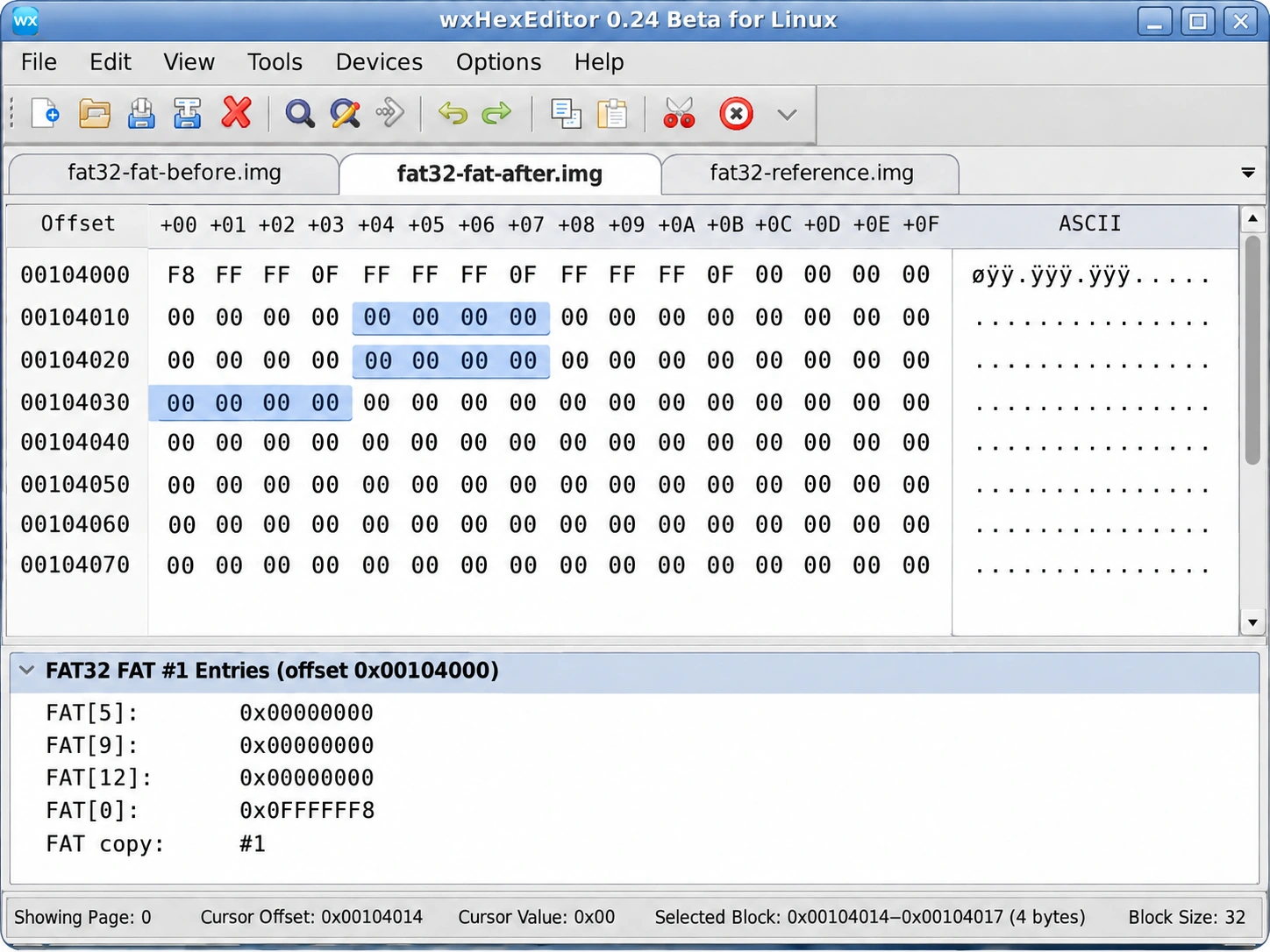
Figure 4. The same FAT region after deletion (S2). The entries for clusters 5, 9, and 12 contain 00 00 00 00, marking those clusters free.
At the FAT #1 starting offset 0x00104000, the first four bytes are F8 FF FF 0F (FAT[0]). The next entry, FAT[1], is FF FF FF 0F, while FAT[2] = FF FF FF 0F marks root-directory cluster 2 as the end of its chain in this reference layout. These bytes remain unchanged in S2; only the entries for the deleted file’s clusters are cleared.
A FAT32 FAT entry after deletion tells a different story from a deleted directory entry. Each FAT32 allocation entry occupies four bytes, and the low 28 bits carry the cluster-allocation value. The disk location of entry N is the FAT start plus 4 × N bytes.
Before deletion, the entries contain little-endian values 09 00 00 00, 0C 00 00 00, and FF FF FF 0F. After S2, all three contain 00 00 00 00. The data clusters themselves occupy the data region, not the FAT. Therefore, a zeroed FAT chain does not by itself show that JPEG payload bytes were overwritten.
The FAT view’s ASCII column displays the actual FAT-area bytes, most of which appear as dots because they are nonprintable. The interpretation 5 → 9 → 12 → EOC comes from decoding FAT entry values, not from text stored in the ASCII column.
Comparing S3–S5 With the Main Result
The additional states reveal why the same directory marker can lead to different recovery outcomes.
S3 — Contiguous file. Deleting a contiguous file also clears its FAT entries. However, the original data lies in successive clusters (5, 6, 7). If those clusters are still available and unchanged, a reconstruction that reads them consecutively may reproduce the file. Adjacency alone, however, does not prove that these were the original locations.
S4 — Directory-only update. The directory entry is marked free, yet clusters 5, 9, and 12 remain allocated and connected. Since the FAT still contains a chain without a live directory reference, this state differs from normal completed deletion. It relates to the orphaned files and lost cluster chains mechanism.
S5 — Cluster reuse. Cluster 9 now belongs to another file. Its 4,096 bytes of previous content have been replaced, while clusters 5 and 12 retain 5,904 bytes of the original 10,000-byte file. Recovering the deleted entry or the old chain cannot recreate the overwritten 4,096 bytes.
The accompanying interactive Hex comparison allows readers to switch between S1–S5 and choose Directory Entry or FAT #1. Both stages stay visible together, but each view displays only the bytes belonging to the selected disk region.
Why Directory Entries and FAT Records Must Be Examined Separately
A FAT32 directory is itself a chain of data clusters containing fixed-size records. By contrast, the FAT occupies a dedicated metadata area near the beginning of the volume. A directory entry identifies a file’s starting cluster, while the File Allocation Table links later clusters to one another.
For example, the FAT32 directory entry structure defines DIR_Name at entry offset 0, DIR_FstClusHI at offset 20, DIR_FstClusLO at offset 26, and DIR_FileSize at offset 28. The three FAT pointers in this experiment are not part of that 32-byte directory entry. They are located elsewhere in the FAT area.
This separation also explains why surviving directory metadata does not guarantee successful recovery. The starting cluster and file size might identify the beginning and expected length, yet the deleted allocation pointers may no longer reveal the sequence of a fragmented file.
PHOTO.JPG uses a traditional 8.3 short name, so one directory record is enough to demonstrate its deletion marker. Longer file names may also require adjacent long-file-name (LFN) entries with attribute 0x0F; deleting such a file affects the relevant name entries as well.
These interpretations follow the field layout, deletion markers, FAT32 entry widths, and allocation rules defined in the Microsoft FAT Specification.
When File Recovery Comes Before File-System Repair
After deletion, Windows may stop listing a file even though its former data clusters remain readable. However, the directory’s first-cluster value cannot reveal a missing fragmented chain on its own. Later writes can also replace data in clusters that FAT32 has marked free.
When the data matters, avoid writing to the affected volume and recover files to another disk before trying repairs. Magic Data Recovery can scan FAT32 storage for recoverable files, but any overwritten bytes remain a separate limitation. Avoid formatting, copying new files onto the drive, or running chkdsk before preserving the data you need.
Practical Interpretation and Limits
The FAT32 deletion before and after comparison illustrates three distinct conditions: a directory reference becomes free, FAT allocations are released, and original data may persist until later writes. These conditions should not be mistaken for a single operation in which every file byte is erased.
Still, device state matters. In a real investigation, verify the relevant directory location, both FAT copies, and the former data clusters. Interrupted writes, inconsistent metadata, directory-slot reuse, and flash storage behavior can affect what remains accessible. A directory-only update such as S4 is a different condition from the completed deletion represented by S2.
Likewise, FAT32 deletion and FAT32 quick formatting should remain separate investigations. Deletion changes the metadata associated with an individual file; formatting can initialize or replace broader file-system structures.
Conclusion
The FAT32 deletion before and after experiment shows why a deleted file can become invisible without immediately losing all its content. At the directory location, the first byte of PHOTO.JPG changes from 50 to E5. In the separate FAT region, entries 5, 9, and 12 change to free values.
Those changes remove the directory reference and cluster-chain mapping, not necessarily the file bytes. A contiguous file may be easier to reconstruct from unchanged clusters, while a fragmented file loses its allocation order and a reused cluster loses overwritten content. For a reliable interpretation, compare the directory entry, FAT records, and data region as three distinct sources of evidence.
FAQs
Does deleting a FAT32 file erase its contents immediately?
What does 0xE5 mean in a FAT32 directory entry?
DIR_Name[0] contains 0xE5, FAT treats that directory entry as free. Other fields in the 32-byte record can remain unchanged. The value does not describe the file's FAT chain or prove that its contents have been erased.Why does a FAT32 FAT entry become zero after deletion?
Can FAT32 recover a fragmented file after its FAT chain is cleared?
Are 0x00 and 0xE5 the same directory marker?
0xE5 marks an unused entry, whereas a first byte of 0x00 also indicates that no subsequent allocated entries follow in that directory. They should not be treated as identical during byte-level analysis.How is a deleted FAT32 file different from an orphaned cluster chain?

Vasilii is a data recovery specialist with around 10 years of hands-on experience in the field. Throughout his career, he has successfully solved thousands of complex cases involving deleted files, formatted drives, lost partitions, and RAW file systems. His expertise covers both manual recovery methods using professional tools like hex editors and advanced automated solutions with recovery software. Vasilii's mission is to make reliable data recovery knowledge accessible to both IT professionals and everyday users, helping them safeguard their valuable digital assets.