
File Allocation Table (FAT): How It Works
A file allocation table (FAT) is a data structure that tracks how storage clusters are allocated to files and how those clusters connect. It forms a central part of FAT12, FAT16, and FAT32 file systems, helping operating systems locate and read data on disks and removable storage.
You’ll encounter FAT on older hard drives, USB flash drives, memory cards, and devices that prioritize compatibility. Understanding it also helps explain why damaged file system information can make files inaccessible, even when some of their contents remain intact. For broader disk-related topics, see our hard drive solutions guide.
This guide covers the file allocation table definition, its underlying mechanism, structural components, differences between FAT variants, and what these details mean when you encounter storage problems.
Table of Contents
File Allocation Table: Quick Facts
Property | Details |
Full name | File Allocation Table |
Acronym | FAT |
Category | File system allocation structure |
Main purpose | Track cluster allocation and file cluster chains |
File system variants | FAT12, FAT16, FAT32 |
Related file system | exFAT, which uses a different allocation design |
Common devices | Older hard drives, USB drives, SD cards, embedded systems |
Key components | Boot sector, FAT region, directory entries, data region |
Main limitation | Limited metadata protection compared with NTFS |
Can it be deleted? | No. Removing or corrupting FAT metadata can prevent file access |
In short: The FAT works as a map of file clusters. The operating system uses directory entries to find where a file starts, then follows allocation records to locate the rest of its data.
What Does a File Allocation Table Do in Simple Terms?
Imagine storing a large document across several numbered boxes.
The first box contains the beginning of the document, but the remaining pages sit in different boxes throughout a warehouse.
To retrieve the complete document, you need a record showing which box comes next.
The file allocation table serves a similar purpose.
When a file occupies multiple storage clusters, FAT records how those clusters connect. Meanwhile, a directory entry identifies the file and the location of its first cluster.
These two structures work together:
- The directory entry tells the system which file to open and where its data begins.
- The FAT identifies the next cluster in the file’s sequence.
- The data region contains the actual file contents.
The analogy has one important limitation: FAT is not a list of filenames or a copy of every file. Directory structures hold filenames and other metadata, while the data region stores the content.
If the allocation information becomes damaged, the operating system may lose the connections between clusters. As a result, a file can become unreadable without every data cluster being physically erased.
How Does the File Allocation Table Work?
To understand how the file allocation table works, consider what happens when an operating system saves and opens a document.
Step 1: The File System Allocates Clusters
A FAT-formatted volume divides its data area into clusters. Each cluster consists of one or more disk sectors.
For example, suppose a volume uses 4 KB clusters.
A 10 KB document would need at least three clusters, assuming ordinary allocation without compression.
Those clusters do not have to occupy neighboring locations. The operating system can use available space elsewhere on the volume.
Step 2: The FAT Records Cluster Connections
When the system allocates storage to the document, it updates the file allocation table to record the cluster chain.
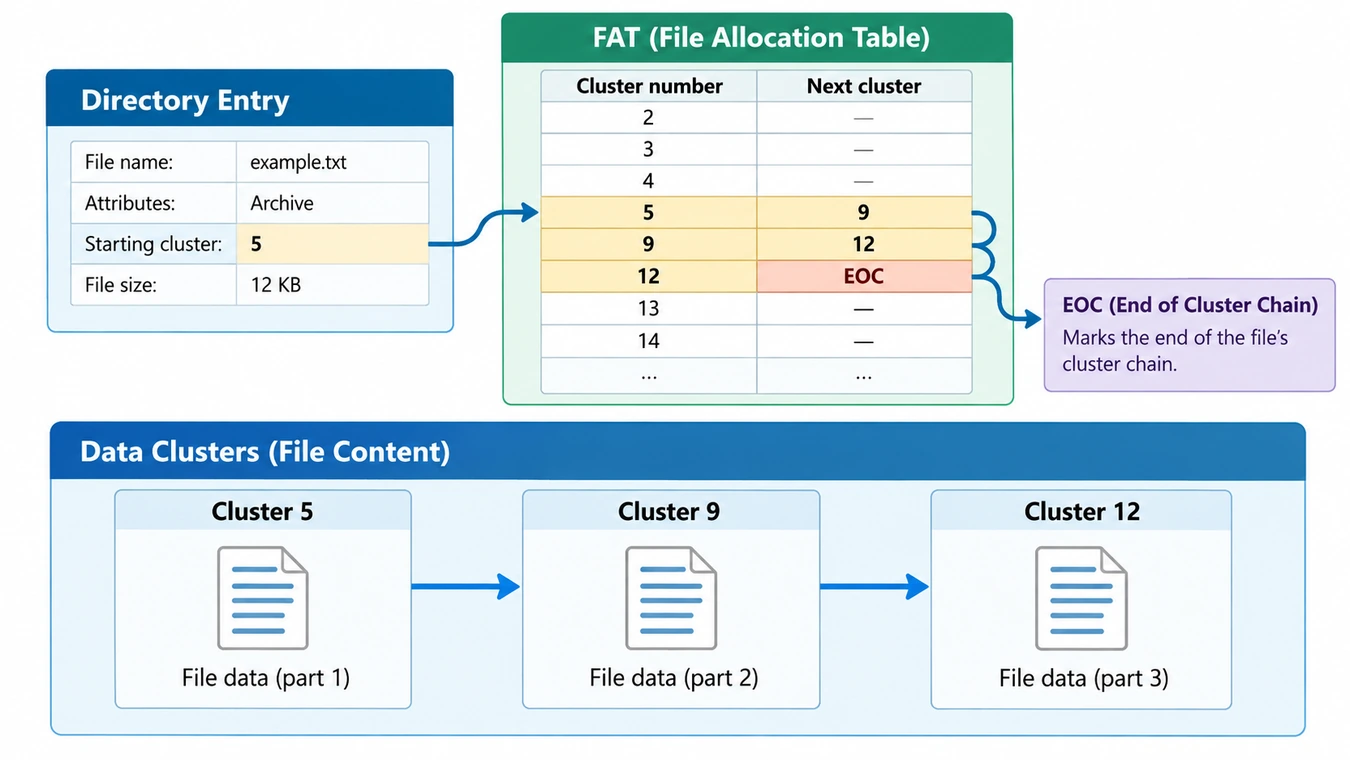
Consider a file stored in clusters 5, 9, and 12.
Cluster 5 → Cluster 9 → Cluster 12 → End of Chain
The FAT entries would conceptually contain:
Cluster number | FAT entry | Meaning |
5 | 9 | Next cluster is 9 |
9 | 12 | Next cluster is 12 |
12 | End-of-chain marker | Final cluster |
15 | Free | Available for allocation |
This linked structure allows the operating system to follow the file’s data even when the clusters are physically separated.
Step 3: Directory Entries Identify the File
A directory entry contains information such as:
- Filename and extension
- File size
- Attributes
- Timestamps
- Starting cluster
When you open a document, the operating system first reads the relevant directory entry.
It then identifies the starting cluster and follows the FAT chain until it reaches the end-of-chain marker. The recorded file size determines how many bytes belong to the document.
Step 4: FAT Updates When Files Change
When a file grows, the operating system may allocate additional clusters and update the chain.
Likewise, deleting a file from a traditional FAT volume generally marks its directory entry as deleted and releases its clusters for reuse.
Although the original data may remain temporarily, some allocation information can disappear.
This explains why recovering fragmented deleted files can be harder than recovering files stored in contiguous clusters.
File Allocation Table Structure: What Is Stored Where?
The file allocation table is one component of a larger FAT file system layout.
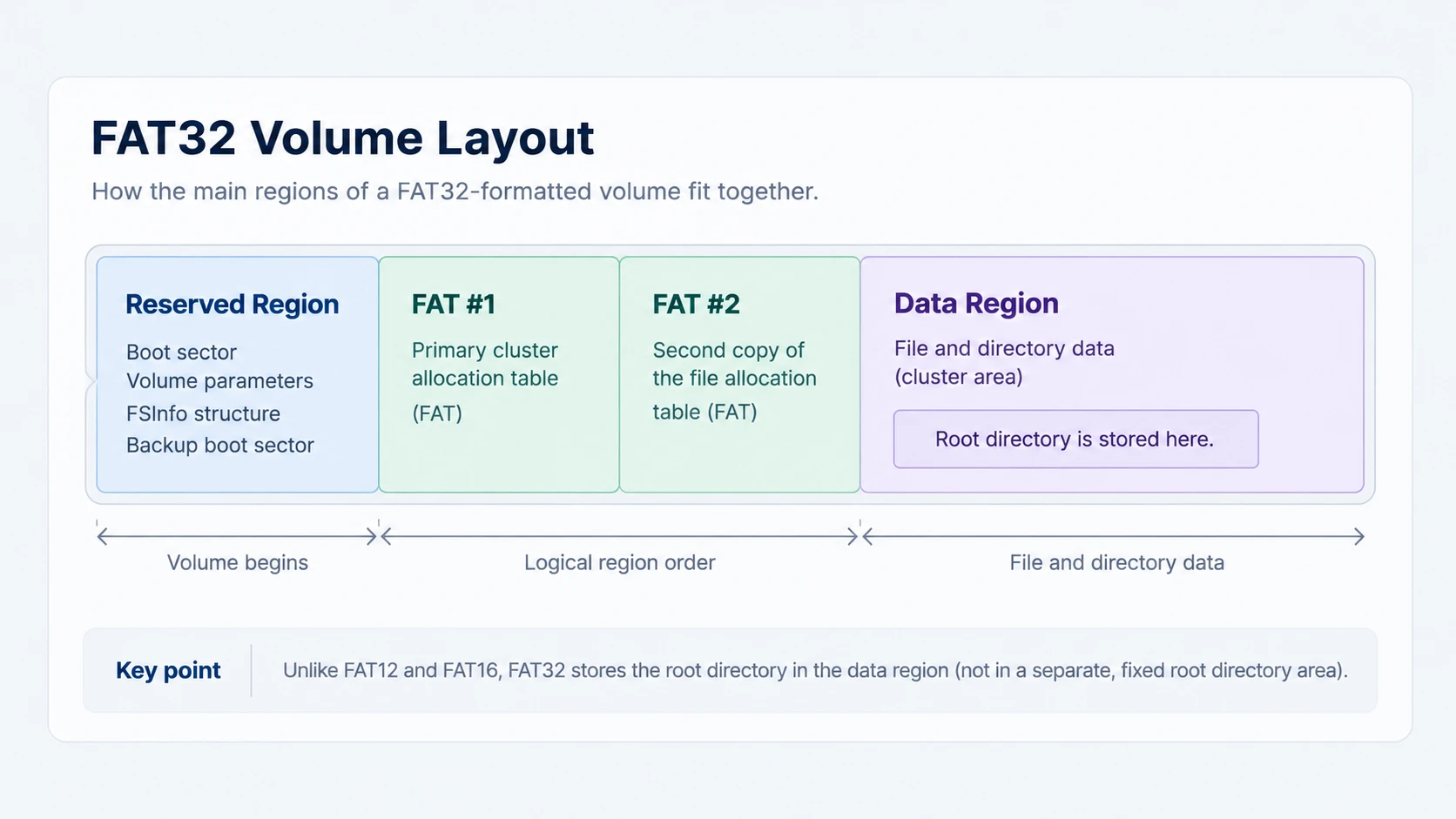
Traditional FAT volumes generally contain a reserved region, one or more FAT copies, directory structures, and a data region.
Boot Sector and Reserved Region
The boot sector contains parameters that describe how the volume is organized.
These include the number of bytes per sector, sectors per cluster, reserved sectors, and FAT copies.
The operating system uses these values to locate and interpret the remaining file system structures.
If critical parameters become unreadable, Windows may fail to recognize the volume correctly.
FAT Region
This region contains the allocation table entries.
Each entry can identify:
- A free cluster
- The next cluster in a chain
- The end of a cluster chain
- A cluster marked as bad
Traditional FAT volumes commonly maintain two FAT copies for redundancy.
However, the second copy is not a complete backup. Both tables may contain identical damage, and neither stores the entire contents of user files.
Directory Structures
Directories store file and folder records.
FAT12 and FAT16 traditionally use a fixed-size root-directory region. In contrast, FAT32 places its root directory in the data region, where it can grow through normal cluster allocation.
This difference matters because FAT32 offers more flexible directory organization than its predecessors.
Data Region
The data region holds file contents and most directory contents.
Its clusters are numbered, typically beginning with cluster 2.
The FAT connects those cluster numbers into sequences, while directory metadata identifies the first cluster associated with each file.
Therefore, the allocation table describes where content resides rather than containing that content itself.
For technical implementation details, Microsoft provides an open-source FAT file system driver sample.
Types of File Allocation Table: FAT12, FAT16, FAT32, and exFAT
The traditional FAT variants differ primarily in the size of their allocation entries and the number of clusters they can address.
File system | Allocation structure | Typical use |
FAT12 | 12-bit FAT entries | Floppy disks and small legacy volumes |
FAT16 | 16-bit FAT entries | Older hard disks and embedded devices |
FAT32 | 32-bit FAT entries, with 28 bits used for cluster addressing | Removable storage and compatible devices |
exFAT | FAT-family design with an allocation bitmap | Modern high-capacity removable storage |
FAT12: Early Small-Capacity Storage
FAT12 appeared in early personal computing systems and was particularly suitable for floppy disks.
Its limited cluster addressing restricts the amount of storage it can manage efficiently.
Although rare on modern consumer storage, FAT12 remains relevant to legacy hardware and specialized environments.
FAT16: Expanded Cluster Addressing
The FAT16 file system uses larger FAT entries than FAT12.
This allows it to address more clusters and accommodate larger volumes.
However, its fixed root-directory structure and capacity constraints make it less practical for modern storage.
FAT16 still appears in industrial equipment, older removable media, and certain embedded devices.
FAT32: Greater Capacity and Compatibility
The FAT32 file system expanded cluster addressing while preserving the traditional FAT allocation mechanism.
It also changed how the root directory is stored.
FAT32 remains useful because many cameras, game consoles, firmware tools, and removable devices recognize it.
However, it cannot store an individual file larger than 4 GiB minus one byte.
For example, a FAT32 drive with 100 GB of free space still cannot accept a single 6 GB video file.
exFAT: A Related but Different Design
The exFAT file system addresses several limitations of older FAT variants.
It supports much larger files and volumes, making it useful for modern removable storage.
However, exFAT is not simply FAT32 with larger entries.
Unlike traditional FAT systems, exFAT uses an allocation bitmap to track which clusters are available. FAT chains remain part of the format, but contiguous files can avoid using them.
Microsoft documents this distinction in the official exFAT File System Specification.
Why Does the File Allocation Table Still Matter?
Although FAT originated decades ago, its design continues to influence storage compatibility, file access, and data recovery.
Device Compatibility
FAT32 remains useful when a device requires a widely supported format.
For example, an older digital camera may recognize FAT32 but not NTFS.
Likewise, some firmware-update tools require FAT-formatted USB media.
Choosing a file system that the target device supports matters more than choosing the newest available format.
File Access and Data Recovery
The file allocation table contains information needed to follow file cluster chains.
If the table becomes damaged, the operating system may lose access to a file even when its content remains on the storage device.
This distinction is important during data recovery.
A broken allocation chain does not automatically mean that every cluster has been overwritten. However, reconstructing a fragmented file without reliable cluster references can be difficult.
Storage Reliability
Traditional FAT file systems lack metadata journaling.
As a result, an interrupted write can leave allocation information and directory records inconsistent.
For example, disconnecting an external drive while files are being written may leave incomplete metadata updates.
However, file system corruption is not always caused by improper removal. Failing storage hardware, read errors, and software faults can produce similar symptoms.
File Allocation Table vs NTFS Master File Table
The file allocation table and the NTFS Master File Table both help operating systems organize files, but they operate differently.
Feature | FAT | NTFS MFT |
Used by | FAT12, FAT16, FAT32 | NTFS |
Main role | Track cluster allocation and chains | Store records describing files and directories |
Filename information | Stored in directory entries | Stored in MFT records |
File location information | Directory starting cluster plus FAT chain | NTFS data attributes and allocation metadata |
Metadata journaling | Not available in traditional FAT | Supported by NTFS |
The Master File Table (MFT) is a central metadata structure in NTFS.
Unlike FAT’s traditional linked-cluster design, NTFS maintains file records with attributes that describe each file and its storage allocation.
Consequently, the two structures are not interchangeable, even though both help the operating system locate data.
File Allocation Table vs Partition Table
Another common confusion involves partition tables.
A partition table, such as MBR or GPT partition information, describes how a physical disk is divided into partitions.
A file allocation table, by contrast, operates inside a FAT-formatted volume.
In other words, partition information identifies the volume’s boundaries, while FAT metadata helps organize files within that volume.
Damage to either structure can prevent normal access, but the cause and appropriate recovery approach differ.
Where Can You Find File Allocation Table Information in Windows?
You normally won’t see the allocation table itself in File Explorer.
However, Windows 10 and Windows 11 provide several ways to identify the file system used by a drive.
Check File Explorer
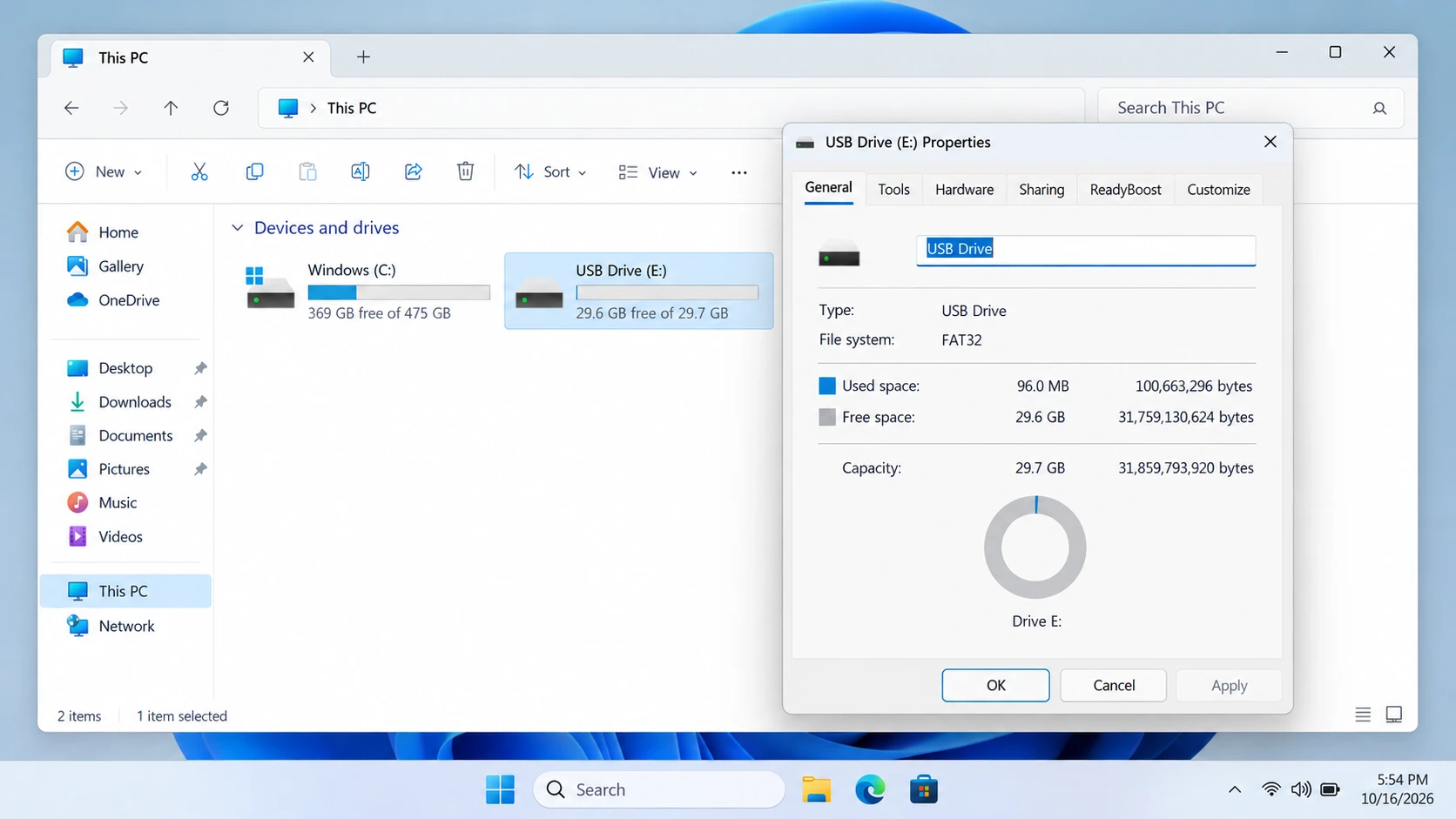
- Open File Explorer.
- Select This PC.
- Right-click a drive and choose Properties.
- Look for the File system field.
Windows may display FAT32, exFAT, or NTFS.
This identifies the recognized file system, but it does not show individual FAT entries or cluster chains.
Check Disk Management
Press Win + X and select Disk Management.
Locate the relevant partition and inspect its displayed file system information.
Disk Management also shows partition boundaries and allocation status, helping you distinguish a recognized volume from an unallocated region.
If Windows reports RAW, it cannot recognize a usable supported file system on that volume.
However, RAW does not automatically prove that FAT metadata is the cause.
Can You View the FAT Directly?
Advanced disk-analysis and forensic tools can inspect raw volume structures, including FAT entries and directory metadata.
However, these tools require technical knowledge. Incorrectly editing allocation values can disconnect cluster chains or make files inaccessible.
For ordinary users, identifying the file system through Windows is usually sufficient.
Common Misconceptions About File Allocation Tables
Several misunderstandings can lead to incorrect conclusions about FAT storage.
Misconception 1: The FAT Contains All File Data
The FAT mainly contains allocation information.
Directory entries identify files, while data clusters hold their contents.
Therefore, recovering an allocation table does not necessarily restore every missing file.
Misconception 2: Two FAT Copies Guarantee Recovery
Traditional FAT volumes commonly contain two table copies.
However, both may contain damaged or inconsistent entries.
The additional copy can help in certain circumstances, but it does not replace independent backups.
Misconception 3: FAT32 Is Always Better for Removable Storage
FAT32 offers broad compatibility, but its individual file-size limit can be inconvenient.
For modern devices that support it, exFAT may be more appropriate when transferring large video files, disk images, or archives.
Misconception 4: Every RAW Partition Has a Corrupted FAT
A RAW volume may result from damaged FAT metadata, but it can also indicate NTFS corruption, damaged boot-sector information, missing partition structures, or storage read failures.
The RAW label describes how Windows currently recognizes the volume. It does not identify one specific root cause.
Is It Safe to Delete or Modify the File Allocation Table?
You should not manually delete or modify a file allocation table on a volume that contains important data.
The operating system depends on this structure to interpret cluster allocation and file sequences.
Incorrect changes can cause files to disappear, become cross-linked, or lose their original cluster connections.
What Happens If FAT Metadata Is Damaged?
Depending on the affected entries, you may encounter missing files, unreadable directories, inconsistent free-space reports, or an inaccessible partition.
Nevertheless, these symptoms can also result from other failures.
A stable diagnosis requires distinguishing logical corruption from hardware damage.
Can CHKDSK Repair the File Allocation Table?
Windows includes CHKDSK for examining and repairing certain file system inconsistencies.
For example, the command chkdsk X: checks a recognized volume, while chkdsk X: /f requests logical repairs.
However, repair operations modify file system metadata. They can also change or remove references that might otherwise help reconstruct missing files.
Therefore, preserve important data before running repairs. Microsoft’s CHKDSK documentation explains the command’s behavior and limitations.
For specific errors involving RAW volumes, consult the CHKDSK RAW drive troubleshooting guide.
If a disk repeatedly disconnects or reports severe read failures, investigate possible hardware problems before attempting logical repairs.
When Does a FAT Problem Require Further Action?
Most people never need to inspect FAT metadata directly.
However, certain symptoms justify further investigation.
Situation | Recommended next step |
FAT32 drive works normally | No repair is necessary |
Large file cannot copy to FAT32 | Check the 4 GiB file-size limitation |
Drive shows read errors | |
Windows displays RAW | Follow a RAW hard drive recovery guide |
Important files disappear | Stop writing to the device and prioritize data preservation |
Storage shows physical failure symptoms | Consider professional evaluation or controlled imaging |
What If FAT Corruption Makes Files Inaccessible?
If files become inaccessible because of logical corruption, deletion, or formatting, a recovery-first approach is generally safer than immediately modifying allocation records.
Magic Data Recovery supports FAT and exFAT storage on Windows. Its scanning and file-preview workflow can help identify recoverable data before file system repairs, while recovered files should be saved to a separate healthy drive.
However, software cannot restore overwritten content or repair physically damaged storage. Recovery depends on the condition of the device and the remaining file data.

Conclusion
The file allocation table is a fundamental structure that helps FAT12, FAT16, and FAT32 file systems organize storage and locate files. By connecting clusters into chains, it allows files to occupy different areas of a volume while remaining accessible to the operating system.
Understanding FAT also explains its limitations, its relationship with directory entries, and why corrupted metadata can interrupt file access.
For broader disk-management and recovery topics, explore our hard drive solutions guide.
When damaged FAT metadata causes logical data loss, Magic Data Recovery is worth considering because it helps identify and extract recoverable files before potentially destructive repairs. For healthy storage, however, no recovery software is necessary—proper device handling and regular backups remain the best protection.
Supports Windows 7/8/10/11 and Windows Server
FAQ
What does FAT stand for in a file system?
Is the file allocation table the same as a partition table?
What happens if both copies of the FAT are corrupted?
Does deleting a file immediately erase its FAT data?
Why can't FAT32 store files larger than 4 GB?
Is the file allocation table a virus?
Can the file allocation table be rebuilt without formatting?

Vasilii is a data recovery specialist with around 10 years of hands-on experience in the field. Throughout his career, he has successfully solved thousands of complex cases involving deleted files, formatted drives, lost partitions, and RAW file systems. His expertise covers both manual recovery methods using professional tools like hex editors and advanced automated solutions with recovery software. Vasilii's mission is to make reliable data recovery knowledge accessible to both IT professionals and everyday users, helping them safeguard their valuable digital assets.