
MBR Partition Deletion Test: Before and After in WinHex
This MBR partition deletion test shows how a missing partition can become unallocated while its NTFS boot sector remains readable. In the recorded case, deleting the middle partition removed its mapping from the MBR table. The following partition occupied the second table slot, and the third slot was empty. Reconstructing an entry later made E: visible again, and subsequent checks confirmed that the recovered data was complete.
The case concerns primary NTFS partitions on a basic MBR data disk with 512-byte logical sectors. It explains the recorded WinHex changes and their consequences. For the underlying structure, see the MBR partition table guide.
Table of Contents
Test Disk and Evidence
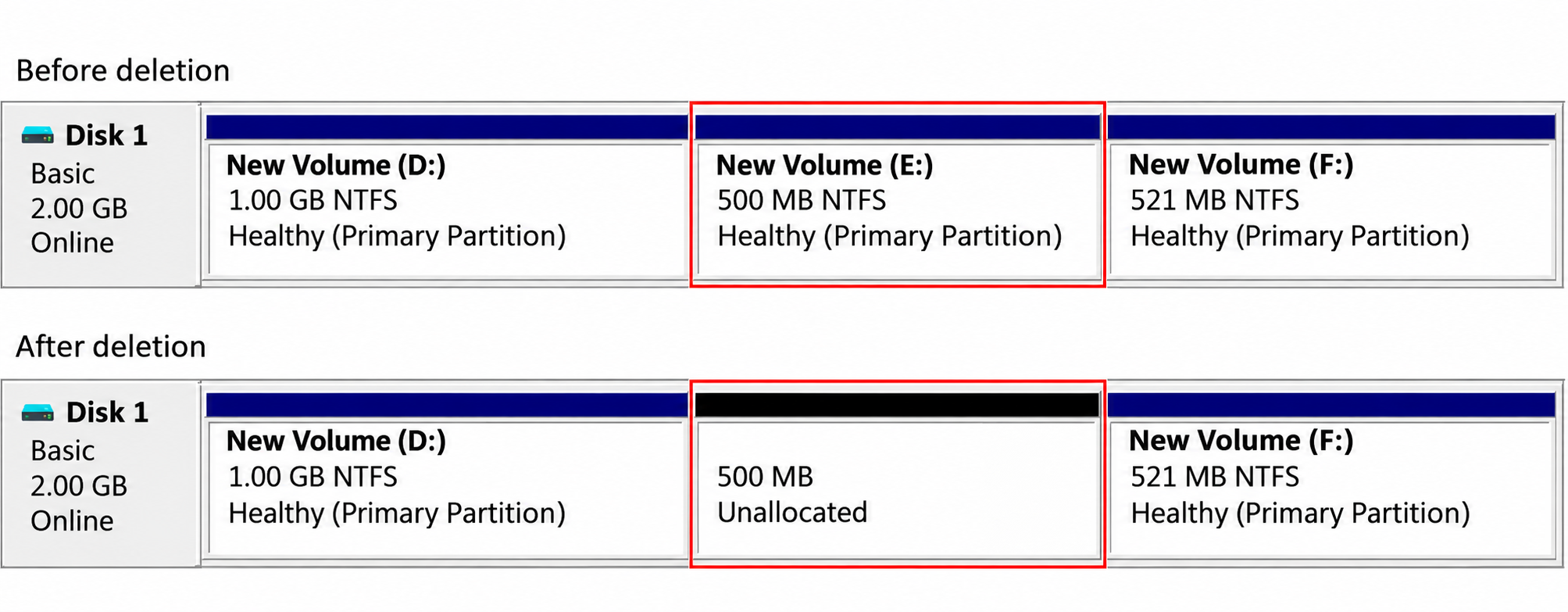
The historical test record shows a separate disk labeled Disk 1 in Windows Disk Management. Disk numbers and drive letters identify this case only; they are not instructions for selecting another computer’s disk.
Item | Recorded condition |
Test disk | Basic MBR disk, displayed as 2.00 GB |
Initial volumes | D: 1.00 GB; E: 500 MB; F: 521 MB, as displayed by Disk Management |
File system | NTFS on all three volumes |
Deleted object | Middle primary partition, originally E: |
Inspection tools | Windows Disk Management and WinHex |
Logical sector size | 512 bytes, also encoded as |
Test outcome | E: reappeared as a 499 MB NTFS primary partition; subsequent checks confirmed that the recovered data was complete |
The screenshots record the layout before deletion, the unallocated region afterward, surviving boot-sector information, and reconstruction. The Windows build, WinHex version, underlying HDD/SSD/virtual-disk type, and test date were not recorded.
There is no saved pre-deletion LBA 0 dump. Consequently, this is a case analysis rather than a complete byte-for-byte deletion audit. The original entry’s exact bytes cannot be presented as a measured baseline.
What Changed in the MBR Partition Table?
The MBR is at disk LBA 0. Its partition table occupies offsets 0x1BE–0x1FD, with four 16-byte records. The signature bytes 55 AA occupy 0x1FE–0x1FF.
Each record includes a partition type, starting LBA, and sector count. These describe a disk region; they do not contain its folders or file contents.
The Following Partition Occupied Slot 2
WinHex’s post-deletion screenshot contains these two occupied records:
MBR field | Slot 1, associated with D: | Slot 2, associated with F: |
Record begins |
|
|
Type |
|
|
Starting-LBA bytes |
|
|
Starting LBA, decimal | 128 | 3,121,280 |
Sector-count bytes |
|
|
Sector count, decimal | 2,097,152 | 1,067,008 |
Slots 3 and 4 are zero-filled. The missing middle volume has no record describing its start and size.
The recorded sequence therefore supports compaction of the surviving records: F: occupies slot 2 after the middle partition is removed. Deleting the second partition does not necessarily leave the second slot empty. Other tools may clear a record without rearranging the remaining entries.
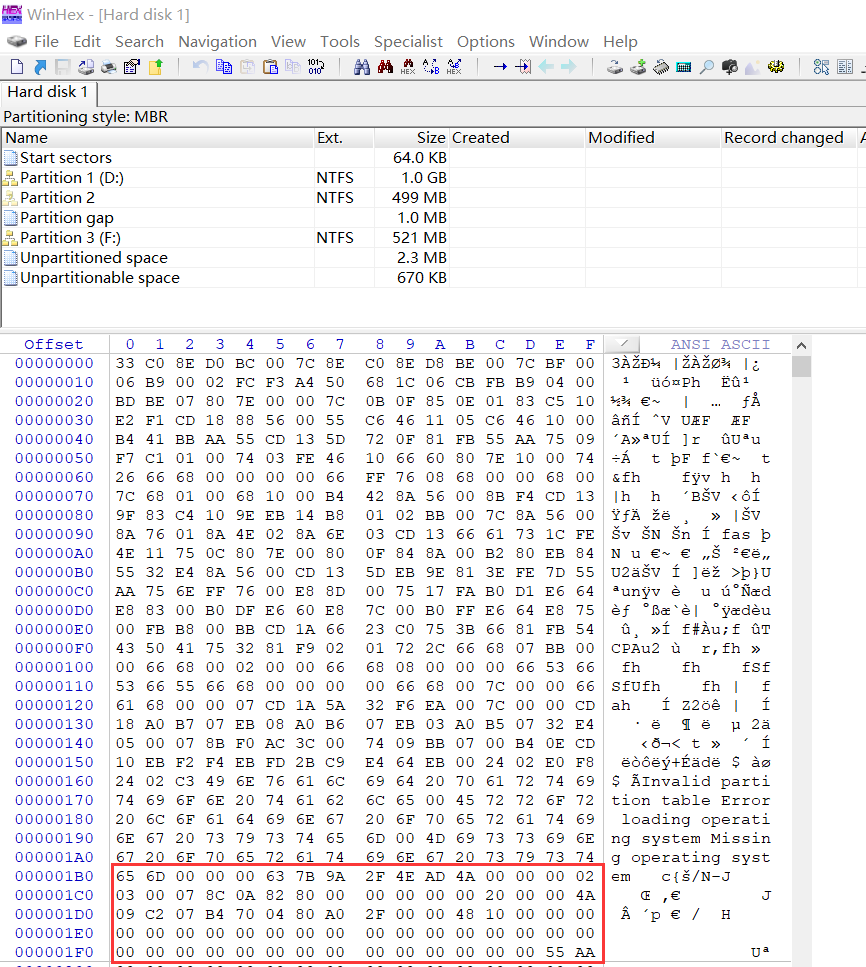
Post-deletion LBA 0: the surviving entries describe D: and F:. The third and fourth records are empty, and the MBR signature is present.
WinHex also lists a middle NTFS region without a drive letter. Its partition list can include detected file systems beyond those currently registered in the MBR. The raw records establish what the table actually contains; a detected NTFS region alone does not establish that Windows has mounted it.
Reading the Bytes Correctly
MBR multi-byte address fields use little-endian order. For example:
- 80 A0 2F 00 -> 0x002FA080 -> LBA 3,121,280
These are logical-sector addresses. The logical block addressing guide explains how the sector size and address origin affect their interpretation.
Why Did E: Become Unallocated?
Windows normally uses partition records to identify the disk regions that contain volumes. Once the middle region has no valid mapping, it is no longer available as the original E: volume through ordinary file access.
That explains the black Unallocated bar. It does not show that every sector in the region contains zeros.
Deleting a partition also differs from deleting its individual files. File deletion changes file-system records. Partition deletion changes the disk layout through which the operating system reaches that file system. The NTFS Master File Table stores file records inside the volume; it is separate from the four MBR partition records.
The screenshots demonstrate surviving boot metadata. Without a complete disk comparison, they do not prove that every other sector was unchanged. They also cannot establish unchanged boot code or disk-signature bytes, because the original LBA 0 dump is unavailable.
Finding the Deleted Partition’s NTFS Boot Sector
The first surviving partition provides a useful starting hypothesis:
- D: starting LBA = 128
- D: partition length = 2,097,152 sectors
- First LBA after D: = 2,097,280
- Byte offset with 512-byte LBAs = 2,097,280 × 512
- = 1,073,807,360
- = 0x40010000
The original record also shows D:’s backup boot sector at LBA 2,097,279, immediately before this address. A neighboring partition need not start immediately afterward, so this arithmetic identifies a candidate, not a universal rule.
At LBA 2,097,280, WinHex displays an NTFS boot sector with several mutually consistent fields:
Boot-sector offset | Recorded bytes | Interpretation |
|
| Boot-code jump instruction in this NTFS sector |
|
| OEM identifier |
|
| 512 bytes per sector |
|
| Hidden-sectors field: 2,097,280 |
|
| NTFS sector-count field: 1,021,951 |
|
| Boot-sector end marker |
Offsets in this table are relative to the NTFS boot sector, not LBA 0.
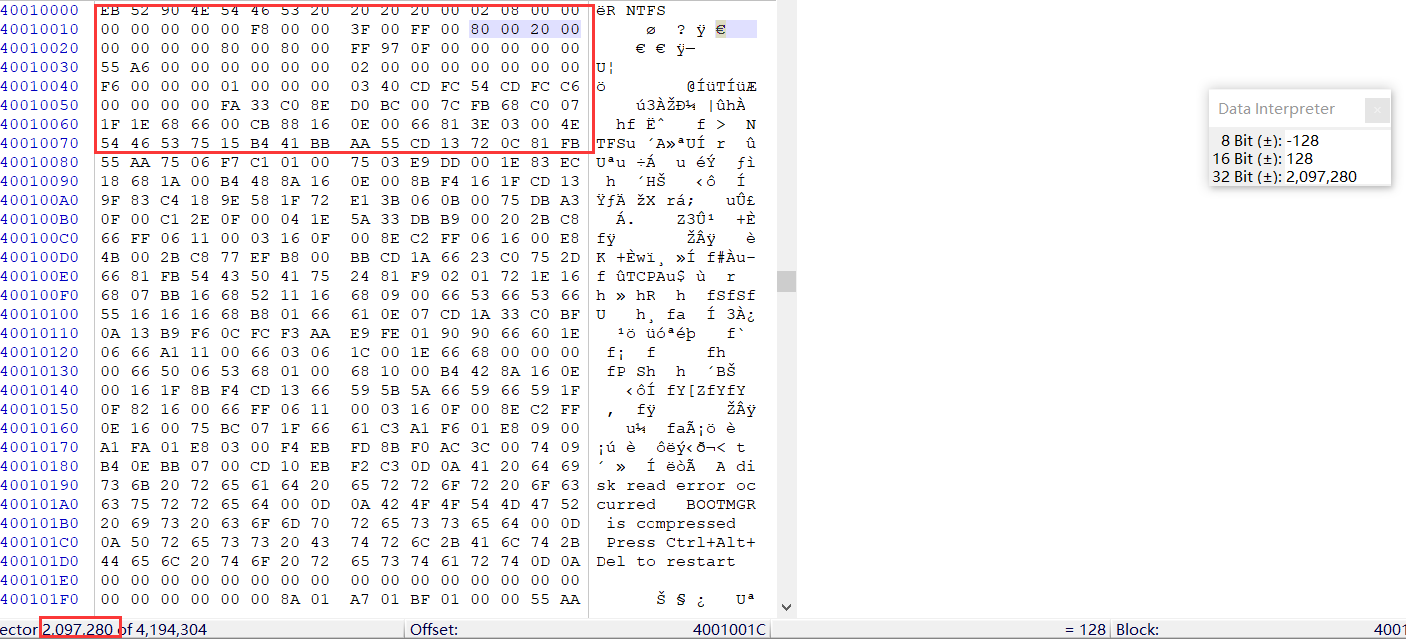
The original WinHex capture shows the candidate NTFS boot sector at LBA 2,097,280. Its location and hidden-sectors field agree.
The four-byte value at 0x1C is not the NTFS reserved-sectors field. Confusing these fields would misidentify the partition start. Likewise, searching for EB 52 90 alone is insufficient: old boot-sector copies and unrelated matching bytes can produce misleading hits. Confirm the file-system identifier, sector size, boundaries, and accessible metadata together.
Reconstructing the Entry: What the Record Shows
The documented reconstruction first preserved F: by copying its record into slot 3. It then populated slot 2 for the missing NTFS region.
The recorded slot 2 contains:
Field | Recorded value |
Boot indicator |
|
Partition type |
|
Starting-LBA bytes |
|
Sector-count bytes |
|
This MBR partition table before/after comparison distinguishes observed states from the unavailable original bytes:
State | Windows layout or outcome | MBR evidence |
Before deletion | D:, E:, and F: visible in Disk Management | Original LBA 0 bytes not captured |
After deletion | Middle region Unallocated | Slot 1: D:; slot 2: F:; slots 3–4: empty |
Reconstruction | E: subsequently reappears | Slot 1: D:; slot 2: reconstructed NTFS record; slot 3: preserved F: |
The first row describes the original visible layout; it does not establish the original slot order byte by byte.
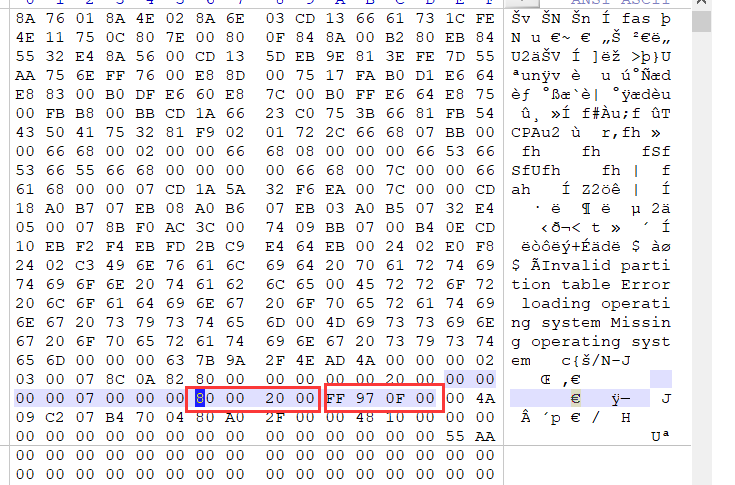
The reconstruction capture shows start bytes 80 00 20 00 and length bytes FF 97 0F 00. These are the recorded values, not generic recovery parameters.
Why the Length Needs an Additional Check
An MBR record requires the complete partition length. The NTFS boot-sector count should not automatically be copied into that field.
The preceding D: volume provides a cross-check within the same record: its MBR length is 2,097,152 sectors, while its backup NTFS boot sector contains FF FF 1F 00 00 00 00 00, or 2,097,151.
For the NTFS layout documented in the Linux NTFS implementation, the boot-sector count is one less than the complete span including the backup boot sector. Applying that relationship to this candidate gives:
- Recorded NTFS count = 1,021,951
- Candidate complete span = 1,021,952 sectors
- Candidate backup LBA = 2,097,280 + 1,021,951
- = 3,119,231
The candidate span would encode as 00 98 0F 00, rather than the recorded FF 97 0F 00. The latter describes a partition ending one sector earlier.
This is a boundary calculation, not a verified replacement value. Confirm the actual backup sector and the original partition extent before writing anything. The original partition could also have included trailing space beyond the NTFS volume. F: starts at LBA 3,121,280, leaving 2,048 sectors after the candidate complete NTFS span; that gap must not automatically be absorbed into the recovered volume.
Did the MBR Deletion Recovery Test Succeed?
The test succeeded: reconstructing the MBR entry restored access to E:, and subsequent checks confirmed that the recovered data was complete. The final Disk Management screenshot shows the partition recognized as NTFS with Healthy (Primary Partition) status.
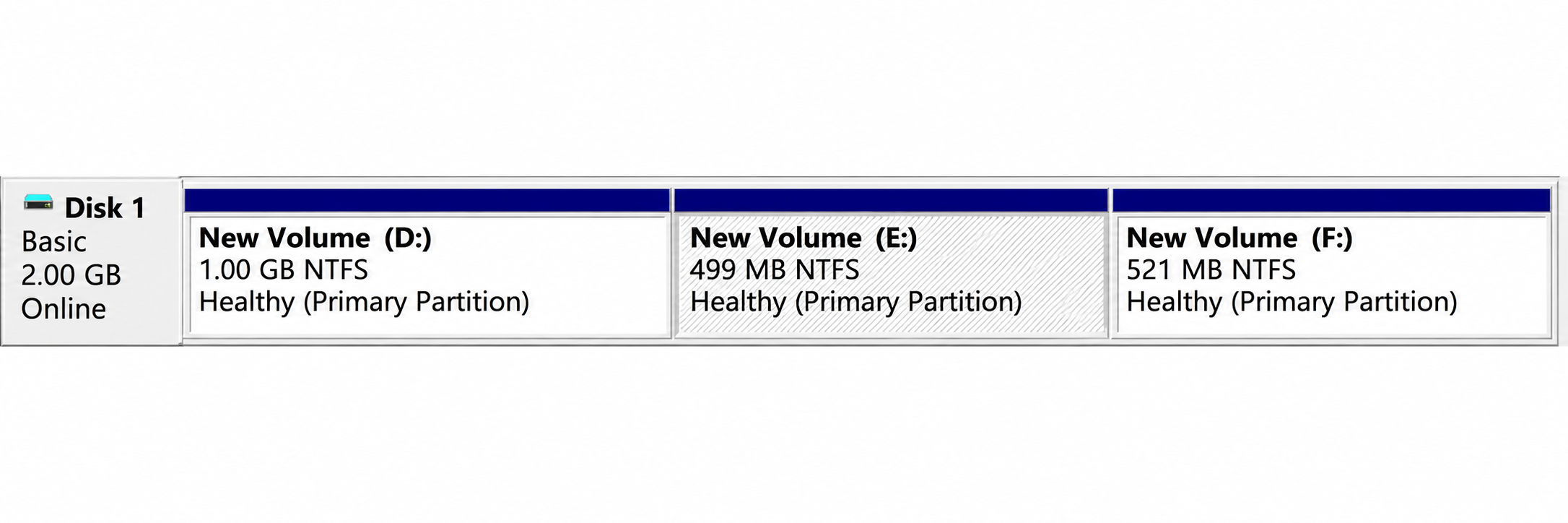
After reconstruction, E: is visible as a 499 MB NTFS primary partition.
The initial screenshot displayed 500 MB; the final one displays 499 MB. That difference, together with the sector-count issue, prevents a claim that the exact original boundaries were restored. Displayed capacity alone cannot supply the missing original sector count. Complete data recovery and exact restoration of the original partition extent are separate conclusions.
The data on the recovered partition was checked after reconstruction and confirmed to be complete. This test therefore demonstrated both restored partition access and complete data recovery. The result applies to this particular test; recovery on another disk depends on whether its file-system metadata and file contents remain intact.
When repeating this experiment, validate the recovered files as well as the partition structure:
- Its boundaries include the validated file-system extent and do not overlap another partition.
- The primary and backup boot-sector locations agree with the proposed layout.
- Directories and expected filenames can be read.
- Important files can be copied to another disk and opened in their applications.
- Compare file sizes with the original baseline when available. If pre-deletion hashes exist, compare those as an additional integrity check.
When Can the Partition and Its Files Be Recovered?
A deleted MBR partition entry experiment demonstrates why structural recovery can work: the mapping can disappear while enough of the file system survives to identify it again.
The recovery path depends on what remains:
Condition | Practical implication |
Consistent boot sectors, readable NTFS metadata, known boundaries | Partition reconstruction may restore access |
Uncertain boundaries but readable file metadata | Recover files to another disk before changing the table |
Overwritten file contents | Recreating the entry cannot restore the overwritten bytes |
Encrypted data without the required key | Restoring the partition map does not decrypt the contents |
Read errors or unstable hardware | Prioritize suitable imaging or specialist assessment |
Partition reconstruction writes disk-layout information. File recovery extracts surviving files to another destination. Boot repair addresses startup structures. These operations solve different problems.
For an actual missing drive, follow the lost partition recovery guide. Avoid creating or formatting a replacement volume over the missing region before protecting its files.
How to Inspect the Same Evidence Safely in WinHex
Use a disk image or disposable test disk for experiments. Preserve an untouched copy before any reconstruction.
- Identify the physical disk by capacity and layout, using Windows Disk Management for orientation.
- Open the corresponding physical disk or image in WinHex using read-only/view mode.
- Inspect LBA 0 and record all four entries at
0x1BE,0x1CE,0x1DE, and0x1EE. - Decode starting LBAs and lengths, then inspect candidate NTFS sectors using the correct logical-sector size.
- Keep inspection separate from writing. Test any proposed reconstruction on a copy and perform the validation above.
For a new controlled deletion test, save LBA 0 before deletion, immediately afterward, and after reconstruction. Also preserve the relevant boot sectors and a file inventory with hashes. Those records establish which bytes changed and whether the recovered files match the originals.
FAQs
Is deleting a partition the same as erasing the MBR?
55 AA signature present. Erasing all of LBA 0 would remove additional information and is a different operation.Why can WinHex detect NTFS while Windows shows Unallocated?
Does the drive letter E: exist inside an MBR entry?
Can a backup NTFS boot sector restore the entire MBR?
Does this experiment predict SSD recovery results?
Does Healthy status prove that every file survived?

Jason is a data recovery and technical support specialist with over 15 years of hands-on experience. He has worked extensively with frontline users, troubleshooting difficult data loss cases and providing practical recovery solutions for accidental deletion, formatted drives, damaged file systems, lost partitions, system failures, and other recovery emergencies. His expertise also includes backup and restoration, file repair, and disaster recovery, with a strong emphasis on safe, reliable, and technically accurate guidance.