
NTFS Metadata After Quick Format: A WinHex Analysis
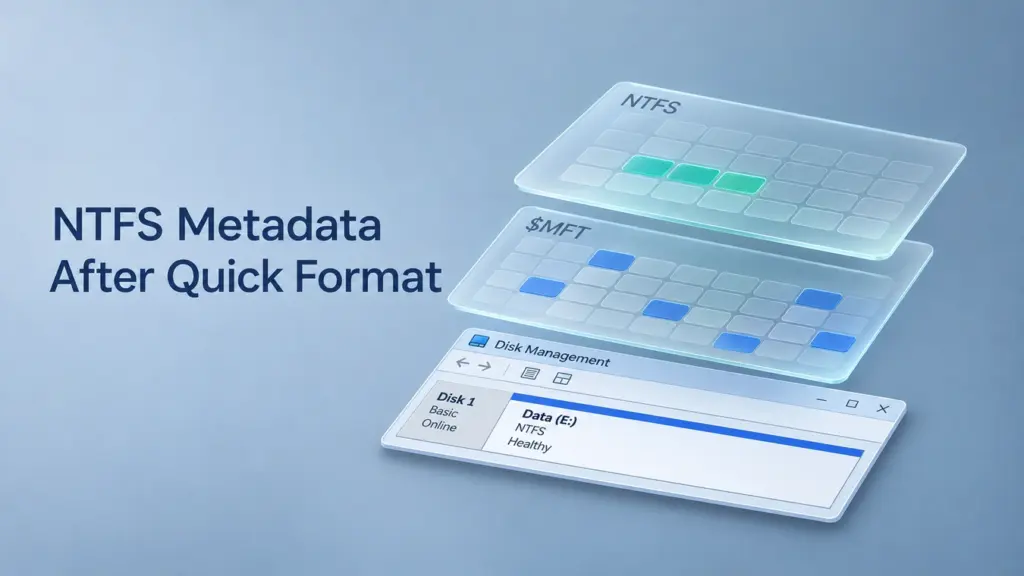
NTFS metadata after quick format describes a newly initialized file system, while some records and file contents from the previous file system may remain readable underneath it. Windows creates a new Master File Table and directory structure; it does not simply hide every old filename. Recovery succeeds when enough original metadata and the data it describes survive and remain accessible.
WinHex helps separate these conditions by exposing boot-sector fields, MFT records, and data-run mappings. This article examines an NTFS-to-NTFS quick-format case and a separate MFT-fragment reconstruction example. The calculations apply to the recorded layouts, rather than every Windows volume. SSD discard behavior and subsequent writes can produce very different outcomes.
Table of Contents
1. What Quick Format Changes in NTFS
The NTFS file system organizes files through metadata files, directory indexes, and cluster mappings. A quick format creates a fresh instance of these structures.
Structure | Role after quick format | Consequence for recovery |
Volume boot sector and its backup | Describe the newly formatted volume | Current MFT pointers may no longer locate the old table |
$MFT and root directory | Describe the new file system and its initial objects | Old filenames and directory relationships disappear from normal browsing |
| Tracks records allocated in the new MFT | Does not inventory surviving records outside that table |
$Bitmap | Tracks clusters allocated in the new volume | Previously occupied clusters can become available for reuse |
$MFTMirr and other system metadata | Support the newly initialized file system | Their writes can overlap older metadata or file contents |
Former file-data locations | May retain readable content outside overwritten or discarded ranges | Survival must be checked rather than assumed |
The Master File Table is itself a file. Its unnamed $DATA stream contains file records; its bitmap describes record allocation. The separate $Bitmap file describes cluster allocation across the volume. Confusing these two bitmaps leads to incorrect conclusions about what survived.
Formatting an existing partition also differs from deleting its partition-table entry. A routine volume format rebuilds the file system inside the selected volume; partition deletion concerns the disk layout outside it.
2. Read the Original Boot Sector in WinHex
For an NTFS format before-and-after hex comparison, preserve a sector image before formatting and compare it with an image captured afterward. On an already formatted source, work from an image and any earlier captures available. Do not repeat the format to reproduce the event.
The volume boot record supplies the parameters needed to interpret cluster addresses.
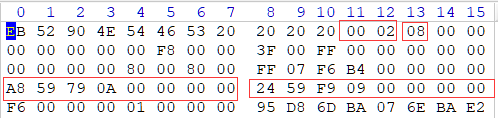
Original boot-sector hex excerpt from the WinHex case record. Red boxes identify the sector-size, cluster-size, and MFT-location fields.
Boot-sector offset | Recorded bytes | Interpretation |
|
| 512 bytes per logical sector |
|
| Eight sectors per cluster |
|
| $MFT starts at LCN 175,724,968 |
|
| $MFTMirr starts at LCN 167,336,228 |
|
| Signed value −10: record size is 2¹⁰ = 1,024 bytes |
Multibyte integers use little-endian byte order. The allocation unit size is therefore:
- 512 × 8 = 4,096 bytes per cluster
LCN means a cluster number relative to the volume. Consequently:
- Original MFT volume-relative sector = 175,724,968 × 8
- = 1,405,799,744
- Original MFT volume-relative byte offset = 175,724,968 × 4,096
- = 719,769,468,928
When examining a whole-disk image, add the volume’s starting byte offset. When examining a volume-only image, do not add it again. WinHex’s displayed addressing context must match the calculation.
The boot sector identifies the first MFT extent. It does not describe every fragment of the table.
3. Decode the Original MFT’s Nonresident Data
At the original MFT location, validate record 0 and locate its unnamed $DATA attribute, type 0x80. A nonresident attribute stores mapping information rather than its entire contents inside the record.
The case notes place this attribute at record offset 0x100. That makes its form byte appear at 0x108; the value 01 means nonresident. These absolute offsets belong to this record. Other records can place the attribute elsewhere.
Use offsets relative to the attribute start when interpreting another record:
Relative offset | Field |
| Resident/nonresident form |
| Lowest virtual cluster number, or VCN |
| Highest VCN, inclusive |
| Offset to the mapping-pairs array |
| Allocated length |
| Logical file size |
| Valid data length |
Read the three size fields separately. Allocated length reserves storage, logical size defines the stream length, and valid data length describes initialized data. They need not be equal.
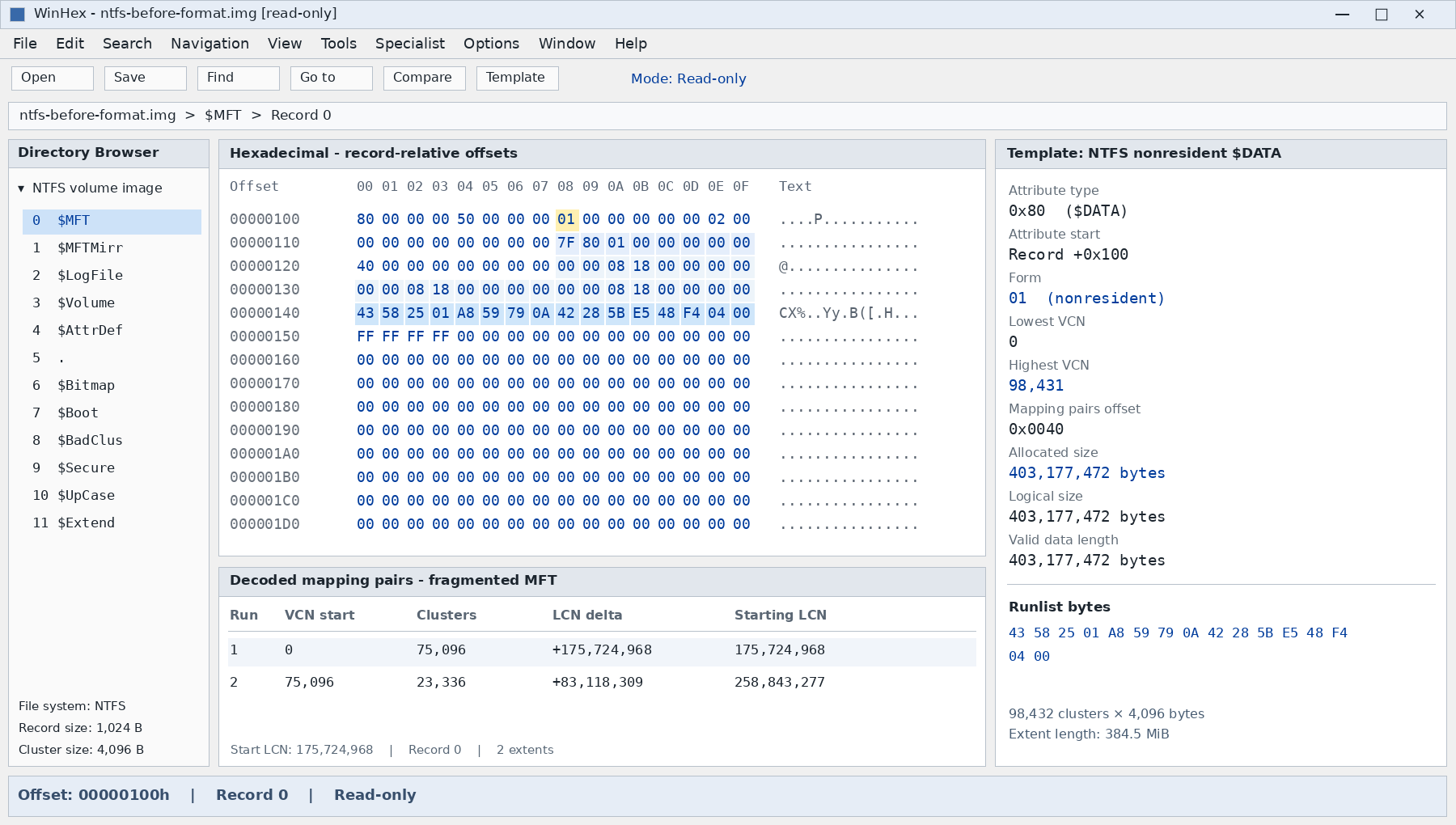
For an extent covering VCNs 0–98,431, the cluster count is 98,432, not 98,431. The recorded two-run layout gives:
Run | Cluster count | Signed LCN delta | Starting LCN | Logical record slots at 1,024 bytes each |
1 | 75,096 | +175,724,968 | 175,724,968 | 0–300,383 |
2 | 23,336 | +83,118,309 | 258,843,277 | 300,384–393,727 |
The second address is relative to the preceding run’s starting LCN:
- 175,724,968 + 83,118,309 = 258,843,277
- (75,096 + 23,336) × 4,096 = 403,177,472 bytes
- 403,177,472 ÷ 1,024 = 393,728 record slots
These are addressable slots, not a count of live files. Some records may be unused, and one file can require multiple records.
The recorded run headers 43 and 42 describe field widths. For 43, the length occupies three bytes and the LCN delta four; for 42, the length occupies two bytes and the delta four. Interpret the LCN delta as signed, because later fragments can lie earlier on the volume.
The resulting extent length is 384.5 MiB. A rounded display of “385 MB” cannot independently establish a different allocation size or prove that extra clusters were reserved.
4. Compare the New MFT with the Old Layout
The case notes record a post-format MFT starting at LCN 786,432, with an extent of 180 clusters. Assuming the recorded 4,096-byte cluster size:
- New MFT starting byte offset = 786,432 × 4,096
- = 3,221,225,472
- New extent size = 180 × 4,096 = 737,280 bytes
The new start is 3 GiB into the volume. That address is an observation from this case, not a mandatory NTFS location.
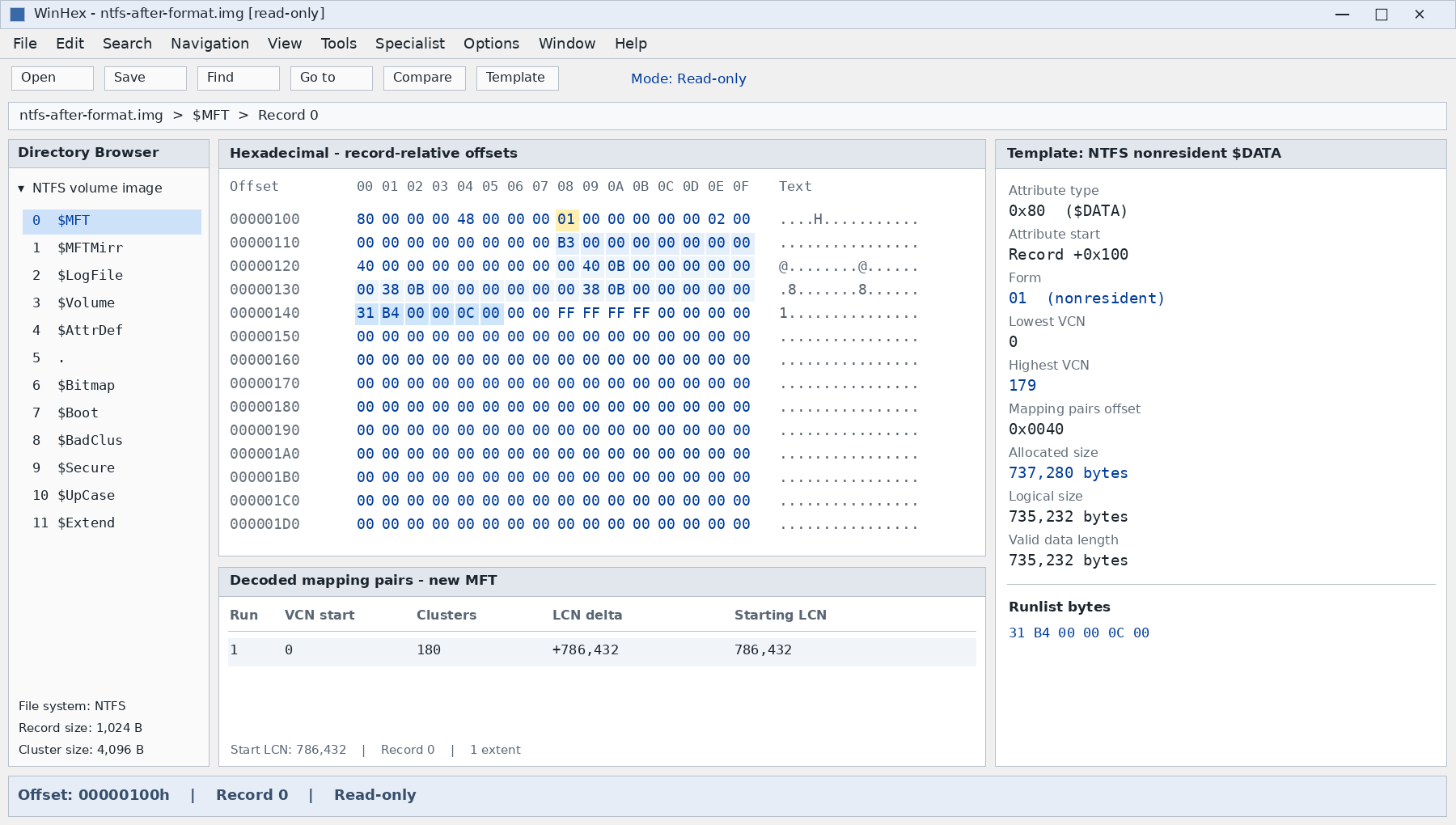
Property | Original layout | Post-format layout recorded in the notes |
Starting MFT LCN | 175,724,968 | 786,432 |
Recorded MFT extents | Two | One |
Extent coverage | 98,432 clusters | 180 clusters |
Capacity at the recorded record size | 393,728 slots | 720 slots |
The notes also mention records 0–717. That is 718 records, or 735,232 bytes. It is compatible with an allocation large enough for 720 slots, but does not establish whether 718 describes logical length, initialized length, or records inspected. Those fields require the underlying attribute bytes.
The important change is that Windows now follows the new table. The new MFT’s smaller size does not mean that the old table was physically truncated in place. Its former locations must be inspected independently.
To determine whether the NTFS MFT was overwritten by format, compare the original MFT extents with all new metadata writes and later allocations. A changed pointer proves a changed reference; a byte comparison establishes overwriting at a particular location. Relocation alone proves neither complete survival nor complete loss.
5. Reconstruct a Fragmented MFT from Surviving Records
MFT fragmentation develops as the table grows and contiguous space becomes unavailable. NTFS reserves an MFT zone to reduce fragmentation, but this does not guarantee a single extent. Growth can allocate fragments before or after the current extent.
A separate reconstruction example in the case material documents this three-run layout. It must not be combined with the preceding two-run case as though both described the same table.
Run | Logical record slots | Starting LCN | Delta from previous run start | Clusters |
1 | 0–204,927 | 786,432 | +786,432 | 51,232 |
2 | 204,928–248,587 | 9,274,281 | +8,487,849 | 10,915 |
3 | 248,588–376,391 | 8,858,108 | −416,173 | 31,951 |
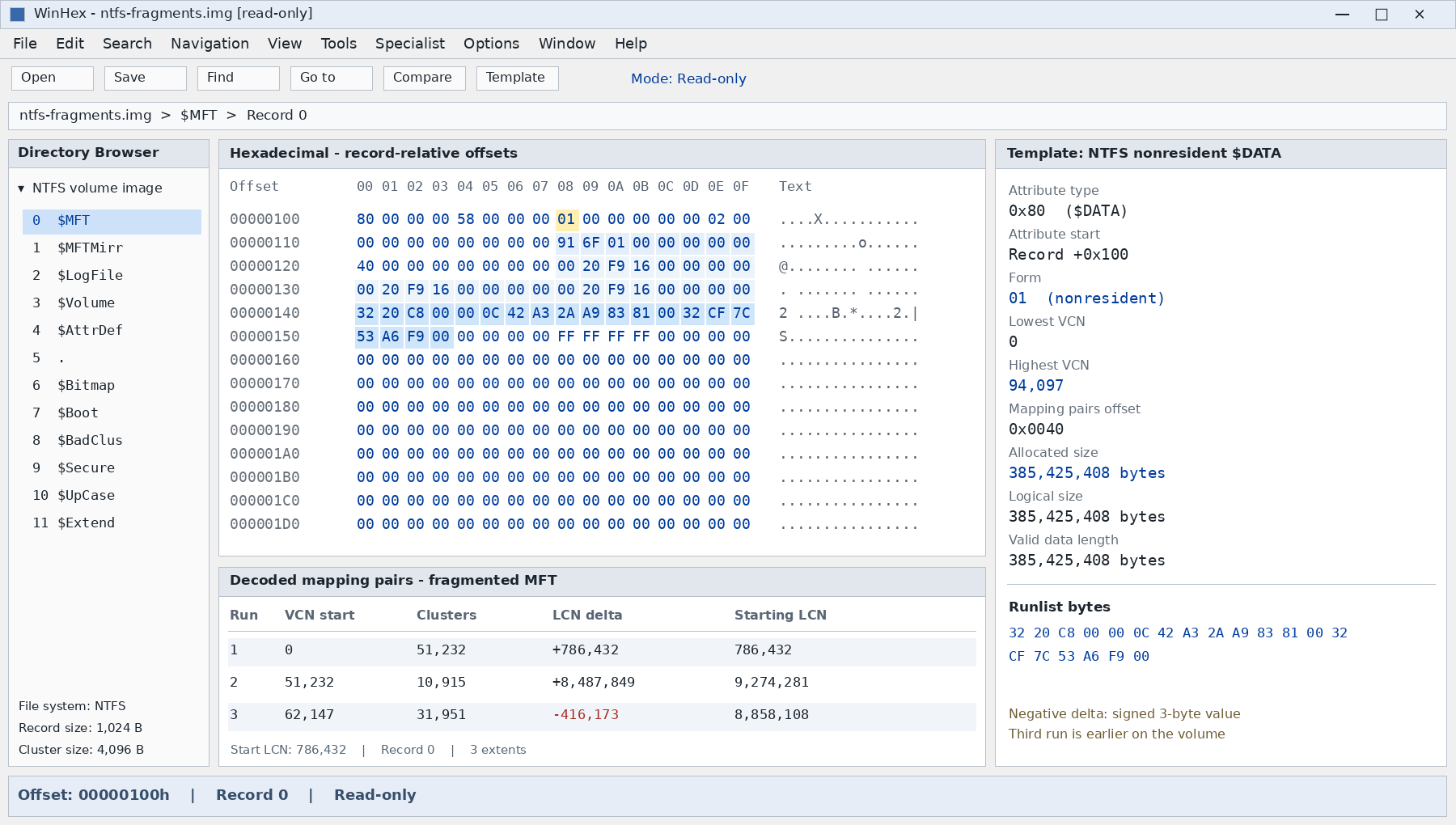
Four 1,024-byte slots fit in each 4,096-byte cluster. This explains both boundaries:
- 51,232 × 4 = 204,928 slots
- 204,928 + (10,915 × 4) = 248,588
- 9,274,281 − 416,173 = 8,858,108
Together, the runs cover 94,098 clusters, or 385,425,408 bytes. The final VCN is 94,097.
Locate and Validate Candidate Records
The reconstruction notes describe searching for record 204,928, rejecting one candidate as invalid, and locating another candidate accepted as valid. A matching number or the FILE signature alone is insufficient.
On a read-only image:
- Search for
FILEsignatures, including locations outside the current MFT. A scan confined to the new table will miss detached records. - Check record boundaries, record length, attribute offsets, and attribute lengths.
- Validate the update sequence array before interpreting protected record bytes. In the recorded 1,024-byte records, its checks cover the ends of the two 512-byte strides.
- Restore the saved trailer words in the parser’s memory before parsing attributes across those boundaries; do not patch the evidence image.
- Compare neighboring records, record numbering where present, names, parent references, and sequence numbers. Reject implausible or stale relationships.
Where a surviving old record 0 provides a valid runlist, use that mapping. If it is missing, reconstructing extents from record sequences remains a hypothesis requiring additional checks. Blank records in a region do not alone prove that no later fragment exists.
Reassemble the Logical Table Separately
Copy validated extents into a separate analysis file in VCN order. Do not sort them by increasing LCN: the third run above lies before the second on disk but follows it logically.
For record number n, record size R, and cluster size C:
- VCN = floor(n × R ÷ C)
- Offset within cluster = (n × R) mod C
- LCN = run starting LCN + (VCN − run starting VCN)
For record 204,929 in the three-run example, the VCN is 51,232 and its within-cluster offset is 1,024 bytes. Its volume-relative address is therefore:
- 9,274,281 × 4,096 + 1,024 = 37,987,456,000 bytes
This mapping recovers an address, not a file. The record and its referenced data still require validation.
6. Recover File Contents Through the Old Attributes
Once a surviving file record is understood, its $DATA attribute determines the extraction method.
Resident data: read the attribute’s value offset and length, then export that value from the validated, fixup-restored record. Small files can lose their contents when their MFT records are overwritten because the contents reside there.
Ordinary nonresident data: decode the file’s own runlist, read each extent from the original volume image, assemble the bytes in VCN order, and trim the output to the logical file size. The MFT runlist locates file records; it does not substitute for each user’s file-data mapping.
Follow $ATTRIBUTE_LIST references when attributes extend into other records. Sparse and compressed streams require their respective decoding rules. Encrypted content still requires the applicable decryption material. Simple concatenation is insufficient for these cases.
Directory recovery needs additional care. A filename can survive while its parent directory does not. Reconstruct paths only where references and sequence numbers agree; otherwise retain an orphaned file rather than inventing a folder relationship.
Save extracted files to another physical device. Editing the new boot sector to point at an old MFT is not equivalent to recovering files: allocation maps, indexes, system records, and other metadata may belong to different file-system instances.
7. Why Recovery Can Work—and Why It Can Fail
Metadata-based recovery can succeed because an old record retains a file’s identity, logical size, and data mappings, while the mapped contents remain readable. A recovery tool can follow those relationships even though Windows no longer includes them in its active namespace.
If records are missing, signature-based carving can sometimes identify file content directly. It usually loses original filenames and directory structure and is less reliable for fragmented files. X-Ways documents searching for NTFS records outside the current MFT separately from file-header searches, reflecting these different recovery methods.
Recovery becomes harder when new metadata overlaps original records, later files reuse old clusters, or fragmentation mappings are missing. A valid filename does not prove intact contents; a recognizable first page or video header does not prove that later fragments survived.
SSDs add another condition. Windows formatting can send TRIM/delete notifications; Microsoft’s format documentation includes /NoTrim to suppress them. This is a formatting option, not a remedy after data loss. Depending on the device and storage path, discarded ranges can cease returning original bytes even without a conventional overwrite visible in WinHex. Quick format is therefore not a universal promise of recoverability.
8. Verify the Extracted Data Before Reusing the Disk
Preserve the source image and the extent map until validation is complete. For a practical scan-and-export workflow, see recovering files from a formatted hard drive.
Check recovered files against a pre-format inventory where available. Compare names, sizes, folder relationships, and hashes against known originals. Without baseline hashes, open documents and inspect their pages, test archives, view images at full resolution, and play complete video files.
Record damaged or missing files separately from verified files. An MFT reconstructed without parse errors establishes readable metadata; usable exported contents establish file recovery. Complete recovery requires accounting for the expected dataset.
FAQs
Does quick format overwrite the entire NTFS MFT?
Can files survive when their MFT records are gone?
Can the MFT mirror restore every file record?
Does a zero bit in the new volume bitmap mean the old data is erased?
Can an old MFT record still have its in-use flag set?
Will restoring the old boot sector undo the format?

Jason is a data recovery and technical support specialist with over 15 years of hands-on experience. He has worked extensively with frontline users, troubleshooting difficult data loss cases and providing practical recovery solutions for accidental deletion, formatted drives, damaged file systems, lost partitions, system failures, and other recovery emergencies. His expertise also includes backup and restoration, file repair, and disaster recovery, with a strong emphasis on safe, reliable, and technically accurate guidance.