
Can You Recover Files from a Formatted SD Card?
Have you accidentally formatted an SD card containing important photos, videos, or documents? If so, your first question is probably: can you recover files from a formatted SD card? In many cases, yes. SD card recovery may still be possible after a quick format, especially when you stop using the card immediately and avoid writing new data to it.
However, no trustworthy method can promise success in every case. The result depends on the formatting method, whether new data has overwritten the original files, the health of the card, and the type of content you want to restore. Therefore, stop using the card as soon as you notice the mistake. In practice, the answer to can you recover files from a formatted SD card often depends on what you do next.
This guide explains how to recover files from a formatted SD card, what affects recovery, which mistakes to avoid, and how Magic Data Recovery can help you scan, preview, and restore files safely.
Supports Windows 7/8/10/11 and Windows Server
Table of Contents
Can You Recover Files from a Formatted SD Card?
Yes, you can often recover files from a formatted SD card when the original data still exists and has not been overwritten. A quick format usually removes or rebuilds file system information, but it may leave the actual file content on the card until new data replaces it.
For example, suppose you quick-format a 64 GB camera card and immediately remove it. In that case, the original photos and videos may still remain in recoverable areas. By contrast, if you continue shooting or recording 4K video, new files may overwrite old data and reduce your chances.
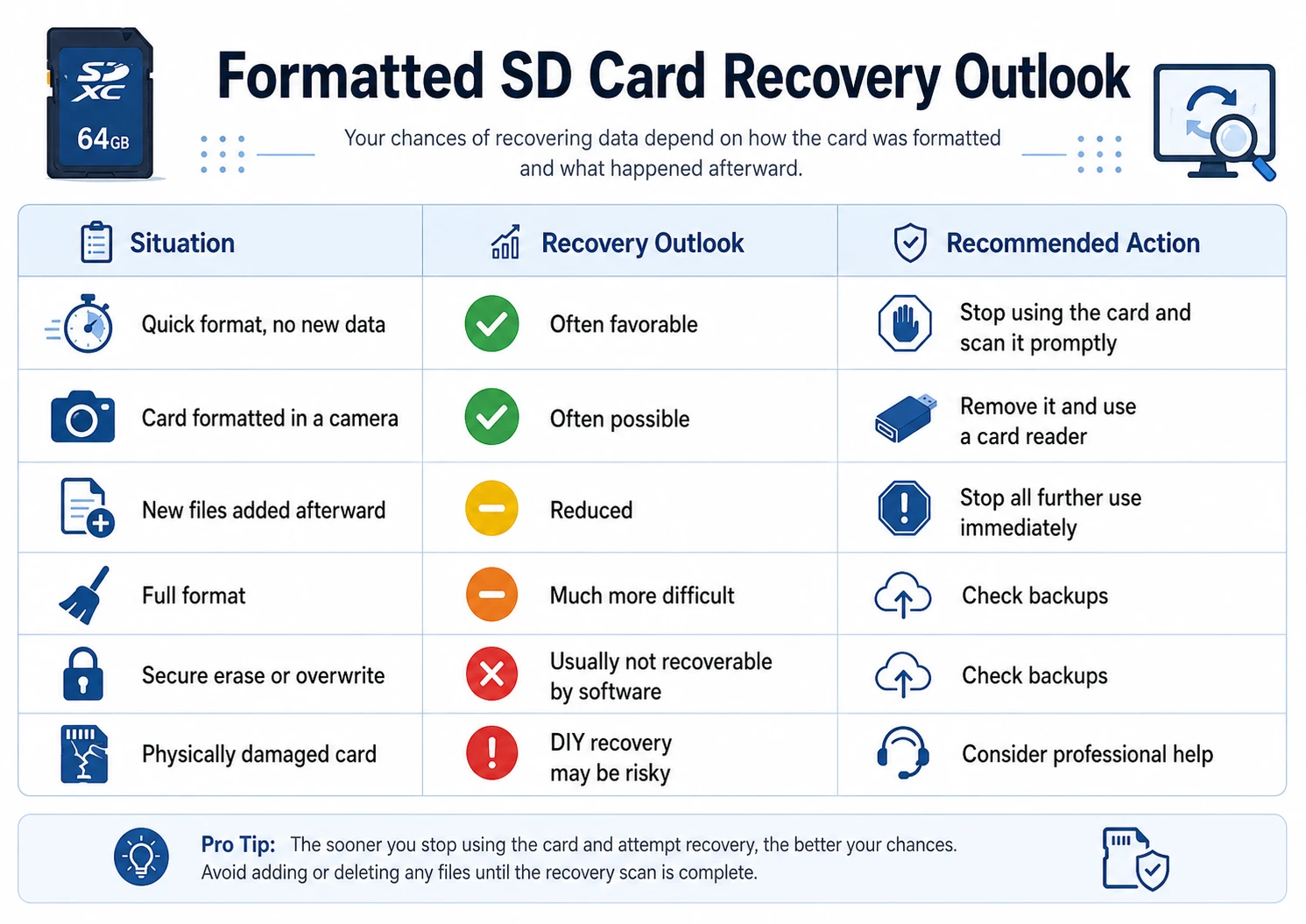
Situation | Recovery Outlook | Recommended Action |
Quick format, no new data | Often favorable | Stop using the card and scan it promptly |
Card formatted in a camera | Often possible | Remove it and use a card reader |
New files added afterward | Reduced | Stop all further use immediately |
Full format | Much more difficult | Check backups |
Secure erase or overwrite | Usually not recoverable by software | Check backups |
Physically damaged card | DIY recovery may be risky | Consider professional help |
So, can you recover files from a formatted SD card after every format? No. Still, quick-format cases usually offer a better opportunity when you have not written new data.
Why Can You Recover Files from a Formatted SD Card?
To understand can you recover files from a formatted SD card, it helps to know what formatting changes. An SD card uses a file system, such as FAT32 or exFAT, to organize files and track where each file begins and ends.
A quick format usually rebuilds this structure without deliberately overwriting every storage sector. Therefore, some original file content may remain until new data replaces it.
A full format can be more destructive. Depending on the operating system or device, it may write across a larger part of the card. As a result, recovery can become far harder or impossible.
In simple terms:
- Quick format often removes file references while leaving some data intact.
- Full format may modify or overwrite more storage areas.
- Secure erase intentionally aims to make old data inaccessible.
Because of these differences, anyone asking can you recover files from a formatted SD card should first identify how the card was formatted and whether it was used afterward.
What About Cameras, Drones, and Phones?
Different devices handle SD cards differently. Digital cameras often use FAT32 or exFAT, and recovery may remain possible if you stop using the card immediately.
Likewise, drone users who ask can you recover files from a formatted SD card may be dealing with large MP4 or MOV files on a microSD card. These videos can be fragmented across several storage areas. Consequently, finding a video file does not always mean the entire recording will play correctly.
Android devices require extra caution. A card used as portable storage may allow normal scanning. However, adopted or internal storage may use device-linked encryption, which can block ordinary recovery without the required encryption information.
What Should You Do Before Trying to Recover Files?
If you want the best possible answer to can you recover files from a formatted SD card, your actions immediately after the accident matter.
First, stop using the card. Do not take more photos, record new videos, copy files to it, or format it again.
Next, remove the card from the camera, phone, drone, or other device. Then connect it to a Windows computer with a reliable card reader.
Most importantly, never save recovered files back to the same SD card during recovery. That rule is central to any attempt to answer can you recover files from a formatted SD card safely. New writes may overwrite other recoverable content.
Also, avoid random repair commands. CHKDSK and ATTRIB can help with certain file system errors or hidden-file problems, but they do not perform true formatted SD card recovery.
How to Recover Files from a Formatted SD Card with Magic Data Recovery
Once you stop using the card, you can scan it with Magic Data Recovery to search for photos, videos, documents, and other files that may still remain recoverable. For users wondering can you recover files from a formatted SD card, this scan-preview-recover workflow provides a direct way to check what the card still contains.
Step 1: Download and Install Magic Data Recovery
Download and install Magic Data Recovery on your Windows computer. Do not install it on the formatted SD card itself, because writing new data to the card may overwrite files that could otherwise be recovered. After installation, connect the SD card to your computer with a reliable card reader.
Supports Windows 7/8/10/11 and Windows Server
Step 2: Select the Formatted SD Card to Scan
Launch Magic Data Recovery and wait for the available storage devices to appear. Next, identify the formatted SD card by checking its drive letter and capacity. Select the correct card and start the scan to search for lost photos, videos, documents, and other recoverable files. This step begins the practical process of finding out can you recover files from a formatted SD card in your specific case.

Step 3: Scan the Formatted SD Card for Lost Files
Magic Data Recovery automatically performs an Advanced Scan of the selected card. Meanwhile, the software displays discovered files as the scan progresses, so you can review results before the scan finishes. For the best recovery outcome, keep the SD card connected and avoid writing any new data to it.

Step 4: Preview Files Before Recovery
Once files appear in the scan results, use the preview feature to inspect their contents. This step helps you confirm whether important photos, documents, and other supported files remain readable. In addition, previewing lets you focus on the files you actually need. Still, finding a file does not always mean it is completely intact, especially if new data has overwritten part of the card.

Step 5: Recover Files to a Safe Location
Finally, select the files you want to restore and start recovery. Save the recovered files to your computer or another safe location. Do not save them back to the same formatted SD card during recovery, because new writes may overwrite additional recoverable data.
Afterward, open the restored photos, videos, and documents to confirm that they are accessible and complete.

Why Use Magic Data Recovery to Recover Files from a Formatted SD Card?
When people ask can you recover files from a formatted SD card, they usually need a tool that can scan the card directly, show what it finds, and let them recover selected files without unnecessary complexity.
Magic Data Recovery addresses that need through a straightforward scan, preview, and recover workflow. Therefore, it gives users a practical way to test can you recover files from a formatted SD card without relying on guesswork.
The software can help with several common situations, including:
- Accidentally formatted camera SD cards.
- Formatted microSD cards.
- Lost photos and documents.
- Deleted camera or drone videos.
- Cards whose original folder structure no longer appears normally.
Moreover, file preview helps users make better decisions. For example, a photographer who formatted a wedding-shoot card by mistake may want to inspect available image previews before restoring everything. Likewise, a drone operator may want to focus on large video files from one particular flight.
Compared with repair commands, dedicated recovery software matches the actual problem more directly. CHKDSK may repair certain logical file system errors, while ATTRIB may reveal hidden files. Neither tool replaces a complete scan for data lost after formatting.
Still, Magic Data Recovery cannot guarantee restoration of overwritten, securely erased, encrypted, or physically inaccessible files. Therefore, can you recover files from a formatted SD card always depends on the actual condition of the card and its data. This realistic limitation helps set trustworthy expectations.
What Affects Whether You Can Recover Files from a Formatted SD Card?
The answer to can you recover files from a formatted SD card depends on several practical factors.
Quick Format vs Full Format
A quick format usually offers a better recovery opportunity because it often leaves more original data untouched. By contrast, a full format may write across more storage areas and make recovery much harder.
Therefore, knowing which type of format occurred can help you set realistic expectations before starting a scan.
New Data Written After Formatting
Overwriting is one of the most important factors in formatted SD card recovery. If you stop using the card immediately, your recovery outlook may be better than if you continue taking hundreds of photos.
Once new data occupies the same storage sectors as old files, software cannot recreate the exact overwritten information.
File Type and Fragmentation
Different files behave differently during recovery. Small JPEG photos may occupy simpler storage areas, while large MP4 or MOV videos may be fragmented across many locations.
Therefore, the answer to can you recover files from a formatted SD card can vary by file type. You may recover many photos successfully while some large videos remain incomplete or unplayable.
SD Card Health, Encryption, and Secure Erase
A healthy, readable card gives software a better chance to scan available storage. However, repeated disconnections, unusual heat, wrong capacity readings, or severe I/O errors may indicate hardware trouble.
Encryption can also prevent normal recovery, while secure erase aims to make old data inaccessible. Therefore, can you recover files from a formatted SD card becomes harder to answer positively when hardware failure, encryption, or deliberate overwriting is involved.
Conclusion: Can You Recover Files from a Formatted SD Card?
So, can you recover files from a formatted SD card? In many situations, yes—especially after a quick format when you stop using the card immediately and prevent new data from overwriting old files.
The safest process is straightforward: remove the card from the original device, connect it to a Windows computer with a reliable card reader, scan it, preview available files, and save recovered data to another safe location. This workflow gives you the clearest practical answer to can you recover files from a formatted SD card.
For users who need a practical SD card recovery solution, Magic Data Recovery is worth considering because it focuses on the core workflow: select the card, scan for remaining files, preview results, and recover the items you actually need.
More importantly, the recommendation comes with realistic limits. No software can guarantee files that have already been overwritten, securely erased, made inaccessible through encryption, or lost because of severe physical damage.
Therefore, when the SD card remains readable and the data has not been overwritten, Magic Data Recovery provides a practical way to answer can you recover files from a formatted SD card before you give up on important photos, videos, or documents.
Supports Windows 7/8/10/11 and Windows Server
FAQ
Can you recover files from a formatted SD card?
Yes, you can often recover files from a formatted SD card after a quick format, especially if you stop using the card immediately. However, recovery depends on whether new data has overwritten the original files, the card's physical condition, the formatting method, and whether encryption or secure erase was involved.
Does formatting an SD card permanently delete files?
Not always. A quick format may remove file system references without immediately erasing every file's underlying content. Therefore, recovery software may still find some data. However, new files can overwrite old storage areas, while a full format, secure erase, or encryption can make recovery much harder or impossible.
Can you recover files after a quick format?
Often, yes. A quick format usually offers one of the better recovery scenarios because it may leave much of the original file content untouched. For the best chance, stop using the card immediately, connect it to a computer with a card reader, and scan it before adding new data.
Can I recover photos and videos from a formatted SD card?
Possibly. Photos often remain recoverable when the card has not been reused, while large videos can be harder to restore because they may be fragmented across several storage areas. After recovery, open photos and play videos fully to confirm that the restored files are complete and usable.
Can I recover files from a formatted microSD card?
Yes. The same general recovery principles apply to microSD cards. Stop using the card, connect it to a Windows computer with a suitable adapter or card reader, and scan it with recovery software. Do not save restored files back to the same microSD card during the recovery process.
Can CMD or CHKDSK recover a formatted SD card?
Usually not in the same way as dedicated recovery software. CHKDSK focuses on file system consistency, while ATTRIB may reveal hidden files. Neither tool performs a complete formatted-data scan. Therefore, use recovery software when you need to search storage areas for files lost after formatting.
Should I format an SD card that asks to be formatted?
No, not if the card contains important files that you still need. Formatting changes the file system and may complicate recovery. Instead, stop using the card, avoid repair attempts that write new data, and scan or assess the card before accepting the format prompt.

Vasilii is a data recovery specialist with around 10 years of hands-on experience in the field. Throughout his career, he has successfully solved thousands of complex cases involving deleted files, formatted drives, lost partitions, and RAW file systems. His expertise covers both manual recovery methods using professional tools like hex editors and advanced automated solutions with recovery software. Vasilii's mission is to make reliable data recovery knowledge accessible to both IT professionals and everyday users, helping them safeguard their valuable digital assets.