
Fix a Broken USB Flash Drive Without Losing Data
When your USB suddenly stops working, panic is a common reaction. However, before you attempt any repair, you should understand one critical fact: fixing a USB drive incorrectly can permanently erase your data. Therefore, this guide explains how to fix a broken USB flash drive safely while protecting your files. In addition, it shows when USB drive recovery should come before repair, and how tools such as Magic Data Recovery can help recover data before any risky operation. It also explains how to avoid common mistakes throughout the process.
Supports Windows 7/8/10/11 and Windows Server
Table of Contents
What Causes a Broken USB Flash Drive
Before learning how to fix a broken USB flash drive, you need to understand why it fails. Otherwise, you may choose the wrong method.
Common causes include:
- File system corruption (RAW USB)
- Physical damage to the connector
- Power or driver issues
- Bad sectors or NAND wear
In many cases, the USB is not completely broken. Instead, the system simply cannot read it correctly. Therefore, the right approach depends on the actual cause.
How to Fix a Broken USB Flash Drive (Safe Methods)
Once your data is secure, you can try the following repair solutions.
Fix 1: USB Not Recognized
First, connect the USB to another port or computer. Then, check Device Manager.
If the device appears:
- Update the driver
- Uninstall and reconnect
This method often resolves connection issues quickly.
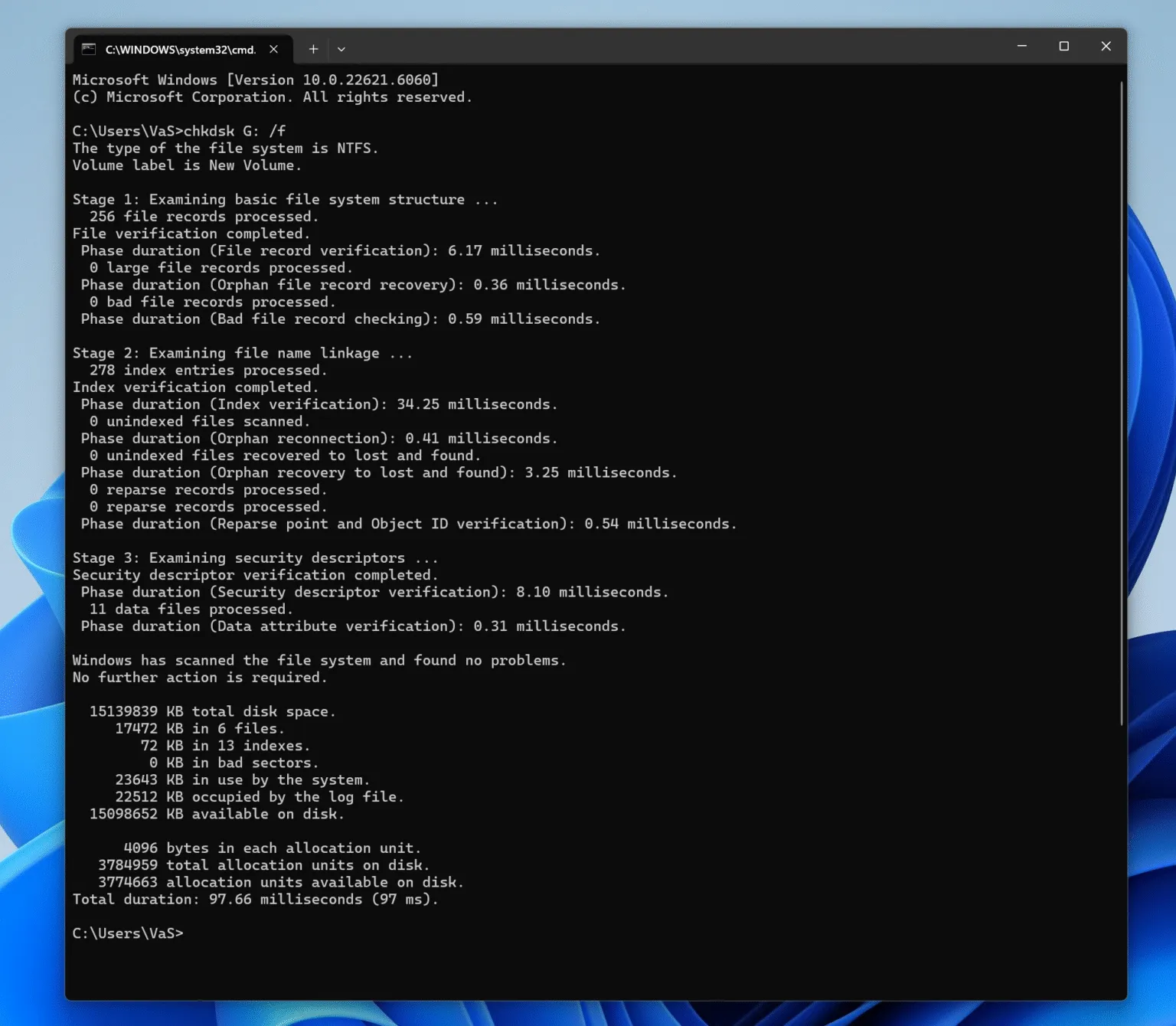
Fix 2: Repair USB Using CHKDSK
If the USB is detected but inaccessible, you can use CHKDSK.
Steps:
- Open Command Prompt
- Type:
chkdsk X: /f - Press Enter
However, this method may delete corrupted files. Therefore, always recover data first.
Fix 3: Fix RAW USB Drive
When a USB becomes RAW, the file system is damaged.
To fix it:
- Open Disk Management
- Format the drive
- Recreate the file system
However, formatting erases all data. As a result, recovery should always come first.
Fix 4: Check for Physical Damage
If the USB is physically damaged:
- Bent connector
- Loose components
Then software solutions will not work. In this case, professional repair or replacement is required.
How to Fix Broken USB Flash Drive Showing RAW File System
Another common case when researching how to fix a broken USB flash drive is when the file system becomes RAW.
A RAW file system means the operating system cannot recognize the storage structure.
Common causes include:
- Interrupted file transfer
- Improper ejection
- Virus infection
- File system corruption
Formatting the drive can repair it, but formatting deletes stored data. Therefore, recovering data first is recommended.
Recover Data Before Fixing the RAW USB Drive
When a USB drive becomes RAW or inaccessible, data recovery software can help retrieve files safely.
Recommended Tool: Magic Data Recovery
Magic Data Recovery helps users recover files from corrupted or damaged storage devices, including USB flash drives.

It is particularly useful in situations related to how to fix broken USB flash drive problems involving data loss.
Key advantages include:
- Recover files from RAW file systems
- Restore data from lost partitions
- Support USB drives, HDDs, SSDs, and memory cards
- Deep scanning for documents, photos, videos, and archives
- Simple interface suitable for beginners
For example, if a USB drive suddenly becomes RAW after improper removal, Windows may ask to format the disk. With Magic Data Recovery, you can scan the drive, preview recoverable files, and restore them before repairing the device.
Supports Windows 7/8/10/11 and Windows Server
If you are looking for a safer way to handle how to fix a broken USB flash drive without losing data, this solution can significantly reduce the risk of permanent file loss.
When a USB Flash Drive Cannot Be Fixed
In some cases, the drive may suffer from physical damage such as:
- Broken connector
- Water exposure
- Controller chip failure
In these situations, professional recovery services may be required.
However, most issues related to how to fix a broken USB flash drive are logical problems that can be resolved with the methods described above.
Conclusion
Fixing a USB drive is not just about making it work again. Instead, it is about protecting your data throughout the process. Therefore, before applying any repair method, you should always recover your files from the USB drive first. With professional recovery tools like Magic Data Recovery, you can safely handle most scenarios and understand how to fix a broken USB flash drive without risking permanent data loss.
Supports Windows 7/8/10/11 and Windows Server
FAQs
How do I fix a broken USB flash drive that is not recognized?
If your USB flash drive is not recognized, start by testing it on another USB port or computer. Next, check Device Manager for driver issues and update or reinstall the USB drivers. If the device appears in Disk Management but not File Explorer, assigning a new drive letter often restores access.
Why does my USB flash drive show a RAW file system?
A RAW file system means the operating system cannot read the drive’s file structure. This usually happens due to unsafe removal, virus infections, or interrupted file transfers. Instead of formatting immediately, recover important files first and then repair the drive.
Can a corrupted USB flash drive be repaired without losing data?
Yes, many corrupted USB drives can be repaired without data loss. First recover your files using professional data recovery software. After retrieving the data, you can repair the drive by formatting it or rebuilding the partition depending on the type of corruption detected.
What should I do if my USB drive asks me to format it?
If Windows asks to format the USB drive, the file system is likely corrupted. Avoid formatting immediately because this may erase your files. Instead, scan the drive with data recovery software to retrieve important files before performing any repair operations.
How can I recover files from a RAW USB flash drive?
You can recover files from a RAW USB drive using data recovery software that scans the storage sectors directly. After scanning, the software rebuilds the file structure and allows you to preview recoverable files. Once the files are recovered, you can repair or format the drive.
Is it possible to repair a USB flash drive with a lost partition?
Yes, a lost partition can often be repaired. When the drive shows unallocated space, recovery software can scan the disk and locate lost partitions or files. After recovering the data, you can recreate the partition using Disk Management.
Can CHKDSK repair a broken USB flash drive?
CHKDSK can repair certain logical file system errors such as corrupted directories or file entries. However, it may not recover deleted files or fix severe partition damage. For critical data loss situations, recovery software is usually required.
When should I stop trying to fix a USB flash drive?
If the USB drive shows signs of physical damage, such as a broken connector, overheating, or frequent disconnections, further attempts to repair it may worsen the problem. In such cases, professional data recovery services are often the safest option.

Jason is a data recovery and technical support specialist with over 15 years of hands-on experience. He has worked extensively with frontline users, troubleshooting difficult data loss cases and providing practical recovery solutions for accidental deletion, formatted drives, damaged file systems, lost partitions, system failures, and other recovery emergencies. His expertise also includes backup and restoration, file repair, and disaster recovery, with a strong emphasis on safe, reliable, and technically accurate guidance.