
Directory Entry Explained: Meaning, Properties & Structure Guide
Have you ever wondered how a computer actually keeps track of thousands of files stored on a disk? When you open a folder, your system instantly shows file names, sizes, dates, and locations. Behind this simple interface lies a critical concept called a directory entry.
A directory record is the fundamental structure that allows an operating system to locate and manage files within a file system. If this file system record becomes corrupted or lost, the file may still exist on the disk but becomes inaccessible to the user.
In this guide, we will explain the directory entry meaning, explore common directory entry properties, and show how directory entries function in modern file systems. We will also discuss real-world scenarios where directory entries become damaged and how such situations can be resolved.
Table of Contents
What Is a Directory Entry?
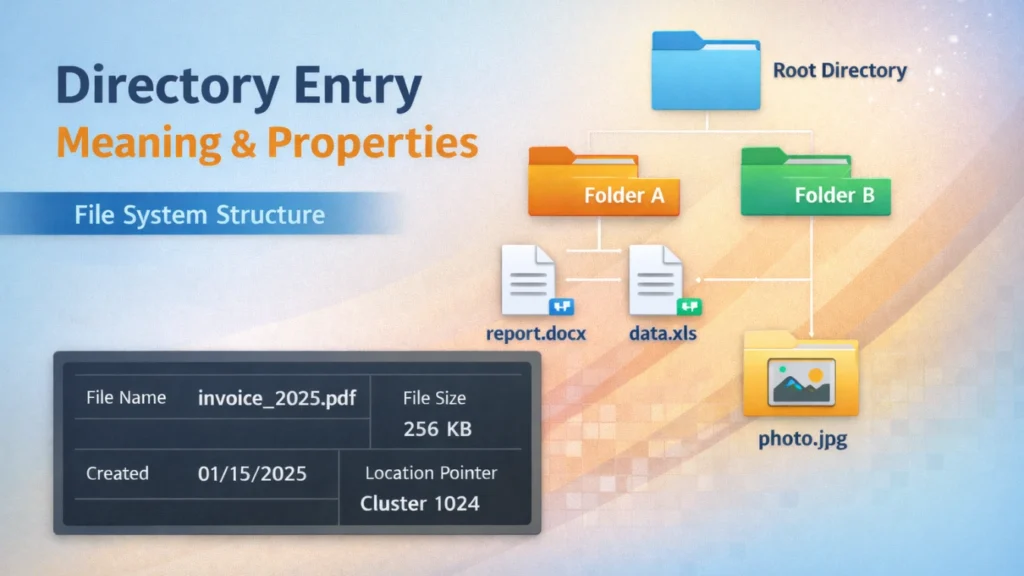
The directory entry meaning refers to a structured record stored within a directory that represents a file or subdirectory.
In simple terms, it acts like an index card in a library catalog. It does not contain the entire book (file) but instead stores key information needed to locate it.
Most operating systems use directory records to manage files in systems such as:
Each directory entry typically stores metadata about a file rather than the file content itself.
Example
When you see a file called:
report.docx
the system actually reads its file record to determine:
- where the file is stored
- how large it is
- when it was created
- which permissions apply
Without a valid directory entry, the operating system cannot locate the file even if the data still exists on disk.
Directory Entry Meaning in File Systems
Understanding the directory entry meaning requires looking at how file systems organize storage.
A disk is divided into sectors and clusters. The file system tracks files by creating directory structures. Within each directory, the operating system stores multiple file records, each describing a specific file.
Key Role of Directory Entries
A file system record performs several important tasks:
- Links a file name to its physical storage location
- Stores essential metadata
- Allows fast file lookup
- Maintains the directory hierarchy
Because of this structure, operating systems can quickly find files without scanning the entire disk.
Real-World Example
Imagine a folder containing 500 photos. Instead of searching every disk sector, the system simply reads the directory entries in that folder to list all files instantly.
This indexing mechanism dramatically improves file system efficiency.
Directory Entry Properties Explained
The most important directory entry properties describe the attributes and metadata associated with a file.
Although different file systems implement them slightly differently, most file metadata properties include the following elements.
File Name
The file name is the most visible part of a directory entry.
It allows users to identify the file in the operating system interface.
Example:
invoice_2025.pdf
In many file systems, the file name is stored alongside its extension within the file record.
File Size
Another essential element of directory entry properties is file size.
This value tells the system:
- how much disk space the file occupies
- how many clusters are required
- how to manage disk allocation
Operating systems use this property to display file sizes in folders.
File Location Pointer
A directory entry also contains pointers that indicate where the file’s data blocks are located.
These pointers may include:
- cluster numbers (FAT)
- inode references (Linux)
- data run information (NTFS)
Without this property, the system cannot locate the actual file data.
File Attributes
File attributes define how the operating system treats a file.
Typical attributes in directory entry properties include:
- Read-only
- Hidden
- System
- Archive
For example, system files may use special attributes to prevent accidental deletion.
Timestamps
Most file systems record timestamps within the directory entry.
Common timestamps include:
- Creation time
- Last modification time
- Last access time
These values help with file tracking, backups, and synchronization tools.
How Directory Entries Work Internally
A directory entry functions as part of a hierarchical file system structure.
The structure works like this:
Root Directory
├── Folder A
│ ├── file1.txt
│ └── file2.txt
└── Folder B
└── photo.jpg
Each item listed above corresponds to a file system record stored inside its parent directory.
Directory Entry Lookup Process
When you open a folder, the operating system follows these steps:
- Access the directory structure.
- Read the directory entries stored in that folder.
- Display file names and metadata to the user.
Because of this design, listing files is extremely fast.
Common Causes of Directory Entry Corruption
Although file systems are reliable, directory entry records can sometimes become corrupted.
This often leads to files appearing missing or inaccessible.
Common causes include:
1. Unexpected Power Loss
If a system shuts down while writing file metadata, the file record may become incomplete.
2. File System Errors
Disk errors or logical corruption may damage file metadata structures.
3. Virus or Malware Activity
Certain malware modifies directory structures, making files invisible.
4. Accidental Deletion
When a file is deleted, the system often removes its directory entry while leaving the data on disk.
5. Storage Device Failure
Bad sectors or failing SSDs may damage directory structures.
What Happens When a Directory Entry Is Lost?
When the file record disappears, the operating system loses the reference to the file.
In practice, this means:
- the file no longer appears in the folder
- the data may still exist on the disk
- the file becomes inaccessible without recovery tools
This scenario commonly occurs after:
- formatting a drive
- deleting files
- partition errors
- corrupted file systems
Fortunately, specialized data recovery tools can rebuild lost directory structures.
How to Recover Files with Missing Directory Entries
When a directory entry is lost, traditional methods such as searching the folder will not work. Instead, recovery software must scan the disk and rebuild the missing metadata.

One practical solution is Magic Data Recovery, a tool designed to locate files whose directory entries have been deleted or damaged.
Why This Tool Helps
Magic Data Recovery addresses several common problems:
- Lost file records
- Formatted drives
- Deleted files
- Corrupted partitions
Key Advantages
- Deep disk scanning technology
- Support for FAT, NTFS, and other file systems
- Recovery of files even when directory entry properties are missing
- Easy interface suitable for non-technical users
Example Use Case
For example, if a USB drive suddenly shows empty folders after a crash, the file data may still exist. In this case, Magic Data Recovery can scan the disk sectors and reconstruct files that lost their directory references.
If you are looking for a practical solution to restore inaccessible files, this tool offers a reliable recovery approach.
Supports Windows 7/8/10/11 and Windows Server
Conclusion
Understanding how directory records work helps explain how operating systems organize and locate files efficiently. A directory entry acts as a critical record containing metadata such as file name, location, timestamps, and other directory entry properties.
When these records become corrupted or deleted, files may appear lost even though their data still remains on the disk. In such cases, specialized recovery solutions become necessary.
Tools like Magic Data Recovery can scan storage devices and rebuild missing file references, allowing users to recover files that lost their directory entries. If you encounter inaccessible files due to directory structure damage, this solution can provide a practical way to restore your data.
FAQs
What is a file directory record in a file system?
A directory entry is a metadata record stored within a folder that represents a file or subdirectory. It contains essential information such as the file name, size, attributes, and storage location. Operating systems rely on directory entries to quickly locate and manage files without scanning the entire disk.
What does directory entry meaning refer to?
The directory entry meaning refers to the role a directory entry plays in linking a file name to its physical storage location. It acts as a reference point that tells the operating system where the file data is stored and how the file should be handled.
What are the main file system metadata properties?
Common directory entry properties include file name, file size, file attributes, timestamps, and pointers to data blocks. These properties allow the operating system to display file information, enforce permissions, and locate the actual data stored on the disk.
Can files exist without directory entries?
Yes, file data may still exist even if the file record is deleted or corrupted. However, without the directory entry, the operating system cannot locate or display the file. Data recovery tools can scan the disk and rebuild references to restore access to the file.
What causes directory entry corruption?
Several factors can damage a directory entry, including sudden power loss, file system errors, malware activity, bad sectors on storage devices, or improper disk removal. These issues may lead to missing files or corrupted directories.
How do operating systems use directory entries?
Operating systems read directory entries when listing files in a folder. Each entry contains metadata and pointers to the file’s storage location. This structure allows systems to display file information quickly and efficiently.
How can I recover files if the directory entry is lost?
If a directory entry is missing, specialized data recovery software can scan the disk and locate file data directly. Tools such as Magic Data Recovery can reconstruct file structures and restore files even when directory metadata has been removed.
How can I prevent directory entry damage?
You can reduce the risk of directory entry corruption by maintaining regular backups, safely ejecting external drives, avoiding sudden shutdowns, and running periodic disk checks. These practices help maintain file system integrity and prevent metadata damage.

Jason is a data recovery and technical support specialist with over 15 years of hands-on experience. He has worked extensively with frontline users, troubleshooting difficult data loss cases and providing practical recovery solutions for accidental deletion, formatted drives, damaged file systems, lost partitions, system failures, and other recovery emergencies. His expertise also includes backup and restoration, file repair, and disaster recovery, with a strong emphasis on safe, reliable, and technically accurate guidance.