
FAT Directory Entry Structure and File Recovery

Many USB drives, memory cards, and older storage devices still rely on the FAT file system. In this system, every file depends on a FAT directory entry that stores its metadata and starting location on the disk.
However, problems may occur when this record becomes corrupted. For example, unplugging a flash drive during file transfer may interrupt file system updates. As a result, the FAT directory entry structure may become inconsistent. Consequently, files may suddenly disappear, file names may look unusual, or folders may refuse to open.
Fortunately, this type of issue does not always mean the data is permanently lost. In many situations, the file content still exists on the disk clusters even though the directory information becomes unreadable. Therefore, understanding how FAT directory entries work can help users diagnose the problem and choose the right recovery method.
This article explains the FAT directory entry structure, the common causes of corruption, and practical solutions for restoring missing files.
Table of Contents
What Is a FAT Directory Entry
A FAT directory entry is a small metadata record stored inside a directory table of the FAT file system. Each file or folder in the directory corresponds to one entry.
The operating system reads these records whenever a folder opens. Therefore, directory entries act as an index that allows the system to locate files on the disk.
Typically, a FAT directory record contains the following information:
- File name in the classic 8.3 format
- File attributes such as hidden or read-only
- Creation and modification timestamps
- Starting cluster number
- File size
Because this metadata links the file to its storage clusters, the operating system depends on the directory entry to access data. If the record becomes damaged, the system may fail to display the file correctly.
FAT Directory Entry Structure Explained
This structure follows a fixed layout of 32 bytes. This standardized format ensures that the file system can interpret directory data quickly and consistently.
Below is a simplified layout:
Offset | Size | Description |
0 | 8 bytes | File name |
8 | 3 bytes | File extension |
11 | 1 byte | Attribute flags |
14 | 2 bytes | Creation time |
16 | 2 bytes | Creation date |
20 | 2 bytes | High word of cluster |
26 | 2 bytes | Starting cluster |
28 | 4 bytes | File size |
The most important element inside the directory record is the starting cluster value. Meanwhile, the FAT table stores the chain of clusters that belong to the file.
Because both components work together, the operating system can reconstruct the full file location.
For instance, the system first reads the directory record. Next, it retrieves the starting cluster. After that, the FAT table reveals the next cluster in the chain.
FAT32 vs exFAT Directory Entries
Although FAT32 and exFAT belong to the FAT file system family, their directory structures differ significantly.
FAT32 Directory Entries
FAT32 uses the classic 32-byte directory entry. Each file normally requires one primary entry, although long file names may use additional LFN entries.
Key characteristics include:
- Single metadata record per file
- Starting cluster stored directly in the entry
- File size stored inside the same entry
Because of this simple structure, FAT32 remains widely used in flash drives and memory cards.
exFAT Directory Entries
The exFAT file system uses a more flexible architecture. Instead of a single record, it stores file metadata in a group of entries called an entry set.
A typical file may contain several entries:
- File directory entry
- Stream extension entry
- File name entry
Each entry still occupies 32 bytes, but the metadata spreads across multiple records.
As a result, exFAT supports:
- Larger files
- Improved metadata management
- Better performance on large storage devices
However, this structure also means that corruption may affect multiple entries instead of one.
How FAT Directory Records Locate Files
A FAT directory entry does not store the entire disk address of a file. Instead, it stores the first cluster number. Then the FAT table links the rest of the clusters together.
The process works as follows:
- The system reads the directory record
- It identifies the starting cluster
- The FAT table reveals the next cluster
- The cluster chain continues until the end marker appears
Because of this design, the actual file data may remain intact even if directory metadata becomes damaged.
Furthermore, the same mechanism explains why deleted files often remain recoverable. When a file is deleted, the directory record simply changes the first byte to a deletion marker. However, the data clusters remain untouched until new files overwrite them.
Common Causes of FAT Directory Entry Corruption
Several factors may damage a FAT directory entry, especially on removable storage devices.
Unsafe Device Removal
Many users disconnect USB drives without safely ejecting them. Consequently, the system may interrupt updates to the FAT structure.
Sudden Power Failure
Power loss during file operations may leave directory metadata incomplete.
Disk Bad Sectors
Physical disk damage can affect the sector containing the directory record.
Malware or File System Errors
Malicious software and system crashes may also alter directory metadata.
Partition Damage
In some situations, partition errors may disrupt directory tables and make entries unreadable.
Because these issues affect metadata rather than the file data itself, recovery remains possible in many cases.
Symptoms of FAT Directory Entry Damage
When a directory record becomes corrupted, the storage device may show unusual behavior.
Common symptoms include:
- Files disappear even though disk space remains used
- File names appear as random characters
- Files suddenly show 0 KB size
- Folders become inaccessible
- The drive reports a RAW file system
These signs often indicate that the directory structure cannot be interpreted correctly.
Methods to Fix FAT Directory Record Errors
Before attempting data recovery, users may try several basic repair tools.
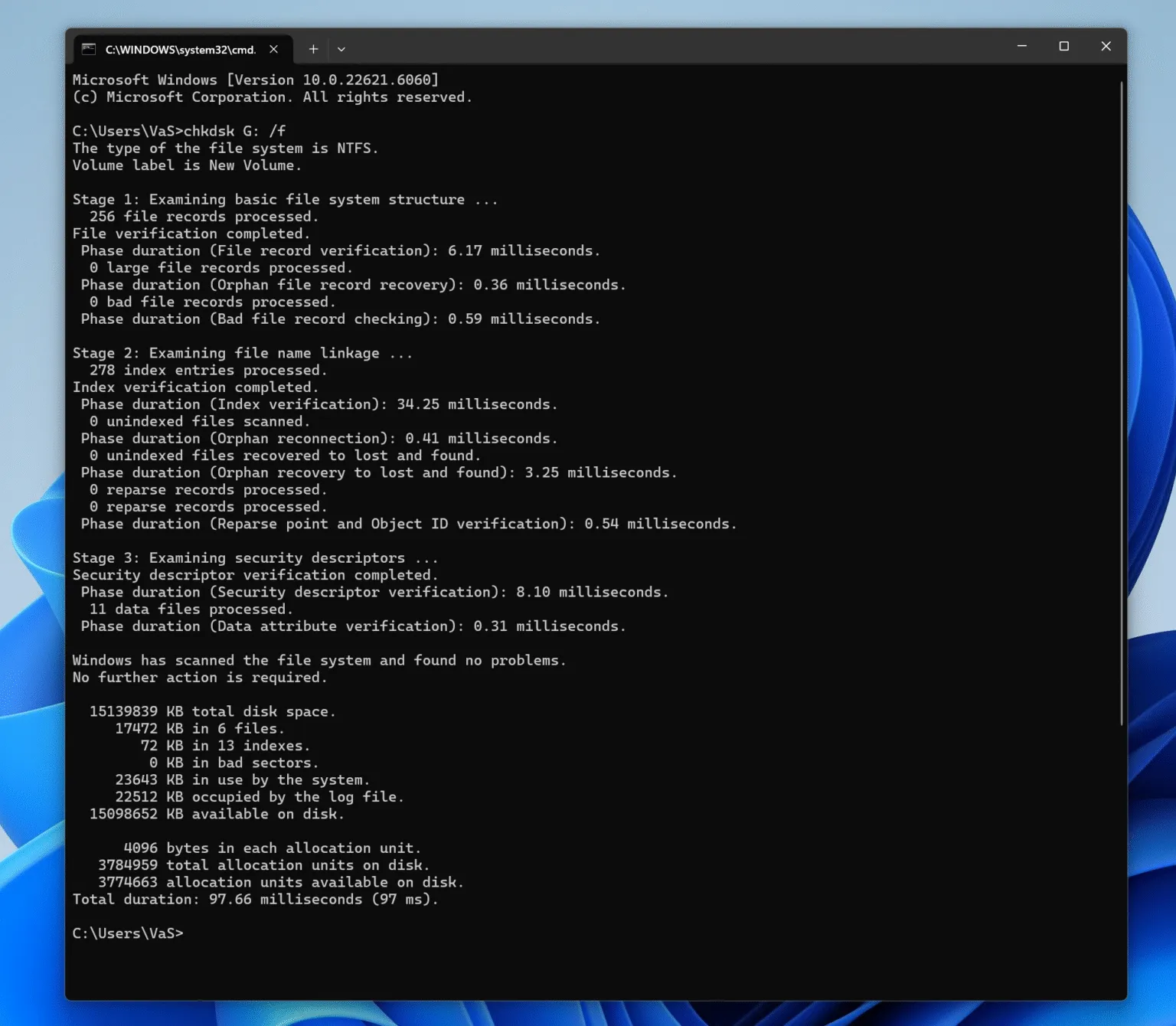
Run CHKDSK
Windows provides a built-in utility for repairing file system errors.
Steps:
- Open Command Prompt as administrator
- Run the command:
chkdsk X: /f
Replace X with the drive letter.
This tool scans the disk and fixes certain directory inconsistencies.
Use Windows Disk Error Checking
Another option is the graphical disk repair tool.
Steps:
- Open File Explorer
- Right-click the drive
- Select Properties → Tools
- Click Check
Although this method resolves minor problems, it cannot recover deleted files.
Restore From Backup
If a backup exists, restoring files remains the safest solution. However, many users discover the issue only after files disappear.
Therefore, recovery tools may become necessary.
Recover Files After FAT Directory Entry Corruption
Even if a directory record becomes corrupted, the file clusters often remain stored on the disk. Consequently, specialized recovery software can analyze the storage device and reconstruct lost files. One practical solution is Magic Data Recovery.
Instead of repairing the damaged file system directly, the software focuses on locating recoverable data. As a result, the risk of overwriting files becomes lower.
Magic Data Recovery can help in scenarios such as:
- Corrupted FAT directory record
- Deleted files on exFAT or FAT32 drives
- Formatted USB drives
- Damaged partitions
Key advantages include:
- Advanced scanning for FAT-based storage devices
- Reconstruction of missing directory metadata
- File preview before recovery
- Support for USB drives, SD cards, and external disks
For example, if a memory card loses its folder structure after an unexpected shutdown, the software can still locate files by analyzing cluster patterns.
Therefore, when files disappear because directory entries become unreadable, recovery software often provides a safer solution.

Tips to Prevent FAT Directory Entry Corruption
Preventing damage to a directory record is easier than recovering lost files later.
Consider the following best practices:
- Always eject removable drives safely
- Avoid disconnecting devices during file transfers
- Use reliable storage devices
- Perform regular disk checks
- Maintain frequent backups
By following these precautions, users can significantly reduce the risk of directory corruption.
Conclusion
The FAT directory entry plays a crucial role in the FAT file system because it links file metadata with the clusters storing the data. When this record becomes corrupted, the operating system may lose the ability to locate files.
However, the file data often remains intact on the disk. Therefore, understanding the FAT directory entry structure helps users identify problems and choose the right recovery strategy.
Basic repair utilities may resolve minor issues, while specialized recovery software offers a safer method for retrieving lost files. Magic Data Recovery focuses on extracting data rather than modifying damaged structures. Consequently, it provides a practical solution when files disappear due to directory corruption.
Supports Windows 7/8/10/11 and Windows Server
FAQ
What is a FAT directory entry?
It is a metadata record that stores information about a file in the FAT file system, including its name, attributes, and starting cluster.
How large is a FAT directory entry?
A standard FAT directory entry occupies 32 bytes in the directory table.
What happens when a FAT directory entry is deleted?
When a file is deleted, the first byte of the directory record changes to a deletion marker. However, the file data usually remains on disk until overwritten.
Why do files disappear but disk space is still used?
This situation usually occurs when the FAT directory entry structure becomes corrupted, preventing the system from locating the file metadata.
Can directory entries be rebuilt?
Yes. Data recovery tools can analyze disk clusters and rebuild missing FAT directory entry records in many cases.
Can CHKDSK fix directory entry errors?
CHKDSK can repair certain file system problems. However, severe corruption may require specialized recovery tools.
What software can recover files after FAT directory corruption?
Tools such as Magic Data Recovery can scan FAT drives and reconstruct files even when directory entries become damaged.

Vasilii is a data recovery specialist with around 10 years of hands-on experience in the field. Throughout his career, he has successfully solved thousands of complex cases involving deleted files, formatted drives, lost partitions, and RAW file systems. His expertise covers both manual recovery methods using professional tools like hex editors and advanced automated solutions with recovery software. Vasilii's mission is to make reliable data recovery knowledge accessible to both IT professionals and everyday users, helping them safeguard their valuable digital assets.