
What Is DRaaS? Full Guide & Benefits
Data loss can happen at any time due to ransomware attacks, system crashes, or cloud outages. As a result, many organizations adopt Disaster Recovery as a Service (DRaaS) to ensure business continuity and reduce downtime.
However, although this cloud-based recovery model is powerful, DRaaS does not cover every data loss scenario. For example, accidental deletion or overwritten files often require a different recovery approach. Therefore, a complete data protection strategy must include multiple layers of recovery.
In this guide, you will learn how DRaaS works, when it is useful, and where its limitations begin.
Table of Contents
What Is Disaster Recovery as a Service?
Disaster Recovery as a Service (DRaaS) is a cloud-based solution that helps organizations restore IT systems after disruptions. Instead of relying on physical infrastructure, it uses cloud environments to replicate systems and enable fast recovery.
How DRaaS Works
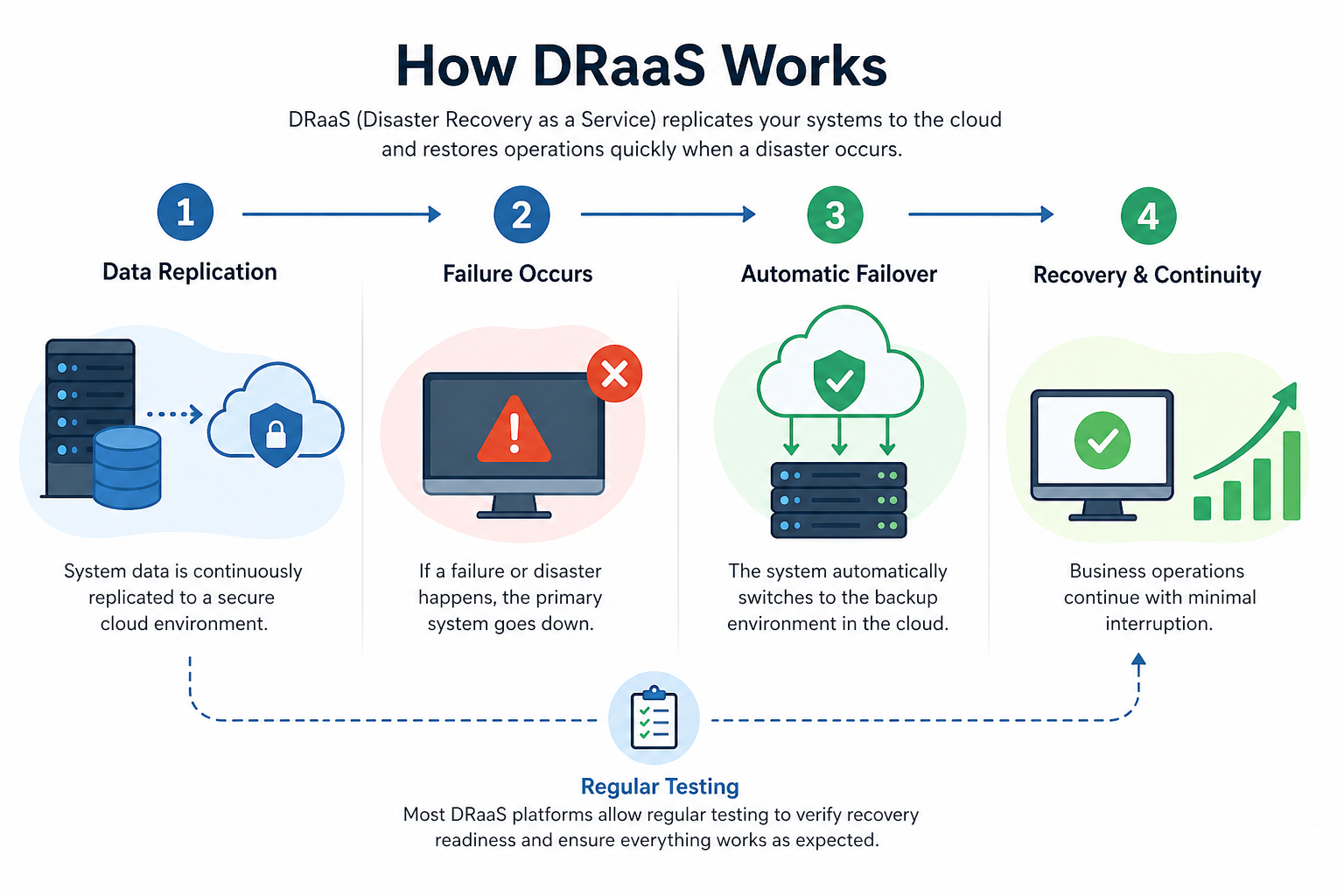
First, system data is continuously replicated to a secure cloud environment. Then, if a failure occurs, the system automatically switches to a backup environment. As a result, businesses can continue operations with minimal interruption.
In addition, most platforms allow regular testing. Therefore, companies can verify recovery readiness before real incidents happen.
Core Components
- Continuous data replication
- Cloud-hosted recovery environment
- Automated failover orchestration
Disaster Recovery vs Backup: Key Differences
Although both solutions protect data, they serve different purposes. On one hand, backup stores file copies. On the other hand, DRaaS restores complete environments.
For example, backup allows you to retrieve a document. However, it cannot bring servers online instantly. In contrast, disaster recovery enables faster system recovery.
Therefore, combining both solutions creates a more reliable strategy.
Benefits of DRaaS
Organizations choose cloud recovery solutions for several reasons.
Faster Recovery
First, automated failover reduces downtime significantly. Systems can often resume within minutes.
Stronger Security
In addition, clean system snapshots help reduce the impact of ransomware attacks.
Lower Infrastructure Cost
Moreover, cloud-based models eliminate the need for physical recovery sites, making them more cost-efficient.
Scalability
As business data grows, cloud resources can expand without major hardware investment.
Cost Considerations
Pricing depends on storage size, recovery speed, and service provider.
Typically, costs include:
- Monthly subscription fees
- Storage usage charges
- Optional recovery testing
For many small businesses, cloud recovery is more affordable than maintaining physical infrastructure. However, costs can increase as data volume grows.
Limitations You Should Know
Although DRaaS is powerful, it has limitations.
It cannot always recover:
- Individual deleted files instantly
- Overwritten file versions
- Unsynced local data
For example, if a file is deleted before synchronization, cloud recovery systems may not detect it. Therefore, relying only on cloud-based solutions can create recovery gaps.
How to Recover Lost Files Beyond DRaaS
When cloud systems cannot restore specific files, a local recovery method becomes necessary. Unlike cloud-based solutions, file-level recovery tools scan storage devices directly and locate lost data before it is overwritten. This is where Magic Data Recovery stands out. It is designed to handle file-level data loss scenarios that cloud recovery solutions often miss, making it a practical complement to your overall recovery strategy.
How to Use Magic Data Recovery
Step 1: Download and Install Magic Data Recovery
Install the software on a different drive to avoid overwriting lost data.
Supports Windows 7/8/10/11 and Windows Server
Step 2: Select the Drive or Partition
Choose the location where files were lost and start searching for lost data.

Step 3: Scan for Lost Files
The tool performs an Advanced Scan automatically and lists recoverable files in real time.

Step 4: Preview Files
Preview files before recovery to ensure accuracy.

Step 5: Recover to a Safe Location
Save recovered files to a different drive to avoid data overwriting.

Why a Hybrid Recovery Strategy Works Best
Cloud recovery focuses on system-level restoration, while local recovery tools handle file-level loss. Therefore, combining both approaches creates a more complete protection strategy.
For example, DRaaS can restore servers after a crash, while local tools can recover accidentally deleted files that were never synced.
This layered approach ensures stronger protection and fewer data gaps.
Best Practices for Data Protection
To improve reliability, consider the following strategies:
- Combine cloud recovery with backup systems
- Follow the 3-2-1 backup rule
- Test recovery plans regularly
- Use local recovery tools for file-level issues
As a result, you can reduce both system-wide failures and individual file loss risks.
Conclusion
DRaaS plays an important role in modern data protection. It helps businesses restore systems quickly and maintain operations during disruptions. However, it does not fully cover file-level data loss scenarios. Therefore, relying only on cloud solutions can leave important gaps.
A more complete strategy combines cloud-based recovery with local file recovery tools. In this context, Magic Data Recovery provides an effective way to retrieve lost files that cloud systems may not detect.
By using both approaches together, you can build a more resilient and reliable data protection system.
Supports Windows 7/8/10/11 and Windows Server
FAQs
What is DRaaS in simple terms?
DRaaS is a cloud-based recovery service that replicates systems and restores them after failures. It helps businesses recover operations quickly and reduces downtime during unexpected disruptions.
Is Disaster Recovery as a Service better than backup?
No, it serves a different purpose. Backup protects files, while DRaaS restores systems. Therefore, using both together provides better protection.
Can Disaster Recovery as a Service recover deleted files?
Not always. It focuses on system recovery, not individual files. Therefore, file-level recovery tools may still be necessary.
What is the difference between Disaster Recovery as a Service and cloud backup?
Cloud backup stores files, while Disaster Recovery as a Service restores full systems. As a result, recovery speed and scope differ significantly.
Do small businesses need Disaster Recovery as a Service?
Yes, especially if downtime affects operations. It provides scalable recovery without requiring expensive infrastructure.
What should you do if recovery fails?
You should use a local recovery tool to scan storage devices directly. These tools can retrieve files that were not backed up or synchronized.

Vasilii is a data recovery specialist with around 10 years of hands-on experience in the field. Throughout his career, he has successfully solved thousands of complex cases involving deleted files, formatted drives, lost partitions, and RAW file systems. His expertise covers both manual recovery methods using professional tools like hex editors and advanced automated solutions with recovery software. Vasilii's mission is to make reliable data recovery knowledge accessible to both IT professionals and everyday users, helping them safeguard their valuable digital assets.