
Asoftech Data Recovery Review & Best Alternative
Losing your irreplaceable photos, critical work documents, or financial spreadsheets can feel like an absolute nightmare. Whether you accidentally emptied the Recycle Bin or faced a sudden drive corruption, the immediate panic drives most users to look for an immediate digital lifesaver. During your search, you have likely come across Asoftech Data Recovery, a long-standing utility in the file retrieval industry.
However, technology evolves at a breakneck pace. Storage hardware changes, file systems become more complex, and modern operating systems like Windows 11 introduce strict security protocols. Consequently, many users wonder if legacy software like Asoftech can still deliver reliable hard drive solution today.
Therefore, in this comprehensive review, we will look closely at Asoftech Data Recovery, analyze the capabilities of Asoftech photo recovery, and evaluate whether it meets modern performance standards. Furthermore, if you find that it falls short of your specific technical needs, we will introduce a highly reliable, professional-grade alternative, Magic Data Recovery, to safely salvage your files.
Supports Windows 7/8/10/11 and Windows Server
Table of Contents
What is Asoftech Data Recovery
Originally developed as a lightweight shareware utility, Asoftech Data Recovery aims to help users salvage deleted or formatted files from a variety of storage media. For many years, Asoftech served as a go-to tool for everyday data mishaps.
Core Features of the Classic Software
The application focuses on straightforward file retrieval. For instance, its primary capabilities include:
- Basic File System Support: The software can read older, traditional file systems such as FAT16, FAT32, and NTFS.
- Broad Storage Compatibility: It attempts retrieval from standard hard drives, USB flash drives, and older digital camera memory cards.
- Targeted Multimedia Retrieval: Through its sister application, Asoftech photo recovery, the developer provides a specialized engine tailored to scanning lost JPEG, PNG, and basic RAW camera formats.
When dealing with older desktop setups or simple external storage devices, Asoftech can sometimes locate recently deleted directory pointers. However, file retrieval technology has shifted dramatically from basic pointer restoration to deep, algorithmic data reconstruction.
The Core Limitations of Asoftech Data Recovery in 2026
While Asoftech Data Recovery was once a practical tool, modern computing environments expose several critical technical limitations. Many remote professionals and home-office creators find that older tools simply cannot handle contemporary data crises.
Outdated User Interface and OS Compatibility
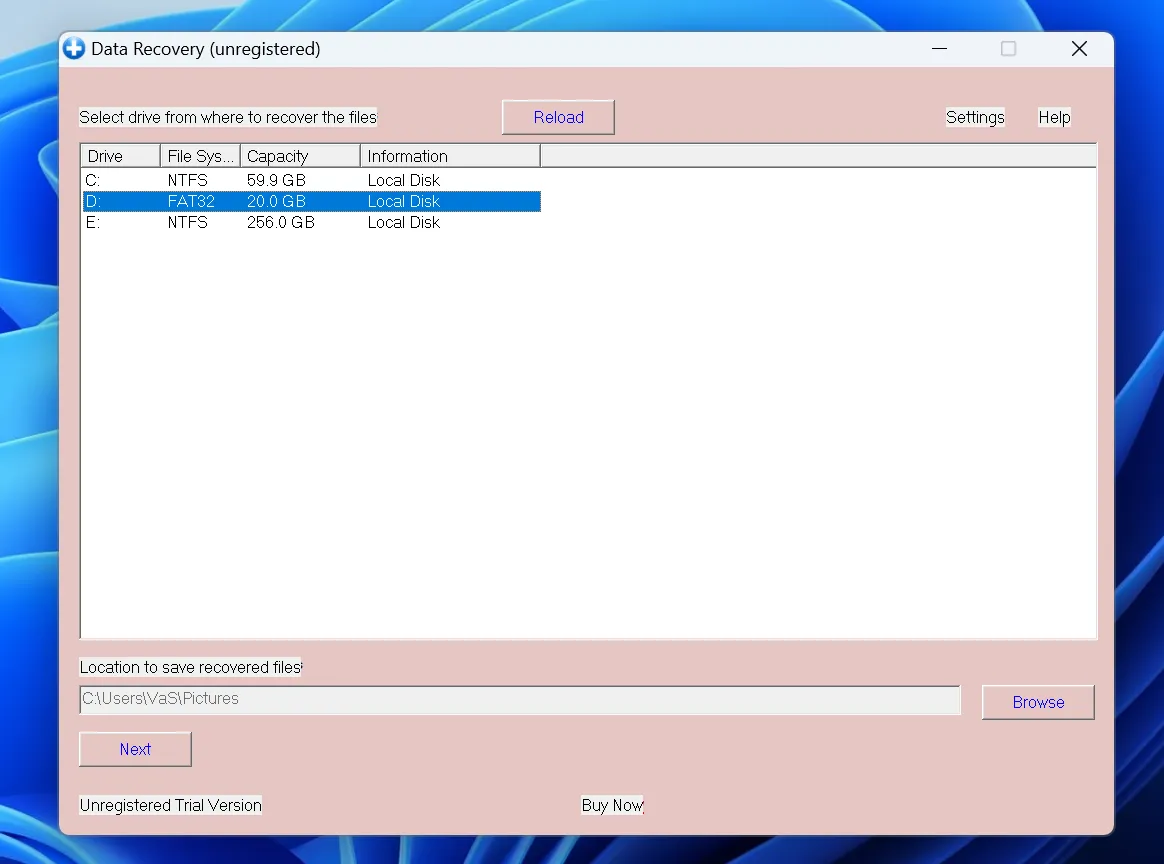
First, the user interface looks and feels like it belongs in the Windows XP era. Because it lacks design optimization for high-resolution displays and modern UX standards, navigation can feel confusing. More importantly, it lacks deep, native integration with the security architectures of Windows 10 and Windows 11.
Strict Trial Version Restrictions
Second, when your data is on the line, you want proof that a tool works before you spend money. Unfortunately, the trial edition of Asoftech Data Recovery only allows you to preview found items. If you want to perform actual file restoration to test the integrity of the data, the software requires an immediate paid upgrade.
Limited File System and Modern Drive Support
Finally, modern solid-state drives (SSDs) utilize advanced tech like the TRIM command, and new storage systems use exFAT, APFS, or ReFS formats. Asoftech struggles to parse these complex configurations, which frequently results in corrupted, unreadable, or incomplete file outputs during deep scans.
Why Users Look Beyond Asoftech Photo Recovery Today
Photographers and content creators face unique challenges when using older software. Because modern camera gear generates massive files and complex directory structures, older tools often stumble during the scanning process.
The Evolution of Image Metadata
For example, modern mirrorless cameras save extensive metadata alongside raw image files. When you deploy Asoftech photo recovery, the software often fails to recognize these advanced structures. As a result, you might end up with corrupted file headers or incomplete images that you cannot open.
The Risk of Permanent Data Overwriting
In addition, the recovery process requires a highly stable scanning algorithm. If an older version of Asoftech photo recovery hangs or crashes midway through a deep scan, it can risk causing further file system corruption. Consequently, modern professionals prefer tools that utilize safer read-only scanning technologies.
The Best Modern Alternative: Why Magic Data Recovery Wins
If you need a more robust and highly dependable approach to file emergency management, shifting to a contemporary solution is the best path forward. For users who require exceptional performance combined with an easy learning curve, we highly recommend Magic Data Recovery.
Magic Data Recovery resolves the exact pain points that legacy software like Asoftech Data Recovery leaves behind. Instead of merely looking for missing file markers, this program uses advanced raw scanning and file system rebuilding technology. This means that even if your storage drive is severely corrupted or marked as “RAW“, the software can systematically piece the fragments back together.
Unique Selling Points of Magic Data Recovery
- Dual Scanning Engine: It features a lightning-fast Quick Scan for recent deletions and a robust Deep Scan that reads the physical drive surface block-by-block.
- Modern, Clean GUI: A simple, wizard-driven interface guides you through the process in three intuitive steps. No IT background is required.
- Universal File Compatibility: The program easily identifies and restores thousands of file types, ranging from high-end DSLR RAW photos to complex database files.
- Risk-Free Evaluation: Users can download the software, scan their media, and preview the actual contents of files safely before making a purchase decision.
Everyday Scenarios Where It Excels
Imagine an independent photographer who accidentally formats an exFAT-configured SD card containing an entire day’s shoot. Where Asoftech photo recovery might fail due to advanced file clustering, this modern utility parses the card structures to extract pristine raw images. Similarly, if a remote employee accidentally deletes a critical project folder from a modern partition, the software safely navigates the accessible storage layers to retrieve the files without compromising data security.
Side-by-Side Comparison: Asoftech vs. Magic Data Recovery
To help you make an informed decision, we have created a direct comparison table highlighting the technical specifications of both applications.
Feature / Capability | Asoftech Data Recovery | Magic Data Recovery |
Supported File Systems | FAT16, FAT32, NTFS | FAT, exFAT, NTFS, ReFS, APFS, HFS+, Ext2/3/4 |
User Interface Design | Legacy / Outdated XP Style | Modern, Clean, and Wizard-Driven |
Scanning Technology | Basic Directory Pointer Scan | Advanced Raw Content & File System Rebuilding |
macOS Compatibility | No | Yes (Full Support Available) |
Pre-Recovery Preview | Limited / Text-Based | Comprehensive Visual & Document Preview |
Storage Media Support | Legacy HDDs and Standard SD Cards | High-Speed NVMe SSDs, Virtual Disks, USBs, Cards |
How to Recover Lost Photos and Files with Magic Data Recovery
If you are ready to salvage your data, the process is incredibly straightforward. Follow these simple steps to safely copy your files away from danger.
Step 1: Download and Install
Download and install the software on a healthy drive partition. However, never install it on the exact drive that contains the lost data, because doing so might overwrite your missing files.
Supports Windows 7/8/10/11 and Windows Server
Step 2: Target the Drive
Launch the program, select the specific drive or memory card you want to analyze, and click the scan button.

Step 3: Scan the Drive
The utility will immediately begin analyzing your storage space automatically in both Quick Scan and Advanced Scan. For recent mishaps, the Quick Scan finishes in seconds. In contrast, if you are dealing with a formatted drive or a corrupted file system, let the Advanced Scan run to completion. It will reconstruct your data structures automatically.

Step 4: Preview Files
Once the scan concludes, browse through the cleanly organized folders. You can use the built-in preview tool to check photos, videos, and text documents.

Step 5: Save Your Files
Finally, select the checkboxes next to the items you wish to save, and click the restore button to output them to a separate, secure storage drive.

Avoid Pirated Crack Serial Keys
During your research, you might encounter websites offering an Asoftech Data Recovery serial key or an Asoftech crack package. We strongly advise you to avoid downloading these files.
Cracked software packages are a primary distribution method for dangerous malware, ransomware, and spyware. Rogue actors modify these applications to inject malicious code that can log your keystrokes or steal your financial data. Furthermore, running an unstable, modified utility on an already damaged storage drive can cause permanent data corruption. Therefore, protecting your system privacy and hardware integrity is always worth choosing a legitimate, officially supported tool.
Conclusion
When a data loss emergency strikes, choosing the right utility determines whether you successfully get your files back or lose them forever. While Asoftech Data Recovery and its counterpart Asoftech photo recovery played a helpful role in the early days of file restoration, they lack the structural updates required to navigate modern storage hardware safely.
Ultimately, we recommend Magic Data Recovery because it combines cutting-edge deep reconstruction algorithms with an incredibly user-friendly design. It adapts seamlessly to modern security standards, supports modern file systems, and lets you verify your data through an honest preview system before purchase. Therefore, do not let an outdated tool complicate your hard drive recovery process. If you want a fast, reliable, and secure solution to bring back your files, visit the official Magic Data Recovery page today and download your free trial scan.
Supports Windows 7/8/10/11 and Windows Server
FAQs
Is Asoftech Data Recovery safe to use?
Yes, the official download from the developer is generally safe. However, because the software has not received significant modern interface or architecture updates, it may occasionally crash or fail to read newer solid-state drives properly. Therefore, modern alternatives offer a more stable experience.
Can I recover files from a formatted SD card using Asoftech photo recovery?
Yes, it can recover files from basic formatted SD cards using FAT file systems. However, if the card uses a modern exFAT format or has undergone a full format, it might fail. In contrast, modern tools handle these situations easily.
Does Asoftech Data Recovery support SSD file restoration?
It offers limited support for traditional HDDs, but it struggles with modern solid-state drives (SSDs). Because SSDs use complex TRIM commands, legacy algorithms cannot track deleted sectors accurately. Therefore, a modern utility is required for reliable SSD recovery.
Is it possible to preview my files before purchasing Magic Data Recovery?
Absolutely. Unlike older tools that offer limited text logs, Magic Data Recovery provides a full visual preview of photos, videos, and documents. Therefore, you can easily verify the integrity of your lost data completely free before buying a license.
Can I safely use an Asoftech Data Recovery serial key from the internet?
No, using a cracked serial key is highly dangerous. These files usually contain hidden malware or ransomware that can compromise your personal data. Furthermore, modified software often causes permanent drive errors, making professional recovery completely impossible.

Vasilii is a data recovery specialist with around 10 years of hands-on experience in the field. Throughout his career, he has successfully solved thousands of complex cases involving deleted files, formatted drives, lost partitions, and RAW file systems. His expertise covers both manual recovery methods using professional tools like hex editors and advanced automated solutions with recovery software. Vasilii's mission is to make reliable data recovery knowledge accessible to both IT professionals and everyday users, helping them safeguard their valuable digital assets.