
Can You Recover Files Deleted from Recycle Bin?
Accidentally emptying the Recycle Bin can feel final, especially when the missing items include work documents, family photos, videos, or project files. Fortunately, the answer to can you recover files deleted from recycle bin is often yes. Your result depends on whether a backup exists, how much you used the drive after deletion, and whether Windows has reused the storage space.
This guide explains how to recover deleted files from Recycle Bin on Windows 10 and Windows 11. It answers can you recover files deleted from recycle bin with proven deleted file recovery methods arranged from the simplest to the most advanced, including built-in tools, backups, and Magic Data Recovery.
Important: Stop using the affected drive as soon as you notice the loss. Do not download files, install programs, or save new data to that drive. Otherwise, new activity may overwrite recoverable information.
Supports Windows 7/8/10/11 and Windows Server
Table of Contents
Can You Recover Files Deleted from Recycle Bin?
Yes. In many situations, the answer to can you recover files deleted from recycle bin is positive. When you delete a file, Windows usually removes its visible file-system reference and marks the occupied space as available. However, the actual content may remain until new data replaces it.
Therefore, act quickly, avoid writing new data, and save recovered files elsewhere. By contrast, downloads, updates, disk cleanup, or formatting can reduce recovery chances.
Before you continue:
- Stop unnecessary activity on the affected drive.
- Install recovery software on another drive when possible.
- Save recovered files to a different drive or partition.
- Seek professional help if the drive clicks, disconnects, or disappears.
Which Recycle Bin Recovery Method Should You Choose?
The best answer to can you recover files deleted from recycle bin depends on your situation. Therefore, choose a method before you start.
Your situation | Recommended solution |
The file is still in Recycle Bin | Restore it directly |
You deleted it seconds ago | Use Ctrl + Z |
File History contains a backup | Restore a previous version |
OneDrive synced the file | Check OneDrive Recycle Bin |
Recycle Bin is empty and no backup exists | Use Magic Data Recovery |
You prefer a Microsoft command-line tool | Use Windows File Recovery |
The drive has physical problems | Contact a recovery service |
How to Recover Deleted Files from Recycle Bin Before Emptying It
If the files still appear in Recycle Bin, recovery is simple. First, open Recycle Bin. Next, locate the file or folder. Then, right-click it and choose Restore. Windows returns the item to its original folder.
If you deleted the file only moments ago, open File Explorer and press Ctrl + Z. However, this shortcut works best before you perform other file actions or restart the computer.
How to Recover Files After Emptying Recycle Bin Without Software
Many people who search can you recover files deleted from recycle bin prefer a free Windows solution. That approach makes sense when a backup or cloud copy already exists.
Restore Files with File History
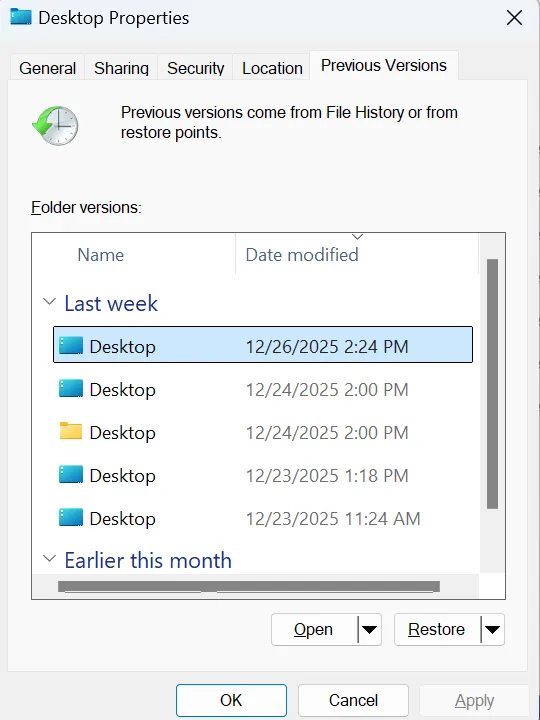
File History can restore earlier versions, but you must enable it before deletion. Open the original folder, right-click it, choose Properties, and open Previous Versions. If Windows shows a version, preview and restore it. However, File History cannot recreate a backup that never existed.
Check the OneDrive Recycle Bin
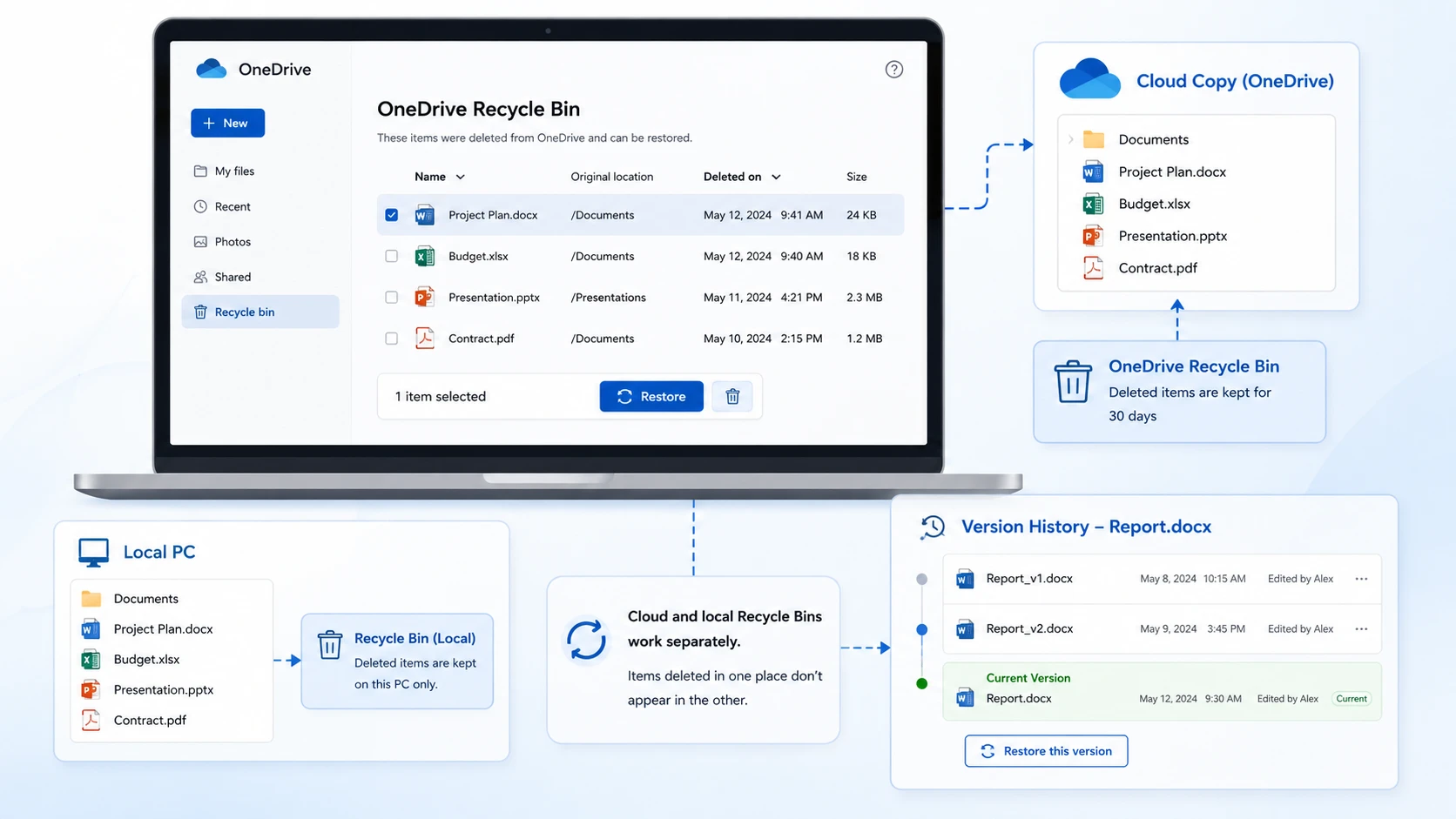
If OneDrive synced the missing file, open the OneDrive Recycle Bin. Because the cloud and local Recycle Bins work separately, a file that disappeared from the computer may still exist online. In addition, check Version History for edited Office files.
How to Recover Files Deleted from Recycle Bin with Magic Data Recovery
When no backup exists, can you recover files deleted from recycle bin becomes a storage-scanning question. In that case, Magic Data Recovery offers a visual workflow with Advanced Scan, search, filters, and file preview.
Moreover, the software does not require a backup created before deletion. Therefore, it can help when File History and OneDrive contain no usable copy. The official product page currently offers a 500 MB recovery allowance for testing, although terms may change.
Why Magic Data Recovery Fits This Situation
Magic Data Recovery addresses four common pain points: it scans a drive when Windows no longer shows deleted files, displays results visually, supports search and filters, and lets you preview files before recovery.
For example, suppose you delete a folder of client PDFs and then empty Recycle Bin. File History was never enabled, and OneDrive did not sync the folder. A drive scan now offers a more relevant solution than empty backup tools. That is why people who search can you recover files deleted from recycle bin often turn to a dedicated recovery tool after backup methods fail.
How to Recover Deleted Files with Magic Data Recovery
Follow these steps to recover files after emptying Recycle Bin.
Step 1: Download and Install Magic Data Recovery
Download Magic Data Recovery and install it on a drive different from the one that originally stored the deleted files. This approach reduces the risk of overwriting recoverable data.
Supports Windows 7/8/10/11 and Windows Server
Step 2: Select the Affected Drive to Scan
Launch the program. Then, select the drive or partition that originally contained the deleted files and start the scan.

Step 3: Scan the Drive for Deleted Files
Magic Data Recovery automatically starts an Advanced Scan. Meanwhile, it adds detected files to the results as the scan progresses. You can review available data before the scan finishes.

Step 4: Preview Deleted Files Before Recovery
Next, use Preview to confirm file content. You can also search or filter by file name, type, size, or date. Consequently, you can focus on the files you need.

Step 5: Recover Files to a Safe Location
Finally, select the target files and start recovery. Save them to a different drive, partition, or storage location rather than the original source. This step helps prevent new data from overwriting other recoverable files.

Why This Method Can Be More Practical
Magic Data Recovery is not the best choice in every case. For instance, a clean File History backup is usually faster, while Windows File Recovery may suit command-line users.
However, Magic Data Recovery becomes practical when Recycle Bin is empty, no backup exists, and you want visual scanning and preview. In addition, filters make large result sets easier to review. For users without a backup, can you recover files deleted from recycle bin becomes easier to evaluate when scan results include a file preview.
No tool can promise success after overwriting. Therefore, Magic Data Recovery provides a useful workflow, not a guarantee.
Use Windows File Recovery for Permanently Deleted Files
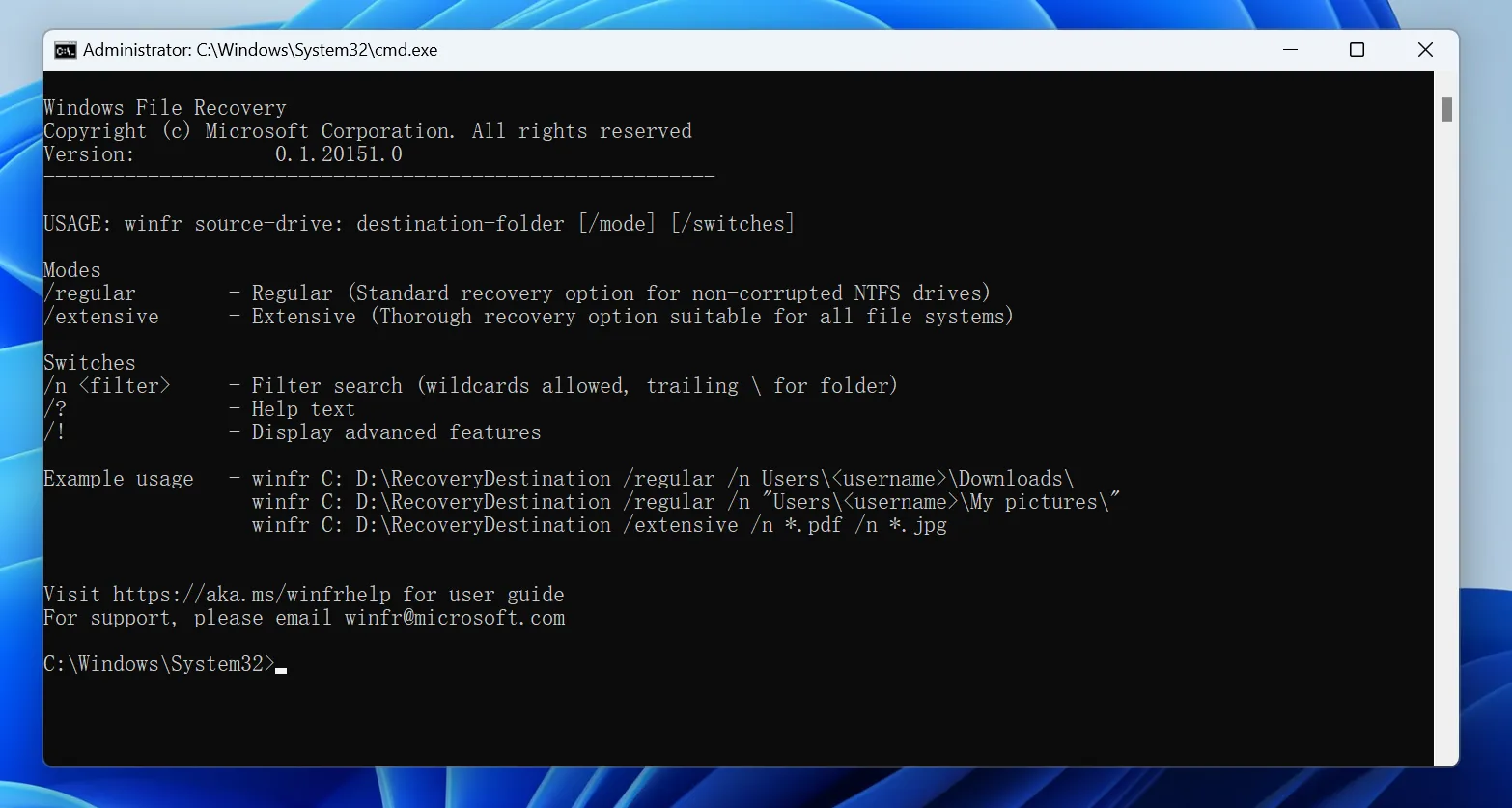
Windows File Recovery is Microsoft’s command-line tool for files that no longer appear in Recycle Bin. However, the source and destination drives must differ.
Example: winfr C: E: /regular /n *.docx
Here, C: is the source, E: is the destination, and /n *.docx searches for Word files. Although the tool is free, beginners may find its commands difficult. Therefore, users searching can you recover files deleted from recycle bin may prefer a graphical interface.
What Affects Your Chance of Recycle Bin Recovery?
A careful answer to can you recover files deleted from recycle bin must consider more than time.
Data Overwriting
After deletion, Windows can reuse the released space. Downloads, updates, caches, and installed apps may replace old data. Consequently, continued use can reduce recovery chances.
HDD vs. SSD and TRIM
Traditional hard drives often leave deleted data in place until another write replaces it. SSDs may use TRIM to manage unused blocks, which can make recovery harder.
Therefore, recover deleted files from SSD results may differ from HDD recovery. Even so, do not assume failure before checking. On an SSD, can you recover files deleted from recycle bin still depends on whether TRIM or later writes removed the data.
Time and Drive Activity
A lightly used drive may preserve recoverable data longer than a busy system drive. In other words, activity often matters more than the calendar.
Tips to Improve Your Recovery Chances
If you are still asking can you recover files deleted from recycle bin, follow these tips:
- Act as soon as you notice the deletion.
- Stop saving new files to the affected drive.
- Check Recycle Bin, File History, and OneDrive first.
- Install recovery software somewhere other than the source drive.
- Save recovered files to another location.
- Avoid formatting, cleanup tools, and unnecessary updates.
- Stop scanning a drive that shows physical failure symptoms.
These actions cannot guarantee a result. However, they help protect data that may still be recoverable.
Conclusion
So, can you recover files deleted from recycle bin? In many cases, yes, but the right deleted file recovery solution depends on where the file still exists. Restore it directly when it remains in Recycle Bin. Use File History or OneDrive when a backup is available. Try Windows File Recovery if you are comfortable with commands.
When Recycle Bin is empty and no backup exists, Magic Data Recovery deserves consideration because it combines drive scanning, search, filters, preview, and recovery in one visual workflow. More importantly, it addresses the core problem without claiming that every deleted file remains recoverable.
Act quickly, protect the affected drive, and save recovered files to another location. These steps give you a safer answer to can you recover files deleted from recycle bin.
Supports Windows 7/8/10/11 and Windows Server
FAQ
Can You Recover Files Deleted from Recycle Bin?
Yes. Can you recover files deleted from recycle bin depends on whether the file still exists in Recycle Bin, a backup, cloud storage, or recoverable drive space. Start with Restore, File History, or OneDrive. If those options contain no copy, scan the affected drive quickly and avoid writing new data to it.
Can You Recover Files After Emptying the Recycle Bin?
Often, yes. You may recover files after emptying Recycle Bin when Windows has not overwritten the underlying data. However, success depends on drive activity, storage type, TRIM behavior, and file-system condition. Stop using the affected drive and choose a recovery destination that differs from the source. In practice, can you recover files deleted from recycle bin depends largely on whether the deleted data remains intact.
Where Do Files Go After the Recycle Bin Is Emptied?
Windows usually removes the file-system reference and marks the occupied space as available. Therefore, the file does not move to a hidden folder. Its data may remain on the storage device until new information replaces it or the storage system clears the relevant blocks.
How Long Can Deleted Files Be Recovered?
No fixed time limit applies to local deleted files. A file may remain recoverable for a short period or much longer, depending on how often the drive receives new data. Therefore, act quickly, but focus on drive activity rather than assuming recovery ends after a set number of days.
Can Deleted Files Be Recovered from an SSD?
Sometimes. However, SSD recovery can be harder because TRIM may help the drive clear blocks that Windows no longer needs. Recovery still depends on timing, settings, device behavior, and overwriting. Stop using the SSD immediately and avoid installing recovery software on the affected partition.
Can I Recover Permanently Deleted Files Without Software?
Yes, when File History, OneDrive, another cloud service, or a separate backup contains a copy. Windows File Recovery also provides a Microsoft command-line option. However, if no backup exists and you prefer a graphical workflow, recovery software may offer a more practical way to scan and preview files.
Is Magic Data Recovery Free?
Magic Data Recovery currently offers 500MB free recovery allowance according to its official product page. You can use the trial to scan the drive, review results, and test whether the software finds the files you need. Because licensing terms may change, always check the current product page before downloading or purchasing.

Vasilii is a data recovery specialist with around 10 years of hands-on experience in the field. Throughout his career, he has successfully solved thousands of complex cases involving deleted files, formatted drives, lost partitions, and RAW file systems. His expertise covers both manual recovery methods using professional tools like hex editors and advanced automated solutions with recovery software. Vasilii's mission is to make reliable data recovery knowledge accessible to both IT professionals and everyday users, helping them safeguard their valuable digital assets.