
How to Recover Files Deleted in Recycle Bin

Supports Windows 7/8/10/11 and Windows Server
Wondering if your files can be recovered? Find out in seconds with our quick check below.
Data Recovery Assessment
Answer 3 quick questions to estimate your recovery chances
Table of Contents
What Happens When Files Are Deleted from the Recycle Bin?
When you delete a file normally, Windows moves it to the Recycle Bin instead of erasing it immediately. This step provides a safety net for accidental deletion.
However, once you empty the Recycle Bin, Windows no longer keeps a visible reference to those files. Instead of removing the data instantly, the system marks the disk space as “available for reuse.” The file content often remains on the drive until new data overwrites it.
Because of this behavior, understanding how to recover files deleted in Recycle Bin depends largely on timing and disk activity after deletion.
Where Do Files Go After Being Deleted from the Recycle Bin?
After you empty the Recycle Bin, files are no longer accessible through Windows Explorer. Internally, Windows removes the file entries from its file system index but does not wipe the underlying data blocks right away.
In practical terms:
- The files are hidden from the operating system.
- The storage space is labeled as free.
- The actual data may still exist until overwritten.
This is why recovery is often possible and why continued use of the same drive significantly lowers the success rate.
Is It Possible to Recover Files Deleted from the Recycle Bin?
Yes, in many situations, data recovery after deletion is possible. However, recovery success depends on several real-world factors.
Situations Where Recovery Is Highly Possible
- You emptied the Recycle Bin recently.
- You haven’t saved large files to the drive since deletion.
- The drive has minimal write activity.
Situations Where Recovery Is Difficult
- The drive has been heavily used after deletion.
- New data was written on the same disk.
- Data blocks have already been overwritten.
Understanding these conditions helps users decide whether manual methods are sufficient or if recovery software is required.
How to Restore Files Deleted from the Recycle Bin Without Software
Before using third-party tools, it is reasonable to check whether Windows backups are available.
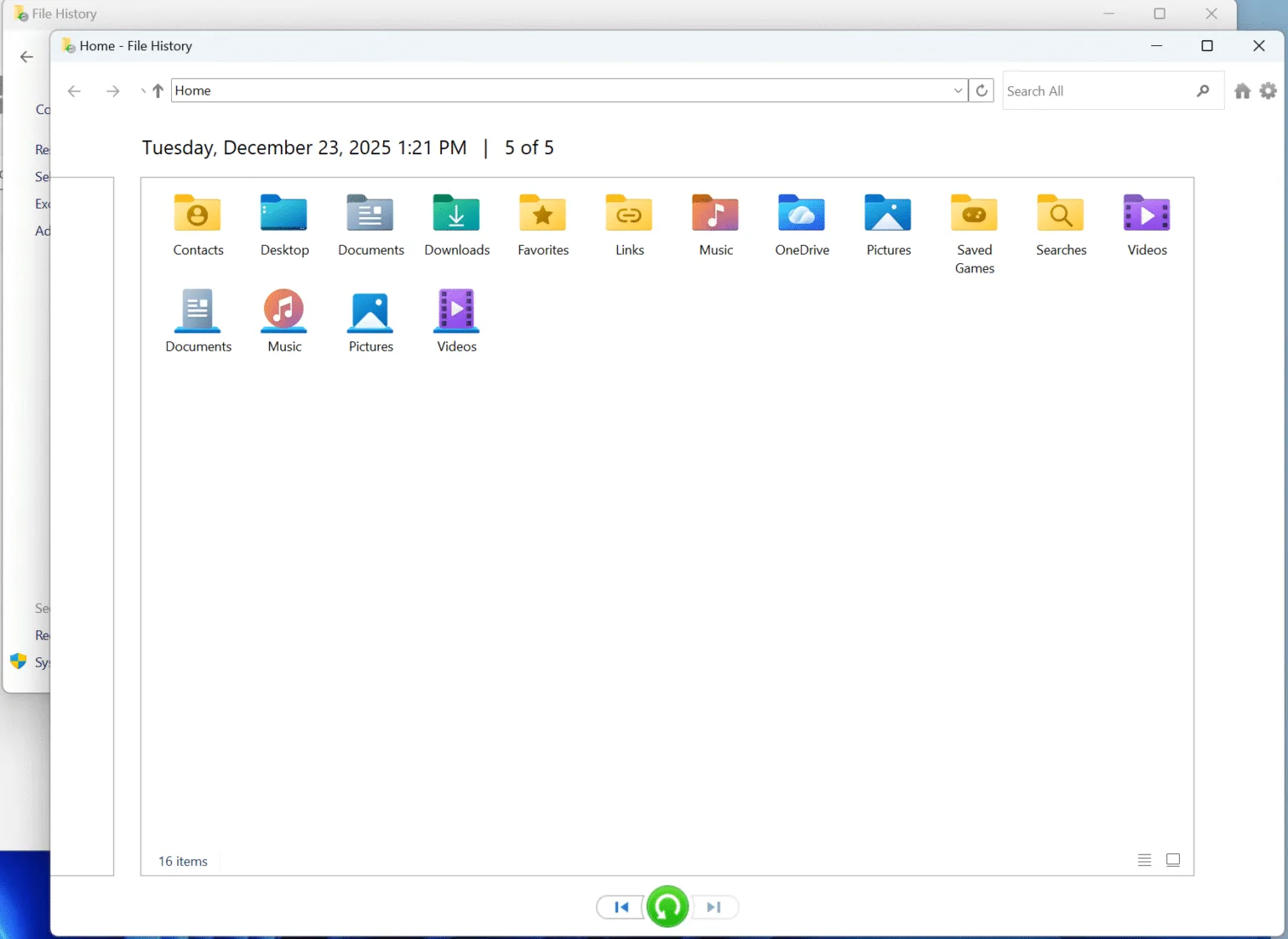
Restore Using File History
If you enabled File History, earlier versions of deleted files may still exist. You can browse backup folders and restore files to their original location.
Restore Previous Versions
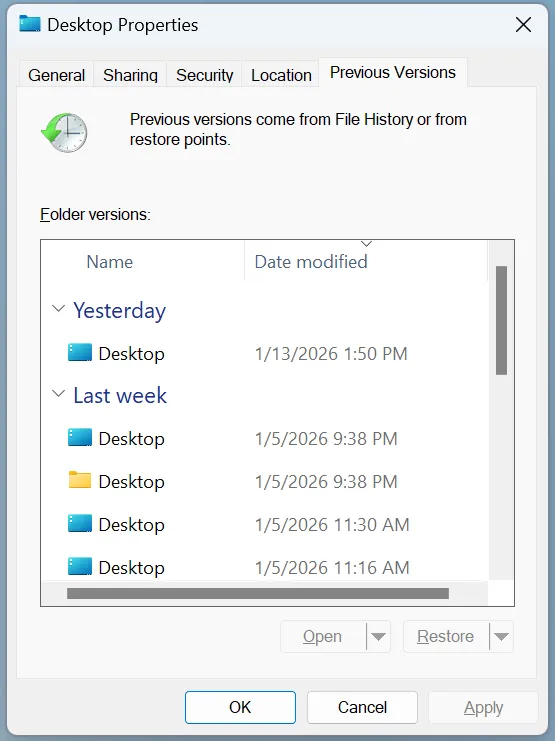
Some system configurations automatically save restore points. Right-clicking a folder and checking “Previous Versions” may reveal recoverable copies.
How to Recover Files Deleted in Recycle Bin Using Magic Data Recovery
When backups are unavailable or incomplete, a dedicated recovery solution becomes necessary. Magic Data Recovery can help with the scenarios where you permanently deleted files, including those removed from the Recycle Bin.
Step 1: Download and Install Magic Data Recovery
To avoid overwriting lost data, install Magic Data Recovery on a different drive than the one where you delete files. This precaution protects recoverable data during the scanning process.
Supports Windows 7/8/10/11 and Windows Server
Step 2: Select the Drive to Scan
After launching the software, select the disk where the Recycle Bin files originally located. This is usually the system drive, but it can also be an external or secondary disk if you changed the settings.

Step 3: Scan for Deleted Files
Magic Data Recovery performs an advanced scan that searches for file traces left behind after deletion. During the scan, recoverable files appear gradually, allowing you to monitor progress in real time.

Step 4: Preview Files Before Recovery
Before restoring anything, preview files to verify their content and integrity. This step helps you focus only on the files that truly matter.

Step 5: Recover Files to a Safe Location
Finally, select the files you want to restore and save them to a different drive or external storage device. Avoid restoring data to the original disk to prevent accidental overwriting.

Why Magic Data Recovery Is a Reliable Choice
Many recovery tools exist, but Magic Data Recovery stands out for practical reasons:
- It is effective for permanently deleted Recycle Bin files.
- The scanning process is designed to minimize missed data.
- Preview functionality improves accuracy and saves time.
- It works even when Windows no longer recognizes deleted files.
For users who need a dependable solution rather than trial-and-error methods, this approach offers a balanced combination of simplicity and effectiveness.
Tips to Increase the Success Rate of Recycle Bin Recovery
To improve your chances of recovery:
- Stop using the affected drive immediately.
- Avoid installing new software on the same disk.
- Recover files as soon as possible.
- Save restored files to an external device.
These practices significantly reduce the risk of permanent data loss.
Conclusion
Losing files after emptying the Recycle Bin does not always mean permanent data loss. Understanding how to recover files deleted in Recycle Bin starts with knowing where deleted data goes and which recovery options make sense for your situation.
When built-in Windows features are not enough, Magic Data Recovery provides a reliable and practical Recycle Bin recovery solution for recovering permanently deleted files. If you are looking for an efficient and trustworthy way to restore important data, this tool is worth considering.
Supports Windows 7/8/10/11 and Windows Server
FAQ: How to Recover Files Deleted in Recycle Bin
How do I recover permanently deleted files from the Recycle Bin?
Is deleted from Recycle Bin gone forever?
Can I still recover permanently deleted files?
Where does the Recycle Bin restore to?
Are permanently deleted files actually deleted?
Where do permanently deleted files go?
Can 2 year old deleted photos be recovered?

Vasilii is a data recovery specialist with around 10 years of hands-on experience in the field. Throughout his career, he has successfully solved thousands of complex cases involving deleted files, formatted drives, lost partitions, and RAW file systems. His expertise covers both manual recovery methods using professional tools like hex editors and advanced automated solutions with recovery software. Vasilii's mission is to make reliable data recovery knowledge accessible to both IT professionals and everyday users, helping them safeguard their valuable digital assets.