
File System Metadata Recovery: How Metadata Locates Files

File system metadata recovery uses surviving file-system records to identify a file, locate its original data clusters, and reconstruct its contents when the original bytes remain readable. Unlike signature-based carving, it may preserve the filename, folder relationships, and correct order of fragmented data. However, finding a valid file record does not prove that the old bytes still exist. Recovery depends on both surviving metadata and surviving content.
This article covers NTFS, FAT32, and exFAT volumes on Windows 10 and 11, including internal disks and removable drives. It describes file-recovery mechanisms, not a guaranteed recovery procedure or a method of repairing damaged storage hardware.
Table of Contents
What Is File System Metadata Recovery?
A file system keeps information that lets it connect a filename to the bytes that make up a file. That information is metadata. Depending on the file system, it may reside in an NTFS Master File Table (MFT) record, a FAT32 directory entry, or an exFAT directory entry set. The data itself normally resides in separately allocated clusters, although small NTFS data streams can be resident inside a file record.
Metadata layer | Examples | What it can establish |
File identity | Filename, timestamps, file record, parent reference | Which file a record may describe |
Data location | NTFS data runs, FAT cluster chain, exFAT stream mapping | Which logical clusters to read and in what order |
Allocation state | NTFS | Whether clusters or records are currently considered allocated |
File content is not another metadata layer: it is the payload that a surviving map helps locate. NTFS resident data is a special case because the payload sits inside a file record. Allocation metadata is not a historical ownership log: a free cluster bit cannot tell you which deleted file previously occupied the cluster. Likewise, an intact filename does not guarantee that its associated location mapping survives.
Also, distinguish file system metadata recovery from reconstructing damaged metadata structures themselves. Research into reconstructing NTFS $LogFile records, for example, concerns historical file-system logging evidence. Such records may help forensic analysis but do not, by themselves, replace a missing user-file payload.
How File System Metadata Recovery Works
Identify a surviving file record
For file system metadata recovery to work, enough coherent old file-record information must survive to identify a candidate. After deletion clears its in-use flag, an NTFS MFT record may still retain attributes. A FAT32 directory entry may remain recognizable after its first short-name byte changes to 0xE5. An exFAT entry set may retain its structure after its entries become inactive. However, later writes may reuse any of these records.
Recover the logical data mapping
Next, file system metadata recovery needs a usable map of where the old data belonged. NTFS can describe multiple cluster runs in a nonresident $DATA attribute. FAT32 uses the starting cluster from its directory entry. If the FAT chain survives, it then follows the remaining clusters. Meanwhile, exFAT uses either a valid FAT chain or a contiguous allocation from its Stream Extension.
To recover files using metadata, a reader must interpret these structures before attempting content reconstruction. The file system’s cluster numbers are logical positions within the volume. They are not disk LBAs, physical flash cells, or a direct description of SSD controller placement.
Read the mapped content in file order
Consider a constructed example, not a disk capture. A file contains 10,000 bytes and uses 4,096-byte clusters. It therefore requires ceil(10,000 / 4,096) = 3 clusters, totaling 3 × 4,096 = 12,288 allocated bytes. The final cluster contains 2,288 bytes beyond the logical end of the file. A reader must exclude that slack from the recovered file.
If the old mapping identifies 20 → 38 → 21, a reader can assemble those clusters in order. It then trims the output to 10,000 bytes. Without a valid mapping, simply reading clusters 20 → 21 → 22 would not reconstruct this fragmented example. The numbers illustrate logical cluster mapping rather than a real runlist or recovered file.
Validate the actual bytes
File system metadata recovery does not end when a reader assembles the logical stream. The reader must also check its content and format. A matching filename, size, or header is not proof of a complete result. For example, a three-cluster file can still have its middle cluster overwritten while its old file record remains readable.
This separation between location and content is the most important condition in file system metadata recovery.
File System Metadata Recovery in NTFS, FAT32, and exFAT
NTFS: MFT records and data runs
For file system metadata recovery on NTFS, the MFT provides the starting point. Microsoft’s Master File Table documentation explains that deletion marks an MFT record free. Later activity may reuse it. The attribute record specification distinguishes resident (FormCode = 0x00) and nonresident (FormCode = 0x01) values.
A resident $DATA value can contain a small file’s bytes directly inside the MFT record. A nonresident $DATA value instead uses mapping pairs, commonly called data runs, to relate virtual clusters of the file to logical clusters on the volume. When those mappings survive, file system metadata recovery may preserve the correct order of a fragmented file. However, record reuse can erase that map even when the external data clusters still contain the original bytes.
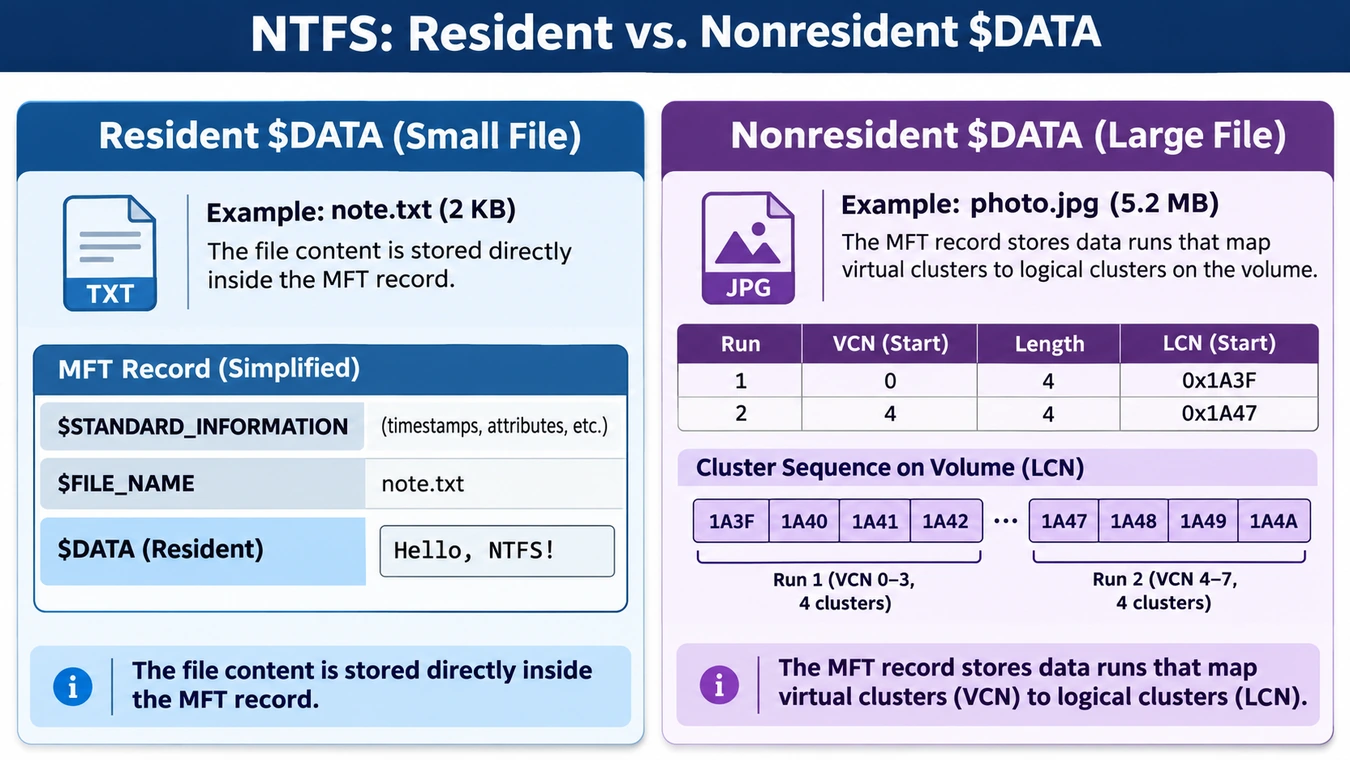
The $FILE_NAME attribute may retain the old name and parent reference. Still, that alone cannot guarantee a complete directory path. For a closer look at record and attribute organization, see the NTFS Master File Table guide. The NTFS deleted file MFT test compares retained mappings, record reuse, and data overwrite using constructed structures. These teaching states do not represent measured recovery success rates.
FAT32: directory entries and cluster chains
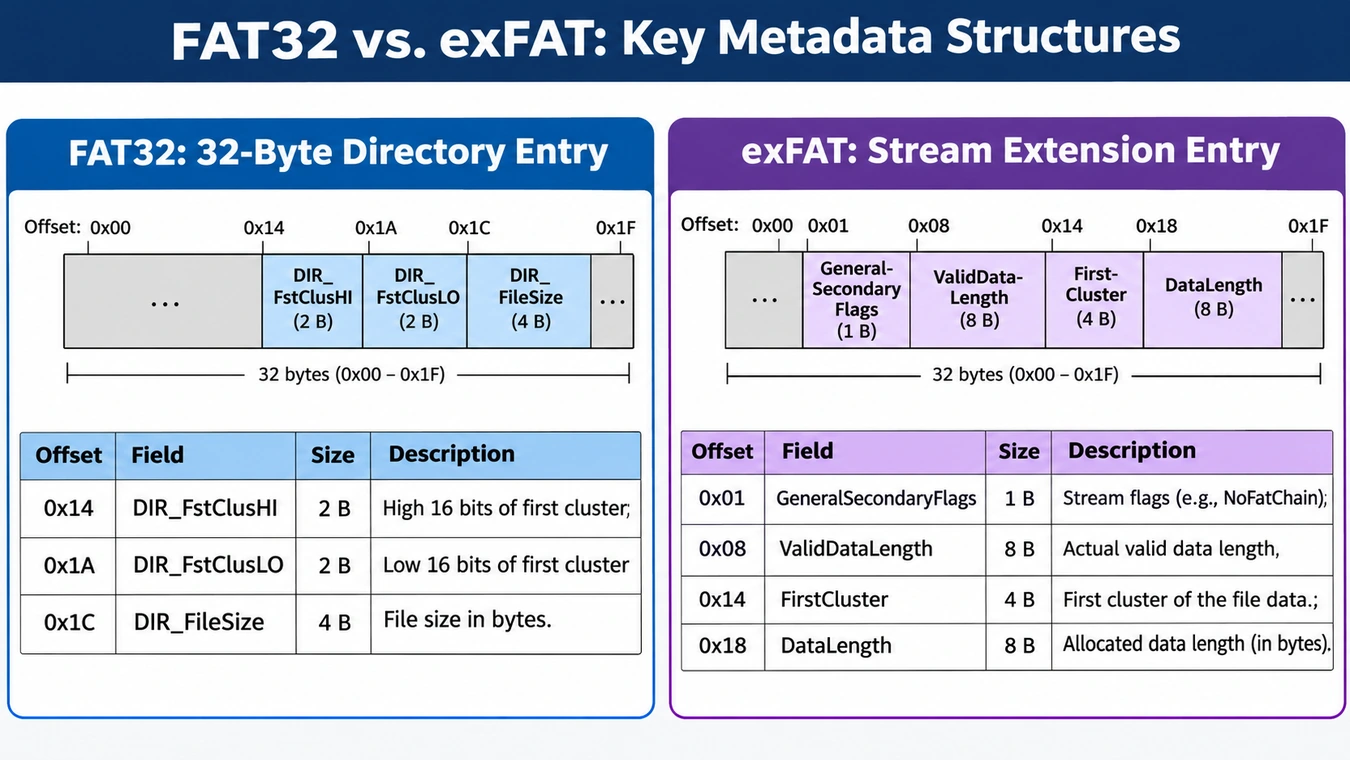
A FAT32 short directory entry is 32 bytes. The Microsoft FAT specification defines these recovery-relevant fields:
Field | Byte offset | Role |
|
| High 16 bits of first cluster |
|
| Low 16 bits of first cluster |
|
| Logical file size, in bytes |
Combine the two fields as (DIR_FstClusHI << 16) | DIR_FstClusLO, subject to the FAT32 cluster-number rules. When DIR_Name[0] equals 0xE5, the short directory slot is available for reuse. Long filename entries, when present, are additional metadata and may be lost or overwritten independently.
For file system metadata recovery on FAT32, the File Allocation Table can link an allocated file’s clusters in order. After deletion, a directory entry may retain the first cluster and file length. Yet the old FAT chain may no longer exist. Therefore, file system metadata recovery cannot infer a former fragmented chain from those two values alone. Assuming that the data was contiguous can combine unrelated bytes. The FAT32 directory entry structure and File Allocation Table guides explain these two components separately.
exFAT: Stream Extension, Allocation Bitmap, and NoFatChain
For file system metadata recovery on exFAT, a directory entry set supplies file identity and stream details. The Microsoft exFAT specification defines GeneralSecondaryFlags at 0x01, ValidDataLength at 0x08, FirstCluster at 0x14, and DataLength at 0x18. These offsets are relative to the Stream Extension entry, not the start of the volume.
The NoFatChain bit changes how file system metadata recovery interprets the location information:
Stream Extension state | How clusters are located |
| Follow the corresponding valid FAT chain |
| Treat the allocation as one contiguous sequence starting at |
For the same constructed 10,000-byte file with 4,096-byte clusters, a surviving FirstCluster = 20, DataLength = 10,000, and NoFatChain = 1 describes three contiguous clusters: 20 → 21 → 22. With NoFatChain = 0, the reader must consult the FAT chain instead. Therefore, two exFAT files may need different location logic even when both retain a first-cluster field.
exFAT’s Allocation Bitmap reports whether clusters are currently allocated; unlike a FAT chain, it does not record file order or historical ownership. In addition, ValidDataLength describes how far the file system has written valid data into the stream. For ordinary reads, the specification requires zero-filled output from ValidDataLength up to DataLength. The underlying storage bytes in that range remain undefined. Consequently, these fields are not interchangeable proof of the original payload.
Why Metadata Survival Matters in File System Metadata Recovery
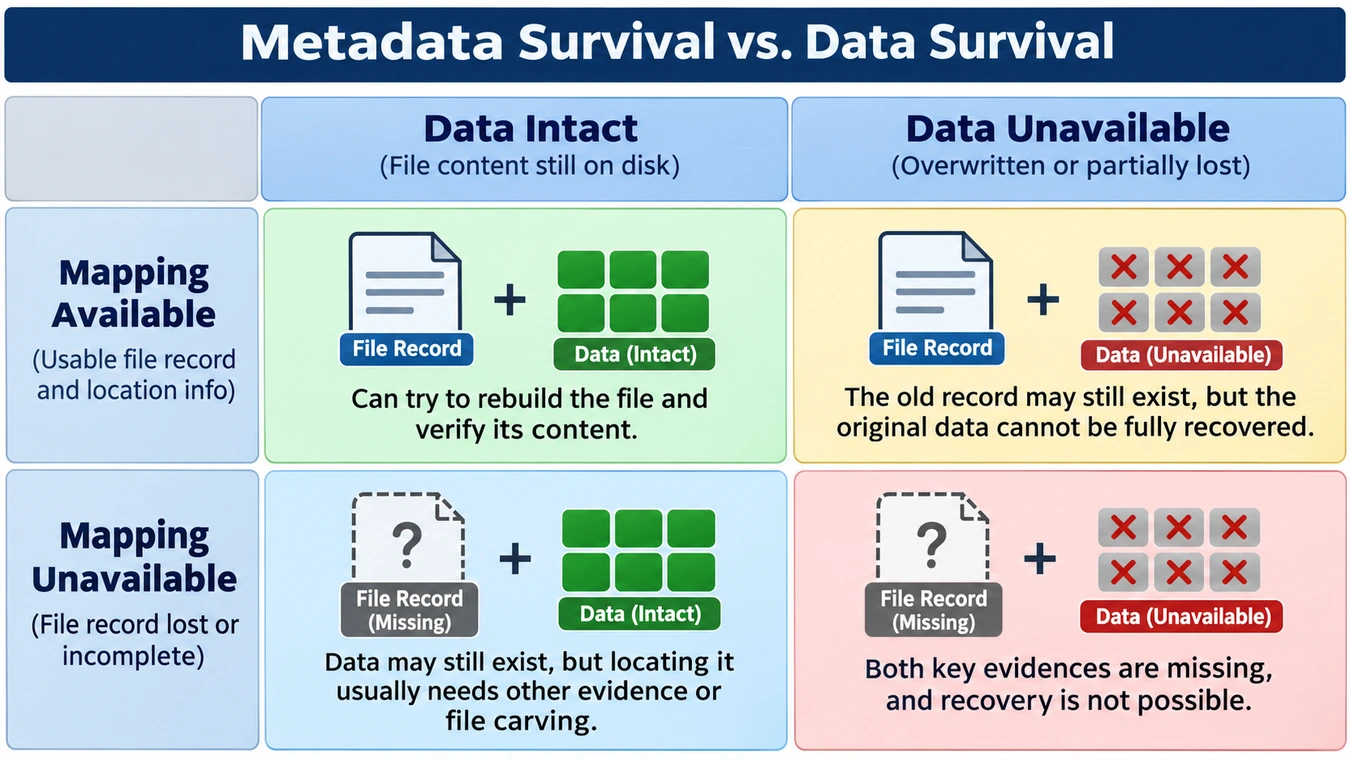
A reliable file system metadata recovery assessment asks two questions. Does enough metadata survive to locate the file? And do those logical locations still contain the original bytes?
Mapping evidence | Original bytes remain readable | Original bytes overwritten or unavailable |
Usable record and mapping survive | The file may be reconstructed with its original attributes, subject to validation | The old filename and map can survive, but the recovered content will be incomplete or incorrect |
File mapping is unavailable | Data may still exist, but locating or attributing it requires other evidence or carving | The missing mapping and missing payload prevent straightforward reconstruction |
This matrix describes evidence, not recovery percentages. Metadata can survive in pieces. A name may remain without a valid parent reference. Likewise, a starting cluster may survive without the rest of its chain. Even readable sectors cannot prove that their bytes belong to a particular historical file.
Three practical conclusions follow. First, recovery of the original filename is an identity result, not an integrity check. Second, a complete NTFS runlist or valid FAT chain provides location evidence, not proof against later overwrites. Third, file carving can sometimes find intact content after file-system records are gone, but it usually cannot reconstruct the original directory hierarchy from signatures alone.
The guide to orphaned files and lost cluster chains explores lost directory references and still-allocated clusters. Do not confuse those cases with completed deletion, where the file system frees clusters for reuse.
How Deletion and Damage Affect File System Metadata Recovery
Deletion: For file system metadata recovery, deletion may release both file records and data-cluster allocations. However, metadata and content may persist for different periods or become inconsistent. The Recycle Bin represents a different state; moving a file there does not necessarily mean permanent deletion.
Quick formatting: File system metadata recovery depends on which old structures survive the new file-system initialization. The formatting tool, file system, device, and writes determine what remains. Quick formatting does not guarantee intact old records.
Lost partition information: A missing partition entry does not prove that the volume’s MFT, directories, or data clusters are gone. First, an analyst must establish the correct volume boundaries before interpreting volume-relative cluster numbers. Writing a new partition table before preserving the source can complicate recovery.
File-system corruption: Damage to a boot region, index, or directory reference can block access even if lower-level records survive. In such cases, the recovery problem may be reconstructing access paths rather than undeleting records. File system metadata recovery therefore covers several mechanisms, not one deletion pattern.
Compare four events across the same storage layers. Select an event to see which evidence may survive.
The file system releases a file record and its allocations for reuse. Old metadata and data may still occupy their previous storage locations.
Deletion marks records or allocations as reusable; it does not necessarily overwrite old content immediately.
Does a usable old mapping survive, and do the referenced locations still contain the original bytes?
Metadata Recovery vs Carving: What Changes in Practice?
Metadata recovery vs carving is a comparison of evidence sources. Metadata-based methods parse existing file-system records and allocation mappings. File carving instead searches stored content for file signatures and format-specific structures, without requiring a usable original directory record. The PhotoRec documentation confirms that a signature-based carver usually cannot restore original names or directory structure.
Question | Metadata-based recovery | File carving |
Where should the file begin? | File record or directory entry | Signature or file-format structure |
How is file order found? | Runlist, FAT chain, or defined contiguous extent | File-format inference; simple carving may assume continuity |
Can the original name or path survive? | Sometimes, when relevant metadata survives | Usually not from carving alone |
Can a fragmented file be recovered? | If its old mapping survives and bytes are readable | Sometimes with advanced format-aware reconstruction; not guaranteed |
Can it recover overwritten bytes? | No | No |
In practice, file system metadata recovery and carving may complement each other. An old record might provide a filename and likely location, while a content scan finds a candidate file body. However, an analyst must reconcile those clues. Similar file types and sizes cannot prove that a carved file belonged to a specific deleted name. Conversely, a carved JPEG that opens correctly does not prove every original byte has been recovered.
When Can File System Metadata Recovery Fail?
During file system metadata recovery, an old record may point to clusters that the file system now considers free. New writes may reuse those clusters, replacing all or part of the old file. Later writes may reuse an MFT record, FAT directory slot, or exFAT entry set. That process can remove critical identity and mapping information. These are different failures and need different evidence.
Storage devices add another layer. Windows can issue TRIM/UNMAP notifications for released logical blocks on supported storage. A notification setting cannot tell whether a specific old range remains readable. Moreover, an SSD may stop returning the former user data even if its old directory entry survives. Compression, sparse allocations, multiple NTFS streams, encryption, and damaged media can also require interpretation beyond a simple cluster list.
If important files have been lost, stop writing to the affected source. Avoid initializing, formatting, running write-enabled repairs, or saving recovered results to the same volume. For drives that click, repeatedly disconnect, or show unstable reads, discontinue repeated software scans and consider a specialist assessment. Neither file system metadata recovery nor carving can reconstruct original bytes after later writes overwrite them.
How to Evaluate File System Metadata Recovery Results
To judge file system metadata recovery results, separate three levels of evidence:
- Identity: Is the surviving filename, record, parent link, or timestamp coherent? This supports identifying a candidate, not claiming intact content.
- Location: Is the record’s mapping complete and internally consistent? For fragmented data, can every required logical cluster be placed in the correct sequence?
- Integrity: Does the resulting file have plausible internal structure, consistent length, and usable content? If a trusted original file or digest exists, compare against it. A new SHA-256 digest alone only fingerprints the recovered bytes.
These checks matter because a correct filename, extension, or file length can coexist with damaged content. Do not treat a successful scan, a thumbnail preview, or a recognized header as a universal integrity guarantee.
Conclusion
File system metadata recovery works by interpreting surviving records as evidence of a file’s identity, size, and logical data locations. NTFS data runs, FAT32 cluster chains, and exFAT stream flags can each supply those locations, but they do so differently. The key distinction is a surviving map versus surviving content: either may exist without the other. Checking both is essential before treating a recovered filename or file as a trustworthy result.
File System Metadata Recovery FAQs
Can file system metadata recovery restore original filenames?
$FILE_NAME attribute, FAT32 directory entry, or exFAT File Name entry may retain naming information. However, the full folder path depends on directory relationships, and a reused or damaged record can make the original name unreliable or unavailable.Can metadata recovery rebuild fragmented files?
Does a surviving MFT record mean a deleted file is recoverable?
Why does FAT32 deletion make fragmented recovery difficult?
Does exFAT always require a FAT chain to locate a file?
NoFatChain = 1, the allocation is contiguous. Therefore, a reader must not interpret its corresponding FAT entries. When NoFatChain = 0, the valid FAT chain describes the allocation. Separately, the Allocation Bitmap records cluster allocation state.Can file carving recover files if metadata is destroyed?
Can SSD TRIM prevent recovery even when metadata survives?

Vasilii is a data recovery specialist with around 10 years of hands-on experience in the field. Throughout his career, he has successfully solved thousands of complex cases involving deleted files, formatted drives, lost partitions, and RAW file systems. His expertise covers both manual recovery methods using professional tools like hex editors and advanced automated solutions with recovery software. Vasilii's mission is to make reliable data recovery knowledge accessible to both IT professionals and everyday users, helping them safeguard their valuable digital assets.