
Google Contacts: Restore Deleted Contacts
Have you ever opened your mobile phone only to realize important phone numbers or business addresses have completely vanished? If you need to use the google contacts restore deleted contacts feature to get your data back, it can be an incredibly frustrating experience. Whether you accidentally tapped the wrong button or encountered a failed system update, losing your address book can disrupt your entire day.
Fortunately, you do not have to panic because multiple recovery paths exist. If you use Google to manage your address book, you have several reliable ways to rescue your data. In this comprehensive guide, we will show you exactly how to execute this process using official cloud methods, mobile settings, and advanced local recovery options for deleted contract files.
Table of Contents
Method 1: Execute a Google Contacts Restore Deleted Contacts Process via Cloud Trash
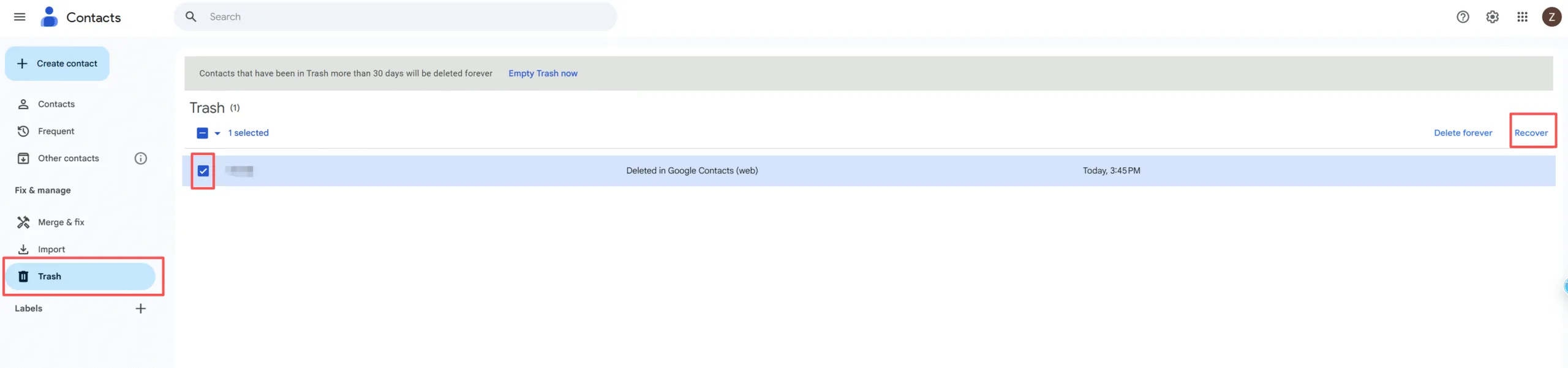
The easiest solution to fix a missing contact is checking the official cloud database. Google automatically moves removed entries to a temporary storage area known as the Trash. However, you must act quickly because this cloud area only holds files for 30 days.
Consequently, if you want to perform a google contacts restore deleted contacts action through your web browser, you can follow these simple tips:
- Open your internet browser and navigate to the official Google Contacts.
- Sign in using the specific Gmail account associated with your lost data.
- Look at the left-hand sidebar menu and click on the Trash option.
- Browse through the listed items to find the specific names you need.
- Hover your mouse over the name and click the Restore link on the right side.
Please remember that this feature only works if your device was actively connected to the internet when the deletion occurred. If you were offline, the cloud server might not reflect the change yet. Therefore, checking your local backups becomes necessary if the cloud remains empty.
Method 2: Use "Undo Changes" to Revert Your Google Contacts List
Sometimes, you might accidentally merge the wrong entries or delete multiple people at the same time. When a massive mistake happens, individual restoration becomes too time-consuming. Thankfully, Google offers a hidden time-machine feature that allows you to roll back your entire contact list to a previous state.
As a result, you can easily implement a google contacts restore deleted contacts strategy by reverting your database. Here is how to recover deleted google contacts on android or desktop using the undo feature:
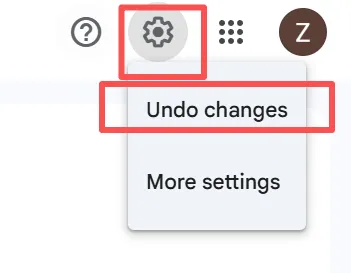
- Go to the Google Contacts website and click on the Gear Icon (Settings) located in the upper right corner.
- Select Undo changes from the dropdown menu.
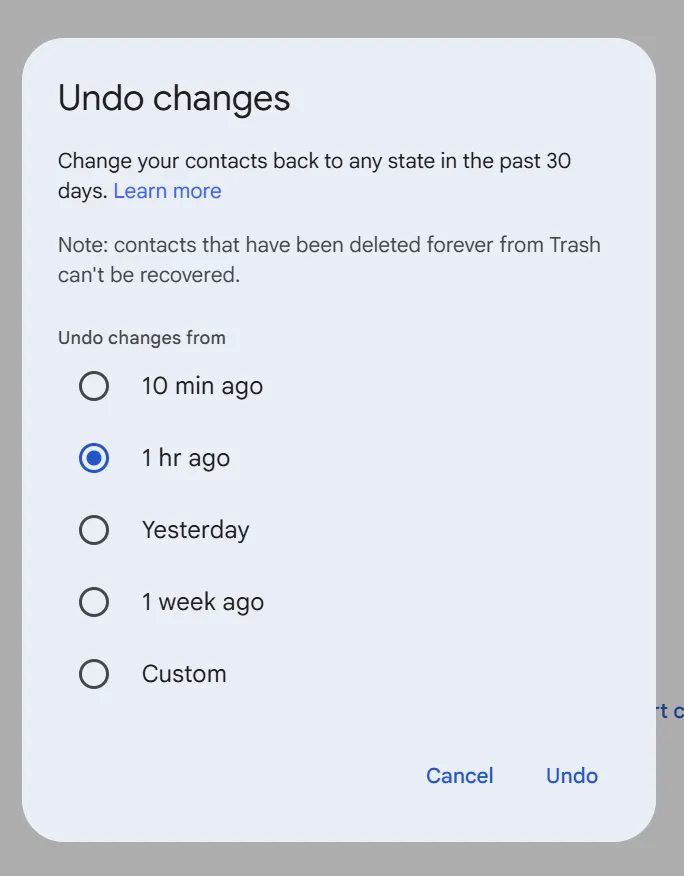
- Choose a specific timeframe from the options provided, such as 10 minutes ago, 1 hour ago, yesterday, or 1 week ago.
- Alternatively, select Custom to specify an exact number of days, hours, and minutes up to 30 days maximum.
- Click the confirmation button to finalize the rollback.
Important Warning: This action will completely revert your list. Consequently, any new people you added after the selected timeframe will be overwritten and removed. We highly recommend writing down recently added numbers before you proceed.
Method 3: Trigger a Manual Google Contacts Restore Deleted Contacts Sync on Android
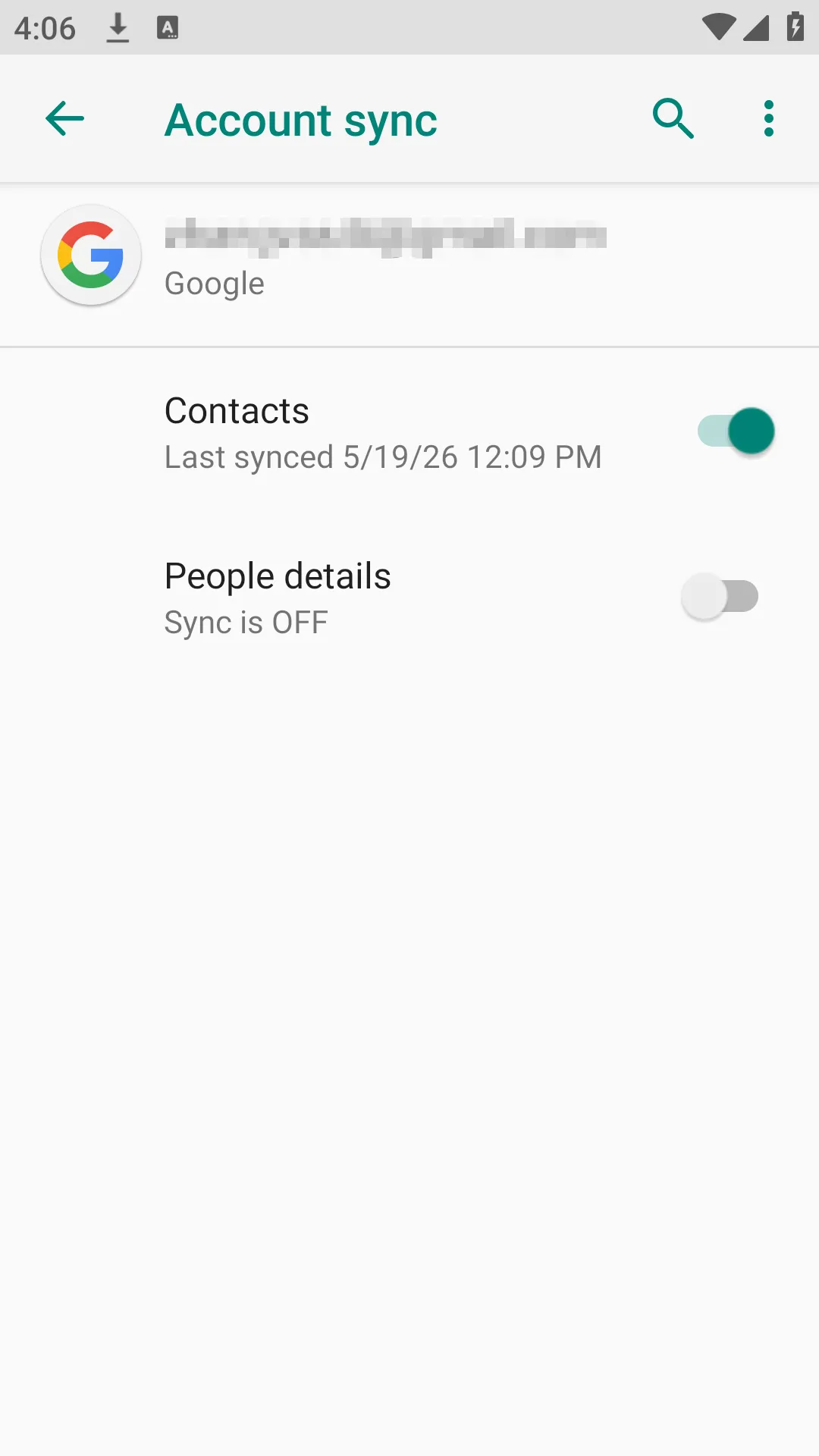
Many mobile users prefer managing everything directly from their smartphones. If you are wondering how to recover deleted google contacts on android without opening a computer, you can utilize the built-in system settings to force a fresh synchronization.
You can follow these steps to trigger a manual sync or restore on your Android phone:
- Launch the primary Settings app on your mobile phone.
- Scroll down the menu and select the Google services section.
- Tap on the All services tab or look for Set up & restore.
- Choose Restore contacts from the available options to initiate the google contacts restore deleted contacts protocol.
- Select the specific device backup you wish to pull data from.
- Tap Restore and wait for the notification confirming the process is complete.
Additionally, make sure your automatic sync option is permanently enabled. You can verify this by going to Settings > Password & Accounts > Google and ensuring the contact toggle switch is turned on.
Method 4: How to Recover Lost Contacts After 30 Days or Without Cloud Backup
What happens if the 30-day window has already passed? What if you never enabled Google cloud synchronization in the first place? When you check the online cloud trash and find it completely empty, standard methods will fail.
Understanding the Local VCF or CSV Contact File Method
Many professionals, IT experts, and advanced Android users regularly export their contact lists as a .VCF (Virtual Contact File) business card template. People often save these backups onto their Windows computers, external hard drives, or phone SD cards for safekeeping.
If you previously exported a backup but recently formatted your drive, emptied your recycle bin, or encountered corrupted drives, that vital .VCF or .csv file might seem permanently lost. Fortunately, when a file is erased from a storage drive, the actual data blocks remain hidden in the system sectors until new data overwrites them. You can use an android contact recovery software approach on your PC storage to locate these lost archives.
A Reliable Solution: Magic Data Recovery
When cloud solutions offer no help, specialized file recovery software becomes your best alternative. We highly recommend using Magic Data Recovery to scan your local storage drives for missing address book backups.
Magic Data Recovery is a professional Windows desktop software utility designed to scan storage sectors deeply. While this desktop tool cannot log directly into Google’s private cloud servers to change your account settings, it excels at finding deleted local files. It can easily find, extract, and restore google contacts from vcf file segments that were saved on your hardware.
- Core Problem Solved: It rescues vital contact backup files when you need to recover lost contacts after 30 days and the official cloud trash is empty.
- Key Product Advantages:
- The tool supports deep scanning algorithms for healthy, formatted, or inaccessible drives.
- It features a completely risk-free scan and offers up to 500MB of free data recovery.
- The user interface is straightforward, requiring no technical background to operate.
- Common Use Case: Imagine you saved your phone’s contact backup to a USB thumb drive last year. Yesterday, that drive became corrupted and unreadable. You can use this software to search the raw sectors, extract the
.vcffile, and upload it back to Gmail.

Once you have rescued the file, open Google Contacts in your web browser, click Import on the left menu, and upload the recovered file to instantly populate your address book. If you are looking for an efficient way to save your historical backups, you should try this software.
Proactive Tips: How to Protect Your Address Book from Permanent Loss
Preventing data loss is always much better than trying to fix it after a disaster occurs. By implementing a few industry best practices, you can ensure you never lose an important phone number again.
- Export Regular Backups: Make it a habit to export your address book monthly. Click the Export button in Google Contacts, choose the Google CSV or vcf format, and save it on an external drive.
- Verify Sync Status: Check your smartphone weekly to ensure that background synchronization is working properly without errors.
- Use Quality Storage: Avoid storing your primary backup files on cheap, unbranded USB drives that are prone to sudden physical corruption.
Conclusion
Losing important contact information can cause major communication issues, but multiple recovery paths exist. You should always start by checking your Google Trash folder or utilizing the built-in Undo Changes option within the 30-day window. These official cloud tools are incredibly efficient for resolving recent accidental deletions.
However, if you are facing a severe data loss scenario involving older files or un-synced accounts, local backups are your ultimate safety net. We recommend Magic Data Recovery because it provides a reliable, user-friendly way to scan storage drives to recover deleted contacts files. Its 500MB free data limit allows you to thoroughly test the software and rescue your essential database files without spending a dime. Therefore, it is the perfect tool to complete your google contacts restore deleted contacts strategy when all cloud options fail.
Supports Windows 7/8/10/11 and Windows Server
FAQs About Google Contacts Restore Deleted Contacts
Can I recover deleted phone contacts if they were not saved to a Google Account?
If the contracts were strictly saved to your local phone memory or a SIM card, cloud recovery will not work. However, you can check if you ever created a local backup file on your computer storage, which you can then retrieve using specialized data recovery software.
Is there an official way to restore Google contacts from a year ago?
Google's server database only keeps deleted items in the trash for exactly 30 days. After that period, the cloud information is permanently wiped. Consequently, your only option to recover lost contacts after 30 days is locating an old .vcf backup file on your physical hard drives.
What is the difference between a mobile contact app and a desktop recovery tool?
Mobile contact software apps manage the active live database directly on your smartphone operating system. In contrast, a desktop software utility like Magic Data Recovery scans physical hardware sectors to rescue lost files, such as a deleted or corrupted vcf backup document.
Why can I not find my deleted contacts in the Google Trash folder?
This issue usually happens because the 30-day retention period has already expired. Alternatively, it could mean your phone failed to sync with your Gmail account before the deletion occurred, meaning the data never reached the Google cloud servers in the first place.
How do I import a recovered VCF file back into my Google account?
First, open your web browser and navigate to the Google Contacts dashboard. Next, click the Import button located on the left-hand sidebar menu. Finally, select the recovered vcf file from your computer storage and click upload to refresh your list.
What should I do if my backup drive becomes an inaccessible drive?
You should stop saving new data to that specific storage device immediately to prevent overwriting. After that, run a deep partition scan using Magic Data Recovery to locate and extract your hidden contact backup files safely before formatting the drive.

Vasilii is a data recovery specialist with around 10 years of hands-on experience in the field. Throughout his career, he has successfully solved thousands of complex cases involving deleted files, formatted drives, lost partitions, and RAW file systems. His expertise covers both manual recovery methods using professional tools like hex editors and advanced automated solutions with recovery software. Vasilii's mission is to make reliable data recovery knowledge accessible to both IT professionals and everyday users, helping them safeguard their valuable digital assets.