
Can You Recover Recently Deleted Files?
If you accidentally removed a work document, photo folder, ZIP archive, or project file, you may immediately ask: can you recover recently deleted files? In many cases, yes. However, the correct method depends on whether the file is still in the Recycle Bin, permanently deleted, backed up, synced to the cloud, or already overwritten.
Start with Windows’ built-in recovery options because they restore existing copies without scanning deleted disk space. If those methods fail and the original file existed on local storage, Magic Data Recovery can scan the drive for recoverable deleted data. You can also see our broader deleted file recovery guide for other deletion scenarios.
Supports Windows 7/8/10/11 and Windows Server
Table of Contents
Can You Recover Recently Deleted Files? What Happens After Deletion
The answer to can you recover recently deleted files depends largely on how they were deleted.
A normal deletion from an internal Windows drive usually sends the file to the Recycle Bin. At this stage, the file has not actually been permanently deleted, so restoration is straightforward.
However, the situation changes after you:
- Empty the Recycle Bin
- Press Shift + Delete
- Delete files from certain removable devices
- Remove a file from a cloud trash folder
- Delete a file and continue writing new data to the drive
After permanent deletion, the file system can mark the occupied storage space as available for new data. Microsoft therefore recommends minimizing computer use while trying to recover deleted files because new writes may overwrite that free space.
For more Windows-specific examples, see our guide to recover recently deleted files in Windows 11.
What happened? | Best first step |
File was just deleted | Try Ctrl + Z |
File is in Recycle Bin | Restore it directly |
Recycle Bin was emptied | Check File History or recovery tools |
Shift + Delete was used | Check backups, then scan the drive |
Cloud file was deleted | Check the service’s Trash/Recently Deleted |
SSD file was deleted | Stop using the SSD immediately |
Drive has physical problems | Consider professional recovery |
What to Do Before Trying to Recover Deleted Files
If can you recover recently deleted files is your immediate concern, avoid making the situation worse.
First, stop unnecessary activity on the affected drive. Do not download large files, install applications, run disk-cleaning software, or copy new data onto it.
If you eventually use recovery software, do not install that software on the same partition that contained the deleted files. Likewise, recovered files should go to another drive.
This precaution matters because overwriting is one of the main limits of deleted file recovery.
SSD Users Need Extra Caution
Recently deleted files on an SSD present an additional challenge: TRIM.
TRIM tells an SSD that certain blocks no longer contain needed data. The SSD’s controller may later clear those blocks during internal maintenance. Therefore, stopping new writes is important, but avoiding overwriting alone does not guarantee that SSD data will remain recoverable.
For a deeper explanation, see how to recover deleted files from an SSD.
Method 1: Undo a Recent File Deletion with Ctrl + Z
If you deleted the file only moments ago, the fastest answer to can you recover recently deleted files may be Ctrl + Z.
Open the folder where the file was deleted and press:
Ctrl + Z
Alternatively, right-click an empty area of the folder and look for Undo Delete.
This method works best immediately after deletion. It may no longer work after restarting Windows, performing several other file operations, or closing the relevant session.
Because it does not scan the drive or modify backups, it should be one of the first methods you try.
Method 2: Restore Recently Deleted Files from the Recycle Bin
For most Windows users asking can you recover recently deleted files, the Recycle Bin is the next place to check.
- Open Recycle Bin from the desktop.
- Find the missing file or folder.
- Sort by Date Deleted if necessary.
- Right-click the item.
- Select Restore.
Windows returns the file to its original folder.
If the Recycle Bin has already been cleared, see our dedicated guide on how to recover files emptied from Recycle Bin.
Do not confuse restoring a file from the Recycle Bin with recovering a permanently deleted file. While both involve deleted data, the underlying recovery process is different.
Method 3: Check Cloud Trash or a “Recently Deleted” Folder
Sometimes can you recover recently deleted files refers to OneDrive, Google Drive, Dropbox, or another synced service rather than local Windows storage.
In this situation, sign in to the relevant service and check its Trash, Recycle Bin, or Recently Deleted area first.
This distinction is important for searches such as can you recover deleted from recently deleted. If a file has already been removed from a service’s secondary trash area, the local Windows Recycle Bin may not contain it.
For example, Google Drive users can review the available account-side options in our guide to recover permanently deleted files from Google Drive.
If the file had also been downloaded or synchronized to your PC, however, a recoverable local copy may still exist.
Important: If “Recently Deleted” refers to the internal storage of a phone or tablet, Windows disk recovery software should not be treated as a replacement for the device manufacturer’s built-in recovery options.
Method 4: Use File History or Previous Versions
If the file is no longer in the Recycle Bin, backups should come before disk scanning.
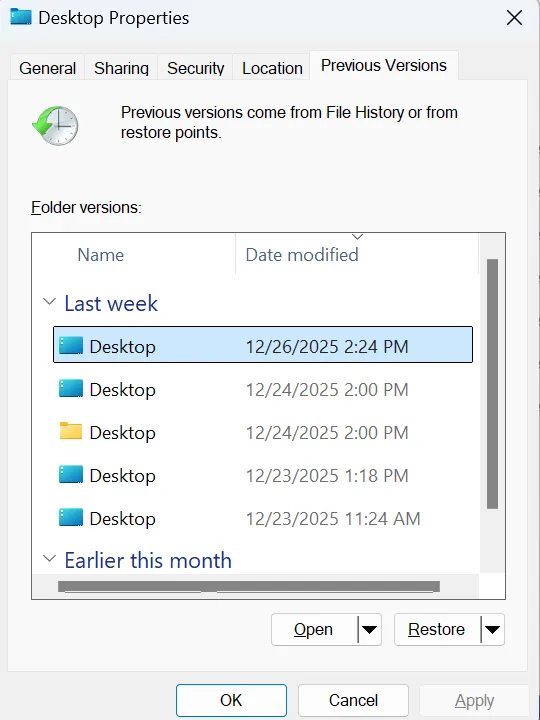
File History can keep earlier copies of protected folders when it was configured before deletion. Microsoft confirms that users can browse previous versions of a folder and restore an older copy containing the deleted file.
To check:
- Open File Explorer.
- Navigate to the folder that previously contained the deleted file.
- Right-click the folder.
- Choose Restore previous versions.
- Select a version from before the deletion.
- Open it first if you want to verify the contents.
- Restore the required file or folder.
Backups are usually preferable when available because they restore a known copy instead of attempting to reconstruct deleted data.
Do Not Confuse File History with System Restore
System Restore is mainly designed to roll back Windows system files, registry settings, drivers, and installed applications. It should not be your primary method for retrieving an accidentally deleted personal document, photo, or video.
Method 5: Try Windows File Recovery
If backups do not solve can you recover recently deleted files, Microsoft provides another option called Windows File Recovery.
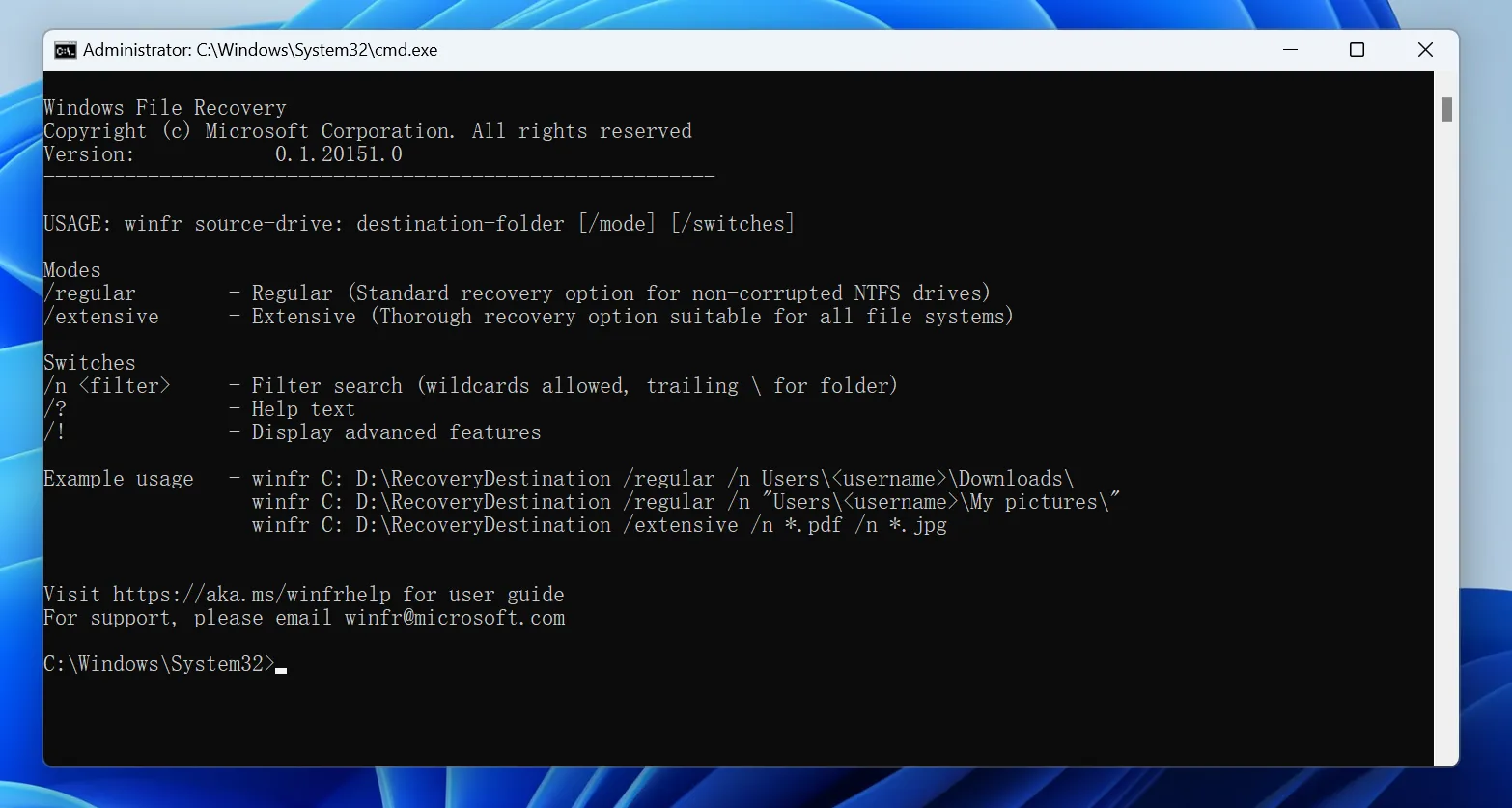
It is a command-line recovery application for files deleted from local storage devices, including internal drives, external drives, and USB devices. It does not recover cloud-only files or network shares.
Its basic syntax is:
winfr source-drive: destination-drive: /mode /n filter
For example:
winfr C: E: /regular /n *.docx
The source and destination drives must be different.
Microsoft provides two main modes:
- Regular — suitable for recently deleted files on a healthy NTFS volume.
- Extensive — performs a broader search when Regular mode fails or when the deletion situation is more complex.
Users who prefer a visual interface may find command-line recovery less convenient.
If an entire folder disappeared rather than one file, our deleted folder recovery guide also covers Windows File Recovery examples.
Method 6: Recover Permanently Deleted Files with Magic Data Recovery
Suppose you have already tried the Recycle Bin, cloud recovery, File History, and other available Windows options. You may still ask: can you recover recently deleted files after Windows no longer shows them?
If the original data has not been overwritten or cleared by the storage device, file recovery software can scan the affected drive for recoverable data.
Magic Data Recovery is designed for local data-loss situations such as:
- Files deleted with Shift + Delete
- An emptied Recycle Bin
- Accidentally deleted folders
- Deleted files on HDDs, SSDs, USB drives, and memory cards
- Files that are no longer accessible through ordinary Windows restoration methods
For Shift + Delete specifically, see our guide to recover Shift-deleted files.
Unlike the Recycle Bin or File History, recovery software does not depend on Windows retaining a visible copy or on a backup being created beforehand. Instead, it searches the storage device for remaining recoverable file data.
However, it cannot recreate overwritten information, reverse completed SSD TRIM erasure, or repair physically damaged hardware.
If the built-in recovery options no longer work, you can try Magic Data Recovery before new data overwrites the deleted files.
How to Use Magic Data Recovery to Recover Recently Deleted Files
Step 1: Download and Install Magic Data Recovery
Download and install Magic Data Recovery on a healthy drive or partition.
Do not install it on the same partition where the deleted files were stored. Installing new software there could overwrite recoverable data.
Supports Windows 7/8/10/11 and Windows Server
Step 2: Select the Drive Where the Deleted Files Were Stored
Launch Magic Data Recovery and identify the original drive or partition that contained the missing files.
Select that location and begin the scan.

Step 3: Scan for Recently or Permanently Deleted Files
Allow the software to scan the selected storage device.
Recoverable results can appear as the scan progresses. Use available file-type, path, or search filters to narrow the results when necessary.

Step 4: Preview Files Before Recovery
Select a candidate file and use Preview when the format and file condition allow it.
Previewing can help you confirm that you selected the intended document, photo, video, or other file before recovery. However, not every damaged or unsupported file can necessarily be previewed.

Step 5: Recover Files to a Safe Location
Select the files you need and recover them to another drive or safe storage location.
Do not save recovered files back to the original data-loss location during the recovery process.

What If You Deleted Files with Shift + Delete?
Shift + Delete bypasses the normal Recycle Bin workflow.
Therefore, if can you recover recently deleted files refers to a Shift-deleted item, checking the Recycle Bin will usually not help. Instead, look for File History, another backup, Windows File Recovery, or recoverable data on the original drive.
You can also read our more detailed guide on how to restore permanently deleted files.
The key point is that “permanently deleted” does not automatically mean “recoverable” or “unrecoverable.” The result depends on what happened to the underlying data afterward.
Why Recently Deleted Files Sometimes Cannot Be Recovered
The word “recently” can be misleading.
A file deleted yesterday from an inactive HDD may sometimes remain recoverable, while a file deleted minutes ago from an active SSD may already be affected by TRIM or subsequent storage activity.
Common reasons recovery fails include:
- Original sectors were overwritten by new data
- SSD TRIM and garbage collection cleared the relevant blocks
- The file was securely erased
- Only an incomplete or damaged file fragment remains
- The storage device has physical damage
- No local copy ever existed
- The cloud provider permanently removed the only copy
Therefore, no legitimate recovery method should promise guaranteed recovery.
When You Should Stop Using Recovery Software
Software is appropriate for logical data loss, not every storage problem.
Stop repeatedly scanning the device if you notice symptoms such as:
- HDD clicking or grinding
- Repeated disconnections
- A drive that disappears from BIOS
- Severe impact or liquid damage
- Burning smell or electrical damage
- A storage device that no longer powers on
In those cases, continued use may worsen the situation. A professional data recovery laboratory may be more appropriate.
How to Prevent the Same Problem in the Future
After resolving can you recover recently deleted files, reduce the chance that another accidental deletion becomes an emergency.
Keep at least one independent backup of important files. Windows File History, another scheduled backup system, and cloud version history can provide different layers of protection.
Also remember that autosave is not the same as a permanent backup. Autosave may protect recent edits inside supported applications, but it does not necessarily preserve a separate copy after deletion.
Finally, review files carefully before emptying the Recycle Bin or using Shift + Delete.
Conclusion
So, can you recover recently deleted files? Often, yes—but start with the least invasive option. Try Ctrl + Z, check the Recycle Bin, review cloud trash, and look for File History or Previous Versions. Windows File Recovery is another option when those methods fail.
If the files have been permanently deleted and no backup remains, Magic Data Recovery can scan local storage for recoverable file data. However, overwriting, SSD TRIM, secure deletion, and physical damage can limit or prevent recovery.
The most important rule is to stop writing new data to the affected storage as soon as possible. For related deletion scenarios and additional recovery methods, visit Amagicsoft’s deleted file recovery guide.
Supports Windows 7/8/10/11 and Windows Server
FAQs
Can you recover recently deleted files after emptying the Recycle Bin?
Can you recover deleted from Recently Deleted after deleting it again?
Can you recover your Recently Deleted files without software?
How long does a recently deleted file remain recoverable?
Can SSD TRIM prevent recovery of recently deleted files?
Can Magic Data Recovery restore permanently deleted files?
What is the safest way to recover a recently deleted file?

Vasilii is a data recovery specialist with around 10 years of hands-on experience in the field. Throughout his career, he has successfully solved thousands of complex cases involving deleted files, formatted drives, lost partitions, and RAW file systems. His expertise covers both manual recovery methods using professional tools like hex editors and advanced automated solutions with recovery software. Vasilii's mission is to make reliable data recovery knowledge accessible to both IT professionals and everyday users, helping them safeguard their valuable digital assets.