
FAT32 Format Metadata Before and After Quick Format
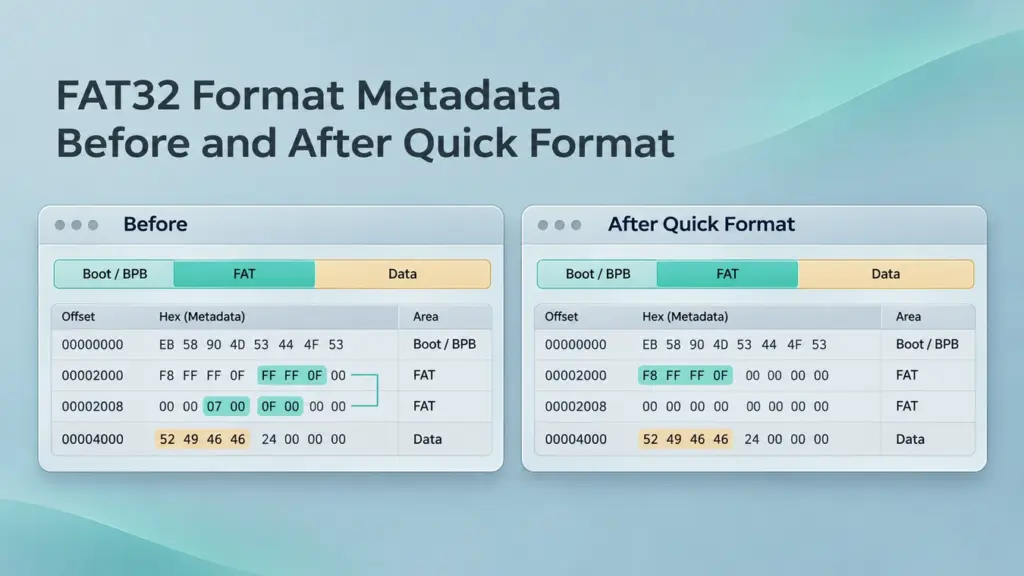
FAT32 format metadata changes when a quick format initializes a fresh file system: the boot information describes the new layout, allocation tables lose the old file chains, and the root directory starts again. Some old subdirectories and file contents may remain readable outside the rewritten areas. An empty drive in File Explorer therefore does not establish that every previous file has been erased.
This matters after accidentally formatting a USB drive, SD card, or FAT32 data partition. The following analysis covers FAT32-to-FAT32 quick formatting and read-only examination in a disk editor. It explains the expected changes, uses directory-entry bytes from a recorded WinHex example, and separates recoverable metadata from evidence that a complete file actually survives.
Table of Contents
FAT32 Metadata Before and After Format
A FAT32 volume contains a reserved region, the FAT region, and a data region holding both directories and file contents. The file allocation table connects clusters; directory entries supply filenames, starting clusters, and sizes.
Microsoft describes Windows quick formatting as deleting the previous file table and root directory without scanning every sector for bad areas. That describes the operation’s scope, rather than a guarantee that every formatter writes the same sectors.
Structure | Before formatting | After FAT32 quick format | Recovery implication |
Boot sector and BPB | Describe the existing layout | Initialized for the new file system; some values may remain identical | Current parameters need comparison with the original layout |
FSInfo | Holds free-space information and an allocation hint | Initialized for the new volume | It is not a record of old file locations |
FAT copies | Track allocated clusters and file chains | Initialized with reserved entries and allocations needed by the new file system | Old chains can disappear from both copies |
Root directory | References top-level files and folders | Initialized as a new directory, possibly with a volume-label entry | Original paths may no longer be reachable |
Old subdirectories | Contain child entries | Some may survive outside rewritten areas | Detached directory records may still identify files |
File contents | Occupy allocated clusters | May remain readable, be overwritten, or become unavailable through discard | Recovery requires checking the actual contents |
A routine volume format does not inherently delete the disk’s partition-table entry. It also differs from deleting individual files, which commonly leaves directory entries marked with 0xE5 and releases their clusters. A formatted root directory need not retain those deleted-entry markers.
The FAT32 Boot Sector After Quick Format
The volume boot record begins at volume-relative sector 0. In a whole-disk image, that address must be translated using the volume’s starting position.
Read these BPB fields before interpreting the rest of the volume. Offsets below are hexadecimal byte offsets from the boot-sector start.
Offset | Field | Length | Meaning |
|
| 2 bytes | Bytes per sector |
|
| 1 byte | Sectors per cluster |
|
| 2 bytes | Reserved-region sector count |
|
| 1 byte | Number of FAT copies |
|
| 4 bytes | Sectors in one FAT |
|
| 2 bytes | FAT mirroring and active-FAT selection |
|
| 4 bytes | First root-directory cluster |
|
| 2 bytes | FSInfo sector number |
|
| 2 bytes | Backup boot-record location |
Multibyte integers use little-endian byte order. The allocation unit size equals bytes per sector multiplied by sectors per cluster.
A quick format can reuse the same geometry. An unchanged cluster-size field, or even an identical boot-sector region, does not prove that formatting did not occur. Compare FAT entries and directory contents as well.
The backup boot record is commonly at volume-relative sector 6; check BPB_BkBootSec. It protects boot information, not every directory or FAT entry. After reformatting, a valid backup can describe the new file system rather than preserve the old one.
The FAT32 FAT Table Before and After Format
Each FAT32 entry occupies four bytes, with the lower 28 bits interpreted as its cluster value. For cluster N, its entry begins N × 4 bytes from the selected FAT’s start.
Interpreted value | Meaning |
| Free cluster |
A valid data-cluster number | Next cluster in the chain |
| Bad cluster |
| End of chain |
Entries 0 and 1 are reserved. Data-cluster numbering begins at 2. Consequently, saying that formatting “clears the FAT” does not mean every byte becomes zero: reserved entries and the new root directory’s allocation remain necessary.

FAT-region excerpt from the recorded WinHex material. This structural reference shows reserved and allocated entries; it is not a matched before-and-after format capture.
Example: A file originally occupies clusters 100 → 101 → 900 → end. If formatting resets those entries to free, the original sequence disappears even if all three data clusters remain readable. A surviving directory entry identifies cluster 100, but does not identify 900 as the third fragment.
Check both FAT copies when the BPB specifies two. They provide redundancy within a file-system instance, not a permanent pre-format archive. If mirroring is disabled, the active FAT indicated by BPB_ExtFlags also matters.
Locate the Original Data Region in WinHex
For an already formatted device, stop writes and preserve a sector image on another physical drive. Open the image read-only in WinHex or another suitable disk editor. Formatting the source again cannot recreate its missing “before” state.
Record the device identity, volume start, sector size, and image scope. Then calculate locations from validated FAT32 parameters:
- First FAT sector = ReservedSectors
- Second FAT sector = ReservedSectors + SectorsPerFAT
- First data sector = ReservedSectors + NumberOfFATs × SectorsPerFAT
- First sector of cluster N = FirstDataSector + (N − 2) × SectorsPerCluster
- Root-directory first sector = FirstDataSector + (RootCluster − 2) × SectorsPerCluster
These sector numbers are relative to the volume; the second-FAT formula applies only when a second copy exists. For a whole-disk image, convert the volume-relative sector to a byte offset and add the volume’s starting byte offset. Do not add that start again for a volume-only image.
The root directory is often in cluster 2, but its location comes from BPB_RootClus. The first data sector is therefore not automatically the root-directory start.
If the formatter changed cluster size or FAT size, present-day parameters may map old cluster numbers incorrectly. Use a pre-format BPB capture when available; otherwise corroborate the proposed old layout against multiple surviving directories and file headers before extracting data.
For a genuine comparison, examine matching byte ranges in images taken before and after the event. Without a prior image, current zeros cannot establish exactly when a range was cleared.
Decode a Surviving Directory Entry
A standard FAT32 directory entry is 32 bytes. Four fields are especially useful for locating a regular file:
Entry-relative offset | Field | Interpretation |
| Attributes | Distinguishes files, directories, and long-name entries |
| First-cluster high word | Upper portion of the starting cluster |
| First-cluster low word | Lower portion of the starting cluster |
| File size | Four-byte little-endian size in bytes |

Directory-entry bytes from the recorded example: 06 00 is the high word, CC EE is the low word, and E9 FC 00 00 is the file size.
Decoding these bytes gives:
- High word: 06 00 → 0x0006
- Low word: CC EE → 0xEECC
- Starting cluster: (0x0006 << 16) | 0xEECC = 0x0006EECC
- Starting cluster in decimal: 454,348
- File size: E9 FC 00 00 → 0x0000FCE9 = 64,745 bytes
This identifies a candidate start and length. The volume geometry and cluster chain still require validation.
Long filenames occupy separate entries with attribute 0x0F; their name fragments precede the associated short entry. A name containing ~1 can be a short-name alias, but that suffix alone does not identify an LFN entry. Read the starting cluster and size from the associated short entry, not from the long-name records.
Subdirectories can also contain . and .. entries. A zero starting-cluster value in .. represents the root directory in this context; it does not mean the FAT32 root physically occupies cluster 0.
Recover Files Through Surviving Metadata
Manual recovery should export bytes from an image rather than make speculative edits to the original device.
Follow a Valid Surviving Chain
If a trustworthy old FAT chain survives, start with the directory entry’s first cluster. Read that cluster’s FAT entry, follow the next valid cluster, and continue until the recorded file size is covered. Reject loops, out-of-range references, and chains too short for that size.
Assemble the clusters in chain order and trim the exported file to its logical length. Sorting fragments by increasing physical address can produce the wrong result.
Assess Contiguous Extraction When the Chain Is Gone
If the FAT has been reset, consecutive extraction is a hypothesis. For the 64,745-byte example, assuming independently confirmed 4,096-byte clusters, the file needs 16 clusters. Exporting 16 consecutive clusters from its first cluster and trimming to 64,745 bytes is valid only if that contiguous layout is supported by the contents.
A correct header cannot establish that later clusters belong to the same file. Fragmented videos, archives, and documents may require additional reconstruction or may remain incomplete.
Search for Detached Subdirectories
When the old root is gone, manual filename searches can miss entire directory branches. X-Ways documents an orphaned-subdirectory search for FAT12/16/32 under its specialist volume-snapshot features. Availability and wording depend on the edition and version.
Use the file-system structure search supported by the installed tool, inspect candidate directories, and export validated files to another device. A recovered directory listed under an unknown path indicates missing ancestry; it does not establish the original complete folder tree. File-header searching is a separate fallback when directory records are missing.
For a broader scan-and-export workflow, see recovering files from FAT32.
Verify Recovery and Keep Repair Separate
Boot-sector damage, partial FAT corruption, and quick formatting can all hide files, but their remedies differ. Restoring boot information cannot recreate erased cluster chains. Likewise, restoring reserved FAT entries may help interpret a narrowly damaged volume without restoring every file allocation.
For important data, defer CHKDSK and direct sector edits until files have been extracted or a separate repair copy has been prepared. The practical formatted USB recovery guide explains the recovery sequence after accidental formatting.
Validate exports against an original inventory when available: compare names, exact sizes, and hashes with known copies. Otherwise, inspect full-resolution images, test archives, review document pages, and play videos beyond their opening frames. Record missing and damaged items separately.
Readable directory entries demonstrate surviving metadata. Usable exported files demonstrate recovery. A claim of complete recovery requires accounting for the expected dataset.
FAQs
Does quick format erase every FAT32 data cluster?
Can the second FAT restore the pre-format file chains?
Does an unchanged boot sector mean the files survived?
Can the backup boot sector undo a quick format?
Are clusters 2 through 5 always overwritten?
Can a recovered filename belong to a damaged file?
Is FAT32 recovery the same as NTFS metadata recovery?

Jason is a data recovery and technical support specialist with over 15 years of hands-on experience. He has worked extensively with frontline users, troubleshooting difficult data loss cases and providing practical recovery solutions for accidental deletion, formatted drives, damaged file systems, lost partitions, system failures, and other recovery emergencies. His expertise also includes backup and restoration, file repair, and disaster recovery, with a strong emphasis on safe, reliable, and technically accurate guidance.