
FAT File Allocation Table Structure Explained: A Practical Guide
The fat file allocation table structure plays a critical role in how data is stored, linked, and accessed on many common storage devices. USB flash drives, SD cards, digital cameras, and embedded systems still rely on FAT-based file systems because of their simplicity and wide compatibility.
When these devices suddenly become unreadable or files go missing, users often struggle to understand what went wrong. In most cases, the root cause lies in how the FAT structure manages file allocation and cluster chains. This guide explains how the FAT structure works, where it fails, and how to deal with real-world data loss safely.
Table of Contents
What Is FAT File Allocation Table Structure?
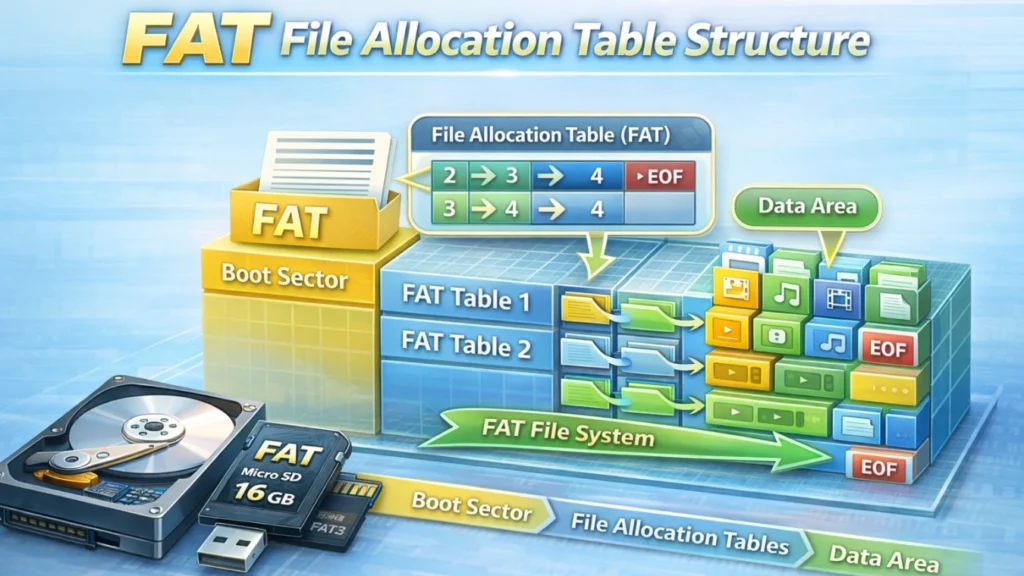
The fat file allocation table structure is the core design used by FAT file systems to manage files on a disk. FAT stands for File Allocation Table, which is a special table that tracks how data clusters are linked together.
Instead of storing files as one continuous block, FAT systems split data into small units called clusters. The allocation table records the order of these clusters so the system knows how to rebuild the file.
Common FAT Variants
Although the concept stays the same, FAT has several versions:
- FAT12 – Used in very small or old storage media
- FAT16 – Common in early Windows systems
- FAT32 – Widely used on USB drives and SD cards
- exFAT – Optimized for large-capacity flash storage
All of them rely on the same fat file allocation table structure, with improvements over time.
How FAT File Allocation Table Structure Works
Understanding the structure helps explain both its reliability and its weaknesses.
Key Components of FAT Structure
The fat file allocation table structure includes:
- Boot Sector – Stores basic file system information
- File Allocation Table (FAT) – Records cluster chains
- Root Directory – Stores file names and metadata
- Data Region – Contains actual file content
Each file uses a linked list of clusters, recorded inside the FAT.
How Files Are Stored and Read
- A file is divided into clusters
- Each cluster points to the next one in the FAT
- The last cluster is marked as end-of-file
- The system follows the chain to read the file
This simple design explains why FAT systems are fast and compatible, but also why corruption spreads easily.
Advantages of FAT File Allocation Table Structure
Despite its age, the fat file allocation table structure remains popular for several reasons.
High Compatibility
FAT works across almost all operating systems, including Windows, macOS, Linux, cameras, and game consoles.
Simple Design
The structure is easy to implement and requires minimal system resources.
Ideal for Removable Storage
USB drives and memory cards benefit from FAT’s lightweight structure.
These advantages explain why FAT still appears in modern devices.
Limitations and Risks of FAT File Allocation Table Structure
However, simplicity comes at a cost.
High Risk of Corruption
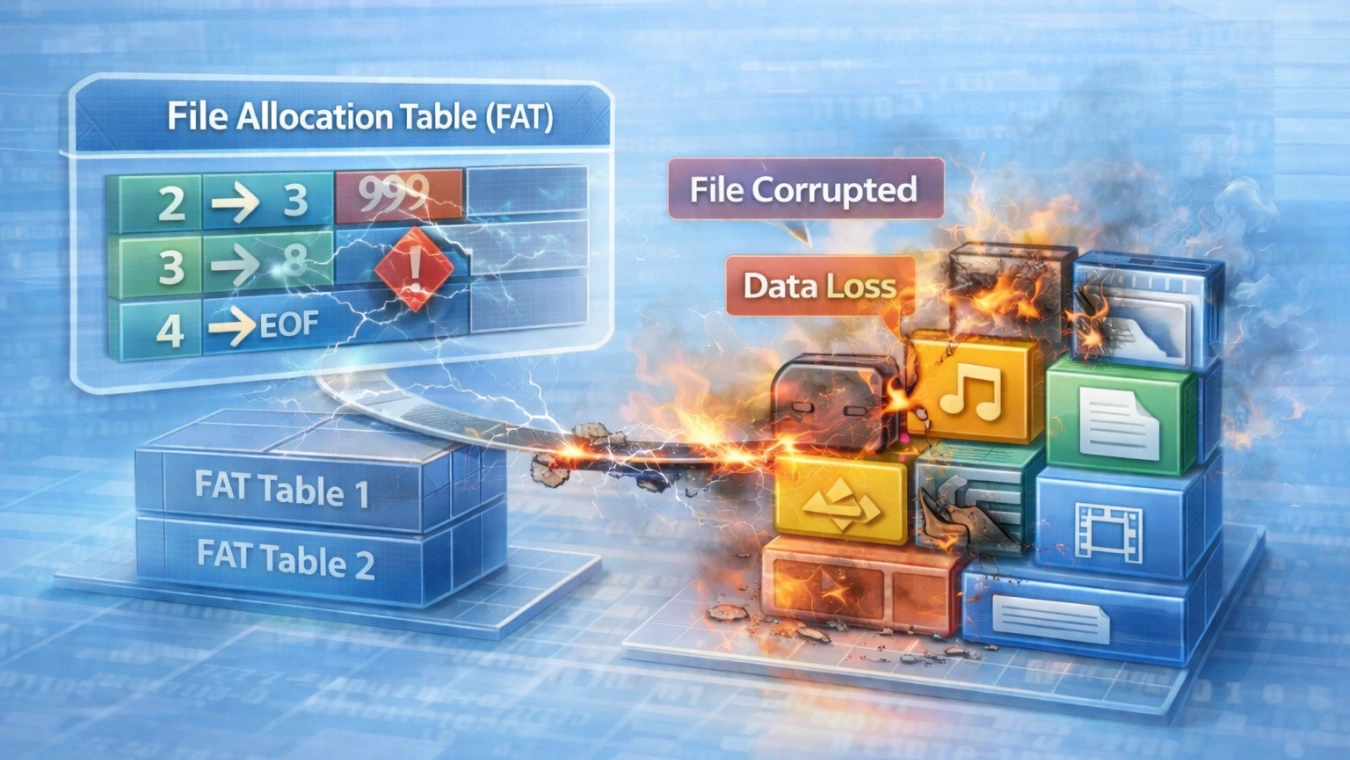
Because the FAT table acts as a single map, damage to it can break access to multiple files at once.
No Built-In Journaling
Unlike NTFS or APFS, FAT does not track changes safely. Sudden power loss can easily corrupt the file system.
File Size and Volume Limits
FAT32 limits individual files to 4GB, which affects modern usage.
These weaknesses often lead to data loss scenarios involving the fat file allocation table structure.
Common FAT File System Errors You May Encounter
In real-world use, FAT errors appear frequently, especially on portable devices.
Typical Symptoms
- Drive shows as RAW
- Files disappear but space is still used
- “File system is corrupted” error
- Device requests formatting before use
In most cases, the underlying issue is damage to the fat file allocation table structure.
Common Causes
- Unsafe device removal
- Power failure during data transfer
- Bad sectors on flash memory
- Virus or malware interference
Understanding the cause helps avoid making the situation worse.
What NOT to Do When FAT Structure Is Corrupted
Many users unintentionally destroy recoverable data.
Avoid these actions:
- Formatting the drive immediately
- Running aggressive repair tools without backup
- Writing new data to the device
- Repeatedly reconnecting a failing drive
Once the fat file allocation table structure is overwritten, recovery becomes harder.
Practical Scenarios Where FAT Structure Fails
Scenario 1: USB Flash Drive Not Accessible
A USB drive suddenly shows as unreadable after unplugging without ejecting. The FAT table loses cluster links, making files invisible.
Scenario 2: SD Card Used in Camera
A camera battery dies during recording. The FAT structure is incomplete, causing missing photos or videos.
Scenario 3: Embedded Device Storage
Industrial or automotive devices using FAT lose access due to sudden power interruptions.
These situations highlight why FAT-related data loss remains common.
How FAT Errors Are Usually Fixed (and Their Limits)
Standard fixes include:
- CHKDSK or disk repair tools
- File system checks by the OS
- Manual directory rebuilding
However, these methods often repair the structure, not the data. In many cases, files are removed to restore consistency.
That’s why recovery-focused solutions are sometimes necessary.
Conclusion
The fat file allocation table structure plays a central role in how data is stored on many everyday devices. While it offers simplicity and compatibility, it also carries higher risks of corruption.
When FAT-related errors result in inaccessible or missing files, traditional repair tools may not be enough. In these situations, a data recovery approach focused on reading raw clusters becomes critical.
If you are dealing with data loss caused by FAT file system errors or inaccessible storage, Magic Data Recovery is a practical solution worth considering. It is designed to scan damaged FAT structures, reconstruct file chains, and recover lost data without relying on a fully functional file system.
If you’re looking for a safer and more efficient solution, Magic Data Recovery can help you recover important files while minimizing further risks.
Supports Windows 7/8/10/11 and Windows Server
FAQs
What is FAT file allocation table structure used for?
Is FAT file allocation table structure still relevant today?
What causes FAT file allocation table corruption?
Can CHKDSK fix FAT file allocation table errors?
Why does a FAT drive ask to be formatted?
Is data still recoverable after FAT corruption?
How can I prevent FAT file system errors?
When should I use a data recovery tool for FAT issues?

Jason is a data recovery and technical support specialist with over 15 years of hands-on experience. He has worked extensively with frontline users, troubleshooting difficult data loss cases and providing practical recovery solutions for accidental deletion, formatted drives, damaged file systems, lost partitions, system failures, and other recovery emergencies. His expertise also includes backup and restoration, file repair, and disaster recovery, with a strong emphasis on safe, reliable, and technically accurate guidance.