Skip to content
amagicsoft logo icon
  • Home
  • Products
    • Magic Data Recovery
    • Magic Recovery Key
  • Store
  • Blog
  • More
    • About Amagicsoft
    • Contact US
    • Privacy Policy
    • Terms
    • License Agreement
    • Refund Policy
  • English
    • 日本語
    • 한국어
    • Deutsch
    • Français
    • 繁體中文
Password Recovery

How to Find WiFi Password on Windows & Mac Easily
05.12.2025 Smith, Erin Comments Off on How to Find WiFi Password on Windows & Mac Easily
How to Find WiFi Password on Windows & Mac Easily
When you need to reconnect a device or share your network, forgetting your Wi-Fi password can be frustrating. Many users look up how to find WiFi password, especially when the password exists only on one computer. This guide explains every reliable method, including Windows, macOS, and a professional tool for deeper recovery. You will learn both the built-in ways and a professional solution using Magic Recovery Key to recover WiFi passwords quickly and safely.
Download Magic Recovery Key

Supports Windows 7/8/10/11 and Windows Server

Table of Contents

Why You May Need to Find Your WiFi Password

People often need to find your WiFi password after resetting the router, switching providers, replacing devices, or losing written notes. Although Windows and macOS store passwords, they are not visible by default. Fortunately, several built-in tools allow you to retrieve them safely.

Below are the most effective and secure approaches.

Built-in Methods to Find WiFi Password

These options use Windows and macOS native tools. They are reliable for users who still have access to a previously connected device.

1. Find WiFi Password on Windows

Windows stores all WiFi credentials in the system’s network configuration. Follow these steps:

Method A: Using Network & Sharing Center

① Open Control Panel.

② Select Network and Internet.

③ Click Network and Sharing Center.

④ Next to your WiFi name, choose Wireless Properties.

⑤ Go to the Security tab.

⑥ Check Show characters to reveal your WiFi password.

Method B: Using Command Prompt

This method is fast and works even if the network is not currently connected.

① Press Win + R, type cmd, and press Enter.

② Type the following command:

netsh wlan show profiles

It will list all saved WiFi profiles.

③ Enter:

netsh wlan show profile "WiFi-Name" key=clear

④ The password appears under Key Content.

2. Find WiFi Password on macOS
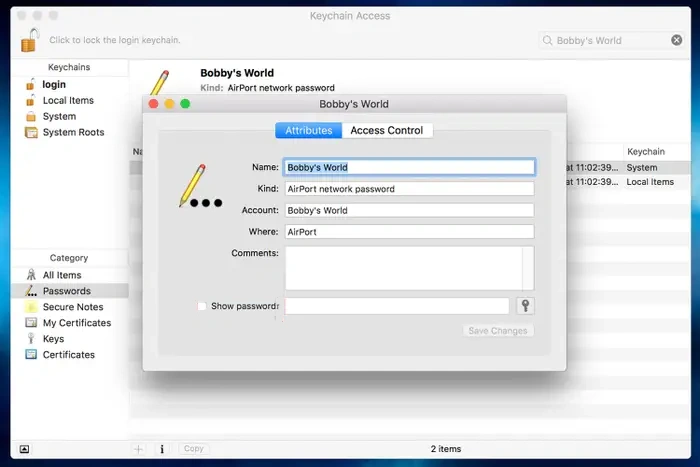
Find WiFi Password on macOS

macOS stores WiFi credentials in Keychain Access.

① Open Keychain Access from Applications → Utilities.

② Search for your WiFi network name.

③ Double-click the network entry.

④ Check Show password.

⑤ Enter your macOS administrator password to reveal it.

Find WiFi Password Using Magic Recovery Key

If built-in tools fail, the Wi-Fi profile is missing, or the system refuses to display stored passwords, you may need a specialized solution. Magic Recovery Key helps users who search for how to find out WiFi password or where can I find my saved Wi-Fi passwords, especially when Windows profiles become hidden or corrupted.

Magic Recovery Key finds stored Wi-Fi passwords safely using a read-only process.

Steps to Recover WiFi Password with Magic Recovery Key

1. Download and install Magic Recovery Key from Amagicsoft.

Download Magic Recovery Key

Supports Windows 7/8/10/11 and Windows Server

2. Launch the software and Once the scan is completed, information about all the WiFi information on the current computer will be listed.
how to find wifi password using magic recovery key
3. You can select the information you need to copy or save.

Conclusion

Finding your Wi-Fi password is simple when using Windows or macOS native tools. If the network profile is missing, the system is corrupted, or you want a faster and more reliable method, Magic Recovery Key offers a complete solution. It is also useful for users searching for how to get WiFi password from a connected computer.

Download Magic Recovery Key

Supports Windows 7/8/10/11 and Windows Server

How to Find WiFi Password FAQs

1. Where can I see what my Wi-Fi password is?

You can view it on any device previously connected. Windows shows it under Wireless Properties, and macOS reveals it in Keychain Access. If the password is missing or hidden, Magic Recovery Key can extract stored Wi-Fi credentials safely.

2. Is it possible to see Wi-Fi passwords?

Yes. Systems like Windows, macOS, Android, and iOS store past Wi-Fi passwords. You can view them in system settings. If the saved profile has been deleted, Magic Recovery Key can scan and recover stored Wi-Fi keys.

3. How to find Wi-Fi password on iPhone?

On iOS 16+, open Settings → Wi-Fi → (i) → Password, then authenticate to view it. Older versions require checking the password on a Mac or PC that previously connected to the same Wi-Fi network.

4. How to join hidden Wi-Fi?

Enter the SSID, password, and security type manually in Wi-Fi settings. If you do not know the password, retrieve it from a previously connected computer using Magic Recovery Key or Windows built-in tools.

5. Is it OK to use public Wi-Fi?

Public Wi-Fi is safe for general browsing but not recommended for sensitive activities. Use HTTPS sites or a VPN to protect your data, as open networks expose traffic to higher security risks.

6. Can Wi-Fi owners see what you do on their Wi-Fi?

Wi-Fi owners can view connected devices, domains visited, and data usage. Encrypted content remains private. Using HTTPS or a VPN helps improve privacy on monitored networks.

7. Can I see who's connected to my Wi-Fi?

Yes. Log in to your router’s admin page and check the connected devices list. Unknown devices can be removed by changing the Wi-Fi password or enabling stronger encryption settings.

8. How to find Wi-Fi password to share from phone?

iPhone displays the password directly, and Android offers a sharable QR code. To view the text version, check the password on a connected Windows or macOS device or recover it using Magic Recovery Key.
  • How to
  • Magic Data Recovery
Smith, Erin

Erin Smith is recognized as one of the most professional writers at Amagicsoft. She has continually honed her writing skills over the past 10 years and helped millions of readers solve their tech problems.

文章导航

Previous
Next

Search

Categories

  • Bitlocker Recovery
  • Deleted File Recovery
  • Format File Recovery
  • Hard Drive Recovery
  • License Key Recovery
  • Lost File Recovery
  • Memory Card Recovery
  • News
  • Password Recovery
  • Photo Recovery
  • SSD Recovery
  • USB Drive Recovery
  • User Guide
  • Video Recovery
  • Wiki

Recent posts

  • Is There a Way to Recover Lost Videos
    Is There a Way to Recover Lost Videos?
  • How to Restore Windows Factory Settings
    How to Restore Windows Factory Settings
  • How to Remove a Windows Password Safely
    How to Remove a Windows Password Safely

Tags

How to Magic Data Recovery Magic Recovery Key WiKi

Related posts

Is There a Way to Recover Lost Videos
Video Recovery

Is There a Way to Recover Lost Videos?

08.12.2025 Vasilii No comments yet

Losing precious videos can feel devastating — whether they were family memories, travel clips, or important work footage. A mistaken deletion, accidental formatting, a corrupted storage device, or even a system crash can make those irreplaceable files disappear in seconds. The good news? In many cases, lost videos are not permanently gone. With the right […]

How to Restore Windows Factory Settings
License Key Recovery

How to Restore Windows Factory Settings

08.12.2025 Vasilii No comments yet

Restoring Windows factory settings is one of the most effective ways to fix a slow, unstable, corrupted, or virus-infected system. Whether you’re using Windows XP, 7, 10, or 11, a factory reset can bring your PC back to its original condition and eliminate persistent issues that normal troubleshooting can’t solve. This guide explains safe and […]

How to Remove a Windows Password Safely
Password Recovery

How to Remove a Windows Password Safely

08.12.2025 Smith, Erin No comments yet

Forgetting your login credentials or simply wanting faster access to your computer can make you wonder how to remove a Windows password safely. Many users want to remove the password to enable quick startup, simplify home-office workflows, or prepare a device for trusted family use. Fortunately, Windows provides several built-in, secure ways to disable password […]

amagicsoft logo icon

Our vision is to become a globally renowned software brand and service provider, delivering top-tier products and services to our users.

Products
  • Magic Data Recovery
  • Magic Recovery Key
Policy
  • Terms
  • Privacy Policy
  • Refund Policy
  • License Agreement
Company
  • About Amagicsoft
  • Contact US
  • Store
Follow Us

Copyright © 2025 Amagicsoft. All Rights Reserved.

  • Terms
  • Privacy Policy