
How to Find Adobe Photoshop Product Key
Need to find your Adobe Photoshop product key before reinstalling Photoshop or moving it to another computer? First, identify which Photoshop version you own. Legacy perpetual-license editions such as Photoshop CS6 use a 24-digit serial number, while current Creative Cloud versions are generally activated by signing in to your Adobe account and may not store a traditional product key on your PC.
If you own a legally purchased legacy Photoshop license, this guide explains how to recover its serial number from your Adobe account, the Windows Registry, or with Magic Recovery Key. You can also review our license key recovery guide for more ways to retrieve stored activation information from an installed Windows system.
Supports Windows 7/8/10/11 and Windows Server
Quick Answer: Photoshop CS6 and other legacy perpetual-license editions may use a 24-digit serial number. Current Photoshop Creative Cloud versions normally activate through an Adobe account and usually do not have a traditional product key to recover.
Table of Contents
What Is an Adobe Photoshop Product Key?
An Adobe Photoshop product key, also known as a Photoshop serial number, is a unique activation code used to verify a legitimate Adobe Photoshop license. It confirms that the software has been legally purchased and allows users to install, activate, and use Photoshop without restrictions.
For older versions of Adobe Photoshop, such as Photoshop CS, CS2, CS3, CS4, CS5, and CS6, a product key is required during installation. This serial number is usually a 24-digit alphanumeric code and may be stored on the computer after activation, which makes it possible to find or recover the Photoshop product key later using specialized recovery tools.
In contrast, most modern versions of Photoshop are distributed through Adobe Creative Cloud and do not use a traditional product key. Instead of entering a serial number, users activate Photoshop by signing in with their Adobe ID. In this case, the Photoshop license is linked to the user’s account rather than a local product key, so there may be no serial number to find on the system.
Because of this difference, many users search for how to find a Photoshop product key but cannot locate one. Before attempting any recovery method, it is essential to identify whether your Photoshop version uses a serial number or account-based activation.
Understand Different Photoshop Versions and Product Key Types
Adobe Photoshop has been released under different licensing models over the years, and each version handles activation differently. Understanding your Photoshop version is crucial before trying to find or recover a product key.
Photoshop CS and CS6 versions use a perpetual license and require a serial number for activation. These product keys are usually stored locally on the system after installation, which means they can often be retrieved using product key recovery software or by checking system records.
Photoshop Creative Cloud versions, however, are subscription-based and activated through an Adobe ID. These versions do not rely on a traditional product key. As long as the user signs in with the correct Adobe account and has an active subscription, Photoshop will be activated automatically.
If you are unsure which version you are using, checking the Photoshop version number or your Adobe account details can help you determine whether a product key recovery method will work for your situation.
Method 1. Find Adobe Photoshop Product Key via Magic Recovery Key
The simplest and most efficient way to obtain your Adobe Photoshop product key is by using Magic Recovery Key. This tool allows you to retrieve your key in just a few easy steps. It’s not only capable of getting Adobe keys but also supports extracting keys from various software activated on your computer, including Windows and Office.
Download Magic Recovery Key from the button below:
Supports Windows 7/8/10/11 and Windows Server
After installing and running Magic Recovery Key, click the Registry Keys tab under Local.

On the right panel, view the Applications Registry Keys. Magic Recovery Key will display all keys for installed software. Select and copy the targeted serial numbers. You can also click Copy or Save for convenience.
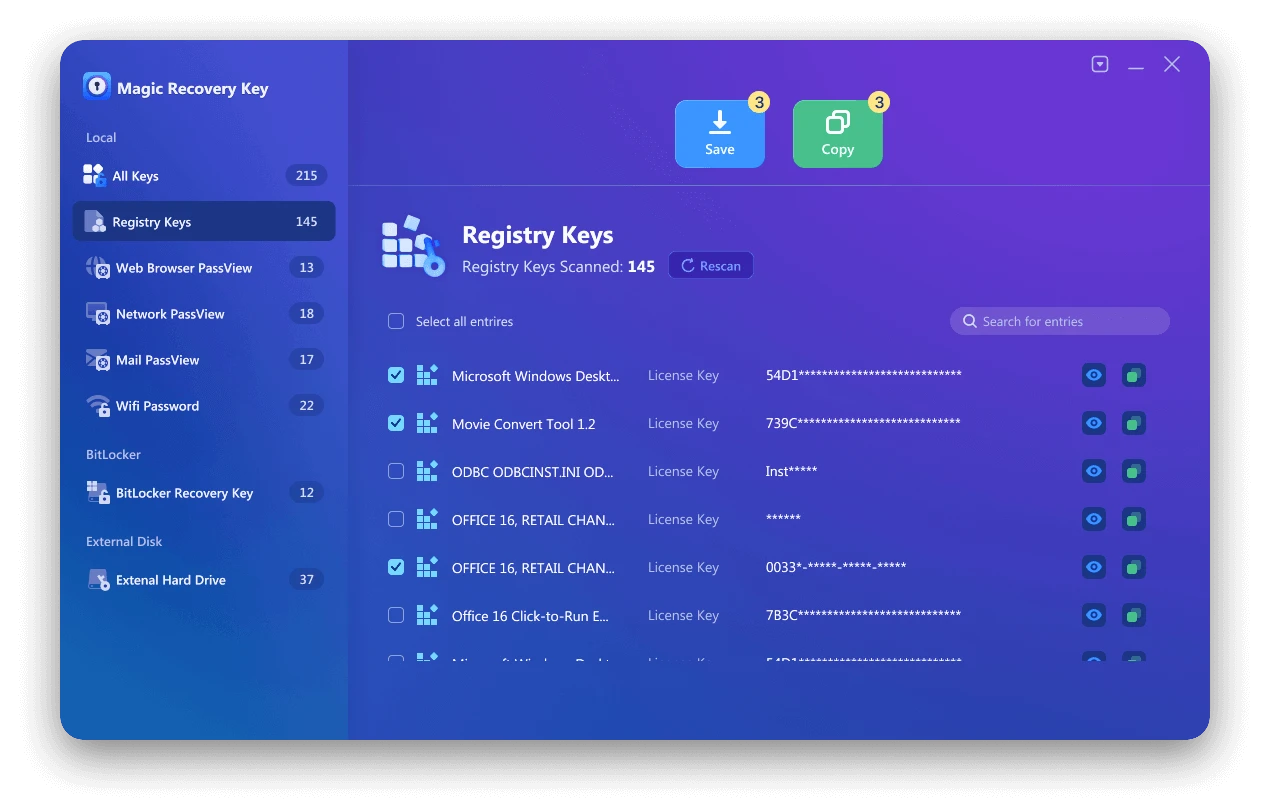
You can also save the web page account and password, Wifi password, network account password, bitlocker recoevery key with Magic Recovery Key or find the license key of Windows system, find the license key of Microsoft Office.
Method 2. Find Photoshop Product Key in Registry
You can also search for your Photoshop product key in the Registry. However, it’s important to exercise caution when working with the Registry, as incorrect modifications may cause system error. This method is not recommended for beginners.

Steps for Adobe Photoshop 9.0 (applicable to other versions):
1. Press Windows + R to open the Run dialog.
2. Type “regedit” and click OK.
3. Confirm “Yes” if prompted.
4. When the Registry Editor opens, navigate to either HKEY_LOCAL_MACHINE > SOFTWARE > Adobe Photoshop > Adobe Photoshop Acrobat > 9.0 > Registration or HKEY_LOCAL_MACHINE > SOFTWARE > Wow6432Node > Adobe Photoshop > Adobe Photoshop Acrobat > 9.0 > Registration.
5. In the right panel, look for a file named “SERIAL”.
Method 3. Find Adobe Photoshop Serial Number from Adobe.com
1. Sign in to the official Adobe website.
2. Navigate to the Products section. Under Registered products, you’ll find the serial number for your Adobe Photoshop apps.
3. Copy the serial number and use it to activate your Adobe Photoshop.
Is It Legal to Recover a Photoshop Product Key?
Recovering a Photoshop product key is legal only if the software was legitimately purchased and activated on your computer. Product key recovery tools simply retrieve existing license information stored on the local system; they do not generate, crack, or bypass Adobe’s activation mechanisms.
Using unauthorized or pirated product keys violates Adobe’s terms of service and may result in software deactivation or account suspension. For this reason, it is strongly recommended to use recovery tools only for legally owned software.
If you are unable to verify your license or recover your product key, contacting Adobe Support with proof of purchase is the safest and most reliable option.
Tips to Avoid Losing Your Photoshop License in the Future
To avoid license issues in the future, it is recommended to back up your Photoshop product key or license information immediately after installation. For older versions of Photoshop, you can export the recovered product key to a secure file or store it in a trusted password manager.
Creative Cloud users should ensure their Adobe account email address remains active and accessible, as all subscription and activation details are tied to the account. Keeping purchase confirmation emails and invoices can also help recover license information if needed.
Regularly backing up license data can save time and prevent activation problems when reinstalling Photoshop or moving to a new computer.
Conclusion
With the three methods described above, you should be able to find the Adobe Photoshop product key smoothly. Whether you prefer the convenient third – party tool or the official channels and system – internal search, there is an option for you. During the operation, if you use a third – party tool, make sure to download it from a legitimate source. If you operate in the Registry, be extremely cautious. We hope you can successfully activate Adobe Photoshop and start your creative design journey! If you have any other questions about finding software keys, feel free to keep following us for more solutions. You can download Magic Recovery Key below.
Supports Windows 7/8/10/11 and Windows Server
FAQs
How can I find my Adobe Photoshop product key?
What if my Adobe Photoshop serial number is missing?
Can I use software to recover my Photoshop product key?
Does Adobe Photoshop still use a product key?
Why can’t I find my Photoshop product key on my computer?
Can I recover a Photoshop product key after reinstalling Windows?
Is it safe to use a product key recovery tool for Photoshop?
What should I do if my Photoshop license is no longer valid?

Erin Smith is recognized as one of the most professional writers at Amagicsoft. She has continually honed her writing skills over the past 10 years and helped millions of readers solve their tech problems.